What should I uninstall from my laptop?

LiliumSnow

New member
Member
Local time
5:05 AM
Messages
67
Location
Winnipeg
(Note: If it turns out that I posted this in the wrong place, then I apologize in advanced).

So I've been looking through my Uninstall Programs list and I realized that I have a ton of stuff on my laptop that I have no idea what they actually do. Not only that, I have no idea if I actually need half the stuff that is on it.
So I took some screen caps of the list and put them together so that maybe someone can tell me what stuff is safe to remove from my laptop.

Just some thing about myself in case that helps:
-I am a university student majoring in English, so I use Microsoft Word and PowerPoint.
-I am a gamer, so anything game-related does need to stay.
-I also like to do digital art from time-to-time.

Thanks. : D

Things5_zpsd096cba7.jpg

Things4_zps35fb6dee.jpg

Things3_zps4c6e15ef.jpg

Things2_zpsc54d3a06.jpg

Things1_zps8a695105.jpg
 

My Computer My Computer

At a glance

Microsoft Windows 7 Professional 64-bit 7601 ...Intel(R) Core(TM) i7-6700 CPU @ 3.40GHz16.00 GBNVIDIA GeForce GTX 1080
Computer type
PC/Desktop
Computer Manufacturer/Model Number
Custom Build
OS
Microsoft Windows 7 Professional 64-bit 7601 Multiprocessor Free Service Pack 1
CPU
Intel(R) Core(TM) i7-6700 CPU @ 3.40GHz
Motherboard
Gigabyte Technology Co., Ltd. B150M-D3H-CF
Memory
16.00 GB
Graphics Card(s)
NVIDIA GeForce GTX 1080
Sound Card
(1) NVIDIA High Definition Audio(2) Realtek High Definition
Monitor(s) Displays
1
Screen Resolution
1920 x 1080 x 32 bits (4294967296 colors) @ 60 Hz
Hard Drives
(1) ADATA SP600 ATA Device (2) WDC WD20EZRZ-00Z5HB0 ATA Device
Case
NZXT H440 (Matte Black) ATX Mid Tower Case
Keyboard
Microsoft Sculpt Ergonomic Keyboard
Mouse
Microsoft Sculpt Ergonomic Mouse
Browser
Google Chrome
you can remove very little. A couple older Java installations can go away, and maybe some of the crapware that Toshiba installed in that, like the "service station" or the "value added package" or "reeltime", check what they are and if you like them.

I mean ok you can nuke more or less everything, but it's either irrelevant (has no impact whatsoever and could be still needed) or something game-related.

I'd personally ditch Norton and use a free antivirus like say Avira (the one I use and install on all PCs I sell), it's pretty light and works well, while I had all kinds of issues and slowdowns with Norton in the past.
 

My Computer My Computer

At a glance

Win 7 Pro 64-bit 7601AMD Phenom 9650 QuadCore, revision DR-B35 GB yes I run 2x 2GB and 1x 1GB, different b...NVIDIA GeForce 9800 GT 512 Mb, unknown manufa...
Computer type
PC/Desktop
Computer Manufacturer/Model Number
custom built
OS
Win 7 Pro 64-bit 7601
CPU
AMD Phenom 9650 QuadCore, revision DR-B3
Motherboard
ASUS M4A78
Memory
5 GB yes I run 2x 2GB and 1x 1GB, different brand, spank me.
Graphics Card(s)
NVIDIA GeForce 9800 GT 512 Mb, unknown manufacturer.
Sound Card
Crappy Realtek Integrated Audio
Monitor(s) Displays
Fujitsu Siemens P19-3P
Screen Resolution
1280 x 1024 x 32 bits @ 60 Hz Oh yeah, 4:3 rocks!
Hard Drives
(1) MAXTOR S TM3320613AS SATA Disk Device (2) STM35004 18AS SATA Disk Device (3) TOSHIBA USB 2.5"-HDD
PSU
whatever, around 450w
Case
Scavenged from old company PC, 10+ years old
Cooling
CPU fan, GPU fan, case fan, nothing fancy
Keyboard
Microsoft, PS/2, white.
Mouse
Optical, logitec.
Internet Speed
effective max speeds: 70-ish kB/s down 30-ish kB/s up
Antivirus
Avira, free edition.
Browser
Firefox with FXChrome to make it look like Google Chrome :P
Other Info
Was discarded by previous owner due to "horrible performance".
Was running Win Xp from a IDE drive. Yeah. Was a pain.
SATA II drive and Win7 and it zips away! Yay!
Instead of uninstalling anything, use msconfig Startup and Services tabs to stop programs from loading at boot. That will leave them there if you still need them but they won't take up any resources every time you boot.

Something like this:

Advanced startup options - Windows 7
How to use msconfig in Windows 7

Click on Start then Run, type msconfig and press Enter.
Click on the Startup tab, record what is currently starting then click the Disable All button. Go back and enable your anti-virus and firewall.

Click on the Services tab.
Check the Hide All Microsoft Services box, record what is currently starting then click the Disable All button. Again, go back and enable your anti-virus and firewall.

Reboot and see how your computer runs. Make sure everything you need is there. If not, you can use msconfig to enable the ones that are absolutely needed.

None of this is permanent so if things seem wonky simply use msconfig to put things back as they were.
 

My Computer My Computer

At a glance

Windows 10 Pro X64Intel Quad Core i7-4770 @ 3.4Ghz16.0GB PC3-12800 DDR3 SDRAM 1600 MHzIntel Integrated HD Graphics
Computer type
PC/Desktop
Computer Manufacturer/Model Number
Lenovo IdeaCenter 450
OS
Windows 10 Pro X64
CPU
Intel Quad Core i7-4770 @ 3.4Ghz
Memory
16.0GB PC3-12800 DDR3 SDRAM 1600 MHz
Graphics Card(s)
Intel Integrated HD Graphics
Sound Card
Realtek HD Audio
Monitor(s) Displays
HP 22" LCD
Screen Resolution
1680 x 1050
Hard Drives
250GB Samsung EVO SATA-3 SSD
2TB Seagate ST2000DM001 SATA-2
1.5TB Seagate ST3150041AS SATA
Keyboard
Dell USB
Mouse
Lenovo USB
Internet Speed
Cable via Road Runner 3MB Upload, 30MB Download
Antivirus
Windows Defender, MBAM Pro, MBAE
Browser
Seamonkey
Other Info
UEFI/GPT
PLDS DVD-RW DH16AERSH
I always uninstall Works because I have the MS Office package.

I also uninstall the Adobe PDF reader because it is a pain in the neck. I use Foxit instead. That is a nice reader.

I definitely would not have any of those games - but I don't game - a waste of time.

Norton I use. It is the best AV program on the market.

I also have one Toshiba with all those Toshiba programs. I kept them because they may be useful at times. Some are needed to manage special features on yout PC.
 

My Computer My Computer

At a glance

Vista, Windows7, Mint Mate, Zorin, Windows 8from 1.6GHz Duo to i7
Computer Manufacturer/Model Number
HP, Dell, Gateway, Toshiba - 4 laptops and 2 desktops
OS
Vista, Windows7, Mint Mate, Zorin, Windows 8
CPU
from 1.6GHz Duo to i7
Monitor(s) Displays
2x HP w2207
Hard Drives
5x HDD, 7x SSD, 12x Externals
Keyboard
with trackball - no mices
Mouse
Trackball mice
Internet Speed
DSL 6000
Thanks for all your suggestions guys. It was really helpful.
This might not be related but when I've been uninstalling stuff, I've actually been losing space on my computer. I started off with 306/435 GB, but when I began uninstalling stuff it dropped to 301/435 GB. Shouldn't I be gaining more space since I removed a bunch of content from my laptop?
 
Last edited:

My Computer My Computer

At a glance

Microsoft Windows 7 Professional 64-bit 7601 ...Intel(R) Core(TM) i7-6700 CPU @ 3.40GHz16.00 GBNVIDIA GeForce GTX 1080
Computer type
PC/Desktop
Computer Manufacturer/Model Number
Custom Build
OS
Microsoft Windows 7 Professional 64-bit 7601 Multiprocessor Free Service Pack 1
CPU
Intel(R) Core(TM) i7-6700 CPU @ 3.40GHz
Motherboard
Gigabyte Technology Co., Ltd. B150M-D3H-CF
Memory
16.00 GB
Graphics Card(s)
NVIDIA GeForce GTX 1080
Sound Card
(1) NVIDIA High Definition Audio(2) Realtek High Definition
Monitor(s) Displays
1
Screen Resolution
1920 x 1080 x 32 bits (4294967296 colors) @ 60 Hz
Hard Drives
(1) ADATA SP600 ATA Device (2) WDC WD20EZRZ-00Z5HB0 ATA Device
Case
NZXT H440 (Matte Black) ATX Mid Tower Case
Keyboard
Microsoft Sculpt Ergonomic Keyboard
Mouse
Microsoft Sculpt Ergonomic Mouse
Browser
Google Chrome
I definitely would not have any of those games - but I don't game - a waste of time.

That is merely a non constructive comment.

It's clear that the OP enjoys them and hence, are not a waste of time.
 

My Computer My Computer

At a glance

8 Pro x64i7 3770K 4.6GHz16GB G.Skill Trident X 2666mhzx2 EVGA 780 Ti Superclocked SLI
Computer type
PC/Desktop
Computer Manufacturer/Model Number
Systems by SmartEyeball
OS
8 Pro x64
CPU
i7 3770K 4.6GHz
Motherboard
ASUS P8Z77 WS
Memory
16GB G.Skill Trident X 2666mhz
Graphics Card(s)
x2 EVGA 780 Ti Superclocked SLI
Sound Card
SB X-FI Surround 5.1 PRO USB / ATH-AD900 Headphones
Monitor(s) Displays
x3 Dell U2410 / 58" Samsung
Screen Resolution
5760*1200/ 1920*1200
Hard Drives
2x Intel 520 240GB (RAID 0) * 2x WD Caviar Blacks 2TB (RAID 0) * 2TB WD Caviar Black * Sony Optirac DVD
PSU
Silverstone Strider Evolution 1200W
Case
Thermaltake Level 10 GT Snow Edition
Cooling
Noctua NH-D14
Keyboard
Topre Realforce // Ducky Shine MX Black // Filco Ninja TKL
Mouse
Thermaltake Theron (Highly Recommended) + Razer Imperator
Antivirus
MSE
Browser
IE, FF, WaterFox
Other Info
GT Extreme V2 Sim Racing Cockpit + 40" LCD and K/B Mouse stand ▼
Fanatec CSR Elite Wheel + Clubsport V1 Pedals + CSR shifter/7G-H ▼Saitek X52 Pro ▼ TrackIR 5 Pro
Buttkicker v2 Seat Rumbler with Dedicated 5.1 and Sub Woofer attached to frame ▼
=
Bloody Big Grin
Thanks for you all your suggestions guys. It was really helpful.
This might not be related but when I've been uninstalling stuff, I've actually been losing space on my computer. I started off with 306/435 GB, but when I began uninstalling stuff it dropped to 301/435 GB. Shouldn't I be gaining more space since I removed a bunch of content from my laptop?
Reason is because every time you install or uninstall a program, the system makes a restore point. And those restore points are 500MB to 1GB each. You can check your shadowstorage (that's where the restore points reside) with this command in elevated Command Prompt:

vssadmin list shadowstorage

The Allocated number is what the system currently has grabbed and the Maximum number is what will ultimately be used.
 
Last edited:

My Computer My Computer

At a glance

Vista, Windows7, Mint Mate, Zorin, Windows 8from 1.6GHz Duo to i7
Computer Manufacturer/Model Number
HP, Dell, Gateway, Toshiba - 4 laptops and 2 desktops
OS
Vista, Windows7, Mint Mate, Zorin, Windows 8
CPU
from 1.6GHz Duo to i7
Monitor(s) Displays
2x HP w2207
Hard Drives
5x HDD, 7x SSD, 12x Externals
Keyboard
with trackball - no mices
Mouse
Trackball mice
Internet Speed
DSL 6000
I definitely would not have any of those games - but I don't game - a waste of time.

That is merely a non constructive comment.

It's clear that the OP enjoys them and hence, are not a waste of time.
I mix constructive with non-constructive comments as I like. Comments on my postings are only welcome when they are constructive.
 

My Computer My Computer

At a glance

Vista, Windows7, Mint Mate, Zorin, Windows 8from 1.6GHz Duo to i7
Computer Manufacturer/Model Number
HP, Dell, Gateway, Toshiba - 4 laptops and 2 desktops
OS
Vista, Windows7, Mint Mate, Zorin, Windows 8
CPU
from 1.6GHz Duo to i7
Monitor(s) Displays
2x HP w2207
Hard Drives
5x HDD, 7x SSD, 12x Externals
Keyboard
with trackball - no mices
Mouse
Trackball mice
Internet Speed
DSL 6000
Thanks for you all your suggestions guys. It was really helpful.
This might not be related but when I've been uninstalling stuff, I've actually been losing space on my computer. I started off with 306/435 GB, but when I began uninstalling stuff it dropped to 301/435 GB. Shouldn't I be gaining more space since I removed a bunch of content from my laptop?
Reason is because every time you install or uninstall a program, the system makes a restore point. And those restore points are 500MB to 1GB each. You can check your shadowstorage (that's where the restore points reside) with this command in elevated Command Prompt:

vssadmin list shadowstorage

The Allocated number is what the system currently has grabbed and the Maximum number is what will ultimately be used.

I tried that, but I got an error that said:

"Error: You don't have the correct permissions to run this command. Please run this utility from a command window that has elevated administrator privileges."
 

My Computer My Computer

At a glance

Microsoft Windows 7 Professional 64-bit 7601 ...Intel(R) Core(TM) i7-6700 CPU @ 3.40GHz16.00 GBNVIDIA GeForce GTX 1080
Computer type
PC/Desktop
Computer Manufacturer/Model Number
Custom Build
OS
Microsoft Windows 7 Professional 64-bit 7601 Multiprocessor Free Service Pack 1
CPU
Intel(R) Core(TM) i7-6700 CPU @ 3.40GHz
Motherboard
Gigabyte Technology Co., Ltd. B150M-D3H-CF
Memory
16.00 GB
Graphics Card(s)
NVIDIA GeForce GTX 1080
Sound Card
(1) NVIDIA High Definition Audio(2) Realtek High Definition
Monitor(s) Displays
1
Screen Resolution
1920 x 1080 x 32 bits (4294967296 colors) @ 60 Hz
Hard Drives
(1) ADATA SP600 ATA Device (2) WDC WD20EZRZ-00Z5HB0 ATA Device
Case
NZXT H440 (Matte Black) ATX Mid Tower Case
Keyboard
Microsoft Sculpt Ergonomic Keyboard
Mouse
Microsoft Sculpt Ergonomic Mouse
Browser
Google Chrome
That's because you did not run it in elevated mode - as I said in my posting. Go to All Programs > Accessories > Right click on Command Prompt > Click on 'Run as Admin'. Then the vssadmin command will be accepted.
 

My Computer My Computer

At a glance

Vista, Windows7, Mint Mate, Zorin, Windows 8from 1.6GHz Duo to i7
Computer Manufacturer/Model Number
HP, Dell, Gateway, Toshiba - 4 laptops and 2 desktops
OS
Vista, Windows7, Mint Mate, Zorin, Windows 8
CPU
from 1.6GHz Duo to i7
Monitor(s) Displays
2x HP w2207
Hard Drives
5x HDD, 7x SSD, 12x Externals
Keyboard
with trackball - no mices
Mouse
Trackball mice
Internet Speed
DSL 6000
That's because you did not run it in elevated mode - as I said in my posting. Go to All Programs > Accessories > Right click on Command Prompt > Click on 'Run as Admin'. Then the vssadmin command will be accepted.

Lol, I missed that part of you instructions. x'D

So I did that, but now it's giving me a new error:

"Error: The shadow copy provider had an unexpected error while trying to process the specified command."

It ...doesn't tell me anything else, just says,"Oh there's an error, kay thanks bye."
 

My Computer My Computer

At a glance

Microsoft Windows 7 Professional 64-bit 7601 ...Intel(R) Core(TM) i7-6700 CPU @ 3.40GHz16.00 GBNVIDIA GeForce GTX 1080
Computer type
PC/Desktop
Computer Manufacturer/Model Number
Custom Build
OS
Microsoft Windows 7 Professional 64-bit 7601 Multiprocessor Free Service Pack 1
CPU
Intel(R) Core(TM) i7-6700 CPU @ 3.40GHz
Motherboard
Gigabyte Technology Co., Ltd. B150M-D3H-CF
Memory
16.00 GB
Graphics Card(s)
NVIDIA GeForce GTX 1080
Sound Card
(1) NVIDIA High Definition Audio(2) Realtek High Definition
Monitor(s) Displays
1
Screen Resolution
1920 x 1080 x 32 bits (4294967296 colors) @ 60 Hz
Hard Drives
(1) ADATA SP600 ATA Device (2) WDC WD20EZRZ-00Z5HB0 ATA Device
Case
NZXT H440 (Matte Black) ATX Mid Tower Case
Keyboard
Microsoft Sculpt Ergonomic Keyboard
Mouse
Microsoft Sculpt Ergonomic Mouse
Browser
Google Chrome
Hmm, we are really out of luck. You can do this:

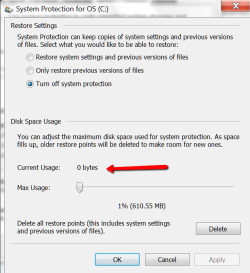
Press Start > Right click on 'Computer' > Properties. On that page on the top left click on 'System Protection' > highlight C:\ and click on the 'Configure' button. It should tell you what is used where it says 0 (zero) on my picture.
 

Attachments

  • 2012-12-16_2017.png
    2012-12-16_2017.png
    22.8 KB · Views: 1

My Computer My Computer

At a glance

Vista, Windows7, Mint Mate, Zorin, Windows 8from 1.6GHz Duo to i7
Computer Manufacturer/Model Number
HP, Dell, Gateway, Toshiba - 4 laptops and 2 desktops
OS
Vista, Windows7, Mint Mate, Zorin, Windows 8
CPU
from 1.6GHz Duo to i7
Monitor(s) Displays
2x HP w2207
Hard Drives
5x HDD, 7x SSD, 12x Externals
Keyboard
with trackball - no mices
Mouse
Trackball mice
Internet Speed
DSL 6000
Hmm, we are really out of luck. You can do this:

Press Start > Right click on 'Computer' > Properties. On that page on the top left click on 'System Protection' > highlight C:\ and click on the 'Configure' button. It should tell you what is used where it says 0 (zero) on my picture.

Oh okay. So I took a screen-shot of that:

SystemProtection_zps5427e436.jpg
 

My Computer My Computer

At a glance

Microsoft Windows 7 Professional 64-bit 7601 ...Intel(R) Core(TM) i7-6700 CPU @ 3.40GHz16.00 GBNVIDIA GeForce GTX 1080
Computer type
PC/Desktop
Computer Manufacturer/Model Number
Custom Build
OS
Microsoft Windows 7 Professional 64-bit 7601 Multiprocessor Free Service Pack 1
CPU
Intel(R) Core(TM) i7-6700 CPU @ 3.40GHz
Motherboard
Gigabyte Technology Co., Ltd. B150M-D3H-CF
Memory
16.00 GB
Graphics Card(s)
NVIDIA GeForce GTX 1080
Sound Card
(1) NVIDIA High Definition Audio(2) Realtek High Definition
Monitor(s) Displays
1
Screen Resolution
1920 x 1080 x 32 bits (4294967296 colors) @ 60 Hz
Hard Drives
(1) ADATA SP600 ATA Device (2) WDC WD20EZRZ-00Z5HB0 ATA Device
Case
NZXT H440 (Matte Black) ATX Mid Tower Case
Keyboard
Microsoft Sculpt Ergonomic Keyboard
Mouse
Microsoft Sculpt Ergonomic Mouse
Browser
Google Chrome
So with 9.47GB you are nearly at your 10GB maximum. From there, your disk usage should be stable because the shadowstorage will be reused FiFo (first in/first out).

At your HDD size, I would leave it as is. At least you now know where all the disk space went.
 

My Computer My Computer

At a glance

Vista, Windows7, Mint Mate, Zorin, Windows 8from 1.6GHz Duo to i7
Computer Manufacturer/Model Number
HP, Dell, Gateway, Toshiba - 4 laptops and 2 desktops
OS
Vista, Windows7, Mint Mate, Zorin, Windows 8
CPU
from 1.6GHz Duo to i7
Monitor(s) Displays
2x HP w2207
Hard Drives
5x HDD, 7x SSD, 12x Externals
Keyboard
with trackball - no mices
Mouse
Trackball mice
Internet Speed
DSL 6000
So with 9.47GB you are nearly at your 10GB maximum. From there, your disk usage should be stable because the shadowstorage will be reused FiFo (first in/first out).

At your HDD size, I would leave it as is. At least you now know where all the disk space went.

Okie dokie! :D
Now what? 8D
 

My Computer My Computer

At a glance

Microsoft Windows 7 Professional 64-bit 7601 ...Intel(R) Core(TM) i7-6700 CPU @ 3.40GHz16.00 GBNVIDIA GeForce GTX 1080
Computer type
PC/Desktop
Computer Manufacturer/Model Number
Custom Build
OS
Microsoft Windows 7 Professional 64-bit 7601 Multiprocessor Free Service Pack 1
CPU
Intel(R) Core(TM) i7-6700 CPU @ 3.40GHz
Motherboard
Gigabyte Technology Co., Ltd. B150M-D3H-CF
Memory
16.00 GB
Graphics Card(s)
NVIDIA GeForce GTX 1080
Sound Card
(1) NVIDIA High Definition Audio(2) Realtek High Definition
Monitor(s) Displays
1
Screen Resolution
1920 x 1080 x 32 bits (4294967296 colors) @ 60 Hz
Hard Drives
(1) ADATA SP600 ATA Device (2) WDC WD20EZRZ-00Z5HB0 ATA Device
Case
NZXT H440 (Matte Black) ATX Mid Tower Case
Keyboard
Microsoft Sculpt Ergonomic Keyboard
Mouse
Microsoft Sculpt Ergonomic Mouse
Browser
Google Chrome

My Computer My Computer

At a glance

Vista, Windows7, Mint Mate, Zorin, Windows 8from 1.6GHz Duo to i7
Computer Manufacturer/Model Number
HP, Dell, Gateway, Toshiba - 4 laptops and 2 desktops
OS
Vista, Windows7, Mint Mate, Zorin, Windows 8
CPU
from 1.6GHz Duo to i7
Monitor(s) Displays
2x HP w2207
Hard Drives
5x HDD, 7x SSD, 12x Externals
Keyboard
with trackball - no mices
Mouse
Trackball mice
Internet Speed
DSL 6000

My Computer My Computer

At a glance

Microsoft Windows 7 Professional 64-bit 7601 ...Intel(R) Core(TM) i7-6700 CPU @ 3.40GHz16.00 GBNVIDIA GeForce GTX 1080
Computer type
PC/Desktop
Computer Manufacturer/Model Number
Custom Build
OS
Microsoft Windows 7 Professional 64-bit 7601 Multiprocessor Free Service Pack 1
CPU
Intel(R) Core(TM) i7-6700 CPU @ 3.40GHz
Motherboard
Gigabyte Technology Co., Ltd. B150M-D3H-CF
Memory
16.00 GB
Graphics Card(s)
NVIDIA GeForce GTX 1080
Sound Card
(1) NVIDIA High Definition Audio(2) Realtek High Definition
Monitor(s) Displays
1
Screen Resolution
1920 x 1080 x 32 bits (4294967296 colors) @ 60 Hz
Hard Drives
(1) ADATA SP600 ATA Device (2) WDC WD20EZRZ-00Z5HB0 ATA Device
Case
NZXT H440 (Matte Black) ATX Mid Tower Case
Keyboard
Microsoft Sculpt Ergonomic Keyboard
Mouse
Microsoft Sculpt Ergonomic Mouse
Browser
Google Chrome
You are most welcome. Any time.
 

My Computer My Computer

At a glance

Vista, Windows7, Mint Mate, Zorin, Windows 8from 1.6GHz Duo to i7
Computer Manufacturer/Model Number
HP, Dell, Gateway, Toshiba - 4 laptops and 2 desktops
OS
Vista, Windows7, Mint Mate, Zorin, Windows 8
CPU
from 1.6GHz Duo to i7
Monitor(s) Displays
2x HP w2207
Hard Drives
5x HDD, 7x SSD, 12x Externals
Keyboard
with trackball - no mices
Mouse
Trackball mice
Internet Speed
DSL 6000
you can delete restore points if you really wanted to, but I don't think you really need to do that, as 300 GB are a lot anyway.

Something you could definelty do is checking how much space the recycle bin is gobbling up (reserved recycle bin space isn't available for other stuff even if empty).

You won't need more than 1-5 GB of recycle bin, but it gobbles around 25 GB for a 500 GB drive like yours if you don't tell it not to. Here a tutorial.
 

My Computer My Computer

At a glance

Win 7 Pro 64-bit 7601AMD Phenom 9650 QuadCore, revision DR-B35 GB yes I run 2x 2GB and 1x 1GB, different b...NVIDIA GeForce 9800 GT 512 Mb, unknown manufa...
Computer type
PC/Desktop
Computer Manufacturer/Model Number
custom built
OS
Win 7 Pro 64-bit 7601
CPU
AMD Phenom 9650 QuadCore, revision DR-B3
Motherboard
ASUS M4A78
Memory
5 GB yes I run 2x 2GB and 1x 1GB, different brand, spank me.
Graphics Card(s)
NVIDIA GeForce 9800 GT 512 Mb, unknown manufacturer.
Sound Card
Crappy Realtek Integrated Audio
Monitor(s) Displays
Fujitsu Siemens P19-3P
Screen Resolution
1280 x 1024 x 32 bits @ 60 Hz Oh yeah, 4:3 rocks!
Hard Drives
(1) MAXTOR S TM3320613AS SATA Disk Device (2) STM35004 18AS SATA Disk Device (3) TOSHIBA USB 2.5"-HDD
PSU
whatever, around 450w
Case
Scavenged from old company PC, 10+ years old
Cooling
CPU fan, GPU fan, case fan, nothing fancy
Keyboard
Microsoft, PS/2, white.
Mouse
Optical, logitec.
Internet Speed
effective max speeds: 70-ish kB/s down 30-ish kB/s up
Antivirus
Avira, free edition.
Browser
Firefox with FXChrome to make it look like Google Chrome :P
Other Info
Was discarded by previous owner due to "horrible performance".
Was running Win Xp from a IDE drive. Yeah. Was a pain.
SATA II drive and Win7 and it zips away! Yay!
Back
Top