
I have Lenovo Z5070 with hard disk 1THDD+8GSSD
i was trying to join my HomeGroup nd i just change the work group name nothing more then i found that my partition D (750Gb) disappeared!
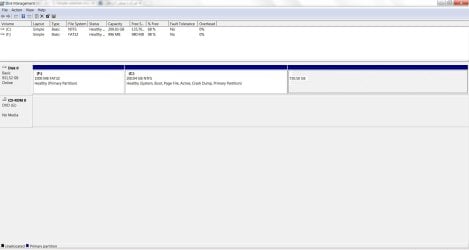
i opened Disk Manager and i found that partition without a letter , i tryed to " Change Drive Letter and Paths " it shows an error "the operation failed to continue because the diskmanager isn't up to date, or restart the computer or the diskmanage" , i tryed to refresh nd reboot but nothing
then i made a mistake by make this partition as active so that blocked me for a while from entering nd it gives me BOOTMNG IS MISSING , for hours i try to fix it nd finally i did nd logged in again
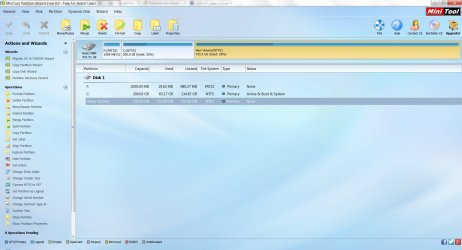
but that partition is still not show up , i try many programmes for it , as EaseUS Partition Master 10.5 ,MiniTool Partition Wizard Free , it show the partition without letter too nd the data on it (i cant delet it its important data) but when i try to change the letter it failed !!
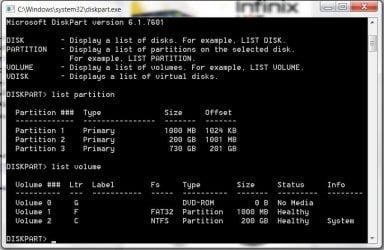
i try with CMD DISK PART ,it shows up in Volume but not show up in Partition and it is NTFS in the other programmes
here is some print screens , plz help
i was trying to join my HomeGroup nd i just change the work group name nothing more then i found that my partition D (750Gb) disappeared!
i opened Disk Manager and i found that partition without a letter , i tryed to " Change Drive Letter and Paths " it shows an error "the operation failed to continue because the diskmanager isn't up to date, or restart the computer or the diskmanage" , i tryed to refresh nd reboot but nothing
then i made a mistake by make this partition as active so that blocked me for a while from entering nd it gives me BOOTMNG IS MISSING , for hours i try to fix it nd finally i did nd logged in again
but that partition is still not show up , i try many programmes for it , as EaseUS Partition Master 10.5 ,MiniTool Partition Wizard Free , it show the partition without letter too nd the data on it (i cant delet it its important data) but when i try to change the letter it failed !!
i try with CMD DISK PART ,it shows up in Volume but not show up in Partition and it is NTFS in the other programmes
here is some print screens , plz help
Attachments
My Computer
At a glance
win7 ultimate 64bit8gb4gb gt840
- Computer type
- Laptop
- Computer Manufacturer/Model Number
- Lenovo
- OS
- win7 ultimate 64bit
- Memory
- 8gb
- Graphics Card(s)
- 4gb gt840
- Hard Drives
- 1THDD+8GSSD
- Browser
- Chrome


