
Firefox - Start Firefox in "Safe Mode"

How to Start Firefox in Safe Mode

Description:
Firefox has a "Safe Mode" function, similar to Windows "Safe Mode".
It allows you to temporarily (or "permanently") disable add-ons, toolbars, etc.
This can be handy if you are troubleshooting problems (e.g. faulty add-ons).

Actions that you can perform in "Safe Mode":

  • Disable all add-ons
  • Reset toolbars and controls
  • Delete all bookmarks except for backups
  • Reset all user preferences to Firefox defaults
  • Restore default search engines
How to start Firefox in "Safe Mode"

Step 1a - Quick Method Hold the "Shift" key and click on the Firefox icon in the "Start Menu" (or on the pinned "Taskbar" icon).
This only works for single click items (it doesn't work with double click icons).
Go to step 4 below.
Step 1b - The Long Method This works without the Firefox icon.
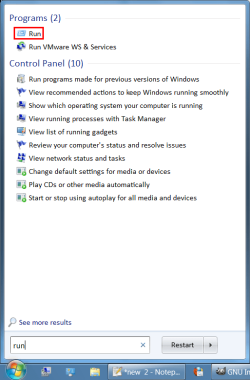
Open the "Start Menu" and type "run" in the "Search" box.
(You can also use "Windows Logo key + R" and go to step 3).
Step 2Click on "Run" in the results.
FF SM 01a (Run).png
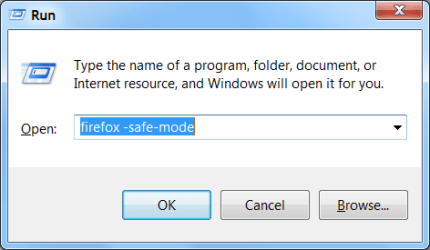
Step 3Type "firefox -safe-mode" (without the quotes; remember the space)..
Click on the "OK" button.
FF SM 02 (Run).png
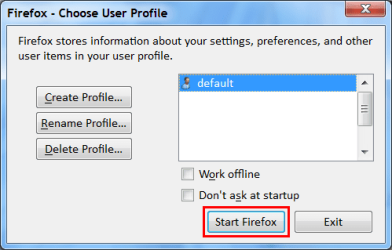
Step 4If you have enabled "Firefox - Choose User Profile", this window will open (if not, go to step 5).
Select the profile that you wish to run in "Safe Mode".
Click on the "Start Firefox" button.
FF SM 03a (Profile Manager).png
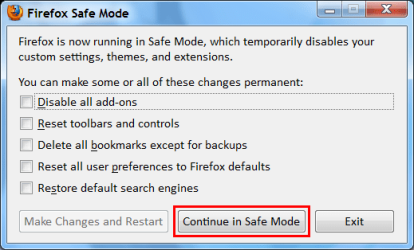
Step 5a - Temporarily disable Firefox featuresThe "Firefox Safe Mode" window will open.
Click on the "Continue in Safe Mode" button.
FF SM 04a (Safe Mode).png
Step 5b - "Permanently" disable Firefox featuresThe "Firefox Safe Mode" window will open.
Select the items that you want to "permanently" disable (or reset).
Click on the "Make Changes and Restart" button.
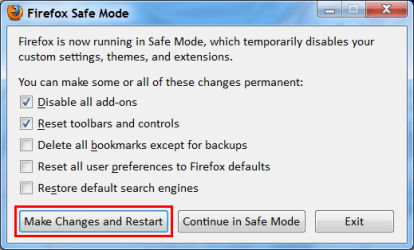
FF SM 05a (Safe Mode).png
Note:
"Permanently" disabled add-ons will still appear on the "Add-ons" tab and can be reactivated.
Deleted and reset items have to be restored manually (reconfigured, recovered from backups or reinstalled).

See this link for more information:
Safe Mode | How to | Firefox Help


Create a Firefox "Safe Mode" shortcut.
Before Firefox 8, Firefox used to create a "Safe Mode" shortcut when it was installed.
You can create your own "Safe Mode" shortcut.

Step 1Duplicate your Firefox shortcut and rename it (e.g. Firefox (Safe Mode)).
Step 2Replace the "firefox.exe" in the "Target:" box, with "firefox.exe -safe-mode" (without the quotes; remember the space).

In this gif I have created a "Safe Mode" shortcut.
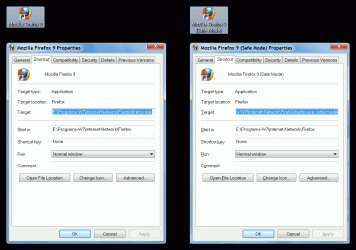
FF Safe Mode Shortcut.gif
 
Last edited:
Very nice tutorial
 

My Computer

Computer type
Laptop
Computer Manufacturer/Model Number
Sager NP9170
OS
Win 7 Pro x64 / Win 10 Pro
CPU
Intel(R) Core(TM) i7-3630QM CPU @ 2.40GHz
Motherboard
CLEVO P170EM
Memory
12 GB
Graphics Card(s)
(1) Intel(R) HD Graphics 4000 (2) NVIDIA GeForce GTX 675M
Sound Card
(1) Realtek High Definition Audio (2) Intel(R) Display Aud
Monitor(s) Displays
17.3
Screen Resolution
1920x1080
Hard Drives
(1) Samsung 860 EVO 500GB(OS) (1) Samsung 860 EVO 500GB(Data)
Keyboard
Backlite
Antivirus
MSE, Malwarebytes Pro
Browser
Firefox
Other Info
DESKTOP: Custom-built.
OS: Win 10 Pro x64.
CASE: Rosewill R5.
CPU: Intel I5 4670K CPU @ 3.40GHz.
CPU COOLER: Cool Master Hyper 212 EVO.
MOTHERBOARD: Asus Z87-A.
MEMORY: Kingston HyperX 2x4 GB.
GPU: Nvidia Geforce 650 TI.
PSU: Corsair TX750.
DRIVES: (1) Samsung 840 120 GB SSD (2) Western Digital blue 500 GB 7200 RPM.

My Computer

Computer type
PC/Desktop
Computer Manufacturer/Model Number
n/a
OS
W7 Ultimate SP1, LM19.2 MATE, W10 Home 1703, W10 Pro 1703 VM, #All 64 bit
CPU
AMD Phenom II x6 1100T, 3.3 GHz
Motherboard
ASUS M4A88T-M/USB3 (AM3)
Memory
12GB DDR3 1333 G-Skill (4GB x 2), G-Skill (2GB x 2)
Graphics Card(s)
NVIDIA GeForce GTX 660
Sound Card
Realtek?
Monitor(s) Displays
Samsung S23B350
Screen Resolution
1920x1080
Hard Drives
WD Green 2TB (SATA), WD Green 3TB (SATA), WD Blue 4TB (SATA), WD Blue 6TB (SATA)
PSU
Cooler Master
Case
Antec GX300 Tower
Cooling
3x Antec TRICOOL 120mm Fans
Mouse
Wired Optical
Internet Speed
DSL
Antivirus
Avast
Browser
Pale Moon (64 bit)
Other Info
2018-12-27 Upgraded HDDs
2015-12-10 Upgraded case, graphics card, storage
2015-08-15 Upgraded motherboard & RAM
2015-07-15 Upgraded LM17.1 to LM17.2
Hello, i usually close firefox by End Process from Task Manager, then next time, when i open firefox, it always start use Safe mode. How can i force Firefox start normally?
 

My Computer

Computer Manufacturer/Model Number
Lenovo ThinkPad T61
OS
windows 7
Weird

Sorry about the delay. :(
Even though I am subscribed to this thread, I don't remember receiving a notification about your message.


I assume that for some reason, you can't close Firefox by:

  • Clicking the "Close" button?
  • Choosing "Exit" from the menu (orange Firefox button)?

If you kill Firefox using the Task Manager (or Process Explorer), the Session Manager file (sessionstore.js) will have an entry saying FF is still running.

sessionstore.js ...
{"state":"running","lastUpdate":1350784513943,"startTime":1346516225279,"recentCrashes":0},"scratchpads":[]}
The next time you start Firefox, it will assume that it crashed and it may offer to restore your previous session.


I sometimes have to kill Firefox (using Process Explorer).
This is usually because Adobe Flash player tries to start running during the shutdown sequence, which causes Firefox to lock up. :confused:

I haven't experienced the behaviour you describe.

Have you tried reinstalling Firefox?

If that doesn't work, you may need to backup certain files and totally uninstall and reinstall Firefox.
I can provide a list of those files, if you need them. :)
 
Last edited:

My Computer

Computer type
PC/Desktop
Computer Manufacturer/Model Number
n/a
OS
W7 Ultimate SP1, LM19.2 MATE, W10 Home 1703, W10 Pro 1703 VM, #All 64 bit
CPU
AMD Phenom II x6 1100T, 3.3 GHz
Motherboard
ASUS M4A88T-M/USB3 (AM3)
Memory
12GB DDR3 1333 G-Skill (4GB x 2), G-Skill (2GB x 2)
Graphics Card(s)
NVIDIA GeForce GTX 660
Sound Card
Realtek?
Monitor(s) Displays
Samsung S23B350
Screen Resolution
1920x1080
Hard Drives
WD Green 2TB (SATA), WD Green 3TB (SATA), WD Blue 4TB (SATA), WD Blue 6TB (SATA)
PSU
Cooler Master
Case
Antec GX300 Tower
Cooling
3x Antec TRICOOL 120mm Fans
Mouse
Wired Optical
Internet Speed
DSL
Antivirus
Avast
Browser
Pale Moon (64 bit)
Other Info
2018-12-27 Upgraded HDDs
2015-12-10 Upgraded case, graphics card, storage
2015-08-15 Upgraded motherboard & RAM
2015-07-15 Upgraded LM17.1 to LM17.2
Thank you lehnerus2000

I have to use a batch file to kill firefox in a autorun program. I used Taskkill to kill it.

I tried to re-install a fresh firefox that doesn't have any add on or plugin, but still the same problem, and problem happenned on Windows XP only, if running on windows 7, it doesn't have any problem :(


Edit: i've just test some more times on windows 7, still the same :(
 
Last edited by a moderator:

My Computer

Computer Manufacturer/Model Number
Lenovo ThinkPad T61
OS
windows 7
I'm confused

Thank you lehnerus2000

I have to use a batch file to kill firefox in a autorun program. I used Taskkill to kill it.

I tried to re-install a fresh firefox that doesn't have any add on or plugin, but still the same problem, and problem happenned on Windows XP only, if running on windows 7, it doesn't have any problem :(

Edit: i've just test some more times on windows 7, still the same :(

I don't understand why you are using a batch file to "crash close" Firefox?
Why not close it normally?

Does it malfunction, if you close it normally?

As long as you keep "crash closing" FF, the Session Manager will "think" FF has crashed, because it hasn't closed normally.

You may be able to disable the Session Manager by changing the "When Firefox starts:" option to "Show my home page" or "Show a blank page".
( Firefox button > Options > Options > General )

I use a VB script to start FF and when I close FF (using the "Close" button) the script runs CCleaner for me.
 

My Computer

Computer type
PC/Desktop
Computer Manufacturer/Model Number
n/a
OS
W7 Ultimate SP1, LM19.2 MATE, W10 Home 1703, W10 Pro 1703 VM, #All 64 bit
CPU
AMD Phenom II x6 1100T, 3.3 GHz
Motherboard
ASUS M4A88T-M/USB3 (AM3)
Memory
12GB DDR3 1333 G-Skill (4GB x 2), G-Skill (2GB x 2)
Graphics Card(s)
NVIDIA GeForce GTX 660
Sound Card
Realtek?
Monitor(s) Displays
Samsung S23B350
Screen Resolution
1920x1080
Hard Drives
WD Green 2TB (SATA), WD Green 3TB (SATA), WD Blue 4TB (SATA), WD Blue 6TB (SATA)
PSU
Cooler Master
Case
Antec GX300 Tower
Cooling
3x Antec TRICOOL 120mm Fans
Mouse
Wired Optical
Internet Speed
DSL
Antivirus
Avast
Browser
Pale Moon (64 bit)
Other Info
2018-12-27 Upgraded HDDs
2015-12-10 Upgraded case, graphics card, storage
2015-08-15 Upgraded motherboard & RAM
2015-07-15 Upgraded LM17.1 to LM17.2

My Computer

Computer type
PC/Desktop
Computer Manufacturer/Model Number
n/a
OS
W7 Ultimate SP1, LM19.2 MATE, W10 Home 1703, W10 Pro 1703 VM, #All 64 bit
CPU
AMD Phenom II x6 1100T, 3.3 GHz
Motherboard
ASUS M4A88T-M/USB3 (AM3)
Memory
12GB DDR3 1333 G-Skill (4GB x 2), G-Skill (2GB x 2)
Graphics Card(s)
NVIDIA GeForce GTX 660
Sound Card
Realtek?
Monitor(s) Displays
Samsung S23B350
Screen Resolution
1920x1080
Hard Drives
WD Green 2TB (SATA), WD Green 3TB (SATA), WD Blue 4TB (SATA), WD Blue 6TB (SATA)
PSU
Cooler Master
Case
Antec GX300 Tower
Cooling
3x Antec TRICOOL 120mm Fans
Mouse
Wired Optical
Internet Speed
DSL
Antivirus
Avast
Browser
Pale Moon (64 bit)
Other Info
2018-12-27 Upgraded HDDs
2015-12-10 Upgraded case, graphics card, storage
2015-08-15 Upgraded motherboard & RAM
2015-07-15 Upgraded LM17.1 to LM17.2
Great tutorial except I think I discovered an error in it.

I was following this tutorial for creating a FF Safe Mode shortcut to my FF v33.1 running with my Win7 x64 Ultimate. It didn't work.
I had successfully created one in other PC in 2011 with FF v3.** using the Firefox Support • mozillaZine Forums . All FF updates have worked with it since. This tutorial is dated 2012 and was the latest I could find but I posted a new one at Mozillazine, where I figured out the issue.

I now see what's wrong. The screenshot shows the entry in the duplicate shortcut Target to NOT be in quotes. I don't know if in 2012 it didn't have quotes but if it did it seems the screenshot would show them. Anyways, in the Target, I added a space and -safe-mode and removed the end quote to follow the tutorial instructions and screenshot and it wouldn't work. I later noticed the problem was that both beginning and end quotes need to be there, then add a space followed by -safe-mode. It now works fine.

I hope this helps if someone has the same problem.
 

My Computer

Computer type
PC/Desktop
Computer Manufacturer/Model Number
Gateway DX4831
OS
Windows 7 Ultimate x64
CPU
i5
Memory
8GB
Hard Drives
Western Digital 1TB
Thanks

Great tutorial except I think I discovered an error in it.

I was following this tutorial for creating a FF Safe Mode shortcut to my FF v33.1 running with my Win7 x64 Ultimate. It didn't work.
I had successfully created one in other PC in 2011 with FF v3.** using the Firefox Support • mozillaZine Forums . All FF updates have worked with it since. This tutorial is dated 2012 and was the latest I could find but I posted a new one at Mozillazine, where I figured out the issue.

I now see what's wrong. The screenshot shows the entry in the duplicate shortcut Target to NOT be in quotes. I don't know if in 2012 it didn't have quotes but if it did it seems the screenshot would show them. Anyways, in the Target, I added a space and -safe-mode and removed the end quote to follow the tutorial instructions and screenshot and it wouldn't work. I later noticed the problem was that both beginning and end quotes need to be there, then add a space followed by -safe-mode. It now works fine.

I hope this helps if someone has the same problem.
Thanks BretMan. :)

It's possible that Mozilla have changed things.
I haven't had Firefox installed on my Real PC for over a year now.

I have the latest version of FF in one of my VMs, so I'll check it out later.

Another program I use (MKVExtract) creates a command line instruction for use in batch files.
It requires the path name to be in quotes, but the options/switches must be outside the quotes.

Note:
If your path name has spaces, it will require quotes at the start and finish.
The path name in the tutorial did not contain any spaces.
When I created this tutorial I was using a custom install location for my programs (not the default location).
 
Last edited:

My Computer

Computer type
PC/Desktop
Computer Manufacturer/Model Number
n/a
OS
W7 Ultimate SP1, LM19.2 MATE, W10 Home 1703, W10 Pro 1703 VM, #All 64 bit
CPU
AMD Phenom II x6 1100T, 3.3 GHz
Motherboard
ASUS M4A88T-M/USB3 (AM3)
Memory
12GB DDR3 1333 G-Skill (4GB x 2), G-Skill (2GB x 2)
Graphics Card(s)
NVIDIA GeForce GTX 660
Sound Card
Realtek?
Monitor(s) Displays
Samsung S23B350
Screen Resolution
1920x1080
Hard Drives
WD Green 2TB (SATA), WD Green 3TB (SATA), WD Blue 4TB (SATA), WD Blue 6TB (SATA)
PSU
Cooler Master
Case
Antec GX300 Tower
Cooling
3x Antec TRICOOL 120mm Fans
Mouse
Wired Optical
Internet Speed
DSL
Antivirus
Avast
Browser
Pale Moon (64 bit)
Other Info
2018-12-27 Upgraded HDDs
2015-12-10 Upgraded case, graphics card, storage
2015-08-15 Upgraded motherboard & RAM
2015-07-15 Upgraded LM17.1 to LM17.2
Back
Top