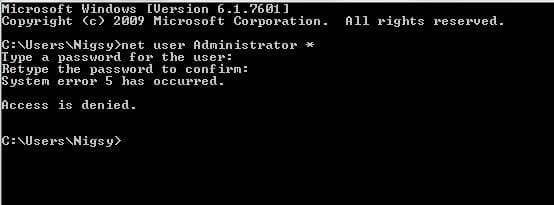
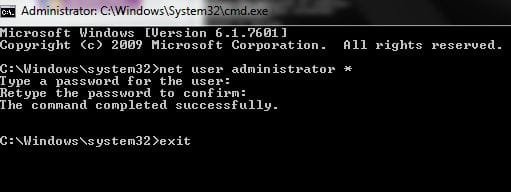
Basically, I had reasons to make really weird passwords a while back because someone knew my usual password habits. So I went with a totally different password to counter that.
For the last 4 months or so I've been using my fingerprint to access my computer.
Now, I want to use Safe Mode for a few things and find that I've totally forgotten the password I made for this (the finger print software is disabled for safe mode of course). Looked for my hard copy but I think someone cleaned it out and tossed it. So now I'm without a password.
Is there any way I can change or disable my password without knowing the current password, given that I can still access my computer normally using my fingerprint?
If not, is there at least a work-around so I can access Safe Mode? Perhaps some way of making it so that my fingerprint software loads in Safe Mode?
Fingerprint Software : Upek Protector Suite 2009.
I was thinking that the fingerprint software must store my Windows password somewhere or do something I can use to my advantage. Just not sure how to extract that data from it.
Thanks!
- Alex
For the last 4 months or so I've been using my fingerprint to access my computer.
Now, I want to use Safe Mode for a few things and find that I've totally forgotten the password I made for this (the finger print software is disabled for safe mode of course). Looked for my hard copy but I think someone cleaned it out and tossed it. So now I'm without a password.
Is there any way I can change or disable my password without knowing the current password, given that I can still access my computer normally using my fingerprint?
If not, is there at least a work-around so I can access Safe Mode? Perhaps some way of making it so that my fingerprint software loads in Safe Mode?
Fingerprint Software : Upek Protector Suite 2009.
I was thinking that the fingerprint software must store my Windows password somewhere or do something I can use to my advantage. Just not sure how to extract that data from it.
Thanks!
- Alex
My Computer
At a glance
Windows 7 Ultimate x64Intel i7 Extreme 2920XM Overclocked 4.1 (~4.8...16GB Kingston Hyper-X Dual Channel DDR3 @ 160...Overclocked 2GB NVIDIA 580M GTX
- Computer type
- PC/Desktop
- Computer Manufacturer/Model Number
- Origin EoN 17S
- OS
- Windows 7 Ultimate x64
- CPU
- Intel i7 Extreme 2920XM Overclocked 4.1 (~4.8Ghz Turbo Mode)
- Motherboard
- CLEVO P170HMx
- Memory
- 16GB Kingston Hyper-X Dual Channel DDR3 @ 1600Mhz
- Graphics Card(s)
- Overclocked 2GB NVIDIA 580M GTX
- Sound Card
- Unknown - Uses Realtek Drivers
- Monitor(s) Displays
- FHD LED Display by LG
- Screen Resolution
- 1920 x 1080
- Hard Drives
- OCZ Vertex 3 Max IOPS 240GB SDD||
750GB SATA III HDD
- PSU
- FSP220-ABAN1 (100-240V 50-60Hz, manufactured by FSP Group)
- Case
- CLEVO P150HM
- Cooling
- Dual fans (one for GPU, one for CPU)
- Keyboard
- Laptop keyboard
- Mouse
- Logitech Performance Mouse MX
- Internet Speed
- 6mbps (locally). Often less internationally, even with VPN.
- Antivirus
- Microsoft Security Essentials
- Browser
- Google Chrome