Acer Aspire M5-518t - UEFI issues

loaba

New member
Member
VIP
Local time
7:50 AM
Messages
161
Location
Albuquerque
Laptop: Aspire M5-581t
OS: Win 8 oem
BIOS: UEFI

Issue - Want to install Win 7 in UEFI mode but USB stick is not recognized.

Error(s) - no bootable drive found and I can't seem to disable Secure Boot

This has been driving me nuts for days. How do I tell the BIOS that it's okay to boot from the USB stick?

/ have googled the heck out of this issue and all I've found is a big, heaping, plate of nuth'n.

Additional info - BIOS type = InsydeH20 Setup Utility

Update - found the secure boot toggle in the Boot Menu. I've been overlooking that for hours now...

New issue - cannot boot from USB stick, can boot from itapi dvd rom (however, system hangs)
 
Last edited:

My Computer My Computer

At a glance

Windows 7 Home x64Intel Core i7-3610QM @ 2.3GHz x416GBsnVidia GeForce GTX 670M
Computer type
Laptop
Computer Manufacturer/Model Number
Sager NP9150
OS
Windows 7 Home x64
CPU
Intel Core i7-3610QM @ 2.3GHz x4
Motherboard
Clevo P15xEMx
Memory
16GBs
Graphics Card(s)
nVidia GeForce GTX 670M
Sound Card
Realtek High Def Audio
Monitor(s) Displays
Samsung SyncMaster S24B300 + Mobile Display
Screen Resolution
1920x1080 + 1920x1080 (running 1366x768)
Hard Drives
128GBt SSD
500GBt HDD
Keyboard
Logitech K360
Mouse
Logitech Anywhere Mouse MX
Internet Speed
Fat
Antivirus
Avast
Browser
Chrome
Our UEFI expert Theog should be along in the morning to advise.

I believe you need to format the USB stick FAT32 only. Theog will know the tool which does this best but you can try it with what you have for now.

As this is a Win8 PC, here is his tutorial on how to Downgrade Windows 8 to Windows 7.
 
Theog - I tried that route (and a few others) and it's a no-go.

I'm using a sandisk cruzer 8gb flash drive (formatted FAT32 and set to boot) and it does work in Legacy BIOS mode. The usb device is seen in the BIOS and will boot.

Once I set the BIOS to UEFI, things get tricky. If I disable Secure Boot, the usb drive does not show up as a bootable device. If I enable Secure Boot, then I can access a menu in the BIOS labeled "select an UEFI fil as trusted for executing".

I have done that and I can see files on the USB drive but I have no idea which ones to "set".
 

My Computer My Computer

At a glance

Windows 7 Home x64Intel Core i7-3610QM @ 2.3GHz x416GBsnVidia GeForce GTX 670M
Computer type
Laptop
Computer Manufacturer/Model Number
Sager NP9150
OS
Windows 7 Home x64
CPU
Intel Core i7-3610QM @ 2.3GHz x4
Motherboard
Clevo P15xEMx
Memory
16GBs
Graphics Card(s)
nVidia GeForce GTX 670M
Sound Card
Realtek High Def Audio
Monitor(s) Displays
Samsung SyncMaster S24B300 + Mobile Display
Screen Resolution
1920x1080 + 1920x1080 (running 1366x768)
Hard Drives
128GBt SSD
500GBt HDD
Keyboard
Logitech K360
Mouse
Logitech Anywhere Mouse MX
Internet Speed
Fat
Antivirus
Avast
Browser
Chrome
Greg - thanks for the link

As for bypassing UEFI - I can (and have) installed Win 7 normally using the Legacy BIOS. The system works fine, with the exception of the SSD and Intel RST.
 

My Computer My Computer

At a glance

Windows 7 Home x64Intel Core i7-3610QM @ 2.3GHz x416GBsnVidia GeForce GTX 670M
Computer type
Laptop
Computer Manufacturer/Model Number
Sager NP9150
OS
Windows 7 Home x64
CPU
Intel Core i7-3610QM @ 2.3GHz x4
Motherboard
Clevo P15xEMx
Memory
16GBs
Graphics Card(s)
nVidia GeForce GTX 670M
Sound Card
Realtek High Def Audio
Monitor(s) Displays
Samsung SyncMaster S24B300 + Mobile Display
Screen Resolution
1920x1080 + 1920x1080 (running 1366x768)
Hard Drives
128GBt SSD
500GBt HDD
Keyboard
Logitech K360
Mouse
Logitech Anywhere Mouse MX
Internet Speed
Fat
Antivirus
Avast
Browser
Chrome
Theog - I tried that route (and a few others) and it's a no-go.

I'm using a sandisk cruzer 8gb flash drive (formatted FAT32 and set to boot) and it does work in Legacy BIOS mode. The usb device is seen in the BIOS and will boot.

Once I set the BIOS to UEFI, things get tricky. If I disable Secure Boot, the usb drive does not show up as a bootable device. If I enable Secure Boot, then I can access a menu in the BIOS labeled "select an UEFI fil as trusted for executing".

I have done that and I can see files on the USB drive but I have no idea which ones to "set".


Where do you buy your DVD from?
 

My Computer My Computer

At a glance

ME/XP/Vista/Win7
OS
ME/XP/Vista/Win7
Theog - I tried that route (and a few others) and it's a no-go.

I'm using a sandisk cruzer 8gb flash drive (formatted FAT32 and set to boot) and it does work in Legacy BIOS mode. The usb device is seen in the BIOS and will boot.

Once I set the BIOS to UEFI, things get tricky. If I disable Secure Boot, the usb drive does not show up as a bootable device. If I enable Secure Boot, then I can access a menu in the BIOS labeled "select an UEFI fil as trusted for executing".

I have done that and I can see files on the USB drive but I have no idea which ones to "set".


Where do you buy your DVD from?

I don't have a physical media, rather I have a student ISO. I could order a recovery disk from Acer, but that would be Win 8 of course.
 

My Computer My Computer

At a glance

Windows 7 Home x64Intel Core i7-3610QM @ 2.3GHz x416GBsnVidia GeForce GTX 670M
Computer type
Laptop
Computer Manufacturer/Model Number
Sager NP9150
OS
Windows 7 Home x64
CPU
Intel Core i7-3610QM @ 2.3GHz x4
Motherboard
Clevo P15xEMx
Memory
16GBs
Graphics Card(s)
nVidia GeForce GTX 670M
Sound Card
Realtek High Def Audio
Monitor(s) Displays
Samsung SyncMaster S24B300 + Mobile Display
Screen Resolution
1920x1080 + 1920x1080 (running 1366x768)
Hard Drives
128GBt SSD
500GBt HDD
Keyboard
Logitech K360
Mouse
Logitech Anywhere Mouse MX
Internet Speed
Fat
Antivirus
Avast
Browser
Chrome
You can not use a student ISO upgrade. full licence is needed.
 

My Computer My Computer

At a glance

ME/XP/Vista/Win7
OS
ME/XP/Vista/Win7
You can not use a student ISO upgrade. full licence is needed.

I have a full version of Win 7 64 SP 1 that I downloaded while I was student, as part of a university program.
 

My Computer My Computer

At a glance

Windows 7 Home x64Intel Core i7-3610QM @ 2.3GHz x416GBsnVidia GeForce GTX 670M
Computer type
Laptop
Computer Manufacturer/Model Number
Sager NP9150
OS
Windows 7 Home x64
CPU
Intel Core i7-3610QM @ 2.3GHz x4
Motherboard
Clevo P15xEMx
Memory
16GBs
Graphics Card(s)
nVidia GeForce GTX 670M
Sound Card
Realtek High Def Audio
Monitor(s) Displays
Samsung SyncMaster S24B300 + Mobile Display
Screen Resolution
1920x1080 + 1920x1080 (running 1366x768)
Hard Drives
128GBt SSD
500GBt HDD
Keyboard
Logitech K360
Mouse
Logitech Anywhere Mouse MX
Internet Speed
Fat
Antivirus
Avast
Browser
Chrome

My Computer My Computer

At a glance

Windows 7 Home x64Intel Core i7-3610QM @ 2.3GHz x416GBsnVidia GeForce GTX 670M
Computer type
Laptop
Computer Manufacturer/Model Number
Sager NP9150
OS
Windows 7 Home x64
CPU
Intel Core i7-3610QM @ 2.3GHz x4
Motherboard
Clevo P15xEMx
Memory
16GBs
Graphics Card(s)
nVidia GeForce GTX 670M
Sound Card
Realtek High Def Audio
Monitor(s) Displays
Samsung SyncMaster S24B300 + Mobile Display
Screen Resolution
1920x1080 + 1920x1080 (running 1366x768)
Hard Drives
128GBt SSD
500GBt HDD
Keyboard
Logitech K360
Mouse
Logitech Anywhere Mouse MX
Internet Speed
Fat
Antivirus
Avast
Browser
Chrome
If the ISO was good DVD/USB would boot uEFI.

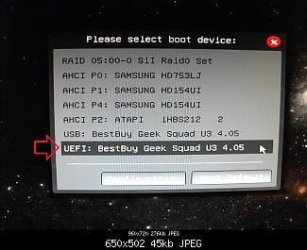
UEFI_USB_Boot_Menu.jpg

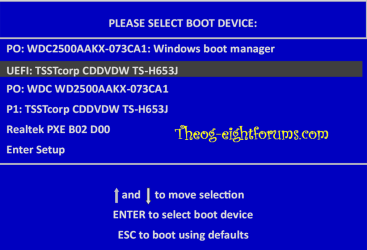
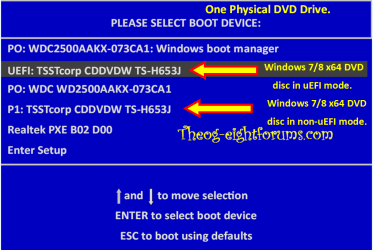
Windows 8 Downgrade-006 SB.PNG
 

My Computer My Computer

At a glance

ME/XP/Vista/Win7
OS
ME/XP/Vista/Win7
UEFI BIOS - Secure Boot enabled

Security / Select an UEFI file as trusted for executing /

files that can be selected are as follows
USB 1/bootmgr.efi
USB 1/efi/microsoft/boot/cdboot.efi
USB 1/efi/microsoft/boot/cdboot_noprompt.efi
USB 1/boot/memtest.efi

What I don't understand is, what happens when I select these files? I highlight them, hit enter and a prompt asks me if I want to add them to the database. I say Yes, and now I have two extra devices in the my boot order.

EFI File Boot 1
EFI File Boot 0

What are these file/devices?
 

My Computer My Computer

At a glance

Windows 7 Home x64Intel Core i7-3610QM @ 2.3GHz x416GBsnVidia GeForce GTX 670M
Computer type
Laptop
Computer Manufacturer/Model Number
Sager NP9150
OS
Windows 7 Home x64
CPU
Intel Core i7-3610QM @ 2.3GHz x4
Motherboard
Clevo P15xEMx
Memory
16GBs
Graphics Card(s)
nVidia GeForce GTX 670M
Sound Card
Realtek High Def Audio
Monitor(s) Displays
Samsung SyncMaster S24B300 + Mobile Display
Screen Resolution
1920x1080 + 1920x1080 (running 1366x768)
Hard Drives
128GBt SSD
500GBt HDD
Keyboard
Logitech K360
Mouse
Logitech Anywhere Mouse MX
Internet Speed
Fat
Antivirus
Avast
Browser
Chrome
If the ISO was good DVD/USB would boot uEFI.

I'm DLing it again - tried fresh ISO - no go

Note - tried a Linux Mint 14 live USB and it worked under UEFI.

The process works, just not with this particular Windows ISO? I guess I could try making an install via my older Win 7 media...
 
Last edited:

My Computer My Computer

At a glance

Windows 7 Home x64Intel Core i7-3610QM @ 2.3GHz x416GBsnVidia GeForce GTX 670M
Computer type
Laptop
Computer Manufacturer/Model Number
Sager NP9150
OS
Windows 7 Home x64
CPU
Intel Core i7-3610QM @ 2.3GHz x4
Motherboard
Clevo P15xEMx
Memory
16GBs
Graphics Card(s)
nVidia GeForce GTX 670M
Sound Card
Realtek High Def Audio
Monitor(s) Displays
Samsung SyncMaster S24B300 + Mobile Display
Screen Resolution
1920x1080 + 1920x1080 (running 1366x768)
Hard Drives
128GBt SSD
500GBt HDD
Keyboard
Logitech K360
Mouse
Logitech Anywhere Mouse MX
Internet Speed
Fat
Antivirus
Avast
Browser
Chrome
Update: finally got the USB stick to boot, however the install process still hangs on "starting windows" screen. Doesn't matter if secure boot is enabled or disabled.

I have updated BIOS and it is still no-go.

What gives?
 

My Computer My Computer

At a glance

Windows 7 Home x64Intel Core i7-3610QM @ 2.3GHz x416GBsnVidia GeForce GTX 670M
Computer type
Laptop
Computer Manufacturer/Model Number
Sager NP9150
OS
Windows 7 Home x64
CPU
Intel Core i7-3610QM @ 2.3GHz x4
Motherboard
Clevo P15xEMx
Memory
16GBs
Graphics Card(s)
nVidia GeForce GTX 670M
Sound Card
Realtek High Def Audio
Monitor(s) Displays
Samsung SyncMaster S24B300 + Mobile Display
Screen Resolution
1920x1080 + 1920x1080 (running 1366x768)
Hard Drives
128GBt SSD
500GBt HDD
Keyboard
Logitech K360
Mouse
Logitech Anywhere Mouse MX
Internet Speed
Fat
Antivirus
Avast
Browser
Chrome
Greg - thanks for the link

As for bypassing UEFI - I can (and have) installed Win 7 normally using the Legacy BIOS. The system works fine, with the exception of the SSD and Intel RST.

Then I'd install in Legacy to avoid the problems with UEFI.

You'll likely be able to get past the installer stall by following the steps and running the commands in Bypass UEFI to Install WIn7
 

Yes

More info - I downloaded the Win 7 pro ISO again. When through the process of making the boot USB stick again. Now the the UEFI system reliably sees the USB drive and starts the Windows install process, but it still hangs on the "starting windows" screen.

Legacy BIOS allows for easy installation of Win 7, no issues whatsoever.

So should I just say screw UEFI?
 

My Computer My Computer

At a glance

Windows 7 Home x64Intel Core i7-3610QM @ 2.3GHz x416GBsnVidia GeForce GTX 670M
Computer type
Laptop
Computer Manufacturer/Model Number
Sager NP9150
OS
Windows 7 Home x64
CPU
Intel Core i7-3610QM @ 2.3GHz x4
Motherboard
Clevo P15xEMx
Memory
16GBs
Graphics Card(s)
nVidia GeForce GTX 670M
Sound Card
Realtek High Def Audio
Monitor(s) Displays
Samsung SyncMaster S24B300 + Mobile Display
Screen Resolution
1920x1080 + 1920x1080 (running 1366x768)
Hard Drives
128GBt SSD
500GBt HDD
Keyboard
Logitech K360
Mouse
Logitech Anywhere Mouse MX
Internet Speed
Fat
Antivirus
Avast
Browser
Chrome
Back
Top