Laptop: Aspire M5-581t
OS: Win 8 oem
BIOS: UEFI
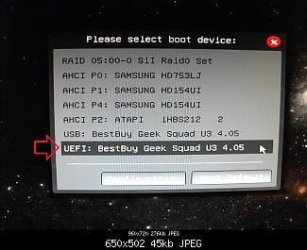
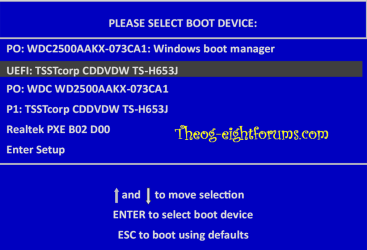
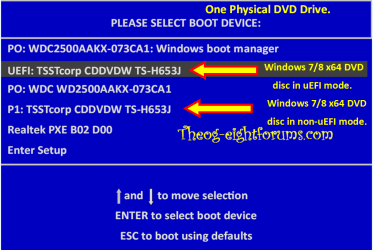
Issue - Want to install Win 7 in UEFI mode but USB stick is not recognized.
Error(s) - no bootable drive found and I can't seem to disable Secure Boot
This has been driving me nuts for days. How do I tell the BIOS that it's okay to boot from the USB stick?
/ have googled the heck out of this issue and all I've found is a big, heaping, plate of nuth'n.
Additional info - BIOS type = InsydeH20 Setup Utility
Update - found the secure boot toggle in the Boot Menu. I've been overlooking that for hours now...
New issue - cannot boot from USB stick, can boot from itapi dvd rom (however, system hangs)
OS: Win 8 oem
BIOS: UEFI
Issue - Want to install Win 7 in UEFI mode but USB stick is not recognized.
Error(s) - no bootable drive found and I can't seem to disable Secure Boot
This has been driving me nuts for days. How do I tell the BIOS that it's okay to boot from the USB stick?
/ have googled the heck out of this issue and all I've found is a big, heaping, plate of nuth'n.
Additional info - BIOS type = InsydeH20 Setup Utility
Update - found the secure boot toggle in the Boot Menu. I've been overlooking that for hours now...
New issue - cannot boot from USB stick, can boot from itapi dvd rom (however, system hangs)
Last edited:
My Computer
At a glance
Windows 7 Home x64Intel Core i7-3610QM @ 2.3GHz x416GBsnVidia GeForce GTX 670M
- Computer type
- Laptop
- Computer Manufacturer/Model Number
- Sager NP9150
- OS
- Windows 7 Home x64
- CPU
- Intel Core i7-3610QM @ 2.3GHz x4
- Motherboard
- Clevo P15xEMx
- Memory
- 16GBs
- Graphics Card(s)
- nVidia GeForce GTX 670M
- Sound Card
- Realtek High Def Audio
- Monitor(s) Displays
- Samsung SyncMaster S24B300 + Mobile Display
- Screen Resolution
- 1920x1080 + 1920x1080 (running 1366x768)
- Hard Drives
- 128GBt SSD
500GBt HDD
- Keyboard
- Logitech K360
- Mouse
- Logitech Anywhere Mouse MX
- Internet Speed
- Fat
- Antivirus
- Avast
- Browser
- Chrome