Netgear router, some computers stuck in "acquiring network address"

kharl

New member
Member
VIP
Local time
6:38 PM
Messages
209
Netgear router, some computers stuck in "acquiring network address"

Hi guys!
i have purchase two wireless routers (by mistake), one Belkin G Wireless Router F5D7234-4 and one Netgear Rangemax N150 WPN824N.

it is amaizing to see that the belking one is about 1/3 the size of the netgear and it performs just AWESOME, so simply and "troublefree".

In the other hand i have this netgear, its cute, but it is BIG, SLOW at start up and once i disconnect one of the devices using its internet its impossible to get connected again.

The only reason why i am stuck with the netgear is because the wifi on/off button.

ok here is the problem in more details
just to give you an idea and to help you to help me, to discard pc configs related issues, ALL my devices were connected without ANY problem.
The device list is:
1-LAPTOP 1 LAN
2-LAPTOP 2 WIFI
3-POCKETPC WIFI
4-PALM WIFI
5-phone WIFI

But when i use the netgear router
only three of the devices get connected
the laptop 2 is stuck in "acquiring network address"
and the pocket pc show is connected but i cant navigate

Clue 1;
in the laptop, if i turn it off/suspend or hibernate while it says "acquiring network address"..., when i get it back, it connects automatically without problem, but if i disconnect it manually or if i turn off and nn the router... if i want it surfing the web i have to suspend then bring it back again

OR....:

Clue 2;
when i disable all security option, i mean instead "WPA-PSK [TKIP] " i choose "NONE"
all of the them get connected and working.
 

My Computer My Computer

At a glance

widnows 7 professional 32 bits
OS
widnows 7 professional 32 bits
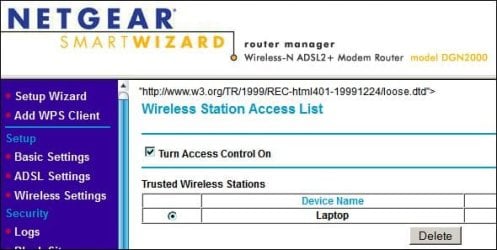
Hi Kharl, is this setting on your Netgear in use ????

RR.JPG
 

My Computer My Computer

At a glance

Win7 H.Prem. 32bit+SP1
Computer Manufacturer/Model Number
Look in my Signature.
OS
Win7 H.Prem. 32bit+SP1
Hi Kharl, is this setting on your Netgear in use ????

View attachment 246501

Hi Roderunner, thank you a lot for your answer!

No, that setting is not in use.
if i turn off then on (or standby or resume from hibernation) with the wireless router's wifi On, then it connects.
it is like if the router's wifi must be ON at the startup of the computer, otherwise wont connect, something similar happen to the pocketpc i have top completly turn off the wifi in the PPC, turn it off , turn it on, then turn on the wifi in the pocket and click to connect
 

My Computer My Computer

At a glance

widnows 7 professional 32 bits
OS
widnows 7 professional 32 bits
Hi Kharl, when I had trouble connecting my one & only wireless app, my Laptop, I deleted the network connection, accessed my router from my wired pc and changed the SSID & password. After starting my Laptop, I input the password, set the Access Control as above and never had any more trouble.
Are all your apps using the same Workgroup name, it's usually called WORKGROUP. I use WPA2-PSK.
 

My Computer My Computer

At a glance

Win7 H.Prem. 32bit+SP1
Computer Manufacturer/Model Number
Look in my Signature.
OS
Win7 H.Prem. 32bit+SP1
i use WPA-PSK
i tried deletin network and creatig it again..
i really dont think theres is something to do with the device trying to conneect or the access control, because when i use the Belkin router instead, with exatly the same configuration, they all connects flawlesly.
 

My Computer My Computer

At a glance

widnows 7 professional 32 bits
OS
widnows 7 professional 32 bits
Are there any firmware updates for the Netgear router.
 

My Computer My Computer

At a glance

Win7 H.Prem. 32bit+SP1
Computer Manufacturer/Model Number
Look in my Signature.
OS
Win7 H.Prem. 32bit+SP1
yes, i did it couple hours ago, and all the same.
 

My Computer My Computer

At a glance

widnows 7 professional 32 bits
OS
widnows 7 professional 32 bits
Try replacing the cable from router to PC. If you don't have a spare reverse the cable.
 

My Computer My Computer

At a glance

Win7 H.Prem. 32bit+SP1
Computer Manufacturer/Model Number
Look in my Signature.
OS
Win7 H.Prem. 32bit+SP1
Hi guys!
i have purchase two wireless routers (by mistake), one Belkin G Wireless Router F5D7234-4 and one Netgear Rangemax N150 WPN824N.

it is amaizing to see that the belking one is about 1/3 the size of the netgear and it performs just AWESOME, so simply and "troublefree".

In the other hand i have this netgear, its cute, but it is BIG, SLOW at start up and once i disconnect one of the devices using its internet its impossible to get connected again.

The only reason why i am stuck with the netgear is because the wifi on/off button.

ok here is the problem in more details
just to give you an idea and to help you to help me, to discard pc configs related issues, ALL my devices were connected without ANY problem.
The device list is:
1-LAPTOP 1 LAN
2-LAPTOP 2 WIFI
3-POCKETPC WIFI
4-PALM WIFI
5-phone WIFI

But when i use the netgear router
only three of the devices get connected
the laptop 2 is stuck in "acquiring network address"
and the pocket pc show is connected but i cant navigate

Clue 1;
in the laptop, if i turn it off/suspend or hibernate while it says "acquiring network address"..., when i get it back, it connects automatically without problem, but if i disconnect it manually or if i turn off and nn the router... if i want it surfing the web i have to suspend then bring it back again

OR....:

Clue 2;
when i disable all security option, i mean instead "WPA-PSK [TKIP] " i choose "NONE"
all of the them get connected and working.

You are going to want to change the encryption from TKIP to AES. TKIP can be problematic with many different drivers. Also use WPA2-PSK if you can.
 

My Computer My Computer

At a glance

Windows 7 Ult, Windows 8.1 Pro,Q9650-4.275GHz, E8600 4.5GHz, E6750-3.8GHzG.Skill PC2 9600 1200Mhz 5 5 5 15 2TGTX480
Computer type
PC/Desktop
Computer Manufacturer/Model Number
Home built
OS
Windows 7 Ult, Windows 8.1 Pro,
CPU
Q9650-4.275GHz, E8600 4.5GHz, E6750-3.8GHz
Motherboard
Evga 780i FTW
Memory
G.Skill PC2 9600 1200Mhz 5 5 5 15 2T
Graphics Card(s)
GTX480
Sound Card
Asus Xonar D2
Monitor(s) Displays
HannsG
Screen Resolution
1680X1050
Hard Drives
GSkill Phoenix Pro 120GB SSD
PSU
ThermalTake Toughpower 1000Watt modular
Case
ThermalTake XaserV
Cooling
Xigmatek S1283
Keyboard
Logitech G15
Mouse
Logitech G9
Internet Speed
T1
Try replacing the cable from router to PC. If you don't have a spare reverse the cable.

from router to PC?

but the wired pc is ok, or are you asking to do that because it could affect wireless connection?
 

My Computer My Computer

At a glance

widnows 7 professional 32 bits
OS
widnows 7 professional 32 bits
Hi guys!
i have purchase two wireless routers (by mistake), one Belkin G Wireless Router F5D7234-4 and one Netgear Rangemax N150 WPN824N.

it is amaizing to see that the belking one is about 1/3 the size of the netgear and it performs just AWESOME, so simply and "troublefree".

In the other hand i have this netgear, its cute, but it is BIG, SLOW at start up and once i disconnect one of the devices using its internet its impossible to get connected again.

The only reason why i am stuck with the netgear is because the wifi on/off button.

ok here is the problem in more details
just to give you an idea and to help you to help me, to discard pc configs related issues, ALL my devices were connected without ANY problem.
The device list is:
1-LAPTOP 1 LAN
2-LAPTOP 2 WIFI
3-POCKETPC WIFI
4-PALM WIFI
5-phone WIFI

But when i use the netgear router
only three of the devices get connected
the laptop 2 is stuck in "acquiring network address"
and the pocket pc show is connected but i cant navigate

Clue 1;
in the laptop, if i turn it off/suspend or hibernate while it says "acquiring network address"..., when i get it back, it connects automatically without problem, but if i disconnect it manually or if i turn off and nn the router... if i want it surfing the web i have to suspend then bring it back again

OR....:

Clue 2;
when i disable all security option, i mean instead "WPA-PSK [TKIP] " i choose "NONE"
all of the them get connected and working.

You are going to want to change the encryption from TKIP to AES. TKIP can be problematic with many different drivers. Also use WPA2-PSK if you can.

can i use the same password ?
 

My Computer My Computer

At a glance

widnows 7 professional 32 bits
OS
widnows 7 professional 32 bits
Hi guys!
i have purchase two wireless routers (by mistake), one Belkin G Wireless Router F5D7234-4 and one Netgear Rangemax N150 WPN824N.

it is amaizing to see that the belking one is about 1/3 the size of the netgear and it performs just AWESOME, so simply and "troublefree".

In the other hand i have this netgear, its cute, but it is BIG, SLOW at start up and once i disconnect one of the devices using its internet its impossible to get connected again.

The only reason why i am stuck with the netgear is because the wifi on/off button.

ok here is the problem in more details
just to give you an idea and to help you to help me, to discard pc configs related issues, ALL my devices were connected without ANY problem.
The device list is:
1-LAPTOP 1 LAN
2-LAPTOP 2 WIFI
3-POCKETPC WIFI
4-PALM WIFI
5-phone WIFI

But when i use the netgear router
only three of the devices get connected
the laptop 2 is stuck in "acquiring network address"
and the pocket pc show is connected but i cant navigate

Clue 1;
in the laptop, if i turn it off/suspend or hibernate while it says "acquiring network address"..., when i get it back, it connects automatically without problem, but if i disconnect it manually or if i turn off and nn the router... if i want it surfing the web i have to suspend then bring it back again

OR....:

Clue 2;
when i disable all security option, i mean instead "WPA-PSK [TKIP] " i choose "NONE"
all of the them get connected and working.

You are going to want to change the encryption from TKIP to AES. TKIP can be problematic with many different drivers. Also use WPA2-PSK if you can.

can i use the same password ?

The pass word doesn't matter but you need to make those changes to the security.

If these machines are using 802.11n there are other settings that can help as well.
 

My Computer My Computer

At a glance

Windows 7 Ult, Windows 8.1 Pro,Q9650-4.275GHz, E8600 4.5GHz, E6750-3.8GHzG.Skill PC2 9600 1200Mhz 5 5 5 15 2TGTX480
Computer type
PC/Desktop
Computer Manufacturer/Model Number
Home built
OS
Windows 7 Ult, Windows 8.1 Pro,
CPU
Q9650-4.275GHz, E8600 4.5GHz, E6750-3.8GHz
Motherboard
Evga 780i FTW
Memory
G.Skill PC2 9600 1200Mhz 5 5 5 15 2T
Graphics Card(s)
GTX480
Sound Card
Asus Xonar D2
Monitor(s) Displays
HannsG
Screen Resolution
1680X1050
Hard Drives
GSkill Phoenix Pro 120GB SSD
PSU
ThermalTake Toughpower 1000Watt modular
Case
ThermalTake XaserV
Cooling
Xigmatek S1283
Keyboard
Logitech G15
Mouse
Logitech G9
Internet Speed
T1
no i want to use 802.11b, since is the common for my devices (i mean, the laptops support abgn, the ppc bg, but the palm only b
i will try with AES instead TKIP and ill let you know

(i really thing the problem has something to do with authentication because when i turn it off, everything gets connected)
 

My Computer My Computer

At a glance

widnows 7 professional 32 bits
OS
widnows 7 professional 32 bits
Bad, i dont have the option to change to AES using WPA,i would have to switch to WPA2 in order to use AES, and i have devices no compatible with WPA2
 

My Computer My Computer

At a glance

widnows 7 professional 32 bits
OS
widnows 7 professional 32 bits
Anyway i sitched to WPA2-PSKAES, and the same problem, "acquiring addres...." if i suspend and get the laptop back from suspend or hibernation then it connects.

in other words,, there was no difference between WPA-PSK TKIPS and WPA2-PSK AES


My Computer My Computer

At a glance

widnows 7 professional 32 bits
OS
widnows 7 professional 32 bits
Bad, i dont have the option to change to AES using WPA,i would have to switch to WPA2 in order to use AES, and i have devices no compatible with WPA2

You should at least try the new settings to determine if that is the problem with your machines not connecting.

The router that works probably just has better legacy settings. Doing all this for a wireless on/off switch seems kind of redundant at this point. If you want it to work just use the router that works best.
 

My Computer My Computer

At a glance

Windows 7 Ult, Windows 8.1 Pro,Q9650-4.275GHz, E8600 4.5GHz, E6750-3.8GHzG.Skill PC2 9600 1200Mhz 5 5 5 15 2TGTX480
Computer type
PC/Desktop
Computer Manufacturer/Model Number
Home built
OS
Windows 7 Ult, Windows 8.1 Pro,
CPU
Q9650-4.275GHz, E8600 4.5GHz, E6750-3.8GHz
Motherboard
Evga 780i FTW
Memory
G.Skill PC2 9600 1200Mhz 5 5 5 15 2T
Graphics Card(s)
GTX480
Sound Card
Asus Xonar D2
Monitor(s) Displays
HannsG
Screen Resolution
1680X1050
Hard Drives
GSkill Phoenix Pro 120GB SSD
PSU
ThermalTake Toughpower 1000Watt modular
Case
ThermalTake XaserV
Cooling
Xigmatek S1283
Keyboard
Logitech G15
Mouse
Logitech G9
Internet Speed
T1
You should at least try the new settings to determine if that is the problem with your machines not connecting.

The router that works probably just has better legacy settings. Doing all this for a wireless on/off switch seems kind of redundant at this point. If you want it to work just use the router that works best.


Anyway i switched to WPA2-PSKAES, and the same problem, "acquiring addres...." if i suspend and get the laptop back from suspend or hibernation then it connects.

in other words,, there was no difference between WPA-PSK TKIPS and WPA2-PSK AES

..................
 

My Computer My Computer

At a glance

widnows 7 professional 32 bits
OS
widnows 7 professional 32 bits
Yes either use the router that works or try updating the firmware on the router that you want to use.

There is no magical Windows fix it button for problems like this because it's not a Windows problem. ;)
 

My Computer My Computer

At a glance

Windows 7 Ult, Windows 8.1 Pro,Q9650-4.275GHz, E8600 4.5GHz, E6750-3.8GHzG.Skill PC2 9600 1200Mhz 5 5 5 15 2TGTX480
Computer type
PC/Desktop
Computer Manufacturer/Model Number
Home built
OS
Windows 7 Ult, Windows 8.1 Pro,
CPU
Q9650-4.275GHz, E8600 4.5GHz, E6750-3.8GHz
Motherboard
Evga 780i FTW
Memory
G.Skill PC2 9600 1200Mhz 5 5 5 15 2T
Graphics Card(s)
GTX480
Sound Card
Asus Xonar D2
Monitor(s) Displays
HannsG
Screen Resolution
1680X1050
Hard Drives
GSkill Phoenix Pro 120GB SSD
PSU
ThermalTake Toughpower 1000Watt modular
Case
ThermalTake XaserV
Cooling
Xigmatek S1283
Keyboard
Logitech G15
Mouse
Logitech G9
Internet Speed
T1
Yes either use the router that works or try updating the firmware on the router that you want to use.

There is no magical Windows fix it button for problems like this because it's not a Windows problem. ;)

the firmware was update, as i mentioned before, and i know there is no magical button where i just click and fix it, that's why i am asking for help here.

and YES is NOT a windows problem that's what i have tried to let understood, IS A ROUTER PROBLEM!

Maybe my big mistake was to mention that i had another router which works with the same configuration, not all user have a spare piece to substitute when the one currently in use fails, if so, maybe forums like this wouldn't exist, people would just "use the one which works" instead asking for help.
 

My Computer My Computer

At a glance

widnows 7 professional 32 bits
OS
widnows 7 professional 32 bits
Yes either use the router that works or try updating the firmware on the router that you want to use.

There is no magical Windows fix it button for problems like this because it's not a Windows problem. ;)

the firmware was update, as i mentioned before, and i know there is no magical button where i just click and fix it, that's why i am asking for help here.

and YES is NOT a windows problem that's what i have tried to let understood, IS A ROUTER PROBLEM!

Maybe my big mistake was to mention that i had another router which works with the same configuration, not all user have a spare piece to substitute when the one currently in use fails, if so, maybe forums like this wouldn't exist, people would just "use the one which works" instead asking for help.

If you have a router that works then why not use it?

This router that doesn't work obviously has problems with legacy settings. So no fix will be available for that other than a firmware update.
 

My Computer My Computer

At a glance

Windows 7 Ult, Windows 8.1 Pro,Q9650-4.275GHz, E8600 4.5GHz, E6750-3.8GHzG.Skill PC2 9600 1200Mhz 5 5 5 15 2TGTX480
Computer type
PC/Desktop
Computer Manufacturer/Model Number
Home built
OS
Windows 7 Ult, Windows 8.1 Pro,
CPU
Q9650-4.275GHz, E8600 4.5GHz, E6750-3.8GHz
Motherboard
Evga 780i FTW
Memory
G.Skill PC2 9600 1200Mhz 5 5 5 15 2T
Graphics Card(s)
GTX480
Sound Card
Asus Xonar D2
Monitor(s) Displays
HannsG
Screen Resolution
1680X1050
Hard Drives
GSkill Phoenix Pro 120GB SSD
PSU
ThermalTake Toughpower 1000Watt modular
Case
ThermalTake XaserV
Cooling
Xigmatek S1283
Keyboard
Logitech G15
Mouse
Logitech G9
Internet Speed
T1
Back
Top