GPT Hard drive issues with installing Windows 7 Ultimate..

Three days ago I posted a way to Bypass UEFI to Install WIn. Have you looked over those steps?

How do i get into Legacy BIOS, the only option i see in the bios is through Advanced into Intergrated Peripherals and then i can see

Legacy USB Support - Enabled

an thats it????
 

My Computer My Computer

At a glance

Winows 8Intel® Core™ i3 Processor4gig DDR3Intergrated Intel Graphics
Computer Manufacturer/Model Number
Packard Bell Imedia
OS
Winows 8
CPU
Intel® Core™ i3 Processor
Memory
4gig DDR3
Graphics Card(s)
Intergrated Intel Graphics
Hard Drives
2 x 1TB Sata 3
Turn off Secure boot.

Now do the EFI options disappear in BIOS Boot priority choices?

Set DVD drive to boot first, then HDD and complete the other steps I gave in link.
 
Last edited:
Do you have Secure Boot?

If so turn it off. Now do the EFI options disappear in BIOS Boot priority choices?

Set DVD drive to boot first, then HDD and complete the other steps I gave in link.


If you read in my other posts I've turned off secure boot many times and the dvd never ever shows up in the boot menu, even when boot primary has been changed along with it. I cant even see the USB Stick when I boot either. its like everything is just locked for good even though I've disabled secure boot NIGHTMARE
 

My Computer My Computer

At a glance

Winows 8Intel® Core™ i3 Processor4gig DDR3Intergrated Intel Graphics
Computer Manufacturer/Model Number
Packard Bell Imedia
OS
Winows 8
CPU
Intel® Core™ i3 Processor
Memory
4gig DDR3
Graphics Card(s)
Intergrated Intel Graphics
Hard Drives
2 x 1TB Sata 3
Check the all settings in the BIOS, looks one of them is set to DISABLE DVD/USB drive from BOOT MENU.
 

My Computer My Computer

At a glance

ME/XP/Vista/Win7
OS
ME/XP/Vista/Win7
Check the all settings in the BIOS, looks one of them is set to DISABLE DVD/USB drive from BOOT MENU.

Nope there is nothing of the sort in any of the BIOS menu :(
 

My Computer My Computer

At a glance

Winows 8Intel® Core™ i3 Processor4gig DDR3Intergrated Intel Graphics
Computer Manufacturer/Model Number
Packard Bell Imedia
OS
Winows 8
CPU
Intel® Core™ i3 Processor
Memory
4gig DDR3
Graphics Card(s)
Intergrated Intel Graphics
Hard Drives
2 x 1TB Sata 3
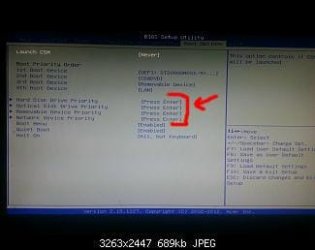
2012-12-21%2023_55_35.jpg

Check here.
 

My Computer My Computer

At a glance

ME/XP/Vista/Win7
OS
ME/XP/Vista/Win7
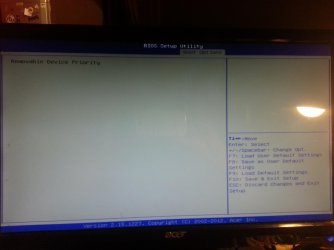
Checked it nothing when I press enter I cant do anything once I've gone into the drive setting in bios
 

Attachments

  • 20121223_184344.jpg
    20121223_184344.jpg
    660.5 KB · Views: 5

My Computer My Computer

At a glance

Winows 8Intel® Core™ i3 Processor4gig DDR3Intergrated Intel Graphics
Computer Manufacturer/Model Number
Packard Bell Imedia
OS
Winows 8
CPU
Intel® Core™ i3 Processor
Memory
4gig DDR3
Graphics Card(s)
Intergrated Intel Graphics
Hard Drives
2 x 1TB Sata 3
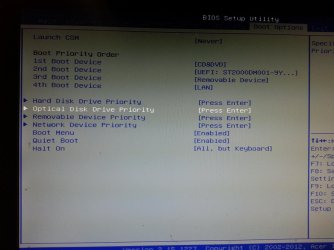
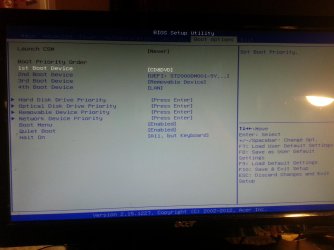
If you're trying to bypass UEFI then it still has UEFI device listed second in boot priority which needs to be changed. Is that the HDD? Look for another HDD choice which isn't UEFI.

I see Optical Drive choice there on menu. What happens when you select it to boot?

Same for HDD is there a HDD to set second?

If no DVD drive set non-UEFI HDD first, try booting DVD drive from Boot Menu key at boot.

Make sure Secure Boot is turned off.

Try booting the HD Diagnostic CD or Partition Wizard CD which will self-boot to test and then Quick Wipe HD. This should make WIn7 DVD boot itself too. Make sure Secure Boot is disabled and (non-UEFI) HDD set first.

Are there other settings we've not seen? Some users have found strangely named settings that actually end up disabling UEFI, if not named Legacy BIOS.
 
Last edited:
Do you have a setting call, BOOT REMOvABLE MEDIA make sure this ENABLED.
 

My Computer My Computer

At a glance

ME/XP/Vista/Win7
OS
ME/XP/Vista/Win7
should I just post pic's of all the pages in bios as there is nothing I can see for what you have been saying?
 

My Computer My Computer

At a glance

Winows 8Intel® Core™ i3 Processor4gig DDR3Intergrated Intel Graphics
Computer Manufacturer/Model Number
Packard Bell Imedia
OS
Winows 8
CPU
Intel® Core™ i3 Processor
Memory
4gig DDR3
Graphics Card(s)
Intergrated Intel Graphics
Hard Drives
2 x 1TB Sata 3
Sure, maybe we can see a setting to disable UEFI or Enable Legacy BIOS that you've missed.
 
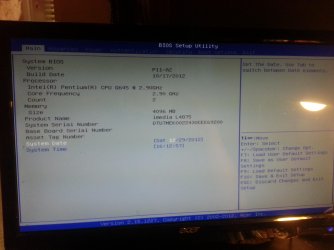
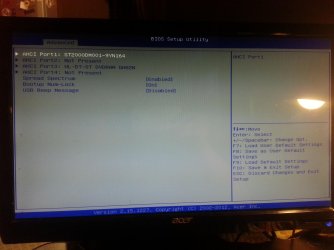
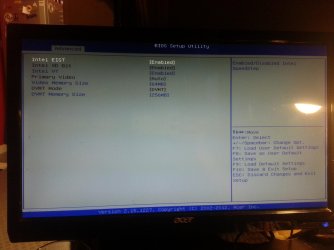
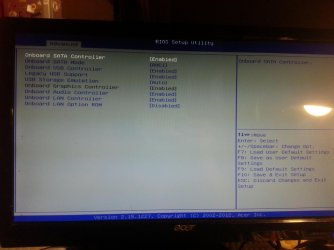
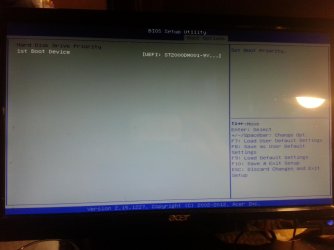
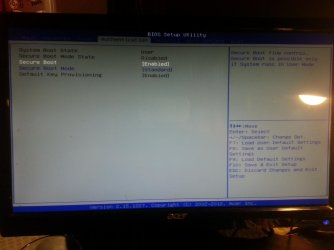
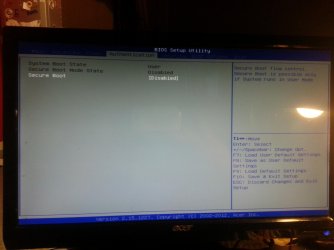
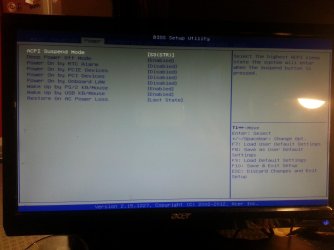
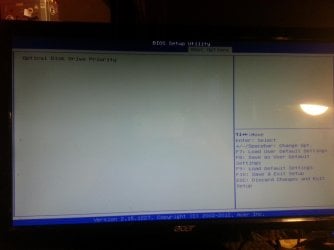
Here are the first 5 pic's i have gone into the advanced menu and into their sub options to show all
 

Attachments

  • 2012-12-29 16.12.06.jpg
    2012-12-29 16.12.06.jpg
    453.3 KB · Views: 8
  • 2012-12-29 16.12.21.jpg
    2012-12-29 16.12.21.jpg
    388.6 KB · Views: 8
  • 2012-12-29 16.12.27.jpg
    2012-12-29 16.12.27.jpg
    474.8 KB · Views: 8
  • 2012-12-29 16.12.33.jpg
    2012-12-29 16.12.33.jpg
    460.5 KB · Views: 9
  • 2012-12-29 16.12.43.jpg
    2012-12-29 16.12.43.jpg
    481.6 KB · Views: 8

My Computer My Computer

At a glance

Winows 8Intel® Core™ i3 Processor4gig DDR3Intergrated Intel Graphics
Computer Manufacturer/Model Number
Packard Bell Imedia
OS
Winows 8
CPU
Intel® Core™ i3 Processor
Memory
4gig DDR3
Graphics Card(s)
Intergrated Intel Graphics
Hard Drives
2 x 1TB Sata 3
second load of pics
I've disabled and enabled the secure boot so you can see the options I get also
 

Attachments

  • 2012-12-29 16.13.31.jpg
    2012-12-29 16.13.31.jpg
    435.7 KB · Views: 6
  • 2012-12-29 16.13.21.jpg
    2012-12-29 16.13.21.jpg
    475.2 KB · Views: 6
  • 2012-12-29 16.13.10.jpg
    2012-12-29 16.13.10.jpg
    397.8 KB · Views: 6
  • 2012-12-29 16.13.00.jpg
    2012-12-29 16.13.00.jpg
    414.7 KB · Views: 5
  • 2012-12-29 16.12.51.jpg
    2012-12-29 16.12.51.jpg
    439.8 KB · Views: 6

My Computer My Computer

At a glance

Winows 8Intel® Core™ i3 Processor4gig DDR3Intergrated Intel Graphics
Computer Manufacturer/Model Number
Packard Bell Imedia
OS
Winows 8
CPU
Intel® Core™ i3 Processor
Memory
4gig DDR3
Graphics Card(s)
Intergrated Intel Graphics
Hard Drives
2 x 1TB Sata 3
last of them.
 

Attachments

  • 2012-12-29 16.13.37.jpg
    2012-12-29 16.13.37.jpg
    398.8 KB · Views: 6
  • 2012-12-29 16.13.44.jpg
    2012-12-29 16.13.44.jpg
    406.7 KB · Views: 5

My Computer My Computer

At a glance

Winows 8Intel® Core™ i3 Processor4gig DDR3Intergrated Intel Graphics
Computer Manufacturer/Model Number
Packard Bell Imedia
OS
Winows 8
CPU
Intel® Core™ i3 Processor
Memory
4gig DDR3
Graphics Card(s)
Intergrated Intel Graphics
Hard Drives
2 x 1TB Sata 3
Looks like you have missed the last page out.
 

My Computer My Computer

At a glance

ME/XP/Vista/Win7
OS
ME/XP/Vista/Win7

My Computer My Computer

At a glance

Winows 8Intel® Core™ i3 Processor4gig DDR3Intergrated Intel Graphics
Computer Manufacturer/Model Number
Packard Bell Imedia
OS
Winows 8
CPU
Intel® Core™ i3 Processor
Memory
4gig DDR3
Graphics Card(s)
Intergrated Intel Graphics
Hard Drives
2 x 1TB Sata 3
What are the other choices in Hard Disk priority? As I said earlier you need to remove all UEFI choices from list once Secure Boot is disabled. It also doesn't look like there's a Legacy BIOS choice which normally would remove all UEFI choices from menus on many BIOS'.

Have you read your BIOS Manual to see exactly how to achieve Legacy BIOS (non-UEFI)?
 
What are the other choices in Hard Disk priority? As I said earlier you need to remove all UEFI choices from list once Secure Boot is disabled. It also doesn't look like there's a Legacy BIOS choice which normally would remove all UEFI choices from menus on many BIOS'.

Have you read your BIOS Manual to see exactly how to achieve Legacy BIOS (non-UEFI)?


Theres no handheld manual with it, just one you search for which does not have any bios info in it. only the one HDD shows up even though there are 2x1tb hdd's in there. there aint no other choices I can see, when I select the uefi hdd it does not give me any other options?
 

My Computer My Computer

At a glance

Winows 8Intel® Core™ i3 Processor4gig DDR3Intergrated Intel Graphics
Computer Manufacturer/Model Number
Packard Bell Imedia
OS
Winows 8
CPU
Intel® Core™ i3 Processor
Memory
4gig DDR3
Graphics Card(s)
Intergrated Intel Graphics
Hard Drives
2 x 1TB Sata 3
Back
Top