PC randomly turns off without closing windows.

I would second bej's post of electrostatic discharge being a possible culprit or a larger electrical problem. What is your computer's environment, does it sit on carpet? How many electrical components are connected on the same circuit? In any case, this sounds like an electrical problem not something occurring in Windows.
 

My Computer My Computer

Computer type
PC/Desktop
Computer Manufacturer/Model Number
Wordsworth 5000
OS
Windows 10 Pro 64 bit
CPU
Core i7 6700K Skylake 4.0GHz
Motherboard
Asus Z170 Pro
Memory
Corsair Vengeance LPX DDR4 32GB 3000MHz
Graphics Card(s)
Asus Radeon RX480 Strix 8GB
Sound Card
Asus Xonar DSX
Monitor(s) Displays
HP 2709m
Screen Resolution
1920x1080
Hard Drives
Intel 600p M.2 PCIe NVMe SSD 512GB; Intel 335 SSD 240GB ;Western Digital Caviar Black 1TB
PSU
Thermaltake Toughpower Grand Platinum 850W
Case
Lian Li PC-B70
Cooling
CPU-Noctua NH D15, GPU-Stock, Case-Noctua 2x140, 2x120
Keyboard
Microsoft Natural Ergo 4000
Mouse
Microsoft Wireless Optical 1000
Internet Speed
Cable
Other Info
HP bd 340,
HP bd 240,
Klipsch Promedia 5.1 THX
I would second bej's post of electrostatic discharge being a possible culprit or a larger electrical problem. What is your computer's environment, does it sit on carpet? How many electrical components are connected on the same circuit? In any case, this sounds like an electrical problem not something occurring in Windows.

I've got my computer sitting on a piece of wood on top of the carpet (as big as the base of my case). I've got two monitors and my PC on the same board. The only thing near my computer that I can think of is a curtain which could possible brush past it when I open or close it, but it's not that close either.
 

My Computer My Computer

OS
Windows 7 Ultimate 64bit
Here's a snapshot from speccy
40C is a lot higher than I like to see on an AMD CPU idling. Download CPUID - System & hardware benchmark, monitoring, reporting and check the core temps are lower. One thing that could be shutting off the computer is if your CPU is overheating it will throttle and then shut off and power down. You may need a new cooler heat sink and fan or new thermal paste on the CPU. Monitor the temps and report back.
 

My Computer My Computer

Computer type
PC/Desktop
Computer Manufacturer/Model Number
Bluethunder II
OS
Windows 7 x64 Ultimate and numerous virtual machines
CPU
AMD FX-8350 Vishera 32nm Technology @ 4.2 GHz default
Motherboard
ASUSTeK COMPUTER INC. SABERTOOTH 990FX R2.0 (Socket 942)
Memory
G Skill 32.0GB Dual-Channel DDR3 @ 1204MHz (11-13-13-31)
Graphics Card(s)
EVGA GeForce GTX 960 4GB Super SC ACX 2.0+ with Back Plate
Sound Card
Creative X-Fi Titanium HD Audiophile PCIe
Monitor(s) Displays
LG L227WTG x 3
Screen Resolution
1680 x 1050 16:10
Hard Drives
238GB Samsung850 PRO SATA Disk Device (SSD)
1863GB Seagate ST2000DM 001-1CH164 (SATA)
1397GB Seagate ST1500DL 003-9VT16L(SATA)
466GB Western Digital WDC WD50 03AZEX-00K1GA0 (SATA) x 2
932GB Seagate ST310005 28AS SATA Disk Device (SATA)
PSU
Enermax Revolution87+ 1000 Watts Gold Certified Power Supply
Case
Rocketfish Full Tower
Cooling
Cooler Master Hyper 212 EVO Push Pull 120mm Fans
Keyboard
Logitech K740
Mouse
Logitech G100S Laser LED + Logitech Gamepad F310
Internet Speed
500 mbs down and 30mbs up
Antivirus
Malwarebytes Pro & Avast and MSE on certain Virtual Machines
Browser
Firefox (Main) Chrome, Internet Explorer (Back Up)
Other Info
Logitech X 230 2.1 Stereo System and 5.1 Yamaha RX V2090
B&W DM6 Monitor Speakers + Center and Surround Speakers
Using Mouse Without Borders (Google it)
I do agree that high temps could cause a shutoff and maybe I missed this, but did the OP say these temps are at idle?

Even if at idle, what is the environment and setup?
- In a desert, on a 100F day, stock cooling, no AC, dusty HSF...

More important, what are the temps under load...?

Just saying...40C temp is not a problem that would cause a shutdown.
And I love to overclock my systems just to see what i can push them to. :p :geek:
 

My Computer My Computer

Computer type
PC/Desktop
Computer Manufacturer/Model Number
home built
OS
Multi-Boot W7_Pro_x64 W8.1_Pro_x64 W10_Pro_x64 +Linux_VMs +Chromium_VM
CPU
AMD Athlon II x4 620
Motherboard
Gigabyte GA-MA785G-UD3H
Memory
6GB GSkill DDR2 800
Graphics Card(s)
AMD 4670 GPU + AMD 4200 IGP
Sound Card
on board Realtek ALC889A
Monitor(s) Displays
RCA 40" LCD TV, Insignia 32" LCD TV, HP 15" LCD monitor
Screen Resolution
1680 x 1050
Hard Drives
OCZ Vertex 3 120GB,
Samsung F3 1TB (3),
Several others - WD, Seagate, Hitachi, ...
PSU
Corsair 500 W
Case
Rosewill mid tower
Cooling
CM 90mm rifle
Keyboard
Gyration wireless, Logitech wireless, Dell USB wired
Mouse
Gyration wireless, Logitech wireless, V7 USB wired
Internet Speed
Spectrum - 100Mbps D / 10Mbps U
Antivirus
Avast, MBAM3, EMET, WinPatrol
Browser
Pale Moon, Firefox, IE
Other Info
2 multi-boot PC's
Mainly HTPC/Office/Gen purpose (no gaming).
Trendnet USB KVM.
LG DVD burner/Blue Ray Player.
Tray system for removable SATA backup drives.

Not currently OCd, under-volted.
I use Hybrid sleep, rarely re-boot or shutdown.

Hauppauge HD-PVR, Avermedia PCIe TV Tuner, Hauppauge PCI TV Tuner.
I do agree that high temps could cause a shutoff and maybe I missed this, but did the OP say these temps are at idle?

Even if at idle, what is the environment and setup?
- In a desert, on a 100F day, stock cooling, no AC, dusty HSF...

More important, what are the temps under load...?

Just saying...40C temp is not a problem that would cause a shutdown.
And I love to overclock my systems just to see what i can push them to. :p :geek:
No he did not say they were at idle. I am just "putting it out there" as it seems to be a weird issue.:geek: Seen a lot of just shuts off stone dead due to cooling issues. 60C under load would do it with some AMD CPU's.:D
 

My Computer My Computer

Computer type
PC/Desktop
Computer Manufacturer/Model Number
Bluethunder II
OS
Windows 7 x64 Ultimate and numerous virtual machines
CPU
AMD FX-8350 Vishera 32nm Technology @ 4.2 GHz default
Motherboard
ASUSTeK COMPUTER INC. SABERTOOTH 990FX R2.0 (Socket 942)
Memory
G Skill 32.0GB Dual-Channel DDR3 @ 1204MHz (11-13-13-31)
Graphics Card(s)
EVGA GeForce GTX 960 4GB Super SC ACX 2.0+ with Back Plate
Sound Card
Creative X-Fi Titanium HD Audiophile PCIe
Monitor(s) Displays
LG L227WTG x 3
Screen Resolution
1680 x 1050 16:10
Hard Drives
238GB Samsung850 PRO SATA Disk Device (SSD)
1863GB Seagate ST2000DM 001-1CH164 (SATA)
1397GB Seagate ST1500DL 003-9VT16L(SATA)
466GB Western Digital WDC WD50 03AZEX-00K1GA0 (SATA) x 2
932GB Seagate ST310005 28AS SATA Disk Device (SATA)
PSU
Enermax Revolution87+ 1000 Watts Gold Certified Power Supply
Case
Rocketfish Full Tower
Cooling
Cooler Master Hyper 212 EVO Push Pull 120mm Fans
Keyboard
Logitech K740
Mouse
Logitech G100S Laser LED + Logitech Gamepad F310
Internet Speed
500 mbs down and 30mbs up
Antivirus
Malwarebytes Pro & Avast and MSE on certain Virtual Machines
Browser
Firefox (Main) Chrome, Internet Explorer (Back Up)
Other Info
Logitech X 230 2.1 Stereo System and 5.1 Yamaha RX V2090
B&W DM6 Monitor Speakers + Center and Surround Speakers
Using Mouse Without Borders (Google it)
I do agree that high temps could cause a shutoff and maybe I missed this, but did the OP say these temps are at idle?

Even if at idle, what is the environment and setup?
- In a desert, on a 100F day, stock cooling, no AC, dusty HSF...

More important, what are the temps under load...?

Just saying...40C temp is not a problem that would cause a shutdown.
And I love to overclock my systems just to see what i can push them to. :p :geek:
No he did not say they were at idle. I am just "putting it out there" as it seems to be a weird issue.:geek: Seen a lot of just shuts off stone dead due to cooling issues. 60C under load would do it with some AMD CPU's.:D

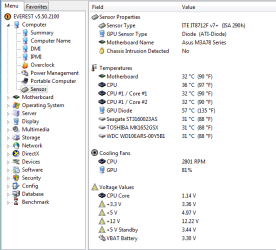
Hey guys, idle temp is around 35 or 36-ish. Here's a snapshot from Everest, maybe this will help?

It's no more than 25 degrees in the room at the moment, quite humid though.
 

Attachments

  • Temps.PNG
    Temps.PNG
    20.2 KB · Views: 7

My Computer My Computer

OS
Windows 7 Ultimate 64bit
Run "Auslogics" registry cleaner.(restart pc)
Just trust it - it makes an auto-back-up anyway.

Have you tried pulling one stick of memory(test) at a time to check for ram faults?

Is your pc protected by an anti-surge/brown-out power strip? (Could be a fridge/freezer or a washing machine causing surge when they kick in knocking out pc.)

I've even read reports of dodgy electric flourescent light bulbs which give off wavelengths that switch off/on tellies and 'putas!
 

My Computer My Computer

Computer type
PC/Desktop
Computer Manufacturer/Model Number
D.I.Y.
OS
WIN7 Ultimate 64bit
CPU
AMD FX8150/Trinity A10-5700
Motherboard
Asus Sabertooth v.1 /Asus F2A85-M Pro
Memory
G-Skill 2400 x2 @ 1866 (both pc's)
Graphics Card(s)
Sapphire (factory OC version) AMD 7770
Sound Card
onboard
Monitor(s) Displays
T260 Samsung
Screen Resolution
1920x1080
Hard Drives
Western Digital Sata 2TB/1TB Caviar Blacks
Buffalo 1TB usb (excellent drive)
PSU
Be-Quiet 700W E-9/Be-Quiet 550W E-9(E-9 = built by FSP)
Case
Antec P183/Antec P180mini
Cooling
x2 Xigmatek SXHH7-U01 + C-Master R4-EXBB-20PK-R0 120mm Fans
Keyboard
Cherry
Mouse
MS Explorer 3.0
Other Info
LG Blu ray combo
Pioneer 207D/208 Blu ray burners
I do agree that high temps could cause a shutoff and maybe I missed this, but did the OP say these temps are at idle?

Even if at idle, what is the environment and setup?
- In a desert, on a 100F day, stock cooling, no AC, dusty HSF...

More important, what are the temps under load...?

Just saying...40C temp is not a problem that would cause a shutdown.
And I love to overclock my systems just to see what i can push them to. :p :geek:
No he did not say they were at idle. I am just "putting it out there" as it seems to be a weird issue.:geek: Seen a lot of just shuts off stone dead due to cooling issues. 60C under load would do it with some AMD CPU's.:D

Hey guys, idle temp is around 35 or 36-ish. Here's a snapshot from Everest, maybe this will help?

It's no more than 25 degrees in the room at the moment, quite humid though.
What about under load, gaming or running Prime 95? Prime95 - CNET Download.com
This will show up any cooling issues.
 

My Computer My Computer

Computer type
PC/Desktop
Computer Manufacturer/Model Number
Bluethunder II
OS
Windows 7 x64 Ultimate and numerous virtual machines
CPU
AMD FX-8350 Vishera 32nm Technology @ 4.2 GHz default
Motherboard
ASUSTeK COMPUTER INC. SABERTOOTH 990FX R2.0 (Socket 942)
Memory
G Skill 32.0GB Dual-Channel DDR3 @ 1204MHz (11-13-13-31)
Graphics Card(s)
EVGA GeForce GTX 960 4GB Super SC ACX 2.0+ with Back Plate
Sound Card
Creative X-Fi Titanium HD Audiophile PCIe
Monitor(s) Displays
LG L227WTG x 3
Screen Resolution
1680 x 1050 16:10
Hard Drives
238GB Samsung850 PRO SATA Disk Device (SSD)
1863GB Seagate ST2000DM 001-1CH164 (SATA)
1397GB Seagate ST1500DL 003-9VT16L(SATA)
466GB Western Digital WDC WD50 03AZEX-00K1GA0 (SATA) x 2
932GB Seagate ST310005 28AS SATA Disk Device (SATA)
PSU
Enermax Revolution87+ 1000 Watts Gold Certified Power Supply
Case
Rocketfish Full Tower
Cooling
Cooler Master Hyper 212 EVO Push Pull 120mm Fans
Keyboard
Logitech K740
Mouse
Logitech G100S Laser LED + Logitech Gamepad F310
Internet Speed
500 mbs down and 30mbs up
Antivirus
Malwarebytes Pro & Avast and MSE on certain Virtual Machines
Browser
Firefox (Main) Chrome, Internet Explorer (Back Up)
Other Info
Logitech X 230 2.1 Stereo System and 5.1 Yamaha RX V2090
B&W DM6 Monitor Speakers + Center and Surround Speakers
Using Mouse Without Borders (Google it)
Run "Auslogics" registry cleaner.(restart pc)
Just trust it - it makes an auto-back-up anyway.

Have you tried pulling one stick of memory(test) at a time to check for ram faults?

Is your pc protected by an anti-surge/brown-out power strip? (Could be a fridge/freezer or a washing machine causing surge when they kick in knocking out pc.)

I've even read reports of dodgy electric flourescent light bulbs which give off wavelengths that switch off/on tellies and 'putas!

I'll run Auslogics tomorrow when I get a chance. No it's not protected by anything like that, but now that you mention it I probably should invest in something...

Could you please eloborate on the testing of memory? Or maybe point me in the direction of the information I want? Cheers :)

No he did not say they were at idle. I am just "putting it out there" as it seems to be a weird issue.:geek: Seen a lot of just shuts off stone dead due to cooling issues. 60C under load would do it with some AMD CPU's.:D

Hey guys, idle temp is around 35 or 36-ish. Here's a snapshot from Everest, maybe this will help?

It's no more than 25 degrees in the room at the moment, quite humid though.
What about under load, gaming or running Prime 95? Prime95 - CNET Download.com
This will show up any cooling issues.

I don't ever play any resource hungry games but I'll run Prime 95 tomorrow and let you know what happens, thanks for the help. :)
 

My Computer My Computer

OS
Windows 7 Ultimate 64bit
Have you checked that all of your power connections, expansion cards, graphics card and RAM are properly seated in their respective connectors?

If you have spare power connection cables available, try swapping them (one at a time) with the ones that you are currently using.
I've had dodgy cables from my PSU cause problems in the past.

:eek: Remember to turn the power off, BEFORE messing around with the connections and other parts. :eek:
 

My Computer My Computer

Computer type
PC/Desktop
Computer Manufacturer/Model Number
n/a
OS
W7 Ultimate SP1, LM19.2 MATE, W10 Home 1703, W10 Pro 1703 VM, #All 64 bit
CPU
AMD Phenom II x6 1100T, 3.3 GHz
Motherboard
ASUS M4A88T-M/USB3 (AM3)
Memory
12GB DDR3 1333 G-Skill (4GB x 2), G-Skill (2GB x 2)
Graphics Card(s)
NVIDIA GeForce GTX 660
Sound Card
Realtek?
Monitor(s) Displays
Samsung S23B350
Screen Resolution
1920x1080
Hard Drives
WD Green 2TB (SATA), WD Green 3TB (SATA), WD Blue 4TB (SATA), WD Blue 6TB (SATA)
PSU
Cooler Master
Case
Antec GX300 Tower
Cooling
3x Antec TRICOOL 120mm Fans
Mouse
Wired Optical
Internet Speed
DSL
Antivirus
Avast
Browser
Pale Moon (64 bit)
Other Info
2018-12-27 Upgraded HDDs
2015-12-10 Upgraded case, graphics card, storage
2015-08-15 Upgraded motherboard & RAM
2015-07-15 Upgraded LM17.1 to LM17.2
Observation

I just noticed that the screen clips from Everest listed your bios as "0701". When in fact Asus says the current bios is 2701.

ASUS - Motherboards- ASUS M3A78-EM

Just something to ponder.
 

My Computer My Computer

Computer Manufacturer/Model Number
BGC (Bob's Garage Crew)
OS
win 7 X64 Ultimate SP1
CPU
I3770K
Motherboard
Asus P8Z77-V Deluxe
Memory
G Skill F3-14900CL9-4GBXL x 4
Graphics Card(s)
NVIDIA GeForce GTX670 + Intel 4000
Sound Card
Realtek HD 5.1 (MOB)
Monitor(s) Displays
Asus VW224T (1)
Screen Resolution
1920 x 1080
Hard Drives
SATA Corsair Force GT 2.5" 180GB (System) Sata 3
OCZ Vertex3 120GB
OCZ Vertex 2 120GB 2.5" SATA II
ST31000524AS 1000.2GB
WD15EARS (External)
PSU
CoolerMaster 1000 Watt
Case
CoolerMaster HAF X
Cooling
CPU -- CoolerMaster 520N
Keyboard
MS Wireless 3000 V2
Mouse
MS Wireless 3000 V2
Internet Speed
Cable
Antivirus
Norton Internet Security
Browser
IE9
Other Info
AMI Bios 1805
OC'd 3%
Have you checked that all of your power connections, expansion cards, graphics card and RAM are properly seated in their respective connectors?

If you have spare power connection cables available, try swapping them (one at a time) with the ones that you are currently using.
I've had dodgy cables from my PSU cause problems in the past.

:eek: Remember to turn the power off, BEFORE messing around with the connections and other parts. :eek:

I replaced the PSU about a week ago, it was a no name 370w that I had in there, and I replaced it with a 650w PSU, and it's still the same problem. I will check all my other components though. Thanks

I just noticed that the screen clips from Everest listed your bios as "0701". When in fact Asus says the current bios is 2701.

ASUS - Motherboards- ASUS M3A78-EM

Just something to ponder.

Ok, thanks, I'll look into that. I've never updated BIOS before, so I'm sure I'll learn something there, thanks :)
 

My Computer My Computer

OS
Windows 7 Ultimate 64bit
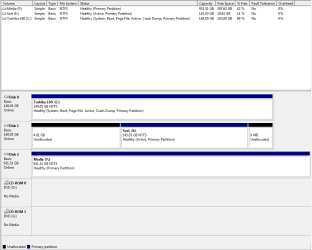
Please post back a screenshot of your maximized Disk Management drive map and listings:

1. Type Disk Management in Start :orb: Search box.
2. Open Disk Mgmt. window and maximize it.
3. Type Snipping Tool in Start Search box.
4. Open Snipping Tool, choose Rectangular Snip, click New, draw a box around full drive map and all listings.
5, Save Snip, attach using paper clip in Reply Box.

Tell us what is on each partition.

Make sure you have an adequate PSU based on calculations: eXtreme Power Supply Calculator
 
Please post back a screenshot of your maximized Disk Management drive map and listings:

1. Type Disk Management in Start :orb: Search box.
2. Open Disk Mgmt. window and maximize it.
3. Type Snipping Tool in Start Search box.
4. Open Snipping Tool, choose Rectangular Snip, click New, draw a box around full drive map and all listings.
5, Save Snip, attach using paper clip in Reply Box.

Tell us what is on each partition.

Make sure you have an adequate PSU based on calculations: eXtreme Power Supply Calculator

I'm not entirely sure why there's 4gb and 9 mb unallocated on disk 1, but it's been that way since I've had it (I got it off a friend of mine ages back, it's never bothered me)

Obviously disk 0 is operating system. the other 2 are just stuff (movies, music, pictures and one or two games)

based on that site I need a 372watt power supply. I had a 370watt, now I have a 650w...
 

Attachments

  • Disks.PNG
    Disks.PNG
    15.6 KB · Views: 4

My Computer My Computer

OS
Windows 7 Ultimate 64bit
Ask back if you have any questions before updating the BIOS since it's a critical operation which you must get right, without power loss.

The temps need to be addressed. Have you cleaned all the dust out of your PC, including the heatsink?


If you need to pull off the heatsink to do this thoroughly then you'll also need to repaste your CPU with thermal paste. This should be done every year or two anyway since the paste dries out. To learn how to do it google for videos like this to watch enough of them you understand it fully:


Remember not to do this on carpet, and guard against static charge to mobo by constantly touching the case before reaching inside, avoid touching electronics as much as possible and do the cleaning and paste operations away from mobo.
 
Ask back if you have any questions before updating the BIOS since it's a critical operation which you must get right, without power loss.

The temps need to be addressed. Have you cleaned all the dust out of your PC, including the heatsink?


If you need to pull off the heatsink to do this thoroughly then you'll also need to repaste your CPU with thermal paste. This should be done every year or two anyway since the paste dries out. To learn how to do it google for videos like this to watch enough of them you understand it fully:


Remember not to do this on carpet, and guard against static charge to mobo by constantly touching the case before reaching inside, avoid touching electronics as much as possible and do the cleaning and paste operations away from mobo.

Ok, thanks for the help, I'll get onto this tonight.
 

My Computer My Computer

OS
Windows 7 Ultimate 64bit
Ask back if you're unsure because these operations can be unforgiving.
 
Last edited:
What about under load, gaming or running Prime 95? Prime95 - CNET Download.com
This will show up any cooling issues.

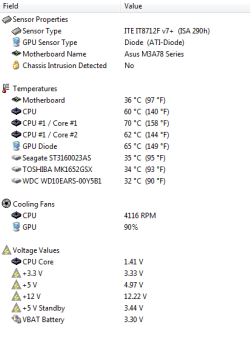
Here's a screenshot of my temps while running Prime95 after 10 minutes, they stayed at this until I turned it off.
The issues of shutting down are IMHO being caused by your cooling is inadequate. Either replace the fan and heat sink or at least replace the heat sink compound. The maximum core temperatures for that CPU are :[FONT=Helvetica, Geneva, Arial][FONT=Helvetica, Geneva, Arial]Product Specification: Processor AMD Athlon™ 64 X2 Dual-Core Model 6000+ Mfg P/N ADX6000CZBOX / ADA6000CZBOX Operating Mode 32/64 Stepping F3 Frequency 3000Mhz HT Speed 2000 Voltage 1.35-1.40V Max Temp 55-63°C Thermal Power 125W L1 Cache 128KB x2 L2 Cache 1MB x2 CMOS Technology 90nm SOI Socket Socket AM2 Warranty 3 Year Manufacturer[/FONT]

[/FONT]
 

My Computer My Computer

Computer type
PC/Desktop
Computer Manufacturer/Model Number
Bluethunder II
OS
Windows 7 x64 Ultimate and numerous virtual machines
CPU
AMD FX-8350 Vishera 32nm Technology @ 4.2 GHz default
Motherboard
ASUSTeK COMPUTER INC. SABERTOOTH 990FX R2.0 (Socket 942)
Memory
G Skill 32.0GB Dual-Channel DDR3 @ 1204MHz (11-13-13-31)
Graphics Card(s)
EVGA GeForce GTX 960 4GB Super SC ACX 2.0+ with Back Plate
Sound Card
Creative X-Fi Titanium HD Audiophile PCIe
Monitor(s) Displays
LG L227WTG x 3
Screen Resolution
1680 x 1050 16:10
Hard Drives
238GB Samsung850 PRO SATA Disk Device (SSD)
1863GB Seagate ST2000DM 001-1CH164 (SATA)
1397GB Seagate ST1500DL 003-9VT16L(SATA)
466GB Western Digital WDC WD50 03AZEX-00K1GA0 (SATA) x 2
932GB Seagate ST310005 28AS SATA Disk Device (SATA)
PSU
Enermax Revolution87+ 1000 Watts Gold Certified Power Supply
Case
Rocketfish Full Tower
Cooling
Cooler Master Hyper 212 EVO Push Pull 120mm Fans
Keyboard
Logitech K740
Mouse
Logitech G100S Laser LED + Logitech Gamepad F310
Internet Speed
500 mbs down and 30mbs up
Antivirus
Malwarebytes Pro & Avast and MSE on certain Virtual Machines
Browser
Firefox (Main) Chrome, Internet Explorer (Back Up)
Other Info
Logitech X 230 2.1 Stereo System and 5.1 Yamaha RX V2090
B&W DM6 Monitor Speakers + Center and Surround Speakers
Using Mouse Without Borders (Google it)
Back
Top