Windows 11 Pro x64 [Latest Release and Releas...Ryzen 9 5950X, 3.8 - 5.2 MHz64GB [2 x 32GB] DDR4 3200MHz4GB NVIDIA GEFORCE GTX 1650 Ti
Computer type
PC/Desktop
Computer Manufacturer/Model Number
ChillBlast - Custom to my design
OS
Windows 11 Pro x64 [Latest Release and Release Preview]
CPU
Ryzen 9 5950X, 3.8 - 5.2 MHz
Motherboard
Asus Prime X570-Pro
Memory
64GB [2 x 32GB] DDR4 3200MHz
Graphics Card(s)
4GB NVIDIA GEFORCE GTX 1650 Ti
Sound Card
On-board SPDIF to 5.1 System + HDMI [5.1 system]
Monitor(s) Displays
32" UHD 32 Bit HDR Monitor + 43" UHD 4K 32Bit HDR TV
Screen Resolution
2 x 3840 x 2160 @60Hz
Hard Drives
1TB M2 SSD OS, 500GB Fast Access SSD, 2 x 8TB Data + Various Externals from 1TB to 4TB, 10TB NAS
PSU
NZXT C750 80 PLUS Gold 750W Modular PSU
Case
Workstation Case [Matt Black]
Cooling
NZXT Kraken X63 280mm CPU Cooler +2x Quiet Case fans
Keyboard
Logitech Wireless MX Keys & K400 + others
Mouse
Logitech Wireless MX Master 3S
Internet Speed
920 MB Down 50 MB Up
Antivirus
BitDefender Total Security Pro
Browser
Chrome (always run latest Non-Beta)
Other Info
Also run ...
Laptop - Quad 8GB - Windows 10 Pro x64
Nexus 7 Android tablet x2
Samsung 10.2" tablet
Blackview TAB 8 4G Android Tablet c/w Keyboard
Wacom Intuos Pro Medium Pen Pad
Wacom Intuos Pro Small Pen Pad
Wacom Expresskeys Remote
Loopdeck+ Graphics Controller
Shuttle Pro v2 Control
At a glance
Windows 11 Pro x64 Latest RPIntel I7 10750H 5.0GHz32GB [2x16GB] DDR4 2933 MHznVidia GTX1650Ti 4 GB GDDR6
Computer type
Laptop
System Manufacturer/Model Number
Dell XPS 17 10750H
OS
Windows 11 Pro x64 Latest RP
CPU
Intel I7 10750H 5.0GHz
Motherboard
Dell XPS
Memory
32GB [2x16GB] DDR4 2933 MHz
Graphics Card(s)
nVidia GTX1650Ti 4 GB GDDR6
Sound Card
Stock [Realtek] 4 Speaker
Monitor(s) Displays
17" IPS UHD+ Infinity Edge Touchscreen
Screen Resolution
3840 x 2400
Hard Drives
2TB M2 NVMe, 4TB External + various 500GB & 1TB External NVMe (also have access to spinner HDD from
PSU
Stock
Case
Stock XPS Aluminium & Carbon Fibre
Cooling
Stock - Active Fan Control
Keyboard
Backlit + Various Logitech
Mouse
Stock Track Pad + Logitech MX Trackball
Internet Speed
72 MB Down 18MB Up
Browser
Chrome
Other Info
Also run ...
Laptop - Quad 8GB - Windows 10 Pro x64
Nexus 7 Android tablet x2
10.2" tablet
Sony Z3 Android Smartphone
Wacom Intuos Pro Medium Pen Pad
Wacom Intuos Pro Small Pen Pad
Wacom Expresskeys Remote
Loopdeck+ Graphics Controller
Shuttle Pro v2 Control Pad
10TB NAS
I know I most close every application. I don't need extra software to achieve what I want. I just want to know if it's safe to empty C:\WINDOWS\TEMP folder in windows 7. Maybe someone has a reference link to some prove?
My Computer
At a glance
Microsoft Windows 7 Home Premium 64-bits 7601...Intel(R) Core(TM) i3 CPU M 370 @ 2.40GHz4,00 GBATI Mobility Radeon HD 5400 Series
Computer type
Laptop
Computer Manufacturer/Model Number
ACER ASPIRE 5742G
OS
Microsoft Windows 7 Home Premium 64-bits 7601 Multiprocessor Free Service Pack 1
CPU
Intel(R) Core(TM) i3 CPU M 370 @ 2.40GHz
Motherboard
Acer Aspire 5742G
Memory
4,00 GB
Graphics Card(s)
ATI Mobility Radeon HD 5400 Series
Sound Card
(1) AMD High Definition Audio Device (2) Realtek High Defi
FWIW: I have been deleting whatever files are in the windows\temp folder for a really long time. Sometimes it says that It can't delete one or more because they are in use and I just unmark them for deletion and it works fine.
I don't know where there would be an official reference to the Temp folder that would give you the warm fuzzy on deleting files. I always have an image of my C drive whenever I do something that I am not 100% sure.
Rich
My Computer
At a glance
Windows 7 Pro x64 SP1Intel Core I716 GigsNVIDIA GeForce GTX 670M
Computer type
Laptop
Computer Manufacturer/Model Number
Toshiba Laptop Qosimo X870
OS
Windows 7 Pro x64 SP1
CPU
Intel Core I7
Motherboard
Toshiba Qosmio
Memory
16 Gigs
Graphics Card(s)
NVIDIA GeForce GTX 670M
Monitor(s) Displays
17.7" laptop
Screen Resolution
1600 x 900
Hard Drives
256 Gig SanDisk SSD for C
256 Gig Intel SSD for D
Internet Speed
50/25 FIOS
Antivirus
Vipre (all you can eat for 10 machines)
Browser
IE and FF
Other Info
I have dos 6.22, wfwg 3.11, win98, 2000 and xp VHD's available for testing. MS's Virtual PC works great.
I know I most close every application. I don't need extra software to achieve what I want. I just want to know if it's safe to empty C:\WINDOWS\TEMP folder in windows 7. Maybe someone has a reference link to some prove?
I realize you said you don't need any extra software. But the native Windows 7 disk cleanup tool (even when using the Extended feature) tends to err on the side of caution. In other words, many temp files will not be deleted no matter how many times you run disk cleanup. That's why there's a market for 3rd party tools like CCleaner and Temp File Cleaner by OldTimer.
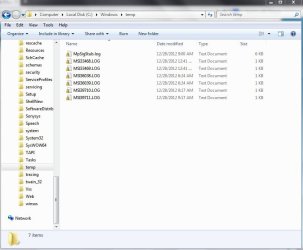
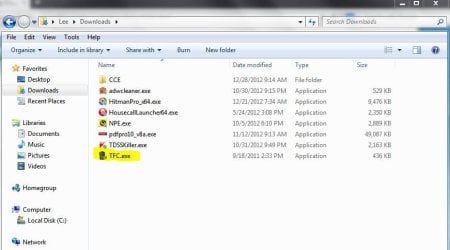
You don't have to permanently install TFC to use it. I keep the .exe file in my Downloads folder. Every so often I run it. In fact, it just so happens I ran it last night. Here's my c:\windows\temp folder and my Download folder. Of course, it's strictly up to you how you want to maintain your computer and what tools you choose to use. Just offering a suggestion and no disrespect intended.
My Computer
At a glance
Win 7 Pro 64-bitIntel i5 2.4 Ghz8GB DDR3Intel HD 3000
Ok thank you for the confirmation and i hope yoir happy. These things normaly speed up the pc. I ince had over 1.5gb of .tmp files and after cleaning it felt like i had 2x more ram
My Computer
At a glance
Windows 7 Ultimate x86Intel Pentium D 925 @ 3.00GHz1GB DDR2 667MHzOverclocked Asus ATI Radeon X1600 Pro 512MB
Computer Manufacturer/Model Number
Packard Bell iMedia 2218 -- Has Been Running For Almost 7 Years!
Yes i saw that online the other day. I currently use advanced system care 6 pro and my license is ending february ish. Should i continue wiht them or go for another.i am quite satisfied with them and they give out regular updates which is good
My Computer
At a glance
Windows 7 Ultimate x86Intel Pentium D 925 @ 3.00GHz1GB DDR2 667MHzOverclocked Asus ATI Radeon X1600 Pro 512MB
Computer Manufacturer/Model Number
Packard Bell iMedia 2218 -- Has Been Running For Almost 7 Years!
Did I read post #4 correctly?
I know I most close every application. I don't need extra software to achieve what I want. I just want to know if it's safe to empty C:\WINDOWS\TEMP folder in windows 7. Maybe someone has a reference link to some prove?
------------------------------------
I have used Temp File Cleaner by OldTimer for years and it always worked as it should.
The same with Ccleaner. Both are 3rd party programs.
My Computer
At a glance
Windows 10 Pro. 64/ version 1709 Windows 7 Pr...Intel i7-6800K @ 4.3Corsair Platinum 16 gig @2400EVGA GTX 1070 OC
Computer type
PC/Desktop
Computer Manufacturer/Model Number
Home made Desktop
OS
Windows 10 Pro. 64/ version 1709 Windows 7 Pro/64
CPU
Intel i7-6800K @ 4.3
Motherboard
ASUS X-99 Deluxe II
Memory
Corsair Platinum 16 gig @2400
Graphics Card(s)
EVGA GTX 1070 OC
Monitor(s) Displays
Asus 27" LED LCD/VE278Q
Screen Resolution
1920-1080 or 1280-720 HDMI
Hard Drives
INTEL SSD 730-240 Gb Sata 3.0/
PSU
EVGA Platium 1200W
Case
Phanteks Luxe Tempered Glass 8 fans/ one radiator
Cooling
XSPC/ Water Cooled CPU
Keyboard
Das 4 Professional
Mouse
Logitech M705/MX Anywhere 2-S
Internet Speed
100 mbits
Antivirus
Microsoft Security Essentials/ Malwarebytes Premium 3.0/ SAS
Browser
I.E. 11 default/Firefox/ ISP Time Warner Cable/Spectrum
Other Info
LG BluRay Burner/
Sound system-KLipsch-THX/
Icy Dock ssd Hot Swap bays.
I have deleted all the files in the TEMP folder(s) for years and never had any issues with it. Then I found that some software and installers would create folders in the TEMP (folders inside the TEMP folder(s)) and I wanted to get rid of them too. So I would just delete the TEMP folder(s) and recreate them. This seems to work perfectly without issues. However and here is the big note. Some software does use the TEMP folder(s) and will set special permissions on that folder so deleting the folder will not put the permissions back. It took me a lot of time on the phone with tech support to figure out what was wrong with my $2000 software not working. The tech could not figure it out, I had no idea. Then after we had worked on it for 5 days it occurred to me that I had deleted the TEMP folder(s) I explained that to the tech on the phone and he said that would have nothing to do with it. However after another 4 hours trying everything he looked at his machine and noticed that there were special permissions set on the TEMP folder(s). Once I added them back the software worked perfectly. HUGE FYI. -WS
Last edited:
My Computer
At a glance
Windows 7 Enterprise (x64); Windows Server 20...16GB
Computer type
PC/Desktop
Computer Manufacturer/Model Number
Dell OP7010
OS
Windows 7 Enterprise (x64); Windows Server 2008 R2 (x64)