I just joined. This is my first post.
In my C:\Users\Me\AppData\Local, I have close to 3.000 empty folders with alpha-numeric names such as {C2C5E397-3FAA-4CA5-BA77-3A7332AA4A9A}. I've attached three screen shots (AppDataLocalFolders1, 2, 3.png) of Windows Explorer, showing just a portion of these folders so you can see what they look like. The first screen shot shows the latest folder, dated 11/4/2019. The third screen shot shows the earliest folder, dated 9/17/2011.
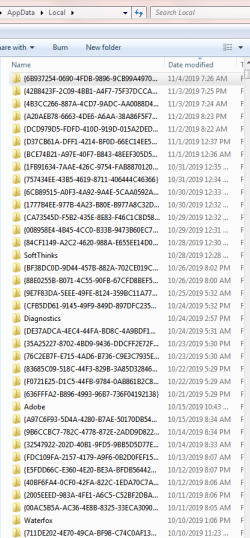
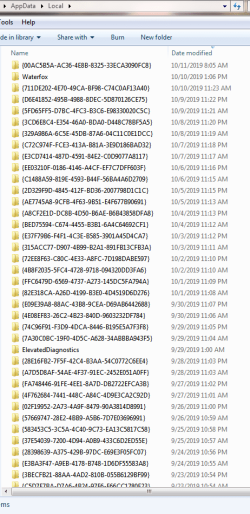

I've scrolled through the entire list of folders, and there is a set of two folders created each day. Notice that the time stamp of each folder in each pair is exactly the same (or a minute later), or separated by 12 hours (or 12 hours and one minute).
I discovered this yesterday when I was doing some housekeeping. It looks like this behavior has been going everyday since 9/14/2011. This Windows 7 Home Premium, 64-bit, SP1 machine is a Dell Studio XPS 8100 originally set up new in October 2010. It has been running 24x7 since, with shutdowns/reboots when needed. The OS has never been reinstalled...haven't had the need.
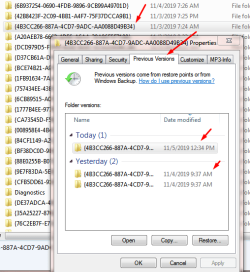
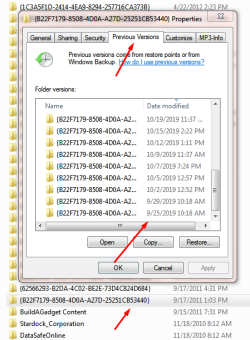
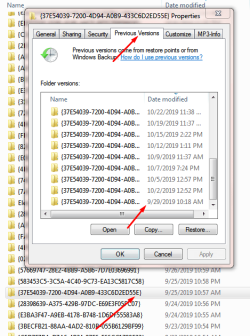
If I select a folder and click Properties>Previous Version on a recent folder, it shows that there are a few previous versions (previous version 1.png). Doing the same for the first created folder, previous versions go all the way back to 9/25/2019 (previous version 2.png), and doing the same for a folder dated after 9/25/2019 shows previous versions beginning 9/29/2019 (previous version 3.png).
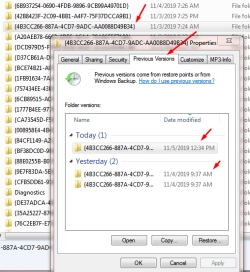
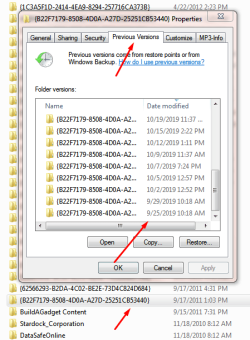
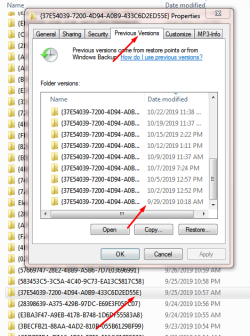
You will also notice that the timestamps on each of the 'previous versions' screen shots are all the same.
(It is odd that there is not a second empty folder created yesterday, 10/4/2019, and none created today, 10/5/2019. I've been running Process Monitor hoping to catch another folder creation, but no luck.)
I am running Windows Live Mail 2011, and I'm aware that has been reported as creating empty (but not double, and not each day) folders, in C:\Users\Me\AppData\Local, rather than in C:\Users\Me\AppData\Local\Temp, but my WLM is working fine and creates temporary files as it should, where it should. Files are deleted upon closing of WLM.
I've also read that this could be caused by incomplete uninstalls of Office 2011. I run Office 2007, but I have no way to check this.
I've looked at running processes, and I don't have a clue.
Anyone have any thoughts?
In my C:\Users\Me\AppData\Local, I have close to 3.000 empty folders with alpha-numeric names such as {C2C5E397-3FAA-4CA5-BA77-3A7332AA4A9A}. I've attached three screen shots (AppDataLocalFolders1, 2, 3.png) of Windows Explorer, showing just a portion of these folders so you can see what they look like. The first screen shot shows the latest folder, dated 11/4/2019. The third screen shot shows the earliest folder, dated 9/17/2011.
I've scrolled through the entire list of folders, and there is a set of two folders created each day. Notice that the time stamp of each folder in each pair is exactly the same (or a minute later), or separated by 12 hours (or 12 hours and one minute).
I discovered this yesterday when I was doing some housekeeping. It looks like this behavior has been going everyday since 9/14/2011. This Windows 7 Home Premium, 64-bit, SP1 machine is a Dell Studio XPS 8100 originally set up new in October 2010. It has been running 24x7 since, with shutdowns/reboots when needed. The OS has never been reinstalled...haven't had the need.
If I select a folder and click Properties>Previous Version on a recent folder, it shows that there are a few previous versions (previous version 1.png). Doing the same for the first created folder, previous versions go all the way back to 9/25/2019 (previous version 2.png), and doing the same for a folder dated after 9/25/2019 shows previous versions beginning 9/29/2019 (previous version 3.png).
You will also notice that the timestamps on each of the 'previous versions' screen shots are all the same.
(It is odd that there is not a second empty folder created yesterday, 10/4/2019, and none created today, 10/5/2019. I've been running Process Monitor hoping to catch another folder creation, but no luck.)
I am running Windows Live Mail 2011, and I'm aware that has been reported as creating empty (but not double, and not each day) folders, in C:\Users\Me\AppData\Local, rather than in C:\Users\Me\AppData\Local\Temp, but my WLM is working fine and creates temporary files as it should, where it should. Files are deleted upon closing of WLM.
I've also read that this could be caused by incomplete uninstalls of Office 2011. I run Office 2007, but I have no way to check this.
I've looked at running processes, and I don't have a clue.
Anyone have any thoughts?
My Computer
- Computer type
- PC/Desktop
- Computer Manufacturer/Model Number
- Dell Studio XPS 8100
- OS
- Windows 7 Home Premium, 64-bit, SP1
- CPU
- Intel Core i5 650 @ 3.20GHz Clarkdale 32nm Technology
- Motherboard
- Dell Inc. 0G3HR7 (CPU 1)
- Memory
- 8.00 GB Dual-Channel DDR3 @ 664MHz (9-9-9-24)
- Graphics Card(s)
- 512MB GeForce 310
- Hard Drives
- 932GB Seagate ST31000528AS (RAID)
932GB Western Digital WDC WD10EZEX-08WN4A0 (SATA)
- Antivirus
- Microsoft Security Essentials
- Browser
- Varied