darksent21
New member
- Local time
- 1:52 AM
- Messages
- 16
hello guys! I dunno if this is the right thread..
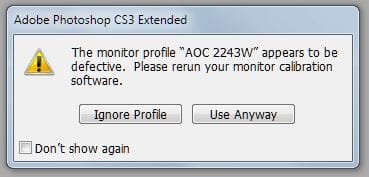
ok so here is my problem.. I open device manager to check whether all my drivers were updated and noticed that my monitor displays "generic PnP monitor". so I right click on it and choose update driver, now windws 7 recognize my monitor but the problem is whenever I preview my photos( any photos, jpg png), the background color of window photo viewer became color yellow(which is supposedly white). Same goes when Im using adobe photoshop cs3, my background color is supposedly white but it became color yellow, but I was surprised when I print all the image I edit on photoshop because the colors were correct! so I assume my monitor has a problem. I try to uninstall my monitor's driver and that solve the problem. But I dont think that's the proper way of fixing it? so guys what could be the problem? is it really okay not to install my monitor's driver?
btw my monitor is AOC e2243Fw
my pc specs are: (if needed)
mobo: Gigabyte H61m S2 B3
CPU: i5 2400k
RAM: 4G (transcend 1333 x2 2G)
GPU: Gtx 550 ti
ok so here is my problem.. I open device manager to check whether all my drivers were updated and noticed that my monitor displays "generic PnP monitor". so I right click on it and choose update driver, now windws 7 recognize my monitor but the problem is whenever I preview my photos( any photos, jpg png), the background color of window photo viewer became color yellow(which is supposedly white). Same goes when Im using adobe photoshop cs3, my background color is supposedly white but it became color yellow, but I was surprised when I print all the image I edit on photoshop because the colors were correct! so I assume my monitor has a problem. I try to uninstall my monitor's driver and that solve the problem. But I dont think that's the proper way of fixing it? so guys what could be the problem? is it really okay not to install my monitor's driver?
btw my monitor is AOC e2243Fw
my pc specs are: (if needed)
mobo: Gigabyte H61m S2 B3
CPU: i5 2400k
RAM: 4G (transcend 1333 x2 2G)
GPU: Gtx 550 ti
My Computer
At a glance
Windows 7 Ultimate x64Intel i5 2400x2 2GB Transcend+Generic MemoryPalit GeForce 210 1G
- Computer Manufacturer/Model Number
- Gigabyte
- OS
- Windows 7 Ultimate x64
- CPU
- Intel i5 2400
- Motherboard
- Gigabyte H61M-S2-B3
- Memory
- x2 2GB Transcend+Generic Memory
- Graphics Card(s)
- Palit GeForce 210 1G
- Sound Card
- On Board
- Monitor(s) Displays
- AOC e2243Fw
- Screen Resolution
- 1920x1080
- Hard Drives
- 500Gb Western Digital HD
- PSU
- generic 350W
- Case
- Generic Tower Case
- Keyboard
- Delkin PS/2 KeyBoard
- Mouse
- Discovery Optical Mouse
- Internet Speed
- 1mbps