Solved My monitor doesn't display correct color

darksent21

New member
Local time
4:16 AM
Messages
16
hello guys! I dunno if this is the right thread..
ok so here is my problem.. I open device manager to check whether all my drivers were updated and noticed that my monitor displays "generic PnP monitor". so I right click on it and choose update driver, now windws 7 recognize my monitor but the problem is whenever I preview my photos( any photos, jpg png), the background color of window photo viewer became color yellow(which is supposedly white). Same goes when Im using adobe photoshop cs3, my background color is supposedly white but it became color yellow, but I was surprised when I print all the image I edit on photoshop because the colors were correct! so I assume my monitor has a problem. I try to uninstall my monitor's driver and that solve the problem. But I dont think that's the proper way of fixing it? so guys what could be the problem? is it really okay not to install my monitor's driver?

btw my monitor is AOC e2243Fw
my pc specs are: (if needed)
mobo: Gigabyte H61m S2 B3
CPU: i5 2400k
RAM: 4G (transcend 1333 x2 2G)
GPU: Gtx 550 ti
 

My Computer My Computer

At a glance

Windows 7 Ultimate x64Intel i5 2400x2 2GB Transcend+Generic MemoryPalit GeForce 210 1G
Computer Manufacturer/Model Number
Gigabyte
OS
Windows 7 Ultimate x64
CPU
Intel i5 2400
Motherboard
Gigabyte H61M-S2-B3
Memory
x2 2GB Transcend+Generic Memory
Graphics Card(s)
Palit GeForce 210 1G
Sound Card
On Board
Monitor(s) Displays
AOC e2243Fw
Screen Resolution
1920x1080
Hard Drives
500Gb Western Digital HD
PSU
generic 350W
Case
Generic Tower Case
Keyboard
Delkin PS/2 KeyBoard
Mouse
Discovery Optical Mouse
Internet Speed
1mbps
Refresh your monitor. There should be a menu button on your monitor, just go through the settings and check them all.
 

My Computer My Computer

At a glance

Windows 7 Ultimate 64 bitAMD Phenom II X4 965 Black EditionGSkill 4 X 2 GB PC 8500XFX Radeon HD 6790 D
Computer Manufacturer/Model Number
Custom built
OS
Windows 7 Ultimate 64 bit
CPU
AMD Phenom II X4 965 Black Edition
Motherboard
Gigabyte GA-MA790X-DS4
Memory
GSkill 4 X 2 GB PC 8500
Graphics Card(s)
XFX Radeon HD 6790 D
Sound Card
On board RealTek HD
Monitor(s) Displays
Dual monitors:Samsung SyncMaster S20B300
Screen Resolution
1600 X 900
Hard Drives
Seagate Barracuda 1TB (primary)
Seagate Barracuda 2 X 320 GB
PSU
Ultra X4 750 watt fully modular
Case
Thermaltake Overseer RX 1 full tower
Cooling
Core-Contact 92 mm CPU Cooler
Keyboard
Logitech G510
Mouse
Razor DeathAdder
Internet Speed
50/5 Mbps UL/DL
Other Info
Optical: Super Muliti DVD burner w/lightscribe, Hauppauge WinTV HVR-1800
Im not sure what you mean menu button on my monitor, if you were referring on my monitor's OSD panel I already reset everything, turn off my monitor , unplug and plug, do a complete restart and etc. I took a screenshot but Im not sure if it will display my problem here since your monitor is okay
 

Attachments

  • err.jpg
    err.jpg
    204.6 KB · Views: 16

My Computer My Computer

At a glance

Windows 7 Ultimate x64Intel i5 2400x2 2GB Transcend+Generic MemoryPalit GeForce 210 1G
Computer Manufacturer/Model Number
Gigabyte
OS
Windows 7 Ultimate x64
CPU
Intel i5 2400
Motherboard
Gigabyte H61M-S2-B3
Memory
x2 2GB Transcend+Generic Memory
Graphics Card(s)
Palit GeForce 210 1G
Sound Card
On Board
Monitor(s) Displays
AOC e2243Fw
Screen Resolution
1920x1080
Hard Drives
500Gb Western Digital HD
PSU
generic 350W
Case
Generic Tower Case
Keyboard
Delkin PS/2 KeyBoard
Mouse
Discovery Optical Mouse
Internet Speed
1mbps
I remeber reading a post afew days ago, that the user had to adjust the colors in Photoviewer. So it may not be your monitor.
 

My Computer My Computer

At a glance

Win7 Enterprise, Win7 x86 (Ult 7600), Win7 x6...AMD fx8350 4ghz, AMD-32 2400mhz, AMD-64 3200m...2gb, 4gb on the Ult 7600, 4gb on Technet RTM,...Draw my own Graphics, several nVidia cards
Computer type
PC/Desktop
Computer Manufacturer/Model Number
Built them myself, Science Experiments !
OS
Win7 Enterprise, Win7 x86 (Ult 7600), Win7 x64 Ult 7600, TechNet RTM on AMD x64 (2.8Ghz)
CPU
AMD fx8350 4ghz, AMD-32 2400mhz, AMD-64 3200mhz, AMDx64 2.8G
Motherboard
SIS 755, ECS-K8M890M-M (Ult 7600), GigaByte & others
Memory
2gb, 4gb on the Ult 7600, 4gb on Technet RTM, 32gb on FX8350
Graphics Card(s)
Draw my own Graphics, several nVidia cards
Sound Card
on motherboard
Monitor(s) Displays
19" flat scr, 28" I-Inc widescr,22" Emprex Widescr, 23" Acer
Screen Resolution
1280 x 1024, 1440 x 900, 1920 x 1080
Hard Drives
6 pata Ide HD's & 2 Sata HD's
added 80gb external on Ult 7600 computer,
numerous extra 1tb, 2TB, 3Tb SATA HD's
A collection of ext HD Docks w/ HDs
PSU
430w, 550w, 600w, 700, 800, etc
Case
All Generic Full Towers
Cooling
Open Air & a few fans, some w/ colored LEDs
Keyboard
Compaq & Dell recycled from GoodWill
Mouse
Made in China Optical Wired Mouse
Internet Speed
Fast Cable InterNet
Antivirus
AVG Free on 24 different Desktops, NO Problems!
Browser
IE 8 is preferred, but use FireFox sometimes
Other Info
Linksys Routers, switches, & Hubs
Too Many USB Flash Drives to count, Biggest is 64GB !
Eight computers in my home network.
Sixteen computers at my business network.
Linked via TeamViewer !
Lots of old used spare computer parts everywhere!

My Computer My Computer

At a glance

Windows 7 Ultimate 64 bitAMD Phenom II X4 965 Black EditionGSkill 4 X 2 GB PC 8500XFX Radeon HD 6790 D
Computer Manufacturer/Model Number
Custom built
OS
Windows 7 Ultimate 64 bit
CPU
AMD Phenom II X4 965 Black Edition
Motherboard
Gigabyte GA-MA790X-DS4
Memory
GSkill 4 X 2 GB PC 8500
Graphics Card(s)
XFX Radeon HD 6790 D
Sound Card
On board RealTek HD
Monitor(s) Displays
Dual monitors:Samsung SyncMaster S20B300
Screen Resolution
1600 X 900
Hard Drives
Seagate Barracuda 1TB (primary)
Seagate Barracuda 2 X 320 GB
PSU
Ultra X4 750 watt fully modular
Case
Thermaltake Overseer RX 1 full tower
Cooling
Core-Contact 92 mm CPU Cooler
Keyboard
Logitech G510
Mouse
Razor DeathAdder
Internet Speed
50/5 Mbps UL/DL
Other Info
Optical: Super Muliti DVD burner w/lightscribe, Hauppauge WinTV HVR-1800
In display properties, calibration. Follow the on screen instructions. There will be a grey scale adjustment where you set for white and black with no tint of any colour. First you must get the gamma correct. This will fix your issue. If you have 2 or more monitors it can be quite a treat getting them all set up the same.
 

Attachments

  • ScreenShot002.jpg
    ScreenShot002.jpg
    67.3 KB · Views: 9

My Computer My Computer

At a glance

Windows 7 x64 Ultimate and numerous virtual m...AMD FX-8350 Vishera 32nm Technology @ 4.2 GHz...G Skill 32.0GB Dual-Channel DDR3 @ 1204MHz (1...EVGA GeForce GTX 960 4GB Super SC ACX 2.0+ wi...
Computer type
PC/Desktop
Computer Manufacturer/Model Number
Bluethunder II
OS
Windows 7 x64 Ultimate and numerous virtual machines
CPU
AMD FX-8350 Vishera 32nm Technology @ 4.2 GHz default
Motherboard
ASUSTeK COMPUTER INC. SABERTOOTH 990FX R2.0 (Socket 942)
Memory
G Skill 32.0GB Dual-Channel DDR3 @ 1204MHz (11-13-13-31)
Graphics Card(s)
EVGA GeForce GTX 960 4GB Super SC ACX 2.0+ with Back Plate
Sound Card
Creative X-Fi Titanium HD Audiophile PCIe
Monitor(s) Displays
LG L227WTG x 3
Screen Resolution
1680 x 1050 16:10
Hard Drives
238GB Samsung850 PRO SATA Disk Device (SSD)
1863GB Seagate ST2000DM 001-1CH164 (SATA)
1397GB Seagate ST1500DL 003-9VT16L(SATA)
466GB Western Digital WDC WD50 03AZEX-00K1GA0 (SATA) x 2
932GB Seagate ST310005 28AS SATA Disk Device (SATA)
PSU
Enermax Revolution87+ 1000 Watts Gold Certified Power Supply
Case
Rocketfish Full Tower
Cooling
Cooler Master Hyper 212 EVO Push Pull 120mm Fans
Keyboard
Logitech K740
Mouse
Logitech G100S Laser LED + Logitech Gamepad F310
Internet Speed
500 mbs down and 30mbs up
Antivirus
Malwarebytes Pro & Avast and MSE on certain Virtual Machines
Browser
Firefox (Main) Chrome, Internet Explorer (Back Up)
Other Info
Logitech X 230 2.1 Stereo System and 5.1 Yamaha RX V2090
B&W DM6 Monitor Speakers + Center and Surround Speakers
Using Mouse Without Borders (Google it)
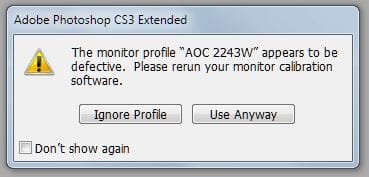
okay! try to scan and post the result here. btw when I open photoshop this message also pop out!
 

Attachments

  • Capture.JPG
    Capture.JPG
    17.6 KB · Views: 17

My Computer My Computer

At a glance

Windows 7 Ultimate x64Intel i5 2400x2 2GB Transcend+Generic MemoryPalit GeForce 210 1G
Computer Manufacturer/Model Number
Gigabyte
OS
Windows 7 Ultimate x64
CPU
Intel i5 2400
Motherboard
Gigabyte H61M-S2-B3
Memory
x2 2GB Transcend+Generic Memory
Graphics Card(s)
Palit GeForce 210 1G
Sound Card
On Board
Monitor(s) Displays
AOC e2243Fw
Screen Resolution
1920x1080
Hard Drives
500Gb Western Digital HD
PSU
generic 350W
Case
Generic Tower Case
Keyboard
Delkin PS/2 KeyBoard
Mouse
Discovery Optical Mouse
Internet Speed
1mbps
okay! try to scan and post the result here. btw when I open photoshop this message also pop out!
Yep calibration is off, go to display properties and follow the wizard to calibrate the monitor colours.
 

My Computer My Computer

At a glance

Windows 7 x64 Ultimate and numerous virtual m...AMD FX-8350 Vishera 32nm Technology @ 4.2 GHz...G Skill 32.0GB Dual-Channel DDR3 @ 1204MHz (1...EVGA GeForce GTX 960 4GB Super SC ACX 2.0+ wi...
Computer type
PC/Desktop
Computer Manufacturer/Model Number
Bluethunder II
OS
Windows 7 x64 Ultimate and numerous virtual machines
CPU
AMD FX-8350 Vishera 32nm Technology @ 4.2 GHz default
Motherboard
ASUSTeK COMPUTER INC. SABERTOOTH 990FX R2.0 (Socket 942)
Memory
G Skill 32.0GB Dual-Channel DDR3 @ 1204MHz (11-13-13-31)
Graphics Card(s)
EVGA GeForce GTX 960 4GB Super SC ACX 2.0+ with Back Plate
Sound Card
Creative X-Fi Titanium HD Audiophile PCIe
Monitor(s) Displays
LG L227WTG x 3
Screen Resolution
1680 x 1050 16:10
Hard Drives
238GB Samsung850 PRO SATA Disk Device (SSD)
1863GB Seagate ST2000DM 001-1CH164 (SATA)
1397GB Seagate ST1500DL 003-9VT16L(SATA)
466GB Western Digital WDC WD50 03AZEX-00K1GA0 (SATA) x 2
932GB Seagate ST310005 28AS SATA Disk Device (SATA)
PSU
Enermax Revolution87+ 1000 Watts Gold Certified Power Supply
Case
Rocketfish Full Tower
Cooling
Cooler Master Hyper 212 EVO Push Pull 120mm Fans
Keyboard
Logitech K740
Mouse
Logitech G100S Laser LED + Logitech Gamepad F310
Internet Speed
500 mbs down and 30mbs up
Antivirus
Malwarebytes Pro & Avast and MSE on certain Virtual Machines
Browser
Firefox (Main) Chrome, Internet Explorer (Back Up)
Other Info
Logitech X 230 2.1 Stereo System and 5.1 Yamaha RX V2090
B&W DM6 Monitor Speakers + Center and Surround Speakers
Using Mouse Without Borders (Google it)
In display properties, calibration. Follow the on screen instructions. There will be a grey scale adjustment where you set for white and black with no tint of any colour. First you must get the gamma correct. This will fix your issue. If you have 2 or more monitors it can be quite a treat getting them all set up the same.

I tried to calibrate my display settings again, but unfortunately it didn't solve the problem. The weird part is it displays the correct color except on photo viewer and adobe photoshop.. :o
 

My Computer My Computer

At a glance

Windows 7 Ultimate x64Intel i5 2400x2 2GB Transcend+Generic MemoryPalit GeForce 210 1G
Computer Manufacturer/Model Number
Gigabyte
OS
Windows 7 Ultimate x64
CPU
Intel i5 2400
Motherboard
Gigabyte H61M-S2-B3
Memory
x2 2GB Transcend+Generic Memory
Graphics Card(s)
Palit GeForce 210 1G
Sound Card
On Board
Monitor(s) Displays
AOC e2243Fw
Screen Resolution
1920x1080
Hard Drives
500Gb Western Digital HD
PSU
generic 350W
Case
Generic Tower Case
Keyboard
Delkin PS/2 KeyBoard
Mouse
Discovery Optical Mouse
Internet Speed
1mbps
okay! try to scan and post the result here. btw when I open photoshop this message also pop out!
Yep calibration is off, go to display properties and follow the wizard to calibrate the monitor colours.

hey! you're right! after installing new driver for my monitor I should re run the calibration wizard. wew, thanks mate!! :D
 

My Computer My Computer

At a glance

Windows 7 Ultimate x64Intel i5 2400x2 2GB Transcend+Generic MemoryPalit GeForce 210 1G
Computer Manufacturer/Model Number
Gigabyte
OS
Windows 7 Ultimate x64
CPU
Intel i5 2400
Motherboard
Gigabyte H61M-S2-B3
Memory
x2 2GB Transcend+Generic Memory
Graphics Card(s)
Palit GeForce 210 1G
Sound Card
On Board
Monitor(s) Displays
AOC e2243Fw
Screen Resolution
1920x1080
Hard Drives
500Gb Western Digital HD
PSU
generic 350W
Case
Generic Tower Case
Keyboard
Delkin PS/2 KeyBoard
Mouse
Discovery Optical Mouse
Internet Speed
1mbps
okay! try to scan and post the result here. btw when I open photoshop this message also pop out!
Yep calibration is off, go to display properties and follow the wizard to calibrate the monitor colours.

hey! you're right! after installing new driver for my monitor I should re run the calibration wizard. wew, thanks mate!! :D
Glad to help. I have calibrated mine a few times and then fixed some software. I have 3 nice LG monitors and I have them nicely calibrated together so they all look the same.
 
Last edited:

My Computer My Computer

At a glance

Windows 7 x64 Ultimate and numerous virtual m...AMD FX-8350 Vishera 32nm Technology @ 4.2 GHz...G Skill 32.0GB Dual-Channel DDR3 @ 1204MHz (1...EVGA GeForce GTX 960 4GB Super SC ACX 2.0+ wi...
Computer type
PC/Desktop
Computer Manufacturer/Model Number
Bluethunder II
OS
Windows 7 x64 Ultimate and numerous virtual machines
CPU
AMD FX-8350 Vishera 32nm Technology @ 4.2 GHz default
Motherboard
ASUSTeK COMPUTER INC. SABERTOOTH 990FX R2.0 (Socket 942)
Memory
G Skill 32.0GB Dual-Channel DDR3 @ 1204MHz (11-13-13-31)
Graphics Card(s)
EVGA GeForce GTX 960 4GB Super SC ACX 2.0+ with Back Plate
Sound Card
Creative X-Fi Titanium HD Audiophile PCIe
Monitor(s) Displays
LG L227WTG x 3
Screen Resolution
1680 x 1050 16:10
Hard Drives
238GB Samsung850 PRO SATA Disk Device (SSD)
1863GB Seagate ST2000DM 001-1CH164 (SATA)
1397GB Seagate ST1500DL 003-9VT16L(SATA)
466GB Western Digital WDC WD50 03AZEX-00K1GA0 (SATA) x 2
932GB Seagate ST310005 28AS SATA Disk Device (SATA)
PSU
Enermax Revolution87+ 1000 Watts Gold Certified Power Supply
Case
Rocketfish Full Tower
Cooling
Cooler Master Hyper 212 EVO Push Pull 120mm Fans
Keyboard
Logitech K740
Mouse
Logitech G100S Laser LED + Logitech Gamepad F310
Internet Speed
500 mbs down and 30mbs up
Antivirus
Malwarebytes Pro & Avast and MSE on certain Virtual Machines
Browser
Firefox (Main) Chrome, Internet Explorer (Back Up)
Other Info
Logitech X 230 2.1 Stereo System and 5.1 Yamaha RX V2090
B&W DM6 Monitor Speakers + Center and Surround Speakers
Using Mouse Without Borders (Google it)
Back
Top