How to read data from a faulty HDD

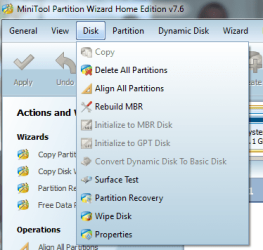
In partition wizard click on the disk, not on the partition! Click in menu on disk-> "rebuild mbr" as shown here
How to Rebuild MBR with partition magic? Partition Wizard Rebuild MBR Video Help.

What options are NOT greyed out in menu disk?
What options are greyed out in menu disk?

ALL options including Both disk and partition for the bad drive... That's not the case for my system disk (witch is working properly), so that means the program is working fine, and the problem is laying in the disk itself!

Device manager recognizes the drive, but mini tool doesn't.
see snip.
Did you do full scan?

Device manager recognizes the drive, but mini tool doesn't.
I thought minitool sees it as 149GB partition?

Once again... is it a problem if you lose everything on that disk?

I didn't full scan
Minitool partition wizard (Boots from CD) sees the 149 unallocated space, but Minitool data recovery (snip that is in the previous post) doesn't recognize the drive at all.

I don't care about the data anymore... I would just like to see if it is possible to save the disk...

BTW is it possible to repair the bad sectors on a disk surface???
 

My Computer My Computer

At a glance

Windows 7 x86 UltimateIntel Pentium 4 (3.2GHz) @3.6GHz3 GB DDR2 (2GB @800MHz + 1GB @533MHz)-3 inuvi...ATI Radeon HD 5450 1GB DDR3
Computer Manufacturer/Model Number
Me, Myself and I (:
OS
Windows 7 x86 Ultimate
CPU
Intel Pentium 4 (3.2GHz) @3.6GHz
Motherboard
Asus P5N-D SLI
Memory
3 GB DDR2 (2GB @800MHz + 1GB @533MHz)-3 inuvidual sticks
Graphics Card(s)
ATI Radeon HD 5450 1GB DDR3
Sound Card
Realtek HD Audio
Monitor(s) Displays
Philips Brilliance 170p 17" DVI/VGA
Screen Resolution
1280x1024 @60 Hz
Hard Drives
WDC WD400BD-08LRAO 40 GB Blue Caviar-Sata II
PSU
LC-Power LC6480S Scorpio-480W 18A@ +12V
Cooling
CPU~Arctic Freezer 7 Pro; 2 92mm case fans; HDD fan;
Keyboard
Logitec Usb
Mouse
Dell optical mouse Usb
Internet Speed
2 Mb/s
Other Info
SOLD MY PC 6 MONTHS AGO IN ORDER TO BUY A MOTORCYCLE :D I don't need a PC :D
Minitool partition wizard (Boots from CD) sees the 149 unallocated space, but Minitool data recovery (snip that is in the previous post) doesn't recognize the drive at all.

I don't understand you anymore! Now you're talking about 149 unallocated space. I thought it was a partition?!
Since you don't care about the data. Boot into win7 and then connect the drive. In http://www.sevenforums.com/tutorials/783-elevated-command-prompt.html

Code:
diskpart
list  disk
[B]write down number of problem disk. Look at its size. Be sure it's the correct one! In this example I us e number 9[/B]
sel  disk  9
clean
exit

Errors? Did commands work? No problems booting anymore? You can make new partitions now.
Perform a surface test... I think is faulty!
 

My Computer My Computer

At a glance

Microsoft Windows 7 Home Premium 64-bits 7601...Intel(R) Core(TM) i3 CPU M 370 @ 2.40GHz4,00 GBATI Mobility Radeon HD 5400 Series
Computer type
Laptop
Computer Manufacturer/Model Number
ACER ASPIRE 5742G
OS
Microsoft Windows 7 Home Premium 64-bits 7601 Multiprocessor Free Service Pack 1
CPU
Intel(R) Core(TM) i3 CPU M 370 @ 2.40GHz
Motherboard
Acer Aspire 5742G
Memory
4,00 GB
Graphics Card(s)
ATI Mobility Radeon HD 5400 Series
Sound Card
(1) AMD High Definition Audio Device (2) Realtek High Defi
Screen Resolution
1366 x 768 x 32 bits (4294967296 colors) @ 60 Hz
Hard Drives
WDC WD5000BEVT-22ZAT0
Minitool partition wizard (Boots from CD) sees the 149 unallocated space, but Minitool data recovery (snip that is in the previous post) doesn't recognize the drive at all.
I don't understand you anymore! Now you're talking about 159 unallocated space. I thought it was a partition?!
Since you don't care about the data. Boot into win7 and then connect the drive. In http://www.sevenforums.com/tutorials/783-elevated-command-prompt.html

Code:
diskpart
list  disk
[B]write down number of problem disk. Look at its size. Be sure it's the correct one! In this example I us e number 9[/B]
sel  disk  9
clean
exit
Errors? Did commands work? No problems booting anymore? You can make new partitions now.
Perform a surface test... I think is faulty!
As I told you at the first comments...
 

My Computer My Computer

At a glance

Windows 7 Ultimate x64core i7.
OS
Windows 7 Ultimate x64
CPU
core i7.
BTW is it possible to repair the bad sectors on a disk surface???
A disk has a lot of spare sectors. If a read/write error happens, the controller tries again to read/write. If very unreadable it maps a spare sector as the new sector. So bad sector replacement is fully automatically
 

My Computer My Computer

At a glance

Microsoft Windows 7 Home Premium 64-bits 7601...Intel(R) Core(TM) i3 CPU M 370 @ 2.40GHz4,00 GBATI Mobility Radeon HD 5400 Series
Computer type
Laptop
Computer Manufacturer/Model Number
ACER ASPIRE 5742G
OS
Microsoft Windows 7 Home Premium 64-bits 7601 Multiprocessor Free Service Pack 1
CPU
Intel(R) Core(TM) i3 CPU M 370 @ 2.40GHz
Motherboard
Acer Aspire 5742G
Memory
4,00 GB
Graphics Card(s)
ATI Mobility Radeon HD 5400 Series
Sound Card
(1) AMD High Definition Audio Device (2) Realtek High Defi
Screen Resolution
1366 x 768 x 32 bits (4294967296 colors) @ 60 Hz
Hard Drives
WDC WD5000BEVT-22ZAT0
In http://www.sevenforums.com/tutorials/783-elevated-command-prompt.html

Code:
diskpart
list  disk
[B][COLOR=red]write down number of problem disk. Look at its size. Be sure it's the[/COLOR][/B]
[B][COLOR=red]correct one! In this example I use number 9[/COLOR][/B]
sel  disk  9
clean
exit

Errors? Did commands work? No problems booting anymore? You can make new partitions now.
Perform a surface test... I think it is faulty![/QUOTE]
 

My Computer My Computer

At a glance

Microsoft Windows 7 Home Premium 64-bits 7601...Intel(R) Core(TM) i3 CPU M 370 @ 2.40GHz4,00 GBATI Mobility Radeon HD 5400 Series
Computer type
Laptop
Computer Manufacturer/Model Number
ACER ASPIRE 5742G
OS
Microsoft Windows 7 Home Premium 64-bits 7601 Multiprocessor Free Service Pack 1
CPU
Intel(R) Core(TM) i3 CPU M 370 @ 2.40GHz
Motherboard
Acer Aspire 5742G
Memory
4,00 GB
Graphics Card(s)
ATI Mobility Radeon HD 5400 Series
Sound Card
(1) AMD High Definition Audio Device (2) Realtek High Defi
Screen Resolution
1366 x 768 x 32 bits (4294967296 colors) @ 60 Hz
Hard Drives
WDC WD5000BEVT-22ZAT0
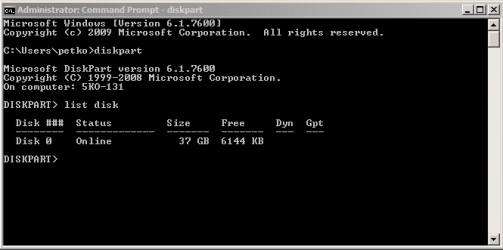
Command prompt doesn't recognize the drive either :(

*there never was a partition recognized with minitool partition wizard, I just said that the drive HAD 1 partition before it got messed up (you asked me if i remember how many partitions were there) :)
 

Attachments

  • Command prompt.PNG
    Command prompt.PNG
    4.8 KB · Views: 7

My Computer My Computer

At a glance

Windows 7 x86 UltimateIntel Pentium 4 (3.2GHz) @3.6GHz3 GB DDR2 (2GB @800MHz + 1GB @533MHz)-3 inuvi...ATI Radeon HD 5450 1GB DDR3
Computer Manufacturer/Model Number
Me, Myself and I (:
OS
Windows 7 x86 Ultimate
CPU
Intel Pentium 4 (3.2GHz) @3.6GHz
Motherboard
Asus P5N-D SLI
Memory
3 GB DDR2 (2GB @800MHz + 1GB @533MHz)-3 inuvidual sticks
Graphics Card(s)
ATI Radeon HD 5450 1GB DDR3
Sound Card
Realtek HD Audio
Monitor(s) Displays
Philips Brilliance 170p 17" DVI/VGA
Screen Resolution
1280x1024 @60 Hz
Hard Drives
WDC WD400BD-08LRAO 40 GB Blue Caviar-Sata II
PSU
LC-Power LC6480S Scorpio-480W 18A@ +12V
Cooling
CPU~Arctic Freezer 7 Pro; 2 92mm case fans; HDD fan;
Keyboard
Logitec Usb
Mouse
Dell optical mouse Usb
Internet Speed
2 Mb/s
Other Info
SOLD MY PC 6 MONTHS AGO IN ORDER TO BUY A MOTORCYCLE :D I don't need a PC :D
sorry but check the cable, and make sure of it

firt make it online in disk management, have you tried making a label it in disk management and make a partition?
 

My Computer My Computer

At a glance

Windows 7 Ultimate x64core i7.
OS
Windows 7 Ultimate x64
CPU
core i7.
So diskpart doesn't see it... very strange.

Partition Wizard does see the disk. There's no partition on disk and no partition can be created. Correct?
Which disk operations are NOT greyed out?
 

Attachments

  • Naamloos.png
    Naamloos.png
    24.3 KB · Views: 3

My Computer My Computer

At a glance

Microsoft Windows 7 Home Premium 64-bits 7601...Intel(R) Core(TM) i3 CPU M 370 @ 2.40GHz4,00 GBATI Mobility Radeon HD 5400 Series
Computer type
Laptop
Computer Manufacturer/Model Number
ACER ASPIRE 5742G
OS
Microsoft Windows 7 Home Premium 64-bits 7601 Multiprocessor Free Service Pack 1
CPU
Intel(R) Core(TM) i3 CPU M 370 @ 2.40GHz
Motherboard
Acer Aspire 5742G
Memory
4,00 GB
Graphics Card(s)
ATI Mobility Radeon HD 5400 Series
Sound Card
(1) AMD High Definition Audio Device (2) Realtek High Defi
Screen Resolution
1366 x 768 x 32 bits (4294967296 colors) @ 60 Hz
Hard Drives
WDC WD5000BEVT-22ZAT0
So diskpart doesn't see it... very strange.

Partition Wizard does see the disk. There's no partition on disk and no partition can be created. Correct?
Which disk operations are NOT greyed out?

Yes, it's correct!

All disk and partition operations are greyed out!
 

My Computer My Computer

At a glance

Windows 7 x86 UltimateIntel Pentium 4 (3.2GHz) @3.6GHz3 GB DDR2 (2GB @800MHz + 1GB @533MHz)-3 inuvi...ATI Radeon HD 5450 1GB DDR3
Computer Manufacturer/Model Number
Me, Myself and I (:
OS
Windows 7 x86 Ultimate
CPU
Intel Pentium 4 (3.2GHz) @3.6GHz
Motherboard
Asus P5N-D SLI
Memory
3 GB DDR2 (2GB @800MHz + 1GB @533MHz)-3 inuvidual sticks
Graphics Card(s)
ATI Radeon HD 5450 1GB DDR3
Sound Card
Realtek HD Audio
Monitor(s) Displays
Philips Brilliance 170p 17" DVI/VGA
Screen Resolution
1280x1024 @60 Hz
Hard Drives
WDC WD400BD-08LRAO 40 GB Blue Caviar-Sata II
PSU
LC-Power LC6480S Scorpio-480W 18A@ +12V
Cooling
CPU~Arctic Freezer 7 Pro; 2 92mm case fans; HDD fan;
Keyboard
Logitec Usb
Mouse
Dell optical mouse Usb
Internet Speed
2 Mb/s
Other Info
SOLD MY PC 6 MONTHS AGO IN ORDER TO BUY A MOTORCYCLE :D I don't need a PC :D
I don't know if it has been suggested but P have you tried a bootable Ubuntu disk and just run the Ubuntu OS don't install it and I have used this method quite a few times now.

Just make a bootable disk set the BIOS to boot from the optical choose the run - not install and then access the drives that are attached.

Desktop | Ubuntu < check the options first
 

My Computer My Computer

At a glance

Desk1 7 Home Prem / Desk2 10 Pro / Main lap A...Desk1 i5 3750K / Laptop i7 GTX 860M / Desk2 i...Desk1 8GB (1866) / Desk2 16GB (1333) / Laptop...Desk 1& 2NVidia GTX 650 & Laptops on board Intel
Computer type
PC/Desktop
Computer Manufacturer/Model Number
Own build (new) Desk1 / Asus ROG Win 7 / Desk2 1st build
OS
Desk1 7 Home Prem / Desk2 10 Pro / Main lap Asus ROG 10 Pro 2 laptop Toshiba 7 Pro Asus P2520 7 & 10
CPU
Desk1 i5 3750K / Laptop i7 GTX 860M / Desk2 i5 2500
Motherboard
Desk1 Asus P877-V / Desk2 Gigabyte H67 UD3H / Laptop ?
Memory
Desk1 8GB (1866) / Desk2 16GB (1333) / Laptop 8Gb DDR3
Graphics Card(s)
Desk 1& 2NVidia GTX 650 & Laptops on board Intel
Sound Card
Desk 1 & 2 -XONAR DG Realtek High Def audio Laptop
Monitor(s) Displays
Desk 1 Benq HD 2450 / Desk2 Philips 24" / Laptop 17.5"
Screen Resolution
1920x1080 D1 & D2 & Laptop 1
Hard Drives
Desk1 Samsung 120GB 830 SSD
Asus ROG 256GB 850 Pro SSD
Desk2 Samsung 840 256 SSD
Toshiba 120GB EVO
PSU
Desk 1 Corsair HX 1050/ Laptop ? / Desk 2 Corsair HX 650
Case
Desk 1 Cooler HAF XM ? Toshiba laptop / Desk2 Coolermaster
Cooling
Fans on all Desk1 -2 Desk2 - all Coolermasters 5 Laptop ?
Keyboard
Desk 1 MS Sidewinder X6 Desk 2 MS Sidewinder X 4
Mouse
Desk 1&2 - Gigabyte MS 900 gamer - laptop - Logitec wireless
Internet Speed
ADSL2+
Other Info
One other Desktop (tester) and spare Toshba laptop both with SSD's
Running Kaspersky 2016 ISS on all machines config'd identically
Logitec audio stereo systems on each machine (x3)
Canon MG5250MFC
Router/modem TP-Link running WPA2SK
I don't know if it has been suggested but P have you tried a bootable Ubuntu disk and just run the Ubuntu OS don't install it and I have used this method quite a few times now.

Just make a bootable disk set the BIOS to boot from the optical choose the run - not install and then access the drives that are attached.

Desktop | Ubuntu < check the options first

So I should download the Ubuntu software from the link, burn it to a empty DVD (witch i don't have @ the moment), shut down PC, connect the bad drive, set BIOS to boot from optical drive, run the installation to access the bad drive in order to see what is in there.

*I don't quite understand how to do this step, because it's the 1st time I come across Ubuntu... :o
I think that the data got lost anyway... :shock: :( But is there a chance of me getting the drive to work properly??? :rolleyes:
 

My Computer My Computer

At a glance

Windows 7 x86 UltimateIntel Pentium 4 (3.2GHz) @3.6GHz3 GB DDR2 (2GB @800MHz + 1GB @533MHz)-3 inuvi...ATI Radeon HD 5450 1GB DDR3
Computer Manufacturer/Model Number
Me, Myself and I (:
OS
Windows 7 x86 Ultimate
CPU
Intel Pentium 4 (3.2GHz) @3.6GHz
Motherboard
Asus P5N-D SLI
Memory
3 GB DDR2 (2GB @800MHz + 1GB @533MHz)-3 inuvidual sticks
Graphics Card(s)
ATI Radeon HD 5450 1GB DDR3
Sound Card
Realtek HD Audio
Monitor(s) Displays
Philips Brilliance 170p 17" DVI/VGA
Screen Resolution
1280x1024 @60 Hz
Hard Drives
WDC WD400BD-08LRAO 40 GB Blue Caviar-Sata II
PSU
LC-Power LC6480S Scorpio-480W 18A@ +12V
Cooling
CPU~Arctic Freezer 7 Pro; 2 92mm case fans; HDD fan;
Keyboard
Logitec Usb
Mouse
Dell optical mouse Usb
Internet Speed
2 Mb/s
Other Info
SOLD MY PC 6 MONTHS AGO IN ORDER TO BUY A MOTORCYCLE :D I don't need a PC :D
You could also use a usb stick with 770mb free space. Using a program called unetbootin . And he refers as the option to run ubuntu from the usb BUT not install it. When you boot from usb/cd you will get a menu with an option to install and an option to run. Click run
 

My Computer My Computer

At a glance

Windows 7 Ultimate x86Intel Pentium D 925 @ 3.00GHz1GB DDR2 667MHzOverclocked Asus ATI Radeon X1600 Pro 512MB
Computer Manufacturer/Model Number
Packard Bell iMedia 2218 -- Has Been Running For Almost 7 Years!
OS
Windows 7 Ultimate x86
CPU
Intel Pentium D 925 @ 3.00GHz
Motherboard
Socket 775 MCP73VT-PM
Memory
1GB DDR2 667MHz
Graphics Card(s)
Overclocked Asus ATI Radeon X1600 Pro 512MB
Sound Card
Sound Blaster Audigy 570
Monitor(s) Displays
19" LCD Monitor; MW19E-AAA
Screen Resolution
1440 x 900
Hard Drives
500gb 7200rpm (Windows 7) ---
160gb 7200rpm (Backup) ---
1TB Iomega External Drive (7200rpm)
PSU
250w Packard Bell Standard
Case
Packard Bell standard
Cooling
Intel Socket 775 Air Cooler
Keyboard
Wired PS/2 Keyboard
Mouse
Dell Wireless USB Mouse
Internet Speed
Wireles --- Download - 6.63 Mbps Upload - 0.38 Mbps
Other Info
Currently Planning To Build New Computer --- Also Got A Samsung Galaxy Ace II (Plays All Games You Throw At It)
I don't know if it has been suggested but P have you tried a bootable Ubuntu disk and just run the Ubuntu OS don't install it and I have used this method quite a few times now.

Just make a bootable disk set the BIOS to boot from the optical choose the run - not install and then access the drives that are attached.

Desktop | Ubuntu < check the options first

how do you think this gonna help, as the hdd doesnt recognize in windows operating system. or even with dos platform,(parttion magic)...
 

My Computer My Computer

At a glance

Windows 7 Ultimate x64core i7.
OS
Windows 7 Ultimate x64
CPU
core i7.
I think he suggested that because bios does recognise it sometimes. And by connecting it after the POST may let him manage it from within ubuntu
 

My Computer My Computer

At a glance

Windows 7 Ultimate x86Intel Pentium D 925 @ 3.00GHz1GB DDR2 667MHzOverclocked Asus ATI Radeon X1600 Pro 512MB
Computer Manufacturer/Model Number
Packard Bell iMedia 2218 -- Has Been Running For Almost 7 Years!
OS
Windows 7 Ultimate x86
CPU
Intel Pentium D 925 @ 3.00GHz
Motherboard
Socket 775 MCP73VT-PM
Memory
1GB DDR2 667MHz
Graphics Card(s)
Overclocked Asus ATI Radeon X1600 Pro 512MB
Sound Card
Sound Blaster Audigy 570
Monitor(s) Displays
19" LCD Monitor; MW19E-AAA
Screen Resolution
1440 x 900
Hard Drives
500gb 7200rpm (Windows 7) ---
160gb 7200rpm (Backup) ---
1TB Iomega External Drive (7200rpm)
PSU
250w Packard Bell Standard
Case
Packard Bell standard
Cooling
Intel Socket 775 Air Cooler
Keyboard
Wired PS/2 Keyboard
Mouse
Dell Wireless USB Mouse
Internet Speed
Wireles --- Download - 6.63 Mbps Upload - 0.38 Mbps
Other Info
Currently Planning To Build New Computer --- Also Got A Samsung Galaxy Ace II (Plays All Games You Throw At It)
i should mension this, obunto must be installed on a ext3, and even if using ubonto live disk, you cann't see the nfts formated drives,..
can you explaine more your idea on this
 

My Computer My Computer

At a glance

Windows 7 Ultimate x64core i7.
OS
Windows 7 Ultimate x64
CPU
core i7.
I use a good bit of software called Restorer2000. Does the job and very cheap to buy!
 

My Computer My Computer

At a glance

Windows 7AMD X6 1090T 4.02Ghz16.00GBNvidia Geforce 470
Computer type
PC/Desktop
Computer Manufacturer/Model Number
Me :D
OS
Windows 7
CPU
AMD X6 1090T 4.02Ghz
Motherboard
ASUS Crosshair IV Formula
Memory
16.00GB
Graphics Card(s)
Nvidia Geforce 470
Sound Card
ASUS Xonar DX
Monitor(s) Displays
Dell 24" Monitor
Hard Drives
2TB WD
1TB WD
2TB WD
60 SSD
60 SSD
PSU
700W Crosshair
Case
Antec Three hundred
Cooling
Water Cooling
I think kaktusoft has a plan for it... You have to wait for him to cone online for him to elaborate his answer
 

My Computer My Computer

At a glance

Windows 7 Ultimate x86Intel Pentium D 925 @ 3.00GHz1GB DDR2 667MHzOverclocked Asus ATI Radeon X1600 Pro 512MB
Computer Manufacturer/Model Number
Packard Bell iMedia 2218 -- Has Been Running For Almost 7 Years!
OS
Windows 7 Ultimate x86
CPU
Intel Pentium D 925 @ 3.00GHz
Motherboard
Socket 775 MCP73VT-PM
Memory
1GB DDR2 667MHz
Graphics Card(s)
Overclocked Asus ATI Radeon X1600 Pro 512MB
Sound Card
Sound Blaster Audigy 570
Monitor(s) Displays
19" LCD Monitor; MW19E-AAA
Screen Resolution
1440 x 900
Hard Drives
500gb 7200rpm (Windows 7) ---
160gb 7200rpm (Backup) ---
1TB Iomega External Drive (7200rpm)
PSU
250w Packard Bell Standard
Case
Packard Bell standard
Cooling
Intel Socket 775 Air Cooler
Keyboard
Wired PS/2 Keyboard
Mouse
Dell Wireless USB Mouse
Internet Speed
Wireles --- Download - 6.63 Mbps Upload - 0.38 Mbps
Other Info
Currently Planning To Build New Computer --- Also Got A Samsung Galaxy Ace II (Plays All Games You Throw At It)
I think kaktusoft has a plan for it... You have to wait for him to cone online for him to elaborate his answer

BTW, his nick is Kaktussoft! But now that you are banned, it doesn't even matter...
 

My Computer My Computer

At a glance

Windows 7 x86 UltimateIntel Pentium 4 (3.2GHz) @3.6GHz3 GB DDR2 (2GB @800MHz + 1GB @533MHz)-3 inuvi...ATI Radeon HD 5450 1GB DDR3
Computer Manufacturer/Model Number
Me, Myself and I (:
OS
Windows 7 x86 Ultimate
CPU
Intel Pentium 4 (3.2GHz) @3.6GHz
Motherboard
Asus P5N-D SLI
Memory
3 GB DDR2 (2GB @800MHz + 1GB @533MHz)-3 inuvidual sticks
Graphics Card(s)
ATI Radeon HD 5450 1GB DDR3
Sound Card
Realtek HD Audio
Monitor(s) Displays
Philips Brilliance 170p 17" DVI/VGA
Screen Resolution
1280x1024 @60 Hz
Hard Drives
WDC WD400BD-08LRAO 40 GB Blue Caviar-Sata II
PSU
LC-Power LC6480S Scorpio-480W 18A@ +12V
Cooling
CPU~Arctic Freezer 7 Pro; 2 92mm case fans; HDD fan;
Keyboard
Logitec Usb
Mouse
Dell optical mouse Usb
Internet Speed
2 Mb/s
Other Info
SOLD MY PC 6 MONTHS AGO IN ORDER TO BUY A MOTORCYCLE :D I don't need a PC :D
Use testdisk or orther software to make disk visible. Or try to test disk with manufacture test disk diagontics.
 

My Computer My Computer

At a glance

Microsoft Windows 7 Home Premium 64-bits 7601...Intel(R) Core(TM) i3 CPU M 370 @ 2.40GHz4,00 GBATI Mobility Radeon HD 5400 Series
Computer type
Laptop
Computer Manufacturer/Model Number
ACER ASPIRE 5742G
OS
Microsoft Windows 7 Home Premium 64-bits 7601 Multiprocessor Free Service Pack 1
CPU
Intel(R) Core(TM) i3 CPU M 370 @ 2.40GHz
Motherboard
Acer Aspire 5742G
Memory
4,00 GB
Graphics Card(s)
ATI Mobility Radeon HD 5400 Series
Sound Card
(1) AMD High Definition Audio Device (2) Realtek High Defi
Screen Resolution
1366 x 768 x 32 bits (4294967296 colors) @ 60 Hz
Hard Drives
WDC WD5000BEVT-22ZAT0
I don't know if it has been suggested but P have you tried a bootable Ubuntu disk and just run the Ubuntu OS don't install it and I have used this method quite a few times now.

Just make a bootable disk set the BIOS to boot from the optical choose the run - not install and then access the drives that are attached.

Desktop | Ubuntu < check the options first

So I should download the Ubuntu software from the link, burn it to a empty DVD (witch i don't have @ the moment), shut down PC, connect the bad drive, set BIOS to boot from optical drive, run the installation to access the bad drive in order to see what is in there.

*I don't quite understand how to do this step, because it's the 1st time I come across Ubuntu... :o
I think that the data got lost anyway... :shock: :( But is there a chance of me getting the drive to work properly??? :rolleyes:
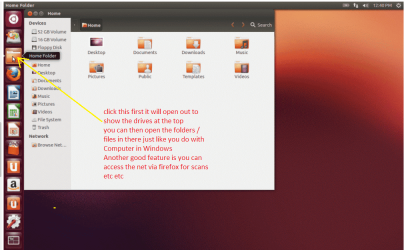
Sorry late reply P despite what has been said I have used a a Ubuntu boot to get stuff off of what seem to be dead drives before now and mate you only need a CD not a DVD.

Just make the disk and then boot as I said - on the Ubuntu screen there will be references to any drive attached or installed in the machine as it is an OS that is independent of any drives bar the optical you have to boot from.

Just make sure you pick the run and not install option when booting the disk.

An addition - screenshot
 

Attachments

  • UB2.PNG
    UB2.PNG
    257.6 KB · Views: 3

My Computer My Computer

At a glance

Desk1 7 Home Prem / Desk2 10 Pro / Main lap A...Desk1 i5 3750K / Laptop i7 GTX 860M / Desk2 i...Desk1 8GB (1866) / Desk2 16GB (1333) / Laptop...Desk 1& 2NVidia GTX 650 & Laptops on board Intel
Computer type
PC/Desktop
Computer Manufacturer/Model Number
Own build (new) Desk1 / Asus ROG Win 7 / Desk2 1st build
OS
Desk1 7 Home Prem / Desk2 10 Pro / Main lap Asus ROG 10 Pro 2 laptop Toshiba 7 Pro Asus P2520 7 & 10
CPU
Desk1 i5 3750K / Laptop i7 GTX 860M / Desk2 i5 2500
Motherboard
Desk1 Asus P877-V / Desk2 Gigabyte H67 UD3H / Laptop ?
Memory
Desk1 8GB (1866) / Desk2 16GB (1333) / Laptop 8Gb DDR3
Graphics Card(s)
Desk 1& 2NVidia GTX 650 & Laptops on board Intel
Sound Card
Desk 1 & 2 -XONAR DG Realtek High Def audio Laptop
Monitor(s) Displays
Desk 1 Benq HD 2450 / Desk2 Philips 24" / Laptop 17.5"
Screen Resolution
1920x1080 D1 & D2 & Laptop 1
Hard Drives
Desk1 Samsung 120GB 830 SSD
Asus ROG 256GB 850 Pro SSD
Desk2 Samsung 840 256 SSD
Toshiba 120GB EVO
PSU
Desk 1 Corsair HX 1050/ Laptop ? / Desk 2 Corsair HX 650
Case
Desk 1 Cooler HAF XM ? Toshiba laptop / Desk2 Coolermaster
Cooling
Fans on all Desk1 -2 Desk2 - all Coolermasters 5 Laptop ?
Keyboard
Desk 1 MS Sidewinder X6 Desk 2 MS Sidewinder X 4
Mouse
Desk 1&2 - Gigabyte MS 900 gamer - laptop - Logitec wireless
Internet Speed
ADSL2+
Other Info
One other Desktop (tester) and spare Toshba laptop both with SSD's
Running Kaspersky 2016 ISS on all machines config'd identically
Logitec audio stereo systems on each machine (x3)
Canon MG5250MFC
Router/modem TP-Link running WPA2SK
Back
Top