
Modem frequently disconnects from Internet

nostaw5

Aww Yiss!
Power User
Local time
3:05 PM
Messages
124
Location
Auckland, New Zealand
Hi guys,

i thought I would bring this up,

My router frequently disconnects from our DSL line. it is stuck on connecting (see Photo 1.)

the connection seems to halt at fetching the DNS settings. and it requires more than 1 restart to fix.

I have set the router (see Photo 2. as according to our ISP's recommendation HERE:)

Telecom Broadband settings for Non Telecom modems - Telecom New Zealand Help

it is away from Cordless Phones, Microwaves and other wireless devices and is on the same floor as the rest of us.

NOW: a few months back telecom updated their servers and half of New Zealand was left without internet >.<
I believe the fault was the servers not recognizing modems. But they say they have fixed it. SECOND we called them MANY (100) times and they sent a man out and HE said we have too much going through the DSL line.
We have 1 cordless phone, the modem and a Neilson People Meter. (tv ratings). Is that considered high load?

All phonelines have splitters fitted to them. but the dude who came round said we need a splitter on our telephone pole XD...

Any suggestions. Telecom use PPOA only. PS there is a firmware update but everyone reverted since it is buggy, (wont accept cookies)

THANKS
 
Last edited by a moderator:

My Computer My Computer

At a glance

Genuine Windows 7 Home Premium x64AMG Athlon II X2 255 3.1/2MB/2000MHz 45nm AM32X 4GB Kingston DDR3 1066MHz @ 1600MHz Dual C...HIS HD Radeon 7770 GHz Edition iCooler Core: ...
Computer Manufacturer/Model Number
CGR Watsonator Custom rig
OS
Genuine Windows 7 Home Premium x64
CPU
AMG Athlon II X2 255 3.1/2MB/2000MHz 45nm AM3
Motherboard
Gigabyte GA-MA78LMT-S2 AM3, 760G, Ultra Durable 3, M-ATX
Memory
2X 4GB Kingston DDR3 1066MHz @ 1600MHz Dual Channel
Graphics Card(s)
HIS HD Radeon 7770 GHz Edition iCooler Core: 1000MHz
Sound Card
Genius Sound Maker Value 5.1
Monitor(s) Displays
Dell E2311H DVI/VGA 5ms response, 1080p
Screen Resolution
1920x1080 @ 60Hz
Hard Drives
Western Digital Caviar Blue 500GB 16MB Cache 7200rpm SATA III
PSU
Cooler Master eXtreme Power Plus 700w
Case
Lian-Li PC-6010 With Side Window
Cooling
Aywun A4 80mm fan
Keyboard
Logitech K120 Wired Keyboard
Mouse
Logitech K120 Wired Mouse
Internet Speed
802.11N 300Mbps+ ADSL2+ Max 12.12Mbps
Other Info
Speakers: Logitech LS21 2.1 Satellites + Sub woofer

AMD Catalyst 12.11 BETA
Linksys x2000 Dual Band Wireless N 300Mbps ADSL2+
LiteON CD/DVD Player


GAME PERFORMANCE:
Battlefield 3: 41 FPS Ultra 1x AA @ 1980x1080
Mass Effect 2 and 3: 60 FPS Highest 4x AA @ 1920x1080
Counter Strike Source (and other Valve games):
300 FPS (max FPS in game) Highest settings 8x AA 16x AF @ 1920x1080!!!
Hello,

You should edit your post and remove the WAN IPs that you have posted, you can be hacked, you shd do this asap.

Regarding your issue, is this wired or wireless issue? How many computers are affected with the disconnection?
 

My Computer My Computer

At a glance

Win7 & Win8 64bitIntel i5
Computer Manufacturer/Model Number
Lenovo Desktop/Samsung Laptop
OS
Win7 & Win8 64bit
CPU
Intel i5
Internet Speed
Charter-20 Mbps
Antivirus
Avast
Browser
FF, IE9 and Chrome
Hello,

You should edit your post and remove the WAN IPs that you have posted, you can be hacked, you shd do this asap.

Regarding your issue, is this wired or wireless issue? How many computers are affected with the disconnection?

Ah thanks, i did not see that o.o. when it happenes all pc's are affected, no one can connect with a yellow exclamation mark by the signal.

all are wireless
 

My Computer My Computer

At a glance

Genuine Windows 7 Home Premium x64AMG Athlon II X2 255 3.1/2MB/2000MHz 45nm AM32X 4GB Kingston DDR3 1066MHz @ 1600MHz Dual C...HIS HD Radeon 7770 GHz Edition iCooler Core: ...
Computer Manufacturer/Model Number
CGR Watsonator Custom rig
OS
Genuine Windows 7 Home Premium x64
CPU
AMG Athlon II X2 255 3.1/2MB/2000MHz 45nm AM3
Motherboard
Gigabyte GA-MA78LMT-S2 AM3, 760G, Ultra Durable 3, M-ATX
Memory
2X 4GB Kingston DDR3 1066MHz @ 1600MHz Dual Channel
Graphics Card(s)
HIS HD Radeon 7770 GHz Edition iCooler Core: 1000MHz
Sound Card
Genius Sound Maker Value 5.1
Monitor(s) Displays
Dell E2311H DVI/VGA 5ms response, 1080p
Screen Resolution
1920x1080 @ 60Hz
Hard Drives
Western Digital Caviar Blue 500GB 16MB Cache 7200rpm SATA III
PSU
Cooler Master eXtreme Power Plus 700w
Case
Lian-Li PC-6010 With Side Window
Cooling
Aywun A4 80mm fan
Keyboard
Logitech K120 Wired Keyboard
Mouse
Logitech K120 Wired Mouse
Internet Speed
802.11N 300Mbps+ ADSL2+ Max 12.12Mbps
Other Info
Speakers: Logitech LS21 2.1 Satellites + Sub woofer

AMD Catalyst 12.11 BETA
Linksys x2000 Dual Band Wireless N 300Mbps ADSL2+
LiteON CD/DVD Player


GAME PERFORMANCE:
Battlefield 3: 41 FPS Ultra 1x AA @ 1980x1080
Mass Effect 2 and 3: 60 FPS Highest 4x AA @ 1920x1080
Counter Strike Source (and other Valve games):
300 FPS (max FPS in game) Highest settings 8x AA 16x AF @ 1920x1080!!!
Thanks Brink for removing the images. :)

Back to the issue....have you tried to Power Cycle the devices?

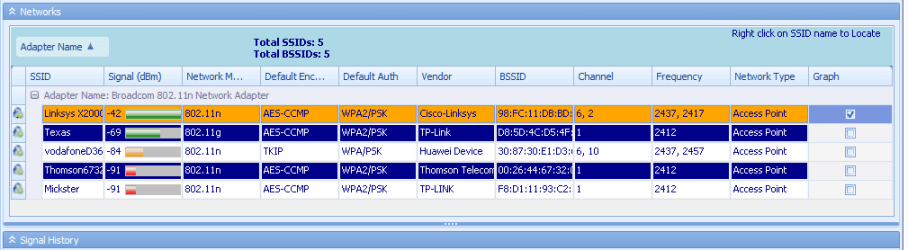
If that didn't help, a Xirrus capture might be worth reviewing. Download, install and run Xirrus Wi-Fi Inspector so that we can see if there's any signal issue or interference.
To run Xirrus Wi-Fi Inspector, double click the Xirrus icon on your Desktop, you may use the Windows 7 snipping tool to crop or Paint by tapping the Print screen key on your keyboard, open up Paint (Click on Start>All Programs>Accessories>Paint) then choose Edit from the Menu and select Paste, then save it and please attach the file on your next post.
 

My Computer My Computer

At a glance

Win7 & Win8 64bitIntel i5
Computer Manufacturer/Model Number
Lenovo Desktop/Samsung Laptop
OS
Win7 & Win8 64bit
CPU
Intel i5
Internet Speed
Charter-20 Mbps
Antivirus
Avast
Browser
FF, IE9 and Chrome
Thanks Brink for removing the images. :)

Back to the issue....have you tried to Power Cycle the devices?

If that didn't help, a Xirrus capture might be worth reviewing. Download, install and run Xirrus Wi-Fi Inspector so that we can see if there's any signal issue or interference.
To run Xirrus Wi-Fi Inspector, double click the Xirrus icon on your Desktop, you may use the Windows 7 snipping tool to crop or Paint by tapping the Print screen key on your keyboard, open up Paint (Click on Start>All Programs>Accessories>Paint) then choose Edit from the Menu and select Paste, then save it and please attach the file on your next post.


Will do
 

My Computer My Computer

At a glance

Genuine Windows 7 Home Premium x64AMG Athlon II X2 255 3.1/2MB/2000MHz 45nm AM32X 4GB Kingston DDR3 1066MHz @ 1600MHz Dual C...HIS HD Radeon 7770 GHz Edition iCooler Core: ...
Computer Manufacturer/Model Number
CGR Watsonator Custom rig
OS
Genuine Windows 7 Home Premium x64
CPU
AMG Athlon II X2 255 3.1/2MB/2000MHz 45nm AM3
Motherboard
Gigabyte GA-MA78LMT-S2 AM3, 760G, Ultra Durable 3, M-ATX
Memory
2X 4GB Kingston DDR3 1066MHz @ 1600MHz Dual Channel
Graphics Card(s)
HIS HD Radeon 7770 GHz Edition iCooler Core: 1000MHz
Sound Card
Genius Sound Maker Value 5.1
Monitor(s) Displays
Dell E2311H DVI/VGA 5ms response, 1080p
Screen Resolution
1920x1080 @ 60Hz
Hard Drives
Western Digital Caviar Blue 500GB 16MB Cache 7200rpm SATA III
PSU
Cooler Master eXtreme Power Plus 700w
Case
Lian-Li PC-6010 With Side Window
Cooling
Aywun A4 80mm fan
Keyboard
Logitech K120 Wired Keyboard
Mouse
Logitech K120 Wired Mouse
Internet Speed
802.11N 300Mbps+ ADSL2+ Max 12.12Mbps
Other Info
Speakers: Logitech LS21 2.1 Satellites + Sub woofer

AMD Catalyst 12.11 BETA
Linksys x2000 Dual Band Wireless N 300Mbps ADSL2+
LiteON CD/DVD Player


GAME PERFORMANCE:
Battlefield 3: 41 FPS Ultra 1x AA @ 1980x1080
Mass Effect 2 and 3: 60 FPS Highest 4x AA @ 1920x1080
Counter Strike Source (and other Valve games):
300 FPS (max FPS in game) Highest settings 8x AA 16x AF @ 1920x1080!!!
please tell me if the picture reveals too much, but that is what i have snipped
 

Attachments

  • fefe.PNG
    fefe.PNG
    10.6 KB · Views: 17

My Computer My Computer

At a glance

Genuine Windows 7 Home Premium x64AMG Athlon II X2 255 3.1/2MB/2000MHz 45nm AM32X 4GB Kingston DDR3 1066MHz @ 1600MHz Dual C...HIS HD Radeon 7770 GHz Edition iCooler Core: ...
Computer Manufacturer/Model Number
CGR Watsonator Custom rig
OS
Genuine Windows 7 Home Premium x64
CPU
AMG Athlon II X2 255 3.1/2MB/2000MHz 45nm AM3
Motherboard
Gigabyte GA-MA78LMT-S2 AM3, 760G, Ultra Durable 3, M-ATX
Memory
2X 4GB Kingston DDR3 1066MHz @ 1600MHz Dual Channel
Graphics Card(s)
HIS HD Radeon 7770 GHz Edition iCooler Core: 1000MHz
Sound Card
Genius Sound Maker Value 5.1
Monitor(s) Displays
Dell E2311H DVI/VGA 5ms response, 1080p
Screen Resolution
1920x1080 @ 60Hz
Hard Drives
Western Digital Caviar Blue 500GB 16MB Cache 7200rpm SATA III
PSU
Cooler Master eXtreme Power Plus 700w
Case
Lian-Li PC-6010 With Side Window
Cooling
Aywun A4 80mm fan
Keyboard
Logitech K120 Wired Keyboard
Mouse
Logitech K120 Wired Mouse
Internet Speed
802.11N 300Mbps+ ADSL2+ Max 12.12Mbps
Other Info
Speakers: Logitech LS21 2.1 Satellites + Sub woofer

AMD Catalyst 12.11 BETA
Linksys x2000 Dual Band Wireless N 300Mbps ADSL2+
LiteON CD/DVD Player


GAME PERFORMANCE:
Battlefield 3: 41 FPS Ultra 1x AA @ 1980x1080
Mass Effect 2 and 3: 60 FPS Highest 4x AA @ 1920x1080
Counter Strike Source (and other Valve games):
300 FPS (max FPS in game) Highest settings 8x AA 16x AF @ 1920x1080!!!
The snip is correct, thanks for your effort. Try changing the wireless channel to 11, see if it helps. Have you also tried power cycling?

What's your signed up bandwidth with your ISP? Are you aware if other Users in your network are utilizing the bandwidth heavily?
 

My Computer My Computer

At a glance

Win7 & Win8 64bitIntel i5
Computer Manufacturer/Model Number
Lenovo Desktop/Samsung Laptop
OS
Win7 & Win8 64bit
CPU
Intel i5
Internet Speed
Charter-20 Mbps
Antivirus
Avast
Browser
FF, IE9 and Chrome
OK channel is set to 11.

Other devices download, and youse facebook, youtube thats it. I also do gaming but the problem happens when im not too.

It was too late to power cycle last night so i will do it now.

for bandwidth we have 120GB (never gone over 80) and the speed is capable of 15Mbps down and 0.72 up
we hit a max of 12.12Mbps. Line is ADSL2+ but right now use the G.DMT module
 
Last edited:

My Computer My Computer

At a glance

Genuine Windows 7 Home Premium x64AMG Athlon II X2 255 3.1/2MB/2000MHz 45nm AM32X 4GB Kingston DDR3 1066MHz @ 1600MHz Dual C...HIS HD Radeon 7770 GHz Edition iCooler Core: ...
Computer Manufacturer/Model Number
CGR Watsonator Custom rig
OS
Genuine Windows 7 Home Premium x64
CPU
AMG Athlon II X2 255 3.1/2MB/2000MHz 45nm AM3
Motherboard
Gigabyte GA-MA78LMT-S2 AM3, 760G, Ultra Durable 3, M-ATX
Memory
2X 4GB Kingston DDR3 1066MHz @ 1600MHz Dual Channel
Graphics Card(s)
HIS HD Radeon 7770 GHz Edition iCooler Core: 1000MHz
Sound Card
Genius Sound Maker Value 5.1
Monitor(s) Displays
Dell E2311H DVI/VGA 5ms response, 1080p
Screen Resolution
1920x1080 @ 60Hz
Hard Drives
Western Digital Caviar Blue 500GB 16MB Cache 7200rpm SATA III
PSU
Cooler Master eXtreme Power Plus 700w
Case
Lian-Li PC-6010 With Side Window
Cooling
Aywun A4 80mm fan
Keyboard
Logitech K120 Wired Keyboard
Mouse
Logitech K120 Wired Mouse
Internet Speed
802.11N 300Mbps+ ADSL2+ Max 12.12Mbps
Other Info
Speakers: Logitech LS21 2.1 Satellites + Sub woofer

AMD Catalyst 12.11 BETA
Linksys x2000 Dual Band Wireless N 300Mbps ADSL2+
LiteON CD/DVD Player


GAME PERFORMANCE:
Battlefield 3: 41 FPS Ultra 1x AA @ 1980x1080
Mass Effect 2 and 3: 60 FPS Highest 4x AA @ 1920x1080
Counter Strike Source (and other Valve games):
300 FPS (max FPS in game) Highest settings 8x AA 16x AF @ 1920x1080!!!
Back
Top