GPT Hard drive issues with installing Windows 7 Ultimate..

The idea is to search the google error text and identifiers to see how others have resolved the issue. That link I believe is the one which seemed to be the best prospect, but I had skimmed a half dozen of them and might have dragged another into my post in error.

EFI is new enough it takes a lot of research of errors and of your mobo via its manual, forums and tech support. In addition to a 6-8 hour volunteer workload daily for almost 4 years, today my real life intrudes so that I cannot do this research for you. If you can't do it yourself maybe someone else will do it for you. You can also always take it to the shop where someone can do it for you.

I would want to know everything that's been done to try to remedy the error since it seems to be blocking install. By googling the error and its exact identifiers you find everything that's ever been tried and reported.
 
Use the ISO for your licensed version from Step 1 in Clean Reinstall - Factory OEM Windows 7

there is no ISO when i load the disc, its standard files for windows disk when i open explorer

I just re-read the thread and this gross misunderstanding of what you were advised popped out at me.

The ISO file in Step 1 is burned to DVD using the tool given in Step 2. Do that now and try the steps in UEFI (Unified Extensible Firmware Interface) - Install Windows 7 with - Windows 7 Forums with EFI enabled.

Wipe the HD first using Diskpart Clean Command so it will format GPT.
 
Use the ISO for your licensed version from Step 1 in Clean Reinstall - Factory OEM Windows 7

there is no ISO when i load the disc, its standard files for windows disk when i open explorer

I just re-read the thread and this gross misunderstanding of what you were advised popped out at me.

The ISO file in Step 1 is burned to DVD using the tool given in Step 2. Do that now and try the steps in UEFI (Unified Extensible Firmware Interface) - Install Windows 7 with - Windows 7 Forums with EFI enabled.

Wipe the HD first using Diskpart Clean Command so it will format GPT.

Done the iso burnt it with the windows prog, went into boot menu to check it. does not even show up in boot menu?
 

My Computer My Computer

At a glance

Winows 8Intel® Core™ i3 Processor4gig DDR3Intergrated Intel Graphics
Computer Manufacturer/Model Number
Packard Bell Imedia
OS
Winows 8
CPU
Intel® Core™ i3 Processor
Memory
4gig DDR3
Graphics Card(s)
Intergrated Intel Graphics
Hard Drives
2 x 1TB Sata 3

I've checked this before booted into bios cannot see anything for legacy bios

also with this -


Boot into BIOS setup to enable Legacy BIOS and look for a setting to disable Secure Boot. Remove any EFI Boot Disk from BIOS Boot order, set DVD drive first to boot, HDD second

How would i disable EFI HDD from the order? only one of the HDD's actually shows up. My boot order is dvd drive then UEFI HDD
 

My Computer My Computer

At a glance

Winows 8Intel® Core™ i3 Processor4gig DDR3Intergrated Intel Graphics
Computer Manufacturer/Model Number
Packard Bell Imedia
OS
Winows 8
CPU
Intel® Core™ i3 Processor
Memory
4gig DDR3
Graphics Card(s)
Intergrated Intel Graphics
Hard Drives
2 x 1TB Sata 3
When you tried this before had you used the latest official installer ISO written to stick using the tool provided? I only noticed last night your response to this was nonsensical and apparently you had not done this fundamental step.

Much of your thread is about messing around with other people's install disks for various versions. I gave you the critical specific step to download the official ISO and write it with a specific tool, and then missed your reply which amounted to it not being done.
 
When you tried this before had you used the latest official installer ISO written to stick using the tool provided? I only noticed last night your response to this was nonsensical and apparently you had not done this fundamental step.

Much of your thread is about messing around with other people's install disks for various versions. I gave you the critical specific step to download the official ISO and write it with a specific tool, and then missed your reply which amounted to it not being done.

No i had not last time i tried i had made an UEFI USB from the Windows installer disc i had. so i shall use the ISO to make a USB now thanks :)
 

My Computer My Computer

At a glance

Winows 8Intel® Core™ i3 Processor4gig DDR3Intergrated Intel Graphics
Computer Manufacturer/Model Number
Packard Bell Imedia
OS
Winows 8
CPU
Intel® Core™ i3 Processor
Memory
4gig DDR3
Graphics Card(s)
Intergrated Intel Graphics
Hard Drives
2 x 1TB Sata 3
When you tried this before had you used the latest official installer ISO written to stick using the tool provided? I only noticed last night your response to this was nonsensical and apparently you had not done this fundamental step.

Much of your thread is about messing around with other people's install disks for various versions. I gave you the critical specific step to download the official ISO and write it with a specific tool, and then missed your reply which amounted to it not being done.

No i had not last time i tried i had made an UEFI USB from the Windows installer disc i had. so i shall use the ISO to make a USB now thanks :)

Now i have mounted from the usb gone through the steps and now i'm at a loggerhead unlike before when i done this through the windows install disc


C) In 7-Zip, navigate to and "Copy" the sources\install.wim\1\Windows\Boot\EFI\bootmgfw.egi file to your desktop, and close 7-Zip.


When i go through 7zip once i get to BOOT there is NO file inside that is called EFI? this time around
 
Last edited:

My Computer My Computer

At a glance

Winows 8Intel® Core™ i3 Processor4gig DDR3Intergrated Intel Graphics
Computer Manufacturer/Model Number
Packard Bell Imedia
OS
Winows 8
CPU
Intel® Core™ i3 Processor
Memory
4gig DDR3
Graphics Card(s)
Intergrated Intel Graphics
Hard Drives
2 x 1TB Sata 3
Any ideas people thanks, i tried 2 times now joining the bit-tech forum and my account has never been given access to post in the forums
 

My Computer My Computer

At a glance

Winows 8Intel® Core™ i3 Processor4gig DDR3Intergrated Intel Graphics
Computer Manufacturer/Model Number
Packard Bell Imedia
OS
Winows 8
CPU
Intel® Core™ i3 Processor
Memory
4gig DDR3
Graphics Card(s)
Intergrated Intel Graphics
Hard Drives
2 x 1TB Sata 3
Well as no one have bothered to reply on that tech forum or anything I guess I am stuck with win8
 

My Computer My Computer

At a glance

Winows 8Intel® Core™ i3 Processor4gig DDR3Intergrated Intel Graphics
Computer Manufacturer/Model Number
Packard Bell Imedia
OS
Winows 8
CPU
Intel® Core™ i3 Processor
Memory
4gig DDR3
Graphics Card(s)
Intergrated Intel Graphics
Hard Drives
2 x 1TB Sata 3
Yours would be the only case that isn't able to install in either EFI Mode OR Bypass UEFI to Install WIn7.

For weeks you labored with a questionable installer so I wonder if you have a Win7 ISO burned to DVD that is confirmed to boot correctly on another machine, then if you are setting BIOS correctly to bypass EFI so that DVD drive shows up to boot like it does for everyone else who bypasses EFI.

Did you ever ask your mobo tech support how to enable Legacy BIOS so that the install DVD shows up without EFI?
 
Now i have mounted from the usb gone through the steps and now i'm at a loggerhead unlike before when i done this through the windows install disc


C) In 7-Zip, navigate to and "Copy" the sources\install.wim\1\Windows\Boot\EFI\bootmgfw.egi file to your desktop, and close 7-Zip.


When i go through 7zip once i get to BOOT there is NO file inside that is called EFI? this time around

You may like to get a DVD & license key from a good source like:
Windows Download and Shop - Microsoft Windows
That way you will have a DVDx64 with uEFI support.
 

My Computer My Computer

At a glance

ME/XP/Vista/Win7
OS
ME/XP/Vista/Win7
As this is the only install thread we've ever had that's stretched for weeks without resolution, I just read back through to recall the reasons:

The question is whether this is a retail copy of Win7 which came with a Product Key. In that case it can be reused. But if it came preinstalled on the laptop (rarely with Ultimate) then as an OEM copy with a COA sticker on machine it lives and dies with that PC's mobo.

Can you clarify this status for the Ultimate license? Does the DVD also contain SP1? It should say on it. Tell us everything it says on the disk.

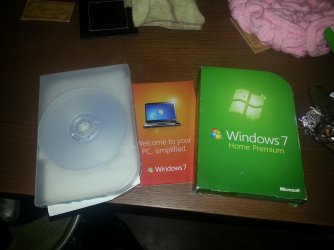
I bought it as a bundle with the case and key the lot OFFICIAL box everything, this is why I don't understand how its not working?

You originally said the bundle came with Win8 but you wanted to replace that with Win7 Ultimate you had.

Ok so I bought a new pc the other day it was delivered with Win 8 preinstalled 64 bit version, its a Packard bell Imedia. I've had a play about with it and I hate windows 8, that's why I have my windows 7 ultimate at hand ready to go on there...

Are you now saying 7 Ultimate came with another bundle? What does it say on the disk? If it came bundled it likely is a Builder's OEM license tied to the PC it was first installed upon. There are ways we can help determine this if you will answer the questions.

Waiting to read what exactly it says on the Ultimate disks. Have now asked three times.

Well it seems my ultimate disk is done, so i've borrowed my brother home premium win 7 64 disk, which does now show up in the boot menu when the disc is in.

Ive created a UEFI USB from it but i cannot get that to show up in the BOOTMENU, Any ideas chaps please? thanks

Do you have a retail Win7 Product Key which is Upgrade or Full and not OEM?

Yes or No.

 
yes I do don't I?
 

Attachments

  • 20130114_013026.jpg
    20130114_013026.jpg
    420.5 KB · Views: 5

My Computer My Computer

At a glance

Winows 8Intel® Core™ i3 Processor4gig DDR3Intergrated Intel Graphics
Computer Manufacturer/Model Number
Packard Bell Imedia
OS
Winows 8
CPU
Intel® Core™ i3 Processor
Memory
4gig DDR3
Graphics Card(s)
Intergrated Intel Graphics
Hard Drives
2 x 1TB Sata 3
Which is it: Upgrade or Full version?

Is the Product Key insert there and readable?

What is wrong with using the disk which came in the package?
 
Which is it: Upgrade or Full version?

Is the Product Key insert there and readable?

What is wrong with using the disk which came in the package?

I'm guessing it's a full version. An yep the card is in the box with the product key on there.
I have tried to install from the disc as it does show up in the boot menu. Though it gets stuck on the main starting windows loading screen
 

My Computer My Computer

At a glance

Winows 8Intel® Core™ i3 Processor4gig DDR3Intergrated Intel Graphics
Computer Manufacturer/Model Number
Packard Bell Imedia
OS
Winows 8
CPU
Intel® Core™ i3 Processor
Memory
4gig DDR3
Graphics Card(s)
Intergrated Intel Graphics
Hard Drives
2 x 1TB Sata 3
In spending another hour re-reading your thread - which is the longest running Install Failure thread we've had here I can recall - I see some things to check.

First, if you disable Secure Boot and it won't install in EFI mode then the question is how to enable Legacy BIOS. In every other case this has been possible and worked.

Is there a BIOS update on the Packard Bell Support Downloads webpage for your model?

This needs to be pursued more aggressively through the mobo manufacturer, asking their phone, chat and email tech support, their Forums, or googling vigorously for others who are dealing with this. I've already suggested this at least once with no reply.

Next, I wonder if the DVD drive refusing to install in EFI or even be listed as EFI in BIOS setup has to do with the port it's plugged into. This has been the case for HD/SSD's on other EFI mobos. Again you need to query your mobo manufacturer to find this out. Packard Bell is crappy hardware but they couldn't have forgotten both Legacy BIOS and EFI installation media.

It's a long shot but the HD may not achieve Legacy BIOS and shrug off EFI label without formatting it MBR. Can you move the HD to another PC to wipe it with Diskpart Clean Command followed by "Convert MBR"
 
Last edited:
Will the Packard Bell Recovery DVD boot in uEFI mode?
 

My Computer My Computer

At a glance

ME/XP/Vista/Win7
OS
ME/XP/Vista/Win7
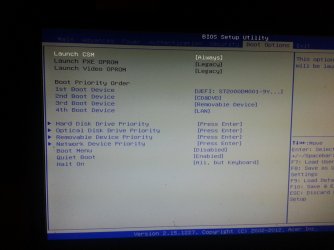
Well I went onto the acer forum about 2 hours ago and got this reply and came up with this!
 

Attachments

  • 20130114_172722.jpg
    20130114_172722.jpg
    444.4 KB · Views: 13

My Computer My Computer

At a glance

Winows 8Intel® Core™ i3 Processor4gig DDR3Intergrated Intel Graphics
Computer Manufacturer/Model Number
Packard Bell Imedia
OS
Winows 8
CPU
Intel® Core™ i3 Processor
Memory
4gig DDR3
Graphics Card(s)
Intergrated Intel Graphics
Hard Drives
2 x 1TB Sata 3
Sounds like a breakthrough. You had CSM set Never before:
246881d1356288905t-gpt-hard-drive-issues-installing-windows-7-ultimate-20121223_184344.jpg


Googling Compatibility Support Mode it is how others have gotten Setup to run without Secure Boot: Unified Extensible Firmware Interface - Wikipedia, the free encyclopedia
Asus UX32vd owners lounge.
Microsoft Windows 8® - Enabling Secure Boot

Do you now get a non-UEFI HD choice to install upon?
 
Back
Top