

- Local time
- 6:40 AM
- Messages
- 124
Hi
If I decide to take the easy route and just clone/migrate my computer “as it is now” onto the SSD. Which software should I use? I've read so much, but I haven’t read hardly anything about Samsung’s software. I see that whs recommends Paragon’s migration software in his “SSD – Install and transfer the Operating System” tutorial which I have. My Crucial version of EZ Gig IV seems easy enough. I see that Paragon’s product properly aligns the SSD. What about the others? We might think that Samsung’s software would, but I really don’t know. Does it align the SSD’s? What about the others? I guess that I could align it afterwards.
I have few questions. Let me explain my situation. I picked up the 512 GB Samsung 840 Pro SSD to install in my Dell 17R N7110 laptop with the 64 bit Windows 7 Ultimate OS. To replace the stock 1 TB hard drive requires removing the keyboard, palm rest, optical drive and some more items. It is a little more than I want to get into for now. So, I am taking an easier route. I ordered a hard drive caddy from NewModeUS.com. This is a kit to install my SSD where the optical drive is. I can then use the optical drive with NewModeUS.com’s eSATA-USB kit. These kits look to be very simple and straight forward modifications.
My questions are software related. I have several cloning/migration programs that I can use. I have Samsung’s Data Migration and SSD Magician software, Paragon’s Migrate OS to SSD 3.0, Apricorn's EZ Gig IV from Clippard and a couple of other free programs. I also have my Windows 7 Ultimate discs to do a fresh install if I choose to go this route instead. One of my problems is that I don’t know how to proceed with this: I like Dell’s programs that came installed on my laptop. I would also like to have a fresh install of Windows’s 7 too. How can I have both?
My questions are software related. I have several cloning/migration programs that I can use. I have Samsung’s Data Migration and SSD Magician software, Paragon’s Migrate OS to SSD 3.0, Apricorn's EZ Gig IV from Clippard and a couple of other free programs. I also have my Windows 7 Ultimate discs to do a fresh install if I choose to go this route instead. One of my problems is that I don’t know how to proceed with this: I like Dell’s programs that came installed on my laptop. I would also like to have a fresh install of Windows’s 7 too. How can I have both?
If I decide to take the easy route and just clone/migrate my computer “as it is now” onto the SSD. Which software should I use? I've read so much, but I haven’t read hardly anything about Samsung’s software. I see that whs recommends Paragon’s migration software in his “SSD – Install and transfer the Operating System” tutorial which I have. My Crucial version of EZ Gig IV seems easy enough. I see that Paragon’s product properly aligns the SSD. What about the others? We might think that Samsung’s software would, but I really don’t know. Does it align the SSD’s? What about the others? I guess that I could align it afterwards.
If I want to do a fresh install of Windows 7 plus include all the Dell programs that came with the laptop. How would I go about doing this? These preinstalled Dell programs aren’t all available online. My other installed programs would be no problem.
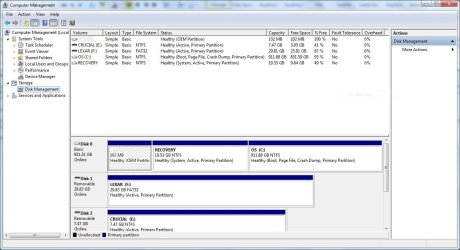
I want to copy my computer before I begin. I have Window’s imaging and recovery software, Dell's Data Safe backup program, Norton's backup program and some other free programs. Which would work the best? I have 852 GB left on the original 1TB hard drive ( Disk 0 ). I have a 102 MB partition, a 19.53 GB partition (Recovery) and then the last partition ( C: ) that has 60.29 GB used of the 911.88 GB capacity for the 1 TB hard drive. That leaves 851.59 GB left. See below. I'm confused a bit. It says that the capacity of my 1 TB HD is 911.88 GB. Isn't that a bit too much to lose[FONT="]?[/FONT]
[FONT="]I apologize for this wordy post. I’m just a bit apprehensive about doing this project.
[/FONT]
I want to copy my computer before I begin. I have Window’s imaging and recovery software, Dell's Data Safe backup program, Norton's backup program and some other free programs. Which would work the best? I have 852 GB left on the original 1TB hard drive ( Disk 0 ). I have a 102 MB partition, a 19.53 GB partition (Recovery) and then the last partition ( C: ) that has 60.29 GB used of the 911.88 GB capacity for the 1 TB hard drive. That leaves 851.59 GB left. See below. I'm confused a bit. It says that the capacity of my 1 TB HD is 911.88 GB. Isn't that a bit too much to lose[FONT="]?[/FONT]
[FONT="]I apologize for this wordy post. I’m just a bit apprehensive about doing this project.
[/FONT]
Attachments
Last edited:
My Computer
At a glance
Windows 7 Ultimate (x64) Service Pack 1 (buil...Intel(R) Core(TM) i5-2450M CPU @ 2.50GHz8 GBIntel HD Graphics 3000 with up to 1.6GB dynam...
- Computer Manufacturer/Model Number
- Dell 17R N7110 Inspiron laptop
- OS
- Windows 7 Ultimate (x64) Service Pack 1 (build 7601)
- CPU
- Intel(R) Core(TM) i5-2450M CPU @ 2.50GHz
- Motherboard
- Dell Inc. 0YH79Y A00
- Memory
- 8 GB
- Graphics Card(s)
- Intel HD Graphics 3000 with up to 1.6GB dynamic video memory
- Sound Card
- SRS Premium Sound - (1) Realtek High Definition Audio
- Monitor(s) Displays
- 17.3" diagonal HD+ TrueLife LED display
- Screen Resolution
- 1600x900 resolution
- Hard Drives
- 1 TB HD #ST1000LM024 HN-M101MBB,
512 GB Samsung 840 Pro SSD
- PSU
- stock
- Case
- stock
- Cooling
- stock
- Keyboard
- stock
- Mouse
- stock
- Internet Speed
- WiFi
- Other Info
- Printer: HP Photosmart C3180


