
Solved What software to use with SSD clone and for backup too? Many Choices!!

LeftC

New member
Member
VIP
Local time
7:05 AM
Messages
124
Hi

I have few questions. Let me explain my situation. I picked up the 512 GB Samsung 840 Pro SSD to install in my Dell 17R N7110 laptop with the 64 bit Windows 7 Ultimate OS. To replace the stock 1 TB hard drive requires removing the keyboard, palm rest, optical drive and some more items. It is a little more than I want to get into for now. So, I am taking an easier route. I ordered a hard drive caddy from NewModeUS.com. This is a kit to install my SSD where the optical drive is. I can then use the optical drive with NewModeUS.com’s eSATA-USB kit. These kits look to be very simple and straight forward modifications.

My questions are software related. I have several cloning/migration programs that I can use. I have Samsung’s Data Migration and SSD Magician software, Paragon’s Migrate OS to SSD 3.0, Apricorn's EZ Gig IV from Clippard and a couple of other free programs. I also have my Windows 7 Ultimate discs to do a fresh install if I choose to go this route instead. One of my problems is that I don’t know how to proceed with this: I like Dell’s programs that came installed on my laptop. I would also like to have a fresh install of Windows’s 7 too. How can I have both?

If I decide to take the easy route and just clone/migrate my computer “as it is now” onto the SSD. Which software should I use? I've read so much, but I haven’t read hardly anything about Samsung’s software. I see that whs recommends Paragon’s migration software in his “SSD – Install and transfer the Operating System” tutorial which I have. My Crucial version of EZ Gig IV seems easy enough. I see that Paragon’s product properly aligns the SSD. What about the others? We might think that Samsung’s software would, but I really don’t know. Does it align the SSD’s? What about the others? I guess that I could align it afterwards.

If I want to do a fresh install of Windows 7 plus include all the Dell programs that came with the laptop. How would I go about doing this? These preinstalled Dell programs aren’t all available online. My other installed programs would be no problem.

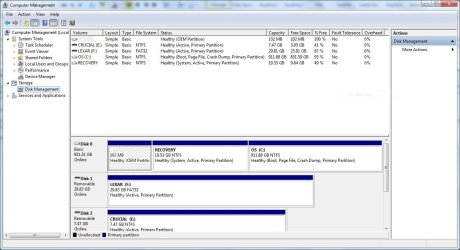
I want to copy my computer before I begin. I have Window’s imaging and recovery software, Dell's Data Safe backup program, Norton's backup program and some other free programs. Which would work the best? I have 852 GB left on the original 1TB hard drive ( Disk 0 ). I have a 102 MB partition, a 19.53 GB partition (Recovery) and then the last partition ( C: ) that has 60.29 GB used of the 911.88 GB capacity for the 1 TB hard drive. That leaves 851.59 GB left. See below. I'm confused a bit. It says that the capacity of my 1 TB HD is 911.88 GB. Isn't that a bit too much to lose[FONT=&quot]?[/FONT]

[FONT=&quot]I apologize for this wordy post. I’m just a bit apprehensive about doing this project.


[/FONT]
 

Attachments
  • disk management 1_7_13.JPG
    disk management 1_7_13.JPG
    106.3 KB · Views: 30
Last edited:

My Computer My Computer

At a glance

Windows 7 Ultimate (x64) Service Pack 1 (buil...Intel(R) Core(TM) i5-2450M CPU @ 2.50GHz8 GBIntel HD Graphics 3000 with up to 1.6GB dynam...
Computer Manufacturer/Model Number
Dell 17R N7110 Inspiron laptop
OS
Windows 7 Ultimate (x64) Service Pack 1 (build 7601)
CPU
Intel(R) Core(TM) i5-2450M CPU @ 2.50GHz
Motherboard
Dell Inc. 0YH79Y A00
Memory
8 GB
Graphics Card(s)
Intel HD Graphics 3000 with up to 1.6GB dynamic video memory
Sound Card
SRS Premium Sound - (1) Realtek High Definition Audio
Monitor(s) Displays
17.3" diagonal HD+ TrueLife LED display
Screen Resolution
1600x900 resolution
Hard Drives
1 TB HD #ST1000LM024 HN-M101MBB,

512 GB Samsung 840 Pro SSD
PSU
stock
Case
stock
Cooling
stock
Keyboard
stock
Mouse
stock
Internet Speed
WiFi
Other Info
Printer: HP Photosmart C3180

My Computer My Computer

At a glance

Microsoft Windows 7 Home Premium 64-bits 7601...Intel(R) Core(TM) i3 CPU M 370 @ 2.40GHz4,00 GBATI Mobility Radeon HD 5400 Series
Computer type
Laptop
Computer Manufacturer/Model Number
ACER ASPIRE 5742G
OS
Microsoft Windows 7 Home Premium 64-bits 7601 Multiprocessor Free Service Pack 1
CPU
Intel(R) Core(TM) i3 CPU M 370 @ 2.40GHz
Motherboard
Acer Aspire 5742G
Memory
4,00 GB
Graphics Card(s)
ATI Mobility Radeon HD 5400 Series
Sound Card
(1) AMD High Definition Audio Device (2) Realtek High Defi
Screen Resolution
1366 x 768 x 32 bits (4294967296 colors) @ 60 Hz
Hard Drives
WDC WD5000BEVT-22ZAT0
I use and believe strongly in Paragon Migrate. I've used it in excess of 50 times and it has never failed. I know it is supposed to work, but there are several cases where Apricorn didn't work. Samsungs migration tool is Norton Ghost, I believe, and I'm not sure about that. The best is always a clean install. You can download all of the newest drivers from Dell. The only issue I can see with Paragon is it will install the OS, but I'm not sure about the recovery partition. You can try it. It should tell you what it is transfering before it actually does the transfer. The only issue with imaging programs is alignment. That's not the case with Paragon. And, trust me, you do not want to align it after the install. Most people I know prefer a clean install of windows without all of the Factory bloatware. You may find this helpful. http://www.sevenforums.com/tutorials/219487-clean-reinstall-factory-oem-windows-7-a.html
Also, Macrium is an excellent imaging program, and you can either use it to image your data partition or I like Microsoft's SyncToy (Free). It's easy to use and the data is backed up on a 1 for 1 basis. It will take a while for the first backup as it has to copy it all. After that it only does the changes, so is really quick.
 

My Computers My Computers

  • At a glance

    Windows 11 ProRyzen 9 5900X32GB G Skill DDR4-3600EVGA RTX 3080 FTW 3 Ultra
    Computer type
    PC/Desktop
    Computer Manufacturer/Model Number
    ALWAYS UNDER CONSTRUCTION
    OS
    Windows 11 Pro
    CPU
    Ryzen 9 5900X
    Motherboard
    Asus X570 Crosshair Viii Hero
    Memory
    32GB G Skill DDR4-3600
    Graphics Card(s)
    EVGA RTX 3080 FTW 3 Ultra
    Sound Card
    On Board/Sennheiser PC37X Headset
    Monitor(s) Displays
    3 X Asus 27"
    Screen Resolution
    2560x1440
    Hard Drives
    2 X 1 TB NVME drives
    PSU
    EVGA 850
    Case
    Phanteks Eclipse P400A
    Cooling
    EVGA 280 AIO
    Keyboard
    Logitech G510s/ Logitech G13
    Mouse
    Logitech G502
    Internet Speed
    24/1
    Antivirus
    ESET/MBAM Pro/SAS Pro
    Browser
    Chrome/ Firefox/ Edge
  • At a glance

    Windows 11 ProIntel Ultra 9 288V32 GB LPDDR5X 8533
    Computer type
    Laptop
    System Manufacturer/Model Number
    Dell 16 Plus
    OS
    Windows 11 Pro
    CPU
    Intel Ultra 9 288V
    Memory
    32 GB LPDDR5X 8533
    Monitor(s) Displays
    16" Mini-LED HDR600 Touch 90 Hz
    Screen Resolution
    2560X1600
    Hard Drives
    1 TB NVME
Backup is a good thing to do! Use Macrium Reflect Free, very flexible and easy to use.
http://www.sevenforums.com/tutorials/73828-imaging-free-macrium.html
Macrium Reflect FREE Edition - Information and download

Do you really want a fresh so clean win7 with all th HP bloatware? There is a hot-key which activates booting from RECOVERY paritition and start the fresh reinstall proces.
I've read a little bit about Macrium Reflect Free, but I haven't used it. It was my main "free" backup software choice to try. I'm a little confused about the differences between an "image" and a "copy."

Will you tell me more about the hot-key which activates booting from RECOVERY paritition and start the fresh reinstall proces?
 

My Computer My Computer

At a glance

Windows 7 Ultimate (x64) Service Pack 1 (buil...Intel(R) Core(TM) i5-2450M CPU @ 2.50GHz8 GBIntel HD Graphics 3000 with up to 1.6GB dynam...
Computer Manufacturer/Model Number
Dell 17R N7110 Inspiron laptop
OS
Windows 7 Ultimate (x64) Service Pack 1 (build 7601)
CPU
Intel(R) Core(TM) i5-2450M CPU @ 2.50GHz
Motherboard
Dell Inc. 0YH79Y A00
Memory
8 GB
Graphics Card(s)
Intel HD Graphics 3000 with up to 1.6GB dynamic video memory
Sound Card
SRS Premium Sound - (1) Realtek High Definition Audio
Monitor(s) Displays
17.3" diagonal HD+ TrueLife LED display
Screen Resolution
1600x900 resolution
Hard Drives
1 TB HD #ST1000LM024 HN-M101MBB,

512 GB Samsung 840 Pro SSD
PSU
stock
Case
stock
Cooling
stock
Keyboard
stock
Mouse
stock
Internet Speed
WiFi
Other Info
Printer: HP Photosmart C3180
Backup is a good thing to do! Use Macrium Reflect Free, very flexible and easy to use.
http://www.sevenforums.com/tutorials/73828-imaging-free-macrium.html
Macrium Reflect FREE Edition - Information and download

Do you really want a fresh so clean win7 with all th HP bloatware? There is a hot-key which activates booting from RECOVERY paritition and start the fresh reinstall proces.
I've read a little bit about Macrium Reflect Free, but I haven't used it. It was my main "free" backup software choice to try. I'm a little confused about the differences between an "image" and a "copy."

Will you tell me more about the hot-key which activates booting from RECOVERY paritition and start the fresh reinstall proces?
An "image" is just a copy of a volume (for example C) or multiple volumes or even a whole physical disk. The image is one big file that you make with backup software. You can restore it using same software to recreate (restore) the volume(s). It has everything in it, partition type, files, permissions, partition size, label.

A copy is.... just a copy.
 

My Computer My Computer

At a glance

Microsoft Windows 7 Home Premium 64-bits 7601...Intel(R) Core(TM) i3 CPU M 370 @ 2.40GHz4,00 GBATI Mobility Radeon HD 5400 Series
Computer type
Laptop
Computer Manufacturer/Model Number
ACER ASPIRE 5742G
OS
Microsoft Windows 7 Home Premium 64-bits 7601 Multiprocessor Free Service Pack 1
CPU
Intel(R) Core(TM) i3 CPU M 370 @ 2.40GHz
Motherboard
Acer Aspire 5742G
Memory
4,00 GB
Graphics Card(s)
ATI Mobility Radeon HD 5400 Series
Sound Card
(1) AMD High Definition Audio Device (2) Realtek High Defi
Screen Resolution
1366 x 768 x 32 bits (4294967296 colors) @ 60 Hz
Hard Drives
WDC WD5000BEVT-22ZAT0
Backup is a good thing to do! Use Macrium Reflect Free, very flexible and easy to use.
http://www.sevenforums.com/tutorials/73828-imaging-free-macrium.html
Macrium Reflect FREE Edition - Information and download

Do you really want a fresh so clean win7 with all th HP bloatware? There is a hot-key which activates booting from RECOVERY paritition and start the fresh reinstall proces.
I've read a little bit about Macrium Reflect Free, but I haven't used it. It was my main "free" backup software choice to try. I'm a little confused about the differences between an "image" and a "copy."

Will you tell me more about the hot-key which activates booting from RECOVERY paritition and start the fresh reinstall proces?
Actually it's not a hotkey. It's built in in windows recovery environment, which DELL customized.

Windows 7 PC Restore | Dell

Clear?
 

My Computer My Computer

At a glance

Microsoft Windows 7 Home Premium 64-bits 7601...Intel(R) Core(TM) i3 CPU M 370 @ 2.40GHz4,00 GBATI Mobility Radeon HD 5400 Series
Computer type
Laptop
Computer Manufacturer/Model Number
ACER ASPIRE 5742G
OS
Microsoft Windows 7 Home Premium 64-bits 7601 Multiprocessor Free Service Pack 1
CPU
Intel(R) Core(TM) i3 CPU M 370 @ 2.40GHz
Motherboard
Acer Aspire 5742G
Memory
4,00 GB
Graphics Card(s)
ATI Mobility Radeon HD 5400 Series
Sound Card
(1) AMD High Definition Audio Device (2) Realtek High Defi
Screen Resolution
1366 x 768 x 32 bits (4294967296 colors) @ 60 Hz
Hard Drives
WDC WD5000BEVT-22ZAT0
I use and believe strongly in Paragon Migrate. I've used it in excess of 50 times and it has never failed. I know it is supposed to work, but there are several cases where Apricorn didn't work. Samsungs migration tool is Norton Ghost, I believe, and I'm not sure about that. The best is always a clean install. You can download all of the newest drivers from Dell. The only issue I can see with Paragon is it will install the OS, but I'm not sure about the recovery partition. You can try it. It should tell you what it is transfering before it actually does the transfer. The only issue with imaging programs is alignment. That's not the case with Paragon. And, trust me, you do not want to align it after the install. Most people I know prefer a clean install of windows without all of the Factory bloatware. You may find this helpful. http://www.sevenforums.com/tutorials/219487-clean-reinstall-factory-oem-windows-7-a.html
Also, Macrium is an excellent imaging program, and you can either use it to image your data partition or I like Microsoft's SyncToy (Free). It's easy to use and the data is backed up on a 1 for 1 basis. It will take a while for the first backup as it has to copy it all. After that it only does the changes, so is really quick.
I've read good things about the Paragon software. The reinstallition of the partitions is a concern. Samsung doesn't use Norton's Ghost anymore. They have their own Data Migration software now. There is very little info about its use other than it exists. Here is their pdf about it. It jshows the opening page and lists the limitations. The limitation of concern is the following because I have three drives: "5. On systems with three (3) drives or more (e.g. “C:”, “D:”, and “E:” drives) with the operating system installed on the “C:” drive, only the first two consecutive drives will be cloned (“C:” and “D:” drives). The “System” partition that is created during Windows installation is automatically replicated." This might be a problem. How would I work around this?

I will read the Win 7 clean install tutorial. Thank you for the SyncToy link. I have never head of it.

An option that I haven't considered is to do a clean install of Win 7 on the SSD after installing it in the optical drive with the NewModeUS.com kit which just came in. And, just leave the present hard drive as it is right now. I'm not sure if this will work though. I think that I read something about Win 7 installing the boot info in the wrong place when more than one drive is hooked up. Is there a possibility that with a fresh install of Win 7 that it might not even install the boot info on the SSD?
 

My Computer My Computer

At a glance

Windows 7 Ultimate (x64) Service Pack 1 (buil...Intel(R) Core(TM) i5-2450M CPU @ 2.50GHz8 GBIntel HD Graphics 3000 with up to 1.6GB dynam...
Computer Manufacturer/Model Number
Dell 17R N7110 Inspiron laptop
OS
Windows 7 Ultimate (x64) Service Pack 1 (build 7601)
CPU
Intel(R) Core(TM) i5-2450M CPU @ 2.50GHz
Motherboard
Dell Inc. 0YH79Y A00
Memory
8 GB
Graphics Card(s)
Intel HD Graphics 3000 with up to 1.6GB dynamic video memory
Sound Card
SRS Premium Sound - (1) Realtek High Definition Audio
Monitor(s) Displays
17.3" diagonal HD+ TrueLife LED display
Screen Resolution
1600x900 resolution
Hard Drives
1 TB HD #ST1000LM024 HN-M101MBB,

512 GB Samsung 840 Pro SSD
PSU
stock
Case
stock
Cooling
stock
Keyboard
stock
Mouse
stock
Internet Speed
WiFi
Other Info
Printer: HP Photosmart C3180
You want to install fresh to ssd? You know your win7 activation key? You know how to detach old drive from system (at least temporary)? You have now Windows 7 Ultimate 32bit accoording to system specs. You have an Windows 7 Ultimate 32bit installation DVD?
 

My Computer My Computer

At a glance

Microsoft Windows 7 Home Premium 64-bits 7601...Intel(R) Core(TM) i3 CPU M 370 @ 2.40GHz4,00 GBATI Mobility Radeon HD 5400 Series
Computer type
Laptop
Computer Manufacturer/Model Number
ACER ASPIRE 5742G
OS
Microsoft Windows 7 Home Premium 64-bits 7601 Multiprocessor Free Service Pack 1
CPU
Intel(R) Core(TM) i3 CPU M 370 @ 2.40GHz
Motherboard
Acer Aspire 5742G
Memory
4,00 GB
Graphics Card(s)
ATI Mobility Radeon HD 5400 Series
Sound Card
(1) AMD High Definition Audio Device (2) Realtek High Defi
Screen Resolution
1366 x 768 x 32 bits (4294967296 colors) @ 60 Hz
Hard Drives
WDC WD5000BEVT-22ZAT0
Backup is a good thing to do! Use Macrium Reflect Free, very flexible and easy to use.
http://www.sevenforums.com/tutorials/73828-imaging-free-macrium.html
Macrium Reflect FREE Edition - Information and download

Do you really want a fresh so clean win7 with all th HP bloatware? There is a hot-key which activates booting from RECOVERY paritition and start the fresh reinstall proces.
I've read a little bit about Macrium Reflect Free, but I haven't used it. It was my main "free" backup software choice to try. I'm a little confused about the differences between an "image" and a "copy."

Will you tell me more about the hot-key which activates booting from RECOVERY paritition and start the fresh reinstall proces?
An "image" is just a copy of a volume (for example C) or multiple volumes or even a whole physical disk. The image is one big file that you make with backup software. You can restore it using same software to recreate (restore) the volume(s). It has everything in it, partition type, files, permissions, partition size, label.

A copy is.... just a copy.
Thank you very much for the clarifcation.
 

My Computer My Computer

At a glance

Windows 7 Ultimate (x64) Service Pack 1 (buil...Intel(R) Core(TM) i5-2450M CPU @ 2.50GHz8 GBIntel HD Graphics 3000 with up to 1.6GB dynam...
Computer Manufacturer/Model Number
Dell 17R N7110 Inspiron laptop
OS
Windows 7 Ultimate (x64) Service Pack 1 (build 7601)
CPU
Intel(R) Core(TM) i5-2450M CPU @ 2.50GHz
Motherboard
Dell Inc. 0YH79Y A00
Memory
8 GB
Graphics Card(s)
Intel HD Graphics 3000 with up to 1.6GB dynamic video memory
Sound Card
SRS Premium Sound - (1) Realtek High Definition Audio
Monitor(s) Displays
17.3" diagonal HD+ TrueLife LED display
Screen Resolution
1600x900 resolution
Hard Drives
1 TB HD #ST1000LM024 HN-M101MBB,

512 GB Samsung 840 Pro SSD
PSU
stock
Case
stock
Cooling
stock
Keyboard
stock
Mouse
stock
Internet Speed
WiFi
Other Info
Printer: HP Photosmart C3180
Backup is a good thing to do! Use Macrium Reflect Free, very flexible and easy to use.
http://www.sevenforums.com/tutorials/73828-imaging-free-macrium.html
Macrium Reflect FREE Edition - Information and download

Do you really want a fresh so clean win7 with all th HP bloatware? There is a hot-key which activates booting from RECOVERY paritition and start the fresh reinstall proces.
I've read a little bit about Macrium Reflect Free, but I haven't used it. It was my main "free" backup software choice to try. I'm a little confused about the differences between an "image" and a "copy."

Will you tell me more about the hot-key which activates booting from RECOVERY paritition and start the fresh reinstall proces?
Actually it's not a hotkey. It's built in in windows recovery environment, which DELL customized.

Windows 7 PC Restore | Dell

Clear?
Got it. This is another new one. :)
 

My Computer My Computer

At a glance

Windows 7 Ultimate (x64) Service Pack 1 (buil...Intel(R) Core(TM) i5-2450M CPU @ 2.50GHz8 GBIntel HD Graphics 3000 with up to 1.6GB dynam...
Computer Manufacturer/Model Number
Dell 17R N7110 Inspiron laptop
OS
Windows 7 Ultimate (x64) Service Pack 1 (build 7601)
CPU
Intel(R) Core(TM) i5-2450M CPU @ 2.50GHz
Motherboard
Dell Inc. 0YH79Y A00
Memory
8 GB
Graphics Card(s)
Intel HD Graphics 3000 with up to 1.6GB dynamic video memory
Sound Card
SRS Premium Sound - (1) Realtek High Definition Audio
Monitor(s) Displays
17.3" diagonal HD+ TrueLife LED display
Screen Resolution
1600x900 resolution
Hard Drives
1 TB HD #ST1000LM024 HN-M101MBB,

512 GB Samsung 840 Pro SSD
PSU
stock
Case
stock
Cooling
stock
Keyboard
stock
Mouse
stock
Internet Speed
WiFi
Other Info
Printer: HP Photosmart C3180
You want to install fresh to ssd? You know your win7 activation key? You know how to detach old drive from system (at least temporary)? You have now Windows 7 Ultimate 32bit accoording to system specs. You have an Windows 7 Ultimate 32bit installation DVD?
Please answer
 

My Computer My Computer

At a glance

Microsoft Windows 7 Home Premium 64-bits 7601...Intel(R) Core(TM) i3 CPU M 370 @ 2.40GHz4,00 GBATI Mobility Radeon HD 5400 Series
Computer type
Laptop
Computer Manufacturer/Model Number
ACER ASPIRE 5742G
OS
Microsoft Windows 7 Home Premium 64-bits 7601 Multiprocessor Free Service Pack 1
CPU
Intel(R) Core(TM) i3 CPU M 370 @ 2.40GHz
Motherboard
Acer Aspire 5742G
Memory
4,00 GB
Graphics Card(s)
ATI Mobility Radeon HD 5400 Series
Sound Card
(1) AMD High Definition Audio Device (2) Realtek High Defi
Screen Resolution
1366 x 768 x 32 bits (4294967296 colors) @ 60 Hz
Hard Drives
WDC WD5000BEVT-22ZAT0
You want to install fresh to ssd?
If I can.

You know your win7 activation key?
Yes.

You know how to detach old drive from system (at least temporary)?
I can't get to the stock HD easily with this laptop. I'd have to remove the keyboard, palm rest, etc.

Without disabling the stock HD I can't do the clean install, I believe.

You have now Windows 7 Ultimate 32bit accoording to system specs.
Oops! It is actually 64bit. The specs that you saw was for an old computer that I used to use. I have changed the specs for the laptop that I would like to modify.

You have an Windows 7 Ultimate 32bit installation DVD?
Got the 64bit installation DVD as well as the 32bit. I am using the 64bit version.
 

My Computer My Computer

At a glance

Windows 7 Ultimate (x64) Service Pack 1 (buil...Intel(R) Core(TM) i5-2450M CPU @ 2.50GHz8 GBIntel HD Graphics 3000 with up to 1.6GB dynam...
Computer Manufacturer/Model Number
Dell 17R N7110 Inspiron laptop
OS
Windows 7 Ultimate (x64) Service Pack 1 (build 7601)
CPU
Intel(R) Core(TM) i5-2450M CPU @ 2.50GHz
Motherboard
Dell Inc. 0YH79Y A00
Memory
8 GB
Graphics Card(s)
Intel HD Graphics 3000 with up to 1.6GB dynamic video memory
Sound Card
SRS Premium Sound - (1) Realtek High Definition Audio
Monitor(s) Displays
17.3" diagonal HD+ TrueLife LED display
Screen Resolution
1600x900 resolution
Hard Drives
1 TB HD #ST1000LM024 HN-M101MBB,

512 GB Samsung 840 Pro SSD
PSU
stock
Case
stock
Cooling
stock
Keyboard
stock
Mouse
stock
Internet Speed
WiFi
Other Info
Printer: HP Photosmart C3180
I would go for the clean install myself. Heck..... I just did!:) No problems at all, simple and easy.....just the way I like it. Only had to install..... 3? maybe 4 drivers total.
 

My Computer My Computer

At a glance

Windows 10x64 Build 1709Intel i7 7700HQ Kaby Lake16 GB DDR4 @2400Nvidia Geforce GTX 1060
Computer type
Laptop
Computer Manufacturer/Model Number
MSI GE72VR Apache Pro-416
OS
Windows 10x64 Build 1709
CPU
Intel i7 7700HQ Kaby Lake
Motherboard
Micro-Star Intl. MS-179B (U3C1)
Memory
16 GB DDR4 @2400
Graphics Card(s)
Nvidia Geforce GTX 1060
Screen Resolution
1920x1080 120Hz
Hard Drives
256 GB Nvme M.2 SSD

1TB HDD@7200
Cooling
Cooler Blast 4
Keyboard
Steel Series
Antivirus
Bit Defender Free
Browser
Edge
You want to install fresh to ssd?
If I can.

You know your win7 activation key?
Yes.

I can't get to the stock HD easily with this laptop. I'd have to remove the keyboard, palm rest, etc.

Without disabling the stock HD I can't do the clean install, I believe.

You have now Windows 7 Ultimate 32bit accoording to system specs.
Oops! It is actually 64bit. The specs that you saw was for an old computer that I used to use. I have changed the specs for the laptop that I would like to modify.

You have an Windows 7 Ultimate 32bit installation DVD?
Got the 64bit installation DVD as well as the 32bit. I am using the 64bit version.

So you have all the stuff needed!
Don't detach old HDD in your case, it's too difficult and not really neccesary. Boot from win7 install dvd and press shift_F10 on first window as shown here http://www.sevenforums.com/tutorials/682-command-prompt-startup.html

Now mark the partition that's current active inactive http://www.sevenforums.com/tutorials/197157-partition-mark-inactive.html
(you can mark it active if all fails)

Reboot again normally. It should fail because boot partition went inactive. That's just what you want. Boot again form win7 install DVD and install win7 on SSD

Report back when done. Check for windows updates and install them (most likely you have to connect wired instead of wireless). Reboot and check for updates again and again. Now check "device manager" for devices without drivers and post results.
 

My Computer My Computer

At a glance

Microsoft Windows 7 Home Premium 64-bits 7601...Intel(R) Core(TM) i3 CPU M 370 @ 2.40GHz4,00 GBATI Mobility Radeon HD 5400 Series
Computer type
Laptop
Computer Manufacturer/Model Number
ACER ASPIRE 5742G
OS
Microsoft Windows 7 Home Premium 64-bits 7601 Multiprocessor Free Service Pack 1
CPU
Intel(R) Core(TM) i3 CPU M 370 @ 2.40GHz
Motherboard
Acer Aspire 5742G
Memory
4,00 GB
Graphics Card(s)
ATI Mobility Radeon HD 5400 Series
Sound Card
(1) AMD High Definition Audio Device (2) Realtek High Defi
Screen Resolution
1366 x 768 x 32 bits (4294967296 colors) @ 60 Hz
Hard Drives
WDC WD5000BEVT-22ZAT0

My Computer My Computer

At a glance

Microsoft Windows 7 Home Premium 64-bits 7601...Intel(R) Core(TM) i3 CPU M 370 @ 2.40GHz4,00 GBATI Mobility Radeon HD 5400 Series
Computer type
Laptop
Computer Manufacturer/Model Number
ACER ASPIRE 5742G
OS
Microsoft Windows 7 Home Premium 64-bits 7601 Multiprocessor Free Service Pack 1
CPU
Intel(R) Core(TM) i3 CPU M 370 @ 2.40GHz
Motherboard
Acer Aspire 5742G
Memory
4,00 GB
Graphics Card(s)
ATI Mobility Radeon HD 5400 Series
Sound Card
(1) AMD High Definition Audio Device (2) Realtek High Defi
Screen Resolution
1366 x 768 x 32 bits (4294967296 colors) @ 60 Hz
Hard Drives
WDC WD5000BEVT-22ZAT0
I would go for the clean install myself. Heck..... I just did!:) No problems at all, simple and easy.....just the way I like it. Only had to install..... 3? maybe 4 drivers total.
Thanks! Simple and easy ... terrific!
 

My Computer My Computer

At a glance

Windows 7 Ultimate (x64) Service Pack 1 (buil...Intel(R) Core(TM) i5-2450M CPU @ 2.50GHz8 GBIntel HD Graphics 3000 with up to 1.6GB dynam...
Computer Manufacturer/Model Number
Dell 17R N7110 Inspiron laptop
OS
Windows 7 Ultimate (x64) Service Pack 1 (build 7601)
CPU
Intel(R) Core(TM) i5-2450M CPU @ 2.50GHz
Motherboard
Dell Inc. 0YH79Y A00
Memory
8 GB
Graphics Card(s)
Intel HD Graphics 3000 with up to 1.6GB dynamic video memory
Sound Card
SRS Premium Sound - (1) Realtek High Definition Audio
Monitor(s) Displays
17.3" diagonal HD+ TrueLife LED display
Screen Resolution
1600x900 resolution
Hard Drives
1 TB HD #ST1000LM024 HN-M101MBB,

512 GB Samsung 840 Pro SSD
PSU
stock
Case
stock
Cooling
stock
Keyboard
stock
Mouse
stock
Internet Speed
WiFi
Other Info
Printer: HP Photosmart C3180
I would go for the clean install myself. Heck..... I just did!:) No problems at all, simple and easy.....just the way I like it. Only had to install..... 3? maybe 4 drivers total.
Thanks! Simple and easy ... terrific!
Did you install succesfully? Post screenshot of "disk management" please
 

My Computer My Computer

At a glance

Microsoft Windows 7 Home Premium 64-bits 7601...Intel(R) Core(TM) i3 CPU M 370 @ 2.40GHz4,00 GBATI Mobility Radeon HD 5400 Series
Computer type
Laptop
Computer Manufacturer/Model Number
ACER ASPIRE 5742G
OS
Microsoft Windows 7 Home Premium 64-bits 7601 Multiprocessor Free Service Pack 1
CPU
Intel(R) Core(TM) i3 CPU M 370 @ 2.40GHz
Motherboard
Acer Aspire 5742G
Memory
4,00 GB
Graphics Card(s)
ATI Mobility Radeon HD 5400 Series
Sound Card
(1) AMD High Definition Audio Device (2) Realtek High Defi
Screen Resolution
1366 x 768 x 32 bits (4294967296 colors) @ 60 Hz
Hard Drives
WDC WD5000BEVT-22ZAT0
... I like Microsoft's SyncToy (Free). It's easy to use and the data is backed up on a 1 for 1 basis. It will take a while for the first backup as it has to copy it all. After that it only does the changes, so is really quick.
With SyncToy, there are left and right folders. Can one be on one drive and the other folder on a different drive? What is SyncToy's true value? I'm a bit confused. :confused:
 

My Computer My Computer

At a glance

Windows 7 Ultimate (x64) Service Pack 1 (buil...Intel(R) Core(TM) i5-2450M CPU @ 2.50GHz8 GBIntel HD Graphics 3000 with up to 1.6GB dynam...
Computer Manufacturer/Model Number
Dell 17R N7110 Inspiron laptop
OS
Windows 7 Ultimate (x64) Service Pack 1 (build 7601)
CPU
Intel(R) Core(TM) i5-2450M CPU @ 2.50GHz
Motherboard
Dell Inc. 0YH79Y A00
Memory
8 GB
Graphics Card(s)
Intel HD Graphics 3000 with up to 1.6GB dynamic video memory
Sound Card
SRS Premium Sound - (1) Realtek High Definition Audio
Monitor(s) Displays
17.3" diagonal HD+ TrueLife LED display
Screen Resolution
1600x900 resolution
Hard Drives
1 TB HD #ST1000LM024 HN-M101MBB,

512 GB Samsung 840 Pro SSD
PSU
stock
Case
stock
Cooling
stock
Keyboard
stock
Mouse
stock
Internet Speed
WiFi
Other Info
Printer: HP Photosmart C3180
With SyncToy, there are left and right folders. Can one be on one drive and the other folder on a different drive? What is SyncToy's true value? I'm a bit confused. :confused:

Yes, folders can be on different drives. What do you mean by "value"? Its an excellent program.
 

My Computer My Computer

At a glance

Windows 10 Pro x64 ; Xubuntu x64Intel i7 860 @ 2.80 GHz O/C'ed to 4.0GHz16GB Corsair Vengance DDR3 @ 661 MHz Dual Cha...EVGA NVidia GTX 560 1024MB
Computer type
PC/Desktop
Computer Manufacturer/Model Number
Golden Mk. I.4
OS
Windows 10 Pro x64 ; Xubuntu x64
CPU
Intel i7 860 @ 2.80 GHz O/C'ed to 4.0GHz
Motherboard
Gigabyte P55A-UD3R Rev.1. Award BIOS F13
Memory
16GB Corsair Vengance DDR3 @ 661 MHz Dual Channel (9-9-9-24)
Graphics Card(s)
EVGA NVidia GTX 560 1024MB
Sound Card
Realtek Integrated
Monitor(s) Displays
Dual Samsung SyncMaster 2494HS
Screen Resolution
1920*1080 and 1920*1080
Hard Drives
1*Samsung 840 EVO 120GB SSD;
1*OCZ Vertex 2 60GB SSD;
2*Samsung F3 SpinPoint 1TB in RAID0;
1*Samsung F1 SpinPoint 1TB;
2*Western Digital 1TB External USB 3.0
1*Western Digital 500GB External USB 3.0
1*Seagate 500GB External USB 2.0
PSU
Thermaltake ToughPower QFan 750W
Case
Thermaltake Element S VK60001W2Z
Cooling
Corsair H60 Water Cooling, 2*230mm and 2*80mm case fans
Keyboard
Logitech G110
Mouse
Logitech MX518
I would go for the clean install myself. Heck..... I just did!:) No problems at all, simple and easy.....just the way I like it. Only had to install..... 3? maybe 4 drivers total.
Thanks! Simple and easy ... terrific!
Did you install succesfully? Post screenshot of "disk management" please
Sorry ... Gosh, I haven't installed it yet. I'm still reading up. I'm sorry for the confusion. indianacarnie said that it was simple and easy and that sounded good to me. I saw where you, Kaktussoft, kindly gave me directions as how to do this in post #14. Thanks!
 

My Computer My Computer

At a glance

Windows 7 Ultimate (x64) Service Pack 1 (buil...Intel(R) Core(TM) i5-2450M CPU @ 2.50GHz8 GBIntel HD Graphics 3000 with up to 1.6GB dynam...
Computer Manufacturer/Model Number
Dell 17R N7110 Inspiron laptop
OS
Windows 7 Ultimate (x64) Service Pack 1 (build 7601)
CPU
Intel(R) Core(TM) i5-2450M CPU @ 2.50GHz
Motherboard
Dell Inc. 0YH79Y A00
Memory
8 GB
Graphics Card(s)
Intel HD Graphics 3000 with up to 1.6GB dynamic video memory
Sound Card
SRS Premium Sound - (1) Realtek High Definition Audio
Monitor(s) Displays
17.3" diagonal HD+ TrueLife LED display
Screen Resolution
1600x900 resolution
Hard Drives
1 TB HD #ST1000LM024 HN-M101MBB,

512 GB Samsung 840 Pro SSD
PSU
stock
Case
stock
Cooling
stock
Keyboard
stock
Mouse
stock
Internet Speed
WiFi
Other Info
Printer: HP Photosmart C3180
Back
Top