Solved EXT HDD issue after scan disk, now prompts to format??

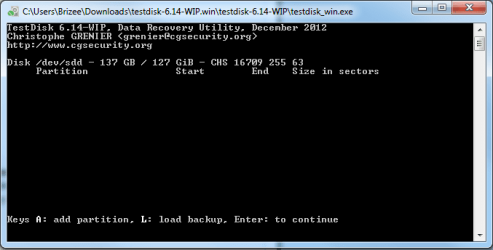
Check Disk has finished and here is the screen shot, I only have the choice to continue.
Capture.PNG
 

My Computer My Computer

At a glance

Windows 7 Ultimate x64 SP1i7 94016G 1333ATI Raedon HD 4850
OS
Windows 7 Ultimate x64 SP1
CPU
i7 940
Motherboard
Asus P6T
Memory
16G 1333
Graphics Card(s)
ATI Raedon HD 4850
Monitor(s) Displays
2 x 23" Proview
Cooling
Coolermaster V8
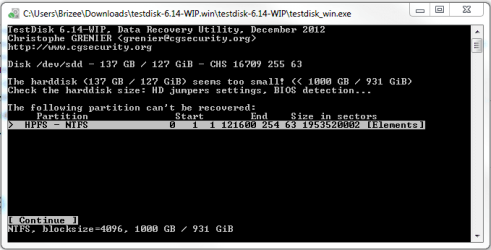
And now this:

Capture 1.PNG

To answer your question it was 1 1TB partition,
 

My Computer My Computer

At a glance

Windows 7 Ultimate x64 SP1i7 94016G 1333ATI Raedon HD 4850
OS
Windows 7 Ultimate x64 SP1
CPU
i7 940
Motherboard
Asus P6T
Memory
16G 1333
Graphics Card(s)
ATI Raedon HD 4850
Monitor(s) Displays
2 x 23" Proview
Cooling
Coolermaster V8
And thanks for the link Junanji that's a great write up, cheers.
 

My Computer My Computer

At a glance

Windows 7 Ultimate x64 SP1i7 94016G 1333ATI Raedon HD 4850
OS
Windows 7 Ultimate x64 SP1
CPU
i7 940
Motherboard
Asus P6T
Memory
16G 1333
Graphics Card(s)
ATI Raedon HD 4850
Monitor(s) Displays
2 x 23" Proview
Cooling
Coolermaster V8
Yep, your hard disk is basically being identified as only a 128GB drive for whatever reason/s. That was evident even in your screenshot. And your 1TB is somehow embedded into that 128GB :).

Unless this problem is resolved, no recovery is possible.And that is what TestDisk says.

As I had already indicated it may be a firmware corruption. I am not sure though.

Hang on to see whether others have some ideas on dealing with this, even as I continue to give a thought into this.
 

My Computer My Computer

At a glance

Windows 7 Home Premium 32 bit
OS
Windows 7 Home Premium 32 bit
No worries, Thanks for all your assistance :)...!
 

My Computer My Computer

At a glance

Windows 7 Ultimate x64 SP1i7 94016G 1333ATI Raedon HD 4850
OS
Windows 7 Ultimate x64 SP1
CPU
i7 940
Motherboard
Asus P6T
Memory
16G 1333
Graphics Card(s)
ATI Raedon HD 4850
Monitor(s) Displays
2 x 23" Proview
Cooling
Coolermaster V8
I got a bad feeling about this. It may be time for a two pronged approach:

First, you should start thinking about data recovery. There are free programs like Recuva ( Recuva - Undelete, Unerase, File and Disk Recovery - Free Download )that you can try - but I have heard that it has trouble with RAW disks. Yours does not show as RAW in disk management so you might be OK.
There are also paid programs that handle more difficult situations.

If you can recover your data then you could just reformat the drive.

But some other ideas you could try before:

Hope that helps.
 

My Computer My Computer

At a glance

Windows 7 64 Bit Home Premium SP1i7-3820GSkill F3-14900CL9Q - 16GBEVGA GeForce GTX660 - Driver 352.86
Computer type
PC/Desktop
Computer Manufacturer/Model Number
Home Built - Jan 2013
OS
Windows 7 64 Bit Home Premium SP1
CPU
i7-3820
Motherboard
Asus P9X79-PRO - Bios 4608
Memory
GSkill F3-14900CL9Q - 16GB
Graphics Card(s)
EVGA GeForce GTX660 - Driver 352.86
Sound Card
On board Realtek ALC898
Monitor(s) Displays
Acer S271HL
Screen Resolution
1920 x 1080
Hard Drives
#1- Samsung 840 Pro Series
#2- Western Digital WD1002FAEX Sata3 Black
#3- Western Digital WD1002FAEX Sata3 Black
PSU
Corsair CMPSU-850TX-V2 - 850 watt (by Seasonic)
Case
Corsair Obsidian 550D
Cooling
Standard 3 120mm case fans, Cooler Master Hyper 212 EVO
Keyboard
MS KC-0405
Mouse
Intellimouse 5-button
Internet Speed
56 Mbits/Sec (on a good day)
Antivirus
Avast & Malwarebytes
Browser
Firefox
Other Info
Asus DVD - DRW-24B1ST 24X
I also thought of Recuva. Can safely be tried since it does not write anything to the HDD.

In the meantime, I spent a little time trying to google to check whether I could get a grip on the problem. Yep, we learn a lot from other people's problems, trying to help them.

I came across only two posts/references trying to get the native capacity of the HDD and both spoke of Seatools for DOS.

For OP's reference I am giving out the links. ( He must be sleeping now.)

1. Set Drive Size with Seatools for DOS

( OP should not try the other option indicated therein i.e., zero-filling since it will wipe out all the data)

2. The last post here 1TB HDD only showing 128GB after Disk wiping (windows 7) - Hard-Disks - Storage

I understand that Seatools for DOS works OK with most other brands too. So let the OP try this irrespective of the brand he has.

If it doesn't work, then OP should run that particular manufacturer's diagnostic/repair tool and check whether it brings any cheers.

He may take recourse to other suggestions made by TVeblen after this perhaps.

( I may be sleeping when the OP wakes up.:))
 

My Computer My Computer

At a glance

Windows 7 Home Premium 32 bit
OS
Windows 7 Home Premium 32 bit
I am currently recovering the files using mini power data recovery but only 5% of the files have recovered correctly and 95% do not work. I am so disappointed that I allowed W7 to scan and fix the errors on this disk as it seems I have lost the files. :mad2:
 

My Computer My Computer

At a glance

Windows 7 Ultimate x64 SP1i7 94016G 1333ATI Raedon HD 4850
OS
Windows 7 Ultimate x64 SP1
CPU
i7 940
Motherboard
Asus P6T
Memory
16G 1333
Graphics Card(s)
ATI Raedon HD 4850
Monitor(s) Displays
2 x 23" Proview
Cooling
Coolermaster V8
I have just sprung for the full version of recuva hopefully I might have more luck.
 

My Computer My Computer

At a glance

Windows 7 Ultimate x64 SP1i7 94016G 1333ATI Raedon HD 4850
OS
Windows 7 Ultimate x64 SP1
CPU
i7 940
Motherboard
Asus P6T
Memory
16G 1333
Graphics Card(s)
ATI Raedon HD 4850
Monitor(s) Displays
2 x 23" Proview
Cooling
Coolermaster V8
No luck at all with recuva it wouldn't even scan the drive. Looks like I have lost 8 years of photo's all my music (well every third track on each cd anyway) pretty disappointed, going to look into cloud back up I think.

I am running power data recovery again to see if it can recover any more.

Thanks for your help guys.
 

My Computer My Computer

At a glance

Windows 7 Ultimate x64 SP1i7 94016G 1333ATI Raedon HD 4850
OS
Windows 7 Ultimate x64 SP1
CPU
i7 940
Motherboard
Asus P6T
Memory
16G 1333
Graphics Card(s)
ATI Raedon HD 4850
Monitor(s) Displays
2 x 23" Proview
Cooling
Coolermaster V8
I tried to rebuild the MBR and the software went through the motions but it has not changed.

I tried to recover the old partition and I can now see the old partition but not in my computer.

View attachment 248952

Not sure what to do now?
Try to go back to this state. And recover that partition. Post screenshot
 

My Computer My Computer

At a glance

Microsoft Windows 7 Home Premium 64-bits 7601...Intel(R) Core(TM) i3 CPU M 370 @ 2.40GHz4,00 GBATI Mobility Radeon HD 5400 Series
Computer type
Laptop
Computer Manufacturer/Model Number
ACER ASPIRE 5742G
OS
Microsoft Windows 7 Home Premium 64-bits 7601 Multiprocessor Free Service Pack 1
CPU
Intel(R) Core(TM) i3 CPU M 370 @ 2.40GHz
Motherboard
Acer Aspire 5742G
Memory
4,00 GB
Graphics Card(s)
ATI Mobility Radeon HD 5400 Series
Sound Card
(1) AMD High Definition Audio Device (2) Realtek High Defi
Screen Resolution
1366 x 768 x 32 bits (4294967296 colors) @ 60 Hz
Hard Drives
WDC WD5000BEVT-22ZAT0
I ran seatools for dos and set the drive to max and it now show up 803gb unallocated in disk management.
Capture 1.PNG

I currently have mini power data recovery scanning for the lost partition.

Hopefully it works.
 

My Computer My Computer

At a glance

Windows 7 Ultimate x64 SP1i7 94016G 1333ATI Raedon HD 4850
OS
Windows 7 Ultimate x64 SP1
CPU
i7 940
Motherboard
Asus P6T
Memory
16G 1333
Graphics Card(s)
ATI Raedon HD 4850
Monitor(s) Displays
2 x 23" Proview
Cooling
Coolermaster V8
I ran seatools for dos and set the drive to max and it now show up 803gb unallocated in disk management.
View attachment 249238

I currently have mini power data recovery scanning for the lost partition.

Hopefully it works.
I hope seatools didn't actually write on the paritition. Was the 1 disk one large partition containing all space? So not lost but has become smaller and RAW?
 

My Computer My Computer

At a glance

Microsoft Windows 7 Home Premium 64-bits 7601...Intel(R) Core(TM) i3 CPU M 370 @ 2.40GHz4,00 GBATI Mobility Radeon HD 5400 Series
Computer type
Laptop
Computer Manufacturer/Model Number
ACER ASPIRE 5742G
OS
Microsoft Windows 7 Home Premium 64-bits 7601 Multiprocessor Free Service Pack 1
CPU
Intel(R) Core(TM) i3 CPU M 370 @ 2.40GHz
Motherboard
Acer Aspire 5742G
Memory
4,00 GB
Graphics Card(s)
ATI Mobility Radeon HD 5400 Series
Sound Card
(1) AMD High Definition Audio Device (2) Realtek High Defi
Screen Resolution
1366 x 768 x 32 bits (4294967296 colors) @ 60 Hz
Hard Drives
WDC WD5000BEVT-22ZAT0
I think it was original 1 lare partition on that disk as you posted before
248952-ext-hdd-issue-after-scan-disk-now-prompts-format-capture-1.png

Strange it's a 128GB disk holding a 931.5GB partition
 

My Computer My Computer

At a glance

Microsoft Windows 7 Home Premium 64-bits 7601...Intel(R) Core(TM) i3 CPU M 370 @ 2.40GHz4,00 GBATI Mobility Radeon HD 5400 Series
Computer type
Laptop
Computer Manufacturer/Model Number
ACER ASPIRE 5742G
OS
Microsoft Windows 7 Home Premium 64-bits 7601 Multiprocessor Free Service Pack 1
CPU
Intel(R) Core(TM) i3 CPU M 370 @ 2.40GHz
Motherboard
Acer Aspire 5742G
Memory
4,00 GB
Graphics Card(s)
ATI Mobility Radeon HD 5400 Series
Sound Card
(1) AMD High Definition Audio Device (2) Realtek High Defi
Screen Resolution
1366 x 768 x 32 bits (4294967296 colors) @ 60 Hz
Hard Drives
WDC WD5000BEVT-22ZAT0
The 128GB Raw was there prior to me using seatools and the 803gb appeared after.
 

My Computer My Computer

At a glance

Windows 7 Ultimate x64 SP1i7 94016G 1333ATI Raedon HD 4850
OS
Windows 7 Ultimate x64 SP1
CPU
i7 940
Motherboard
Asus P6T
Memory
16G 1333
Graphics Card(s)
ATI Raedon HD 4850
Monitor(s) Displays
2 x 23" Proview
Cooling
Coolermaster V8
The 128GB Raw was there prior to me using seatools and the 803gb appeared after.
But was it originally (before you had problems) a 931GB physical disk with 1 large partition containing all disk space?
 

My Computer My Computer

At a glance

Microsoft Windows 7 Home Premium 64-bits 7601...Intel(R) Core(TM) i3 CPU M 370 @ 2.40GHz4,00 GBATI Mobility Radeon HD 5400 Series
Computer type
Laptop
Computer Manufacturer/Model Number
ACER ASPIRE 5742G
OS
Microsoft Windows 7 Home Premium 64-bits 7601 Multiprocessor Free Service Pack 1
CPU
Intel(R) Core(TM) i3 CPU M 370 @ 2.40GHz
Motherboard
Acer Aspire 5742G
Memory
4,00 GB
Graphics Card(s)
ATI Mobility Radeon HD 5400 Series
Sound Card
(1) AMD High Definition Audio Device (2) Realtek High Defi
Screen Resolution
1366 x 768 x 32 bits (4294967296 colors) @ 60 Hz
Hard Drives
WDC WD5000BEVT-22ZAT0
Correct it was the elements portion 931.5GB.
 

My Computer My Computer

At a glance

Windows 7 Ultimate x64 SP1i7 94016G 1333ATI Raedon HD 4850
OS
Windows 7 Ultimate x64 SP1
CPU
i7 940
Motherboard
Asus P6T
Memory
16G 1333
Graphics Card(s)
ATI Raedon HD 4850
Monitor(s) Displays
2 x 23" Proview
Cooling
Coolermaster V8
Correct it was the elements portion 931.5GB.
Then searching for lost partition is useless!! The partition isn't lost but corrupt start and end point. It's turned to type RAW because windows/partition wizard and so on don't understand the file system. Partition is useless now. Steps to do:

Of course APPLY the changes. Do you really want it to be a primary partition? Do you really want it ACTIVE? Is it a boot or OS partition?
 
Last edited:

My Computer My Computer

At a glance

Microsoft Windows 7 Home Premium 64-bits 7601...Intel(R) Core(TM) i3 CPU M 370 @ 2.40GHz4,00 GBATI Mobility Radeon HD 5400 Series
Computer type
Laptop
Computer Manufacturer/Model Number
ACER ASPIRE 5742G
OS
Microsoft Windows 7 Home Premium 64-bits 7601 Multiprocessor Free Service Pack 1
CPU
Intel(R) Core(TM) i3 CPU M 370 @ 2.40GHz
Motherboard
Acer Aspire 5742G
Memory
4,00 GB
Graphics Card(s)
ATI Mobility Radeon HD 5400 Series
Sound Card
(1) AMD High Definition Audio Device (2) Realtek High Defi
Screen Resolution
1366 x 768 x 32 bits (4294967296 colors) @ 60 Hz
Hard Drives
WDC WD5000BEVT-22ZAT0
Kaktussoft your a legend !! Thankyou so much.
Capture 1.PNG
The drive is back.!

Should I look at saving all my data elsewhere and getting rid of this drive?
 

My Computer My Computer

At a glance

Windows 7 Ultimate x64 SP1i7 94016G 1333ATI Raedon HD 4850
OS
Windows 7 Ultimate x64 SP1
CPU
i7 940
Motherboard
Asus P6T
Memory
16G 1333
Graphics Card(s)
ATI Raedon HD 4850
Monitor(s) Displays
2 x 23" Proview
Cooling
Coolermaster V8
Kaktussoft your a legend !! Thankyou so much.
View attachment 249250
The drive is back.!

Should I look at saving all my data elsewhere and getting rid of this drive?
Partition was back in a few seconds (after deleting it) when doing the partition recovery .... was it?

Run seatools and check your drive for errors. If no errors... I don't know why it happened. If seatools doesn't find errors ... drive should be fine
 

My Computer My Computer

At a glance

Microsoft Windows 7 Home Premium 64-bits 7601...Intel(R) Core(TM) i3 CPU M 370 @ 2.40GHz4,00 GBATI Mobility Radeon HD 5400 Series
Computer type
Laptop
Computer Manufacturer/Model Number
ACER ASPIRE 5742G
OS
Microsoft Windows 7 Home Premium 64-bits 7601 Multiprocessor Free Service Pack 1
CPU
Intel(R) Core(TM) i3 CPU M 370 @ 2.40GHz
Motherboard
Acer Aspire 5742G
Memory
4,00 GB
Graphics Card(s)
ATI Mobility Radeon HD 5400 Series
Sound Card
(1) AMD High Definition Audio Device (2) Realtek High Defi
Screen Resolution
1366 x 768 x 32 bits (4294967296 colors) @ 60 Hz
Hard Drives
WDC WD5000BEVT-22ZAT0
Back
Top