what is the best blu ray drive software for windows 7?

Canuck67

New member
Local time
5:11 AM
Messages
74
Hello,

I just installed a LG BH14NS40 blu ray rewriter and player and was wondering what everyone thought the best software is to use with it?

It comes with Power DVD 10, but I've read some not so nice reviews about that particular product.

oh, and if possible, mention both free and pay programs and why you think they are good. (I'm trying to learn)

thanks in advance!
 

My Computer My Computer

OS
Windows 7 Home Premium 32 bit
CPU
Intel(R) Core(TM)2 Duo CPU E6750 @ 2.66GHz
Motherboard
ASUSTeK Computer INC. P5E
Memory
4.00 GB with 3.25 GB available
Graphics Card(s)
(1) Radeon X1950 Series (Microsoft Corporation - WDDM) (
Sound Card
High Definition Audio Device
Hard Drives
(1) WDC WD7501AALS-00J7B0 ATA Device
Do you want burning software or a player?
 

My Computer My Computer

Computer type
PC/Desktop
Computer Manufacturer/Model Number
Home Built Desktop By DataTech
OS
Windows 7 Ultimate X64 SP1
CPU
Intel i5-2550K, Differing ~4.4-4.8GHz No built in GPU
Motherboard
ASUS P8Z68-V PRO/GEN3
Memory
16GB G.Skill Sniper 1866MHz @ 2133MHz 2x8GB
Graphics Card(s)
ASUS GTX650TIB-DC2OC-2GD5, (650TI Boost)
Sound Card
Onboard Realtek 5-1
Monitor(s) Displays
Samsung P2570HD
Screen Resolution
1920x1080
Hard Drives
Samsung 840 Pro 256GB SSD for OS, 500GB Seagate Constellation (Enterprise drive) for Data
PSU
Corsair HX650W
Case
Inwin Dragon Rider
Cooling
Hyper 212 EVO w/two Noctua fans, push-pull, @1300 RPM
Keyboard
E-Z Eyes, bright yellow keys with large characters
Mouse
steelseries SENSEI Laser Pro Gaming
Internet Speed
48-51Mbs Mbs down, 11 Mbs up Xfinity Cable
Antivirus
Norton Internet Security 2013
Browser
IE 10, Opera, Pale Moon if needed
Other Info
4 case fans, LG BluRay-RE, ASUS DVD-RW, Mr. Fusion power supply, 1.21 gigawatts.

My Computer My Computer

OS
Windows 7 Home Premium 32 bit
CPU
Intel(R) Core(TM)2 Duo CPU E6750 @ 2.66GHz
Motherboard
ASUSTeK Computer INC. P5E
Memory
4.00 GB with 3.25 GB available
Graphics Card(s)
(1) Radeon X1950 Series (Microsoft Corporation - WDDM) (
Sound Card
High Definition Audio Device
Hard Drives
(1) WDC WD7501AALS-00J7B0 ATA Device
This is actually a good question as I myself have been wondering what to get since I have nothing Blu-Ray in my system. Anyway I'm not necessarily looking to record but play. That said, what should I look for.
 

My Computer My Computer

Computer type
PC/Desktop
Computer Manufacturer/Model Number
Custom built by me.
OS
Windows 10 Pro
CPU
Intel Core i7-4770K (3.5Ghz)
Motherboard
Gigabyte G1 Sniper 5 (F10 Bios)
Memory
32 gig Corsair Dominator Platinum (4x8Gig)
Graphics Card(s)
Sapphire Tri-X R9 Fury
Sound Card
Soundblaster ZXR
Monitor(s) Displays
NEC PA242W 24" LCD Monitor
Screen Resolution
1920 x 1200
Hard Drives
Primary - Samsung 850 Pro (512gig), Samsung 840 Pro (256gig), 2TB WD Caviar Black.
PSU
EVGA Supernova 1000 G2
Case
Cooler Master HAF X
Cooling
Corsair H100i with Corsair Air Series SP120 Quiet Fans
Keyboard
Logitech Wireless Wave
Mouse
Logitech Performance MX
Internet Speed
High Speed Cable
Antivirus
Norton Security
Browser
IE11
Other Info
Memory Timings - 1866MHz @ 9-9-9-27-1T @ 1.5 volts
For playback I like this free one, it can play almost any video file format...and it's free. http://www.videolan.org/vlc/index.html

I have not used anything for BD burning other than what w7 has built in. I used it to burn several HD movies to a disk.

I used to use software from Roxio for music CDs. Here's a few paid items. Blu-ray Burning Software Review 2013 | Best Blu-ray Burner Software | Burn Blu-ray Movies - TopTenREVIEWS
Some free ones. 6 Free Blu-ray Disc Burning Software Apps

Note that I haven't used any of them though.
 

My Computer My Computer

Computer type
PC/Desktop
Computer Manufacturer/Model Number
Home Built Desktop By DataTech
OS
Windows 7 Ultimate X64 SP1
CPU
Intel i5-2550K, Differing ~4.4-4.8GHz No built in GPU
Motherboard
ASUS P8Z68-V PRO/GEN3
Memory
16GB G.Skill Sniper 1866MHz @ 2133MHz 2x8GB
Graphics Card(s)
ASUS GTX650TIB-DC2OC-2GD5, (650TI Boost)
Sound Card
Onboard Realtek 5-1
Monitor(s) Displays
Samsung P2570HD
Screen Resolution
1920x1080
Hard Drives
Samsung 840 Pro 256GB SSD for OS, 500GB Seagate Constellation (Enterprise drive) for Data
PSU
Corsair HX650W
Case
Inwin Dragon Rider
Cooling
Hyper 212 EVO w/two Noctua fans, push-pull, @1300 RPM
Keyboard
E-Z Eyes, bright yellow keys with large characters
Mouse
steelseries SENSEI Laser Pro Gaming
Internet Speed
48-51Mbs Mbs down, 11 Mbs up Xfinity Cable
Antivirus
Norton Internet Security 2013
Browser
IE 10, Opera, Pale Moon if needed
Other Info
4 case fans, LG BluRay-RE, ASUS DVD-RW, Mr. Fusion power supply, 1.21 gigawatts.

My Computer My Computer

OS
Windows 7 Home Premium 32 bit
CPU
Intel(R) Core(TM)2 Duo CPU E6750 @ 2.66GHz
Motherboard
ASUSTeK Computer INC. P5E
Memory
4.00 GB with 3.25 GB available
Graphics Card(s)
(1) Radeon X1950 Series (Microsoft Corporation - WDDM) (
Sound Card
High Definition Audio Device
Hard Drives
(1) WDC WD7501AALS-00J7B0 ATA Device
If you want to play an encrypted Bluray disk ( almost all movie disks are encrypted) as you would play on a hardware Bluray player with all features, then your only option is to go in for standard authorised bluray software players. I say authorised as only these players pay a royalty to the Bluray Disk Association permitting them to decrypt the disks and play for your pleasure. There are only a handful of such players like Cyberlink's Power DVD, Arcsoft's Total Media theatre, Corel's WinDVD and Nero's Player ( not available as a standalone player unlike the other three but bundled with their multimedia suite). They do cost and quite substantially because of the royalty factor.

My recommendation will be 1. Arcsoft's Total Media Theatre and 2.Power DVD in that order. You may download the trial versions of these, use them during the trial period and then choose the one that you like most. You have to experience the real blu-ray playback, if you have to appreciate what you will miss using other work-around players like VLC.(VLC does not natively play bluray movies.) I am not going to elaborate further on this.

As far as blu-ray burning software is concerned you may google search on the topic and you will get any number of freeware burners which are way better than the Windows native burner.( One major drawback of Windows native burner that can lead to creating coasters: Windows 7 may not calculate the size of writable area on BD-R, BD-R DL and BD-R XL correctly. )

My recommendation will be to start with the simple and compact freeware burners like Free Any Burn The Official Free Any Burn Website and CDBurnerXP CDBurnerXP: Free CD and DVD burning software. Once you get a grip on BD burning, you can migrate to other feature rich burners like ImgBurn etc. You would have grown enough to search, try and make your own choice. In both these cases - player and burner - what is best for me or anyone else may not be the best for you. :)
 

My Computer My Computer

OS
Windows 7 Home Premium 32 bit
Coasters? I thought those were Chihuahua frisbees.
 

My Computer My Computer

Computer type
PC/Desktop
Computer Manufacturer/Model Number
Custom Build
OS
Win 7 Ultimate 64 bit
CPU
Intel i7-3930K
Motherboard
ASUS P9X79 WS
Memory
Kingston HyperX Genesis 32GB Kit (8x4GB Modules) 1600MHz DDR
Graphics Card(s)
MSI R7850 Twin Frozr 2GD5/OC Radeon HD 7850 2GB 256-bit GDDR
Sound Card
Asus Xonar Essence STX
Monitor(s) Displays
3x Asus VG248QE 24", Vizio 32" TV
Screen Resolution
1920 x 1080, ?
Hard Drives
Samsung 128GB 840 Pro SSD (1),
Samsung 4TB 850 EVO SSDs (4)
Samsung 4TB 850 EVO SSDs (16) external backup drives used in 2.5" hot swap bays in the computer.
PSU
Corsair HX750w
Case
Antec Two Hundred v2 (modified)
Cooling
Cooler Master GeminII S524 120mm (fan replaced with a 140mm)
Keyboard
Logitech G510s
Mouse
Logitech M525 (two in use)
Internet Speed
=< 32Mbps down, 8Mbps up
Antivirus
AVAST!, MBAM, SAS, Spybot S&D (all but MBAM free) Glary Util
Browser
IE11
Other Info
LSI 9211-8i HBA card (8 SATA III ports), 2.5" & 3.5" Hot Swap Bays, HooToo HT-CR001 PCI-E to USB 3.0 Internal Hub + 6 Slot Card Reader, and LG Model CH12LS28 BD-ROM Optical Drive. Also, ScanSnap S1500 ADF duplexing scanner, Canon 9000F flat bed scanner, Corsair SP2500 2.1 speakers, Samsung CLP 415nw laser color printer, Cyberpower PP2200SW UPS
If you want to play an encrypted Bluray disk ( almost all movie disks are encrypted) as you would play on a hardware Bluray player with all features, then your only option is to go in for standard authorised bluray software players. I say authorised as only these players pay a royalty to the Bluray Disk Association permitting them to decrypt the disks and play for your pleasure. There are only a handful of such players like Cyberlink's Power DVD, Arcsoft's Total Media theatre, Corel's WinDVD and Nero's Player ( not available as a standalone player unlike the other three but bundled with their multimedia suite). They do cost and quite substantially because of the royalty factor.

My recommendation will be 1. Arcsoft's Total Media Theatre and 2.Power DVD in that order. You may download the trial versions of these, use them during the trial period and then choose the one that you like most. You have to experience the real blu-ray playback, if you have to appreciate what you will miss using other work-around players like VLC.(VLC does not natively play bluray movies.) I am not going to elaborate further on this.

As far as blu-ray burning software is concerned you may google search on the topic and you will get any number of freeware burners which are way better than the Windows native burner.( One major drawback that can lead to creating coasters: Windows 7 may not calculate the size of writable area on BD-R, BD-R DL and BD-R XL correctly. )

My recommendation will be to start with the simple and compact freeware burners like Free Any Burn The Official Free Any Burn Website and CDBurnerXP CDBurnerXP: Free CD and DVD burning software. Once you get a grip on BD burning, you can migrate to other feature rich burners like ImgBurn etc. You would have grown enough to search, try and make your own choice. In both these cases - player and burner - what is best for me or anyone else may not be the best for you. :)


good info, thanks.
 

My Computer My Computer

OS
Windows 7 Home Premium 32 bit
CPU
Intel(R) Core(TM)2 Duo CPU E6750 @ 2.66GHz
Motherboard
ASUSTeK Computer INC. P5E
Memory
4.00 GB with 3.25 GB available
Graphics Card(s)
(1) Radeon X1950 Series (Microsoft Corporation - WDDM) (
Sound Card
High Definition Audio Device
Hard Drives
(1) WDC WD7501AALS-00J7B0 ATA Device
If you want to play an encrypted Bluray disk ( almost all movie disks are encrypted) as you would play on a hardware Bluray player with all features, then your only option is to go in for standard authorised bluray software players. I say authorised as only these players pay a royalty to the Bluray Disk Association permitting them to decrypt the disks and play for your pleasure. There are only a handful of such players like Cyberlink's Power DVD, Arcsoft's Total Media theatre, Corel's WinDVD and Nero's Player ( not available as a standalone player unlike the other three but bundled with their multimedia suite). They do cost and quite substantially because of the royalty factor....

Great info. Thanks.

+1 :)
 

My Computer My Computer

Computer type
PC/Desktop
Computer Manufacturer/Model Number
Custom built by me.
OS
Windows 10 Pro
CPU
Intel Core i7-4770K (3.5Ghz)
Motherboard
Gigabyte G1 Sniper 5 (F10 Bios)
Memory
32 gig Corsair Dominator Platinum (4x8Gig)
Graphics Card(s)
Sapphire Tri-X R9 Fury
Sound Card
Soundblaster ZXR
Monitor(s) Displays
NEC PA242W 24" LCD Monitor
Screen Resolution
1920 x 1200
Hard Drives
Primary - Samsung 850 Pro (512gig), Samsung 840 Pro (256gig), 2TB WD Caviar Black.
PSU
EVGA Supernova 1000 G2
Case
Cooler Master HAF X
Cooling
Corsair H100i with Corsair Air Series SP120 Quiet Fans
Keyboard
Logitech Wireless Wave
Mouse
Logitech Performance MX
Internet Speed
High Speed Cable
Antivirus
Norton Security
Browser
IE11
Other Info
Memory Timings - 1866MHz @ 9-9-9-27-1T @ 1.5 volts

Stay away from unscrupulous sites/vendors selling pirated copies.

In the above site, nothing is free. ( Free only to try)

If you order you will get old versions with illegally hacked registration.You will not get any support/updates from the real vendor of the products. You will be bluntly told that it is a pirated copy.

For example, you can download the free version of Bluray Player. It will be a trial version of Power DVD 10 Ultra. If you order ($99) - just click on the title Bluray Player and you will see yourself -you will get a pirated copy of the same. ( The current version is Power DVD 12 and Cyberlink does not sell 8, 9, 10 or 11 any longer. So who sells it?)
 

My Computer My Computer

OS
Windows 7 Home Premium 32 bit
For example, you can download the free version of Bluray Player. It will be a trial version of Power DVD 10 Ultra. If you order ($99) - just click on the title Bluray Player and you will see yourself -you will get a pirated copy of the same. ( The current version is Power DVD 12 and Cyberlink does not sell 8, 9, 10 or 11 any longer. So who sells it?)

Crazyly insightful opinion!!;)
 

My Computer My Computer

OS
Windows 7 Ultimate x64
Not an opinion but a fact.:busted:
 

My Computer My Computer

OS
Windows 7 Home Premium 32 bit
Buy 123 Xcopy Platinum it rips DVD BLU RAY and rip a blu-ray to dvd


Bling 123 Copy DVD Platinum 2012 (PC) 8086191 - Micro Center) I bought the regular one because I don't do Blu Ray but here you go works well very fast rip and burn in 15 to 20 min tops

Also depends on the drive speed it will copy full menu and tittles and rip movies and other things from youtube and hulu
 

My Computer My Computer

Computer type
PC/Desktop
Computer Manufacturer/Model Number
CoreI7-6700K MrFingerIII Special Builds
OS
Windows 10 Home Premium 64bit sp1
CPU
Intel I7-6700K @ 4.6 Ghz 1.344 volts everyday OC
Motherboard
Asrock Fatality K6 Z170 Socket 1151
Memory
32GB G-Skill TridentZ 3200mhz 16-18-18-38 DDR4
Graphics Card(s)
Sli Gigabyte Windforce GTX 980 G1
Sound Card
AC97 Creative Rage Tactic 3D Headphones Bluetooth
Monitor(s) Displays
27" Asus ROG Swift PG278Q G-Sync 48" Vizio Smart HD TV
Screen Resolution
2560x1440p 27"- 48" Currently Gaming at 2560x1440p Res 2K
Hard Drives
250GB Samsung Evo840SSD Seagate baracuda 500 GB WD Mybook 500Gb 1TB Seagate Barracuda
PSU
HX1050w Corsair Silver 80plus certified crosfire/sli
Case
Enthod Pro Full Tower
Cooling
Corsair H110i GT 280 mm High Performance WaterBlock
Keyboard
Logitech wireless keyboard
Mouse
Logitech wireless mouse
Internet Speed
Cox Cable 100+ mb
Antivirus
WebRoot Spysweeper with Antivirus
Browser
IE-10, Chrome, Opera
Other Info
My Other Rig is a AMD FX8320E @4.6Ghz 16GB Ballistic Sport Ram
Mobo Asrock Fatality 990FX 120GB OCZ SSD 1TB Seagate Barracuda Corsair H75 Cooling PSU Corsair CX750
GPU GTX Gigabyte 970G1
OK, here it goes bust. :busted:

One can download the 7-day free trial version of 123 Copy DVD Platinum 2013 here: 123 Copy DVD - 123 Copy DVD Platinum

Hmmm.............it cannot decrypt most of the BDs.

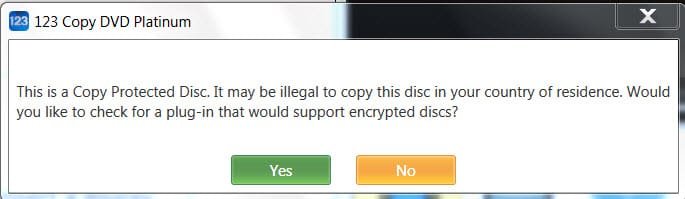
With Night At the Museum - Battle of the Smithsonian - Bluray Disc

12-01-2013 14-45-49.jpg

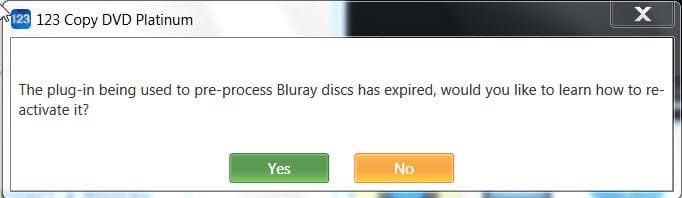
With the default free boooya Addin plug-in from boooya.com which it forces on you during insatallation - God knows what this boooya.com is :)

12-01-2013 15-03-11.jpg

When you say "YES" your knowledge is going to get enhanced.

123 Copy DVD - Disc Decryption

Gist of the knowledgebase article::

The free boooya plug-in does not support the newer types of BD+ secondary Blu-ray protecion.

Use MakeMKV to decrypt and then use DVD 123

Buy anyDVD HD

Is this reactivation of the expired plug-in?

And so it requires third party software.

Why would one buy this to play Blurays? !!!!!!!!!!
 

My Computer My Computer

OS
Windows 7 Home Premium 32 bit
Back
Top