more Windows 7 basic themes other than the standard light blue????

bras4real

New member
Local time
4:08 AM
Messages
5
hello everybody,

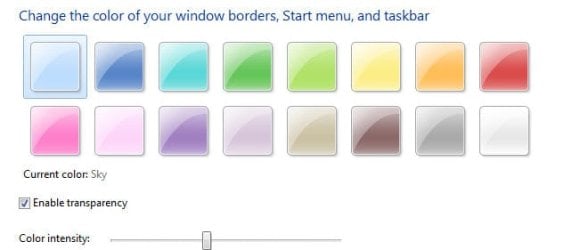
Is there a fairly non-technical method to change the color of the windows 7 basic theme (so not the aero themes!!). The windows areo themes do seem to have an excellent basic color selection from grey to orange, but the basic theme only comes in 'baby blue'.

I dont really appreciate the aero themes in my case because I use changing wallpaper backrounds that are visible through the areo themes it just doesn t look good unless you stick to a plain wallpaper solid colour backround........

I tried google this solution for hours the only way is to use thrd party themes which are a nightmare, I just want to stick to simple colours as in the attachment shown (but then with a solid pattern not glass)

any suggestions/help mostly appreciated!
 

Attachments
  • Snap2.jpg
    Snap2.jpg
    17.1 KB · Views: 210

My Computer My Computer

OS
windows 7 64 bit
Welcome to the Seven Forums
You are right a 3rd party theme with the basic part done to are hard to find but that's what you would need the basic theme is controlled by the areo theme's .msstyle they share some images and some images are for aero and some for basic.

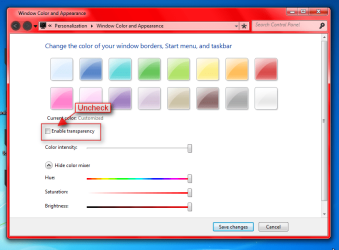
Have you tried to unchecking Enable Transparency with the aero theme?
Jerry
Region.png
 

My Computer My Computer

Computer type
Laptop
Computer Manufacturer/Model Number
Sager NP9170
OS
Win 7 Pro x64 / Win 10 Pro
CPU
Intel(R) Core(TM) i7-3630QM CPU @ 2.40GHz
Motherboard
CLEVO P170EM
Memory
12 GB
Graphics Card(s)
(1) Intel(R) HD Graphics 4000 (2) NVIDIA GeForce GTX 675M
Sound Card
(1) Realtek High Definition Audio (2) Intel(R) Display Aud
Monitor(s) Displays
17.3
Screen Resolution
1920x1080
Hard Drives
(1) Samsung 860 EVO 500GB(OS) (1) Samsung 860 EVO 500GB(Data)
Keyboard
Backlite
Antivirus
MSE, Malwarebytes Pro
Browser
Firefox
Other Info
DESKTOP: Custom-built.
OS: Win 10 Pro x64.
CASE: Rosewill R5.
CPU: Intel I5 4670K CPU @ 3.40GHz.
CPU COOLER: Cool Master Hyper 212 EVO.
MOTHERBOARD: Asus Z87-A.
MEMORY: Kingston HyperX 2x4 GB.
GPU: Nvidia Geforce 650 TI.
PSU: Corsair TX750.
DRIVES: (1) Samsung 840 120 GB SSD (2) Western Digital blue 500 GB 7200 RPM.
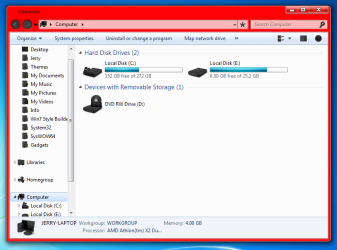
thanks I figured that out exactly, but there is still some pattern in these colours unfortunately. do you know a way to get one colour so no shine effect??
 

My Computer My Computer

OS
windows 7 64 bit
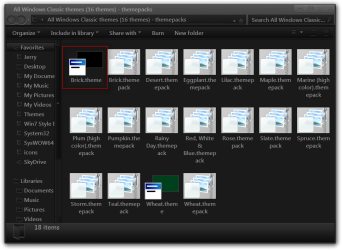
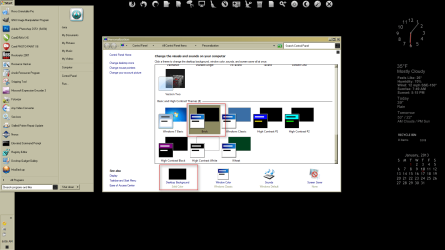
Hello bras4real about this time last year I recreated some basic themes that can be used on Windows 7 based on the old Windows XP themes. These are not 3rd party themes they were created using the lone windows 7 basic theme the same way you have attempted but I used XP Mode as a guide to get the theme as close to the original as possible

Unzip the zip file and click to install the theme in the Personalization panel or save the theme in C/WINDOWS/Resources/Themes.

More Windows Classic Themes for Windows 7
 

My Computer My Computer

Computer type
PC/Desktop
Computer Manufacturer/Model Number
My own abomination, I call it the Money Pit
OS
Windows 10 Pro x 2/Windows 11 Home
CPU
Intel i7 2600K @ 3.40 GHz
Motherboard
ASUS Sabertooth P67
Memory
Corsair Vengeance 16GB DDR3 1600MHz CL8 Dual Channel Kit
Graphics Card(s)
EVGA GeForce RTX 3080 XC3 ULTRA GAMING 10GB GDDR6X
Sound Card
Onboard Realtek or Nvidia High Definition Audio (HDMI)
Monitor(s) Displays
Samsung JS7000 50" SUHD TV or Samsung 27" FHD 60Hz 8ms GTG V
Screen Resolution
1920 x 1080
Hard Drives
1 x Samsung 870 EVO 250 GB SSD (Windows 10 Pro), 1 x Samsung 850 EVO 250 GB SSD (Windows 10 Pro)
PSU
Corsair AX860 - 860W Modular Power Supply
Case
Phanteks Enthoo Luxe Full Tower Case - Black
Cooling
CORSAIR Hydro Series H150i PRO RGB 360mm Liquid CPU Cooler
Keyboard
Logitech K830 Illuminated Living-Room Keyboard
Mouse
Logitech MX Anywhere 2S Wireless Mouse
Internet Speed
100 Mbps
Antivirus
ESET Internet Security
Browser
Latest Version Of Firefox & Microsoft Edge Chromium Stable
Other Info
LG Super Multi Blue Internal Blu-ray Disk Rewriter - BH10LS30
6x2 HDMI Switcher (6 inputs, 2 outputs) so I can send the output of my Cable Box, Roku, or any my 4 computers to either my TV or Monitor separately or simultaneously.
I use Ave's Windows7 Style Builder and Gimp to edit the .msstyles

Aero no shine
1.png

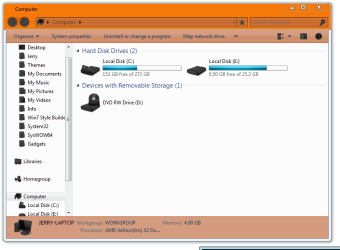
Aero with top frame color change
2.png

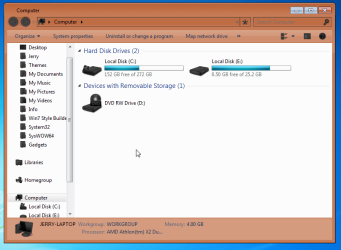
Basic with frame color change
basic.png

Jerry
 

My Computer My Computer

Computer type
Laptop
Computer Manufacturer/Model Number
Sager NP9170
OS
Win 7 Pro x64 / Win 10 Pro
CPU
Intel(R) Core(TM) i7-3630QM CPU @ 2.40GHz
Motherboard
CLEVO P170EM
Memory
12 GB
Graphics Card(s)
(1) Intel(R) HD Graphics 4000 (2) NVIDIA GeForce GTX 675M
Sound Card
(1) Realtek High Definition Audio (2) Intel(R) Display Aud
Monitor(s) Displays
17.3
Screen Resolution
1920x1080
Hard Drives
(1) Samsung 860 EVO 500GB(OS) (1) Samsung 860 EVO 500GB(Data)
Keyboard
Backlite
Antivirus
MSE, Malwarebytes Pro
Browser
Firefox
Other Info
DESKTOP: Custom-built.
OS: Win 10 Pro x64.
CASE: Rosewill R5.
CPU: Intel I5 4670K CPU @ 3.40GHz.
CPU COOLER: Cool Master Hyper 212 EVO.
MOTHERBOARD: Asus Z87-A.
MEMORY: Kingston HyperX 2x4 GB.
GPU: Nvidia Geforce 650 TI.
PSU: Corsair TX750.
DRIVES: (1) Samsung 840 120 GB SSD (2) Western Digital blue 500 GB 7200 RPM.
No third-party tools are needed, actually.

You may simply select the Windows 7 Basic theme (with the blue colors you don't like) and then click at the bottom on Windows Color. This time, you won't just get a color selection, but can actually edit each attribute of the UI such as frame thicknesses, font styles and - you guessed it - colors.

After you're happy with your settings, simply save the theme as a new custom theme.
 

My Computer My Computer

Computer type
PC/Desktop
Computer Manufacturer/Model Number
Custom-built
OS
Windows 7 Professional SP1 32-bit
CPU
Intel Core 2 Duo E6600 2.4GHz
Motherboard
Asus PL5D2
Memory
4GB DDR2-667 (4x1GB in dual-channel config)
Graphics Card(s)
nVidia GeForce 9800 GT
Sound Card
Creative X-Fi XtremeMusic
Monitor(s) Displays
Acer P236H
Screen Resolution
1920x1200 (DVI)
Hard Drives
OCZ SSD Vertex Plus 60GB SATA (Firmware 3.55), 64MB cache
Hitachi HD321KJ SATA, 320GB, 7200rpm, 16MB cache
PSU
Antec TruePower 2.0
Case
Cooler Master Centurion
Cooling
Too many fans
Keyboard
Standard
Mouse
Microsoft wireless optical mouse
Internet Speed
AT&T U-verse (18mbit/sec)
Antivirus
Microsoft Security Essentials
Browser
Firefox
Other Info
Other devices:
Compaq CQ-60 laptop
Google Nexus 7 (2012) tablet
Nvidia SHIELD tablet (US/LTE)
Hardkernel ODROID-XU single-board computer (Samsung Exynos 5420)
No third-party tools are needed, actually.

You may simply select the Windows 7 Basic theme (with the blue colors you don't like) and then click at the bottom on
Windows Color. This time, you won't just get a color selection, but can actually edit each attribute of the UI such as frame thicknesses, font styles and - you guessed it - colors.

I noticed this also, but how do you change the taskbar color???I managed to change the colours of the active windows, and window frames but how to get the taskbar the colour you want..............??? i could nt figure it out...
 

My Computer My Computer

OS
windows 7 64 bit
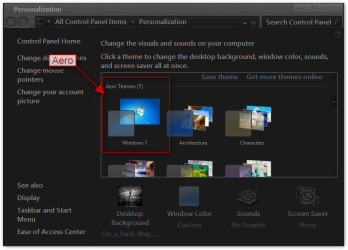
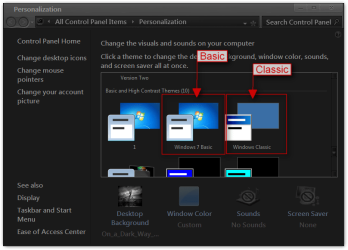
You all are getting Basic and Classic theme mixed up
aero.pngbasic-classic.png

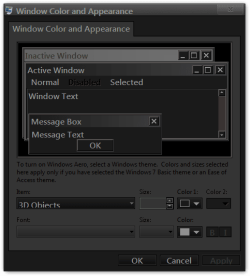
Window Color and Appearance can be used on all 3 types of themes (Aero, Bacis, Classic) but will only change to frame color of Classic theme, on Aero and Basic it can only change some text font and color, with Aero and Basic themes you need to edit the aero.msstyles (and it should be a copy of the aero.msstyles renamed) which makes it a 3rd party custom theme and for it to work you will need to do 1 of these 2 ways of Enabling custom themes.
http://www.sevenforums.com/tutorials/34579-enabling-custom-themes-windows-7-a.html
Or
http://www.sevenforums.com/tutorials/28377-theme-how-apply-custom-themes.html?filter

To change the taskbar color with the Classic theme use 3D Objects in Window Color and Appearance
Window Color and Appearance.png
Jerry
 

My Computer My Computer

Computer type
Laptop
Computer Manufacturer/Model Number
Sager NP9170
OS
Win 7 Pro x64 / Win 10 Pro
CPU
Intel(R) Core(TM) i7-3630QM CPU @ 2.40GHz
Motherboard
CLEVO P170EM
Memory
12 GB
Graphics Card(s)
(1) Intel(R) HD Graphics 4000 (2) NVIDIA GeForce GTX 675M
Sound Card
(1) Realtek High Definition Audio (2) Intel(R) Display Aud
Monitor(s) Displays
17.3
Screen Resolution
1920x1080
Hard Drives
(1) Samsung 860 EVO 500GB(OS) (1) Samsung 860 EVO 500GB(Data)
Keyboard
Backlite
Antivirus
MSE, Malwarebytes Pro
Browser
Firefox
Other Info
DESKTOP: Custom-built.
OS: Win 10 Pro x64.
CASE: Rosewill R5.
CPU: Intel I5 4670K CPU @ 3.40GHz.
CPU COOLER: Cool Master Hyper 212 EVO.
MOTHERBOARD: Asus Z87-A.
MEMORY: Kingston HyperX 2x4 GB.
GPU: Nvidia Geforce 650 TI.
PSU: Corsair TX750.
DRIVES: (1) Samsung 840 120 GB SSD (2) Western Digital blue 500 GB 7200 RPM.
Hello bras4real about this time last year I recreated some basic themes that can be used on Windows 7 based on the old Windows XP themes. These are not 3rd party themes they were created using the lone windows 7 basic theme the same way you have attempted but I used XP Mode as a guide to get the theme as close to the original as possible

Unzip the zip file and click to install the theme in the Personalization panel or save the theme in C/WINDOWS/Resources/Themes.

More Windows Classic Themes for Windows 7

I'm running windows 7 home premium x64 sp1 but nothing changes with these themes.
 

My Computer My Computer

Computer Manufacturer/Model Number
Sony Vaio
OS
Windows 7 Home premium x64
CPU
Intel i5 520m at 2.4GHz(plus turbo mode at 2.9GHz)
Memory
4GB ddr3 1067
Graphics Card(s)
Nvidia 330m
Hello bras4real about this time last year I recreated some basic themes that can be used on Windows 7 based on the old Windows XP themes. These are not 3rd party themes they were created using the lone windows 7 basic theme the same way you have attempted but I used XP Mode as a guide to get the theme as close to the original as possible

Unzip the zip file and click to install the theme in the Personalization panel or save the theme in C/WINDOWS/Resources/Themes.

More Windows Classic Themes for Windows 7

I'm running windows 7 home premium x64 sp1 but nothing changes with these themes.

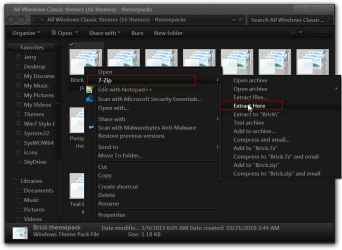
Try putting them in C:\Windows\Resources\Ease of Access Themes folder. The theme packs are just a zip folder download 7-zip and you can extract the contents and put him in the above location and they should show up at the bottom of personalization.

Jerry
 

My Computer My Computer

Computer type
Laptop
Computer Manufacturer/Model Number
Sager NP9170
OS
Win 7 Pro x64 / Win 10 Pro
CPU
Intel(R) Core(TM) i7-3630QM CPU @ 2.40GHz
Motherboard
CLEVO P170EM
Memory
12 GB
Graphics Card(s)
(1) Intel(R) HD Graphics 4000 (2) NVIDIA GeForce GTX 675M
Sound Card
(1) Realtek High Definition Audio (2) Intel(R) Display Aud
Monitor(s) Displays
17.3
Screen Resolution
1920x1080
Hard Drives
(1) Samsung 860 EVO 500GB(OS) (1) Samsung 860 EVO 500GB(Data)
Keyboard
Backlite
Antivirus
MSE, Malwarebytes Pro
Browser
Firefox
Other Info
DESKTOP: Custom-built.
OS: Win 10 Pro x64.
CASE: Rosewill R5.
CPU: Intel I5 4670K CPU @ 3.40GHz.
CPU COOLER: Cool Master Hyper 212 EVO.
MOTHERBOARD: Asus Z87-A.
MEMORY: Kingston HyperX 2x4 GB.
GPU: Nvidia Geforce 650 TI.
PSU: Corsair TX750.
DRIVES: (1) Samsung 840 120 GB SSD (2) Western Digital blue 500 GB 7200 RPM.
Just did this and it still does not work... I just get black background and basic theme... It is very strange...
 

My Computer My Computer

Computer Manufacturer/Model Number
Sony Vaio
OS
Windows 7 Home premium x64
CPU
Intel i5 520m at 2.4GHz(plus turbo mode at 2.9GHz)
Memory
4GB ddr3 1067
Graphics Card(s)
Nvidia 330m
I just tried it and it worked fine, which one did you try?

Jerry

untitled.PNG
 

My Computer My Computer

Computer type
Laptop
Computer Manufacturer/Model Number
Sager NP9170
OS
Win 7 Pro x64 / Win 10 Pro
CPU
Intel(R) Core(TM) i7-3630QM CPU @ 2.40GHz
Motherboard
CLEVO P170EM
Memory
12 GB
Graphics Card(s)
(1) Intel(R) HD Graphics 4000 (2) NVIDIA GeForce GTX 675M
Sound Card
(1) Realtek High Definition Audio (2) Intel(R) Display Aud
Monitor(s) Displays
17.3
Screen Resolution
1920x1080
Hard Drives
(1) Samsung 860 EVO 500GB(OS) (1) Samsung 860 EVO 500GB(Data)
Keyboard
Backlite
Antivirus
MSE, Malwarebytes Pro
Browser
Firefox
Other Info
DESKTOP: Custom-built.
OS: Win 10 Pro x64.
CASE: Rosewill R5.
CPU: Intel I5 4670K CPU @ 3.40GHz.
CPU COOLER: Cool Master Hyper 212 EVO.
MOTHERBOARD: Asus Z87-A.
MEMORY: Kingston HyperX 2x4 GB.
GPU: Nvidia Geforce 650 TI.
PSU: Corsair TX750.
DRIVES: (1) Samsung 840 120 GB SSD (2) Western Digital blue 500 GB 7200 RPM.
I've tried the brick theme and desert.
 

My Computer My Computer

Computer Manufacturer/Model Number
Sony Vaio
OS
Windows 7 Home premium x64
CPU
Intel i5 520m at 2.4GHz(plus turbo mode at 2.9GHz)
Memory
4GB ddr3 1067
Graphics Card(s)
Nvidia 330m
Brick works fine for me also. If you have 7-zip you need to right-click on any of those theme packs go to 7-zip and then to Extract here then you will see the extracted theme copy that to C:\Windows\Resources\Ease of Access Themes folder then in Personalization click on Brick then you will need to click on Desktop background and change it to what you want that will get rid of the back background.

Jerry
All Windows Classic themes (16 themes) - themepacks.png

All Windows Classic themes (16 themes) - themepacks2.png

Ease of Access Themes.png

b.PNG
 

My Computer My Computer

Computer type
Laptop
Computer Manufacturer/Model Number
Sager NP9170
OS
Win 7 Pro x64 / Win 10 Pro
CPU
Intel(R) Core(TM) i7-3630QM CPU @ 2.40GHz
Motherboard
CLEVO P170EM
Memory
12 GB
Graphics Card(s)
(1) Intel(R) HD Graphics 4000 (2) NVIDIA GeForce GTX 675M
Sound Card
(1) Realtek High Definition Audio (2) Intel(R) Display Aud
Monitor(s) Displays
17.3
Screen Resolution
1920x1080
Hard Drives
(1) Samsung 860 EVO 500GB(OS) (1) Samsung 860 EVO 500GB(Data)
Keyboard
Backlite
Antivirus
MSE, Malwarebytes Pro
Browser
Firefox
Other Info
DESKTOP: Custom-built.
OS: Win 10 Pro x64.
CASE: Rosewill R5.
CPU: Intel I5 4670K CPU @ 3.40GHz.
CPU COOLER: Cool Master Hyper 212 EVO.
MOTHERBOARD: Asus Z87-A.
MEMORY: Kingston HyperX 2x4 GB.
GPU: Nvidia Geforce 650 TI.
PSU: Corsair TX750.
DRIVES: (1) Samsung 840 120 GB SSD (2) Western Digital blue 500 GB 7200 RPM.
Oh sorry I've found some others basic themes and stopped testing... Maybe I need to reinstall my os for a lot reasons...
 

My Computer My Computer

Computer Manufacturer/Model Number
Sony Vaio
OS
Windows 7 Home premium x64
CPU
Intel i5 520m at 2.4GHz(plus turbo mode at 2.9GHz)
Memory
4GB ddr3 1067
Graphics Card(s)
Nvidia 330m
There actually IS this windows 7 basic gray theme made by leosss on deviantart. I tried it and it looks really awesome. Maybe there are still some variations of the windows 7 basic theme in other colours, but I haven't found them so far...
 

My Computers My Computers

System One System Two

  • Computer type
    Laptop
    Computer Manufacturer/Model Number
    Acer Aspire ONE D260
    OS
    Windows 7 Starter 32bit
    CPU
    Intel(R)Atom(TM)CPU N450/1.66GHz
    Memory
    2 GB
    Antivirus
    ESET NOD32 Antivirus
    Browser
    Google Chrome
  • Antivirus
    Linux
Back
Top