Windows 7 identifies WPA2 network as WEP

stephglo

New member
Local time
3:18 PM
Messages
12
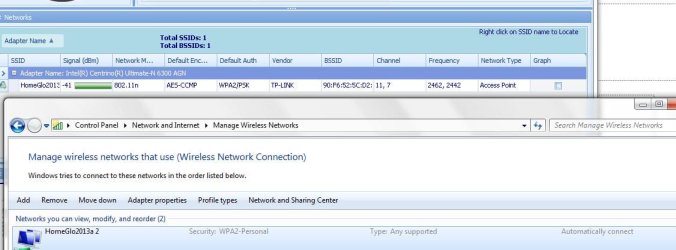
I have multiple devices (approximately 20 with various OS) attached to a wireless network with WPA2-Personal security. No other devices have reported trouble. However I began having trouble with increasing frequency on my work laptop and am now rarely able connect without disabling the security, restarting the router, and removing any remembered networks in Manage Wireless Networks . I have spent days online with Dell trying various versions of the wireless drivers, reinstalling windows, and have had the wireless card, motherboard, and backcover including antenna replaced, all to no avail. The most common error claims that the security settings of the access point do not match those saved on the computer. I can compare the settings with the UI and vouch that they do agree, however my computer keeps identifying the WPA2 security as WEP. Based on advice from another forum I ran a trace while duplicating the problem. The contents of this trace are consistent with what I've seen - the network security is incorrectly identified as WEP. The router is a TP-link model TL-WR2543ND and I've updated the firmware to 3.13.17 Build 120509. Since there are so many other devices on the network I would really like to find a solution that doesn't entail constant changes to the network security or leave it unsecured. I'm attaching a zip of files that resulted from the trace, will be happy to provide any additional required info. I've installed Xirrus wi-fi inspector as an aid in diagnosing the problem and it seems that occasionally the network security is correctly identified but once it has been incorrectly identified once, I'm screwed. The other bizarre symptom is that the network is frequently identified as 2 networks- this is visible in the log. One of them (the one not broadcasting an SSID) is always identified as WEP, the real network is sometimes identified correctly but generally is not.
 

Attachments

My Computer My Computer

OS
Windows 7 Professional 32bit
I'm not too familiar with NetTrace but if you can post a screen shot of the ipconfig/all it would be helpful.

A screen shot of the Xirrus read out would also be helpful. :)

Are you certain that your modem isn't one of those modem/router's ?
 

My Computer My Computer

Computer type
PC/Desktop
Computer Manufacturer/Model Number
Home built
OS
Windows 7 Ult, Windows 8.1 Pro,
CPU
Q9650-4.275GHz, E8600 4.5GHz, E6750-3.8GHz
Motherboard
Evga 780i FTW
Memory
G.Skill PC2 9600 1200Mhz 5 5 5 15 2T
Graphics Card(s)
GTX480
Sound Card
Asus Xonar D2
Monitor(s) Displays
HannsG
Screen Resolution
1680X1050
Hard Drives
GSkill Phoenix Pro 120GB SSD
PSU
ThermalTake Toughpower 1000Watt modular
Case
ThermalTake XaserV
Cooling
Xigmatek S1283
Keyboard
Logitech G15
Mouse
Logitech G9
Internet Speed
T1
Screenshots attached. I believe the router in question is not the problem because it worked fine for several weeks before the connection issue appeared. Now, when I try the old router that connected happily for over a year I see the same issues. Different brands, same WPA2 seen as WEP problem.
I've stuck the screenshots in a docx file with some small explanation and the text contents of one of the trace files that seemed particularly informative.
 

Attachments

My Computer My Computer

OS
Windows 7 Professional 32bit
Have you tried a hard reset of the router?

The 30-30-30 Hard Reset Rule for Routers

After the reset you will need to type in your routers wireless set up information again.

I'm not sure which brand or router you are using but if it's a dual band router perhaps the 5ghz frequency is enabled for some reason and you don't realize it?

I'm assuming that you are using a security password for the router and that you have the SSID broadcast turned on etc.
 

My Computer My Computer

Computer type
PC/Desktop
Computer Manufacturer/Model Number
Home built
OS
Windows 7 Ult, Windows 8.1 Pro,
CPU
Q9650-4.275GHz, E8600 4.5GHz, E6750-3.8GHz
Motherboard
Evga 780i FTW
Memory
G.Skill PC2 9600 1200Mhz 5 5 5 15 2T
Graphics Card(s)
GTX480
Sound Card
Asus Xonar D2
Monitor(s) Displays
HannsG
Screen Resolution
1680X1050
Hard Drives
GSkill Phoenix Pro 120GB SSD
PSU
ThermalTake Toughpower 1000Watt modular
Case
ThermalTake XaserV
Cooling
Xigmatek S1283
Keyboard
Logitech G15
Mouse
Logitech G9
Internet Speed
T1
More info but still no solution: The nonbroadcasting network that appears in the Xirrus screenshots appears to be our wii u. The bssid shown in the Xirrus screenshot for the non-broadcasting network share the first 5 characters of the mac id of the wii u. The location as shown in the radar map corresponds roughly to the location in the house of the wii u. When I turn off the wii u, the non-broadcasting network goes away.

With the wii u off I unplugged the router, waited, deleted the wireless network from Manage Wireless Networks, then rebooted the router and was able to connect with ease. For all of 5 minutes. While composing this reply the connection went away and any attempt to reconnect claims that the security settings do not match. Since the security settings didn't change, something is not being interpreted correctly and I can't even blame the wii u this time around.
 

My Computer My Computer

OS
Windows 7 Professional 32bit
Thanks for the info, chev65. I know I've done a hard reset within the past few weeks and it did default to factory settings but it may be worth trying again in the morning. I'll let you know how it goes. I've confirmed that the 5G band is unselected in the wireless settings. Your other assumptions are correct- security password and SSID broadcast enabled.

Have you tried a hard reset of the router?

The 30-30-30 Hard Reset Rule for Routers

After the reset you will need to type in your routers wireless set up information again.

I'm not sure which brand or router you are using but if it's a dual band router perhaps the 5ghz frequency is enabled for some reason and you don't realize it?

I'm assuming that you are using a security password for the router and that you have the SSID broadcast turned on etc.
 

My Computer My Computer

OS
Windows 7 Professional 32bit
After the reset of the router.

If you can post the ipconfig/all from the work machine with the problem it would be most helpful. :)
 

My Computer My Computer

Computer type
PC/Desktop
Computer Manufacturer/Model Number
Home built
OS
Windows 7 Ult, Windows 8.1 Pro,
CPU
Q9650-4.275GHz, E8600 4.5GHz, E6750-3.8GHz
Motherboard
Evga 780i FTW
Memory
G.Skill PC2 9600 1200Mhz 5 5 5 15 2T
Graphics Card(s)
GTX480
Sound Card
Asus Xonar D2
Monitor(s) Displays
HannsG
Screen Resolution
1680X1050
Hard Drives
GSkill Phoenix Pro 120GB SSD
PSU
ThermalTake Toughpower 1000Watt modular
Case
ThermalTake XaserV
Cooling
Xigmatek S1283
Keyboard
Logitech G15
Mouse
Logitech G9
Internet Speed
T1
OK, did a hard reset of the router using the 30-30-30 directions and re-input all the security settings. I am currently connected wirelessly, though this is not an indicator of success because I have reconnected previously only to suddenly lose both connection and ability to reconnect until I reboot the router and delete the network from my computer.
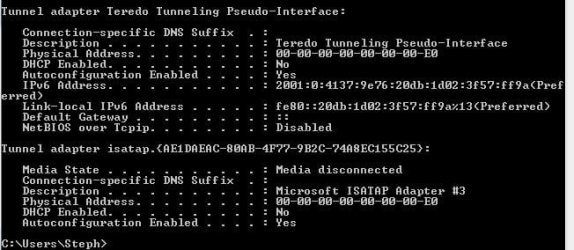
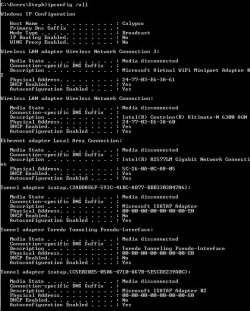
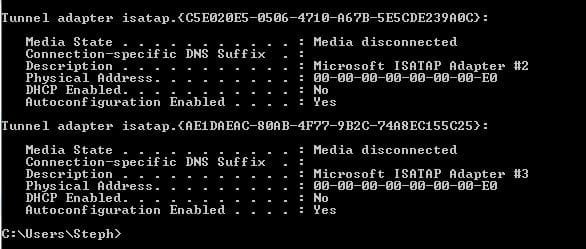
Attached are two screenshots of ipconfig /all right now in the working and connected state.
I will repost when I lose connection (if it happens). A new motherboard is being input this afternoon because power and display issues have occurred since the last one was installed on Monday so I may need to recreate new before and after pics after that change.
Further information: On the router I have DHCP assigned ips and ARP binding attached in order to be able to rule out some other issues and read the router logs more easily. These settings do not appear to have any impact on my ability to connect but I want anyone willing to help to have all the info. At various times I have ruled out router, software, and hardware, so am taking a much harder look at each component this time around.
 

Attachments

  • ipconfig1.JPG
    ipconfig1.JPG
    103.9 KB · Views: 7
  • ipconfig2.JPG
    ipconfig2.JPG
    42.5 KB · Views: 7

My Computer My Computer

OS
Windows 7 Professional 32bit
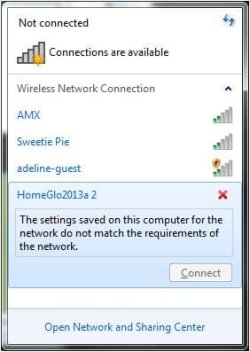
While I was eating lunch the connection got lost again and could not be re-established. So this is before the new motherboard coming this afternoon. I've taken shots of ipconfig below, along with the error that shows if I persist in trying to connect. I've also attached screenshots of Xirrus showing first the network displaying as WPA2. The moment I enter a password in the connection process, however, Xirrus shows the network as WEP (second xirrus image) and I get the security settings error. No changes to the network were made between the screenshots in my last post and the screenshots in this post. No changes to my computer were made either. I looked away and had lost connection.
 

Attachments

  • ipconfigAfterFail1.JPG
    ipconfigAfterFail1.JPG
    85.8 KB · Views: 4
  • ipconfigAFterFail2.JPG
    ipconfigAFterFail2.JPG
    33.1 KB · Views: 5
  • NetworkError.jpg
    NetworkError.jpg
    17.4 KB · Views: 7
  • NetworkProb.JPG
    NetworkProb.JPG
    65.3 KB · Views: 6
  • NetworkProb2JPG.JPG
    NetworkProb2JPG.JPG
    33 KB · Views: 7

My Computer My Computer

OS
Windows 7 Professional 32bit
So it's just this computer that you have the problem with? Presumably all your other computers that you have and connect wirelessly with use the same settings (password/security level) as this one, yet they remain connected?

What I'm going to suggest is to temporarily change the password on the router to a new one and see if the problematic machine maintains its connection with the new password (you will, of course, need to use the new password on both router and machine). Don't worry about the others not being able to connect, as this is only for testing purposes and you can always reset the password to the original afterwards. In fact, you may well find that this solves the problem. Another thing would be to ensure that the driver is up to date, as support for WEP/WPA/WPA2 is a function of the driver. What network adapters do you have on your other computers? If one of them is the same (and I'm assuming that it is a USB device), try swapping it over to see if it is a hardware problem with the adapter. If you have one of a different make that is working, try that as well (but you might need to install the driver for it). Also test the adapter from your problematic machine on one of your others. Does the problem remain with the initial machine, or does it move with the adapter?
 

My Computer My Computer

Computer type
PC/Desktop
Computer Manufacturer/Model Number
Dwarf Dwf/11/2012 r09/2013
OS
Windows 8.1 Pro RTM x64
CPU
Intel Core-i5-3570K 4-core @ 3.4GHz (Ivy Bridge) (OC 4.4GHz)
Motherboard
ASRock Z77 Extreme4-M
Memory
4 x 4GB DDR3-1600 Corsair Vengeance CMZ8GX3M2A1600C9B (16GB)
Graphics Card(s)
MSI GeForce GTX770 Gaming OC 2GB
Sound Card
Realtek High Definition on board solution (ALC 898)
Monitor(s) Displays
ViewSonic VA1912w Widescreen (VGA)
Screen Resolution
1440x900
Hard Drives
OCZ Agility 3 SSD 120GB SATA III x2 (RAID 0)
Samsung HD501LJ 500GB SATA II x2
Hitachi HDS721010CLA332 1TB SATA II
Iomega 1.5TB Ext USB 2.0
WD 2.0TB Ext USB 3.0
PSU
XFX Pro Series 850W Semi-Modular
Case
Gigabyte IF233
Cooling
1 x 120mm Front Inlet 1 x 120mm Rear Exhaust
Keyboard
Microsoft Comfort Curve Keyboard 3000 (USB)
Mouse
Microsoft Comfort Mouse 3000 for Business (USB)
Internet Speed
NetGear DG834Gv3 ADSL Modem/Router (Ethernet) ~4.0 Mb/s (O2)
Antivirus
Avast! 8.0.1497
Browser
IE 11
Other Info
Optical Drive: HL-DT-ST BD-RE BH10LS30 SATA Bluray
Lexmark S305 Printer/Scanner/Copier (USB)
WEI Score: 8.1/8.1/8.5/8.5/8.25
Asus Eee PC 1011PX Netbook (Windows 7 x86 Starter)
Dwarf, thank you.
Yes, the other computers on the network have been happily connected and have become disconnected only as a result of my constant fiddling with the router. They happily reconnect once I've communicated the new settings. Only the Windows 7 laptop has an issue.
The wireless adapter is not a usb device but an internal card that Dell replaced last week hoping to solve the issue. It is an Intel(R) Centrino(R) Ultimate-N 6300AGN wireless card running driver version 15.3.1.2 released 9/30/2012. Unfortunately no other device on the network has this card. I have worked with Dell to try different versions of the driver and at one point did a complete restore back to June when everything was running beautifully but so far none of the driver versions we have tried has worked and the problem resurfaced after the complete restore to June. The restore was a backup of all partitions using Acronis which was why I initially rejected a software solution and thought it must be hardware or router related. I will try resetting the password per your solution however may not know the results for many hours since I can typically reconnect once per major change to the router and remain connected for an indefinite period of time before losing connection and ability to connect. New mother board has arrived, will try afterwards...

So it's just this computer that you have the problem with? Presumably all your other computers that you have and connect wirelessly with use the same settings (password/security level) as this one, yet they remain connected?

What I'm going to suggest is to temporarily change the password on the router to a new one and see if the problematic machine maintains its connection with the new password (you will, of course, need to use the new password on both router and machine). Don't worry about the others not being able to connect, as this is only for testing purposes and you can always reset the password to the original afterwards. In fact, you may well find that this solves the problem. Another thing would be to ensure that the driver is up to date, as support for WEP/WPA/WPA2 is a function of the driver. What network adapters do you have on your other computers? If one of them is the same (and I'm assuming that it is a USB device), try swapping it over to see if it is a hardware problem with the adapter. If you have one of a different make that is working, try that as well (but you might need to install the driver for it). Also test the adapter from your problematic machine on one of your others. Does the problem remain with the initial machine, or does it move with the adapter?
 

My Computer My Computer

OS
Windows 7 Professional 32bit
Update: the motherboard that dell sent today was defective and the computer will no longer boot. At this point they are having me send it in to their depot since it has had so many issues. So, I will not try anything for about a week until I have it returned. I'll update the post when I have it back- perhaps the issue will have been resolved by whatever work is done at the depot.
 

My Computer My Computer

OS
Windows 7 Professional 32bit
Before you send it back in, copy any personal data onto USB stick(s) and restore it to factory condition using the recovery partition. In all likelihood, they will do this any way, but you still don't want them to have potential access to your private information.
 

My Computer My Computer

Computer type
PC/Desktop
Computer Manufacturer/Model Number
Dwarf Dwf/11/2012 r09/2013
OS
Windows 8.1 Pro RTM x64
CPU
Intel Core-i5-3570K 4-core @ 3.4GHz (Ivy Bridge) (OC 4.4GHz)
Motherboard
ASRock Z77 Extreme4-M
Memory
4 x 4GB DDR3-1600 Corsair Vengeance CMZ8GX3M2A1600C9B (16GB)
Graphics Card(s)
MSI GeForce GTX770 Gaming OC 2GB
Sound Card
Realtek High Definition on board solution (ALC 898)
Monitor(s) Displays
ViewSonic VA1912w Widescreen (VGA)
Screen Resolution
1440x900
Hard Drives
OCZ Agility 3 SSD 120GB SATA III x2 (RAID 0)
Samsung HD501LJ 500GB SATA II x2
Hitachi HDS721010CLA332 1TB SATA II
Iomega 1.5TB Ext USB 2.0
WD 2.0TB Ext USB 3.0
PSU
XFX Pro Series 850W Semi-Modular
Case
Gigabyte IF233
Cooling
1 x 120mm Front Inlet 1 x 120mm Rear Exhaust
Keyboard
Microsoft Comfort Curve Keyboard 3000 (USB)
Mouse
Microsoft Comfort Mouse 3000 for Business (USB)
Internet Speed
NetGear DG834Gv3 ADSL Modem/Router (Ethernet) ~4.0 Mb/s (O2)
Antivirus
Avast! 8.0.1497
Browser
IE 11
Other Info
Optical Drive: HL-DT-ST BD-RE BH10LS30 SATA Bluray
Lexmark S305 Printer/Scanner/Copier (USB)
WEI Score: 8.1/8.1/8.5/8.5/8.25
Asus Eee PC 1011PX Netbook (Windows 7 x86 Starter)
Good point, will do. Need to go buy a cage and get Acronis working on my temp computer so I can create a final backup and push the factory install onto the existing hard drive.
Before you send it back in, copy any personal data onto USB stick(s) and restore it to factory condition using the recovery partition. In all likelihood, they will do this any way, but you still don't want them to have potential access to your private information.
 

My Computer My Computer

OS
Windows 7 Professional 32bit
I am coming to the conclusion that this is indeed a Windows 7 on PC problem. My computer is back from the shop and still has the problem. The problem is consistent both with the router I bought a few months ago and which has otherwise been performing perfectly and the router I used for several years before getting the new one (only replaced it to extend the range) Both have current firmware. My new evidence comes from the fact that a friend loaned me her Windows 7 laptop to test here and I'm having similar issues on it. There are 24 devices that connect to my internet. These include an XP machine, a Vista machine, an Apple running Windows 7, multiple gaming devices, multiple iphones/pads, and the only two devices having any issues are both running Windows 7 on PC. I had initially discounted this possibility since the apple is also running Windows 7 but I am guessing the system files that interface with the wireless drivers may be the issue.
Suggestions? Not sure what else there is to do on my end except strip all security from my router and wait for Microsoft to put out a patch. I can't be the only one having problems. Please, any ideas, send them my way...
 

My Computer My Computer

OS
Windows 7 Professional 32bit
I had the same problem and solved it by changing my router's security setting from "Auto (WPA or WPA2)" to "WPA2 only". Apparently Windows 7 didn't understand the auto mode.
 

My Computer My Computer

Computer type
PC/Desktop
OS
Windows 7 64
Back
Top