Solved BSOD playing CS:GO/APB/ARMA II, error 0x0000003b & 0x000000a

Alright I went ahead and uninstalled CCC. There wasn't an option to get rid of the Install Manager without removing the rest of the display drivers. Am I missing something?
 

My Computer My Computer

At a glance

Windows 7 Professional x64i7 3770k16 gbSapphire 7970 OC
Computer Manufacturer/Model Number
N/A
OS
Windows 7 Professional x64
CPU
i7 3770k
Motherboard
Asus P8z77-v
Memory
16 gb
Graphics Card(s)
Sapphire 7970 OC
Sound Card
on board
Monitor(s) Displays
3 22" Samsung LED
Hard Drives
Scan Disk 240 gb SSD

1 TB Seagate
PSU
1100w Majesty
Case
CoolerMaster
Cooling
Antec 620
Alright I went ahead and uninstalled CCC. There wasn't an option to get rid of the Install Manager without removing the rest of the display drivers. Am I missing something?


Its fine, as long as the CCC is removed, thats the one that can cause problems.
Any crashes since removing?

Cheers

Dave
 

My Computer My Computer

At a glance

Windows 7 Professional 64bitAMD Athlon (tm) X2 5200+ Dual Core 2712 Mhz4GBNividia GeForce 8600 GTS- DIED 25/7/2013 R.I.P
Computer type
PC/Desktop
OS
Windows 7 Professional 64bit
CPU
AMD Athlon (tm) X2 5200+ Dual Core 2712 Mhz
Motherboard
Asus
Memory
4GB
Graphics Card(s)
Nividia GeForce 8600 GTS- DIED 25/7/2013 R.I.P
Sound Card
None
Monitor(s) Displays
22" Yuraku LCD (Dont ask)
Screen Resolution
1280x960
Hard Drives
2TB WD Caviar green
PSU
Windy up type
Case
Scout cm Storm
Cooling
Hair dryer on full cool power ;-)
Keyboard
QWERTY
Mouse
Microsoft Special
Internet Speed
BT Infinity 9.38Mb/s Wheeeeeeeeeeeeeeee!!
Antivirus
MSE
Browser
Internet Explore 10 and Chrome
Other Info
Don't shout...I've got a Hangover!
Alright I went ahead and uninstalled CCC. There wasn't an option to get rid of the Install Manager without removing the rest of the display drivers. Am I missing something?


Its fine, as long as the CCC is removed, thats the one that can cause problems.
Any crashes since removing?

Cheers

Dave

Well nothing so far. Time will tell. What would you suggest as an alternative to CCC? MSI Afterburner?

Side note: The only thing driver verifier is doing is causing a slightly noticeable sluggishness in programs.


UPDATE:

Computer screen has frozen twice. I was unable to recover from it and had to do a hard reboot (push the button). I'm not sure if this was due to verifier stressing the PC or what.
 

My Computer My Computer

At a glance

Windows 7 Professional x64i7 3770k16 gbSapphire 7970 OC
Computer Manufacturer/Model Number
N/A
OS
Windows 7 Professional x64
CPU
i7 3770k
Motherboard
Asus P8z77-v
Memory
16 gb
Graphics Card(s)
Sapphire 7970 OC
Sound Card
on board
Monitor(s) Displays
3 22" Samsung LED
Hard Drives
Scan Disk 240 gb SSD

1 TB Seagate
PSU
1100w Majesty
Case
CoolerMaster
Cooling
Antec 620
Alright I went ahead and uninstalled CCC. There wasn't an option to get rid of the Install Manager without removing the rest of the display drivers. Am I missing something?


Its fine, as long as the CCC is removed, thats the one that can cause problems.
Any crashes since removing?

Cheers

Dave

Well nothing so far. Time will tell. What would you suggest as an alternative to CCC? MSI Afterburner?

Side note: The only thing driver verifier is doing is causing a slightly noticeable sluggishness in programs.


UPDATE:

Computer screen has frozen twice. I was unable to recover from it and had to do a hard reboot (push the button). I'm not sure if this was due to verifier stressing the PC or what.

Hi,

Possible it is the verifier, i would advise to run that overnight.
Try playing games and using computer as normal, and see if you get the BSOD, then run verifier when computer not in use.

Cheers

Dave
 

My Computer My Computer

At a glance

Windows 7 Professional 64bitAMD Athlon (tm) X2 5200+ Dual Core 2712 Mhz4GBNividia GeForce 8600 GTS- DIED 25/7/2013 R.I.P
Computer type
PC/Desktop
OS
Windows 7 Professional 64bit
CPU
AMD Athlon (tm) X2 5200+ Dual Core 2712 Mhz
Motherboard
Asus
Memory
4GB
Graphics Card(s)
Nividia GeForce 8600 GTS- DIED 25/7/2013 R.I.P
Sound Card
None
Monitor(s) Displays
22" Yuraku LCD (Dont ask)
Screen Resolution
1280x960
Hard Drives
2TB WD Caviar green
PSU
Windy up type
Case
Scout cm Storm
Cooling
Hair dryer on full cool power ;-)
Keyboard
QWERTY
Mouse
Microsoft Special
Internet Speed
BT Infinity 9.38Mb/s Wheeeeeeeeeeeeeeee!!
Antivirus
MSE
Browser
Internet Explore 10 and Chrome
Other Info
Don't shout...I've got a Hangover!
So wait, Driver Verifier causes freezing or is that just speculation? Make sure that to confirm if that's the case, since it really should be causing BSODs, not freezing.

I personally recommend keeping Driver Verifier on at all times until this situation is taken care of. Unless it causes a boot loop or for some reason it causes system to freeze instead of BSOD, it should be kept on. Yes, DV will cause sluggishness because of the extra driver checks. Try to coerce your system to BSOD again when DV is on then send us the crashdumps.
 

My Computer My Computer

At a glance

Windows 7 64-bit
OS
Windows 7 64-bit
So wait, Driver Verifier causes freezing or is that just speculation? Make sure that to confirm if that's the case, since it really should be causing BSODs, not freezing.

I personally recommend keeping Driver Verifier on at all times until this situation is taken care of. Unless it causes a boot loop or for some reason it causes system to freeze instead of BSOD, it should be kept on. Yes, DV will cause sluggishness because of the extra driver checks. Try to coerce your system to BSOD again when DV is on then send us the crashdumps.


Yeah,,,sorry Vir Gnarus....I shouldnt have advised, till Driver Verifier had ran its course....my bad :o
 

My Computer My Computer

At a glance

Windows 7 Professional 64bitAMD Athlon (tm) X2 5200+ Dual Core 2712 Mhz4GBNividia GeForce 8600 GTS- DIED 25/7/2013 R.I.P
Computer type
PC/Desktop
OS
Windows 7 Professional 64bit
CPU
AMD Athlon (tm) X2 5200+ Dual Core 2712 Mhz
Motherboard
Asus
Memory
4GB
Graphics Card(s)
Nividia GeForce 8600 GTS- DIED 25/7/2013 R.I.P
Sound Card
None
Monitor(s) Displays
22" Yuraku LCD (Dont ask)
Screen Resolution
1280x960
Hard Drives
2TB WD Caviar green
PSU
Windy up type
Case
Scout cm Storm
Cooling
Hair dryer on full cool power ;-)
Keyboard
QWERTY
Mouse
Microsoft Special
Internet Speed
BT Infinity 9.38Mb/s Wheeeeeeeeeeeeeeee!!
Antivirus
MSE
Browser
Internet Explore 10 and Chrome
Other Info
Don't shout...I've got a Hangover!
I was actually trying to confirm if that was the case with the client. If so, then you're right, DV should be left off since it won't serve us any good.
 

My Computer My Computer

At a glance

Windows 7 64-bit
OS
Windows 7 64-bit
I was actually trying to confirm if that was the case with the client. If so, then you're right, DV should be left off since it won't serve us any good.


Ahhh......I see....thanks :D
 

My Computer My Computer

At a glance

Windows 7 Professional 64bitAMD Athlon (tm) X2 5200+ Dual Core 2712 Mhz4GBNividia GeForce 8600 GTS- DIED 25/7/2013 R.I.P
Computer type
PC/Desktop
OS
Windows 7 Professional 64bit
CPU
AMD Athlon (tm) X2 5200+ Dual Core 2712 Mhz
Motherboard
Asus
Memory
4GB
Graphics Card(s)
Nividia GeForce 8600 GTS- DIED 25/7/2013 R.I.P
Sound Card
None
Monitor(s) Displays
22" Yuraku LCD (Dont ask)
Screen Resolution
1280x960
Hard Drives
2TB WD Caviar green
PSU
Windy up type
Case
Scout cm Storm
Cooling
Hair dryer on full cool power ;-)
Keyboard
QWERTY
Mouse
Microsoft Special
Internet Speed
BT Infinity 9.38Mb/s Wheeeeeeeeeeeeeeee!!
Antivirus
MSE
Browser
Internet Explore 10 and Chrome
Other Info
Don't shout...I've got a Hangover!
Well while I was running a game that normally causes the BSOD, I had an issue where the screen froze and was unrecoverable. I just rebooted the PC to clear it up. I'm really not sure what caused it, but I notice that game FPS seems to drop a bit with verifier running.

Verifier has been running for a little over 24 hours with no problems. Same as last time. Perhaps it was the CCC?
 

My Computer My Computer

At a glance

Windows 7 Professional x64i7 3770k16 gbSapphire 7970 OC
Computer Manufacturer/Model Number
N/A
OS
Windows 7 Professional x64
CPU
i7 3770k
Motherboard
Asus P8z77-v
Memory
16 gb
Graphics Card(s)
Sapphire 7970 OC
Sound Card
on board
Monitor(s) Displays
3 22" Samsung LED
Hard Drives
Scan Disk 240 gb SSD

1 TB Seagate
PSU
1100w Majesty
Case
CoolerMaster
Cooling
Antec 620
Hey fxblaze,


Pop back in a few days and let us know if your BSOD's have stopped, Its quite possible CCC was causing the issues, saw quite a few recently.

cheers

Dave
 

My Computer My Computer

At a glance

Windows 7 Professional 64bitAMD Athlon (tm) X2 5200+ Dual Core 2712 Mhz4GBNividia GeForce 8600 GTS- DIED 25/7/2013 R.I.P
Computer type
PC/Desktop
OS
Windows 7 Professional 64bit
CPU
AMD Athlon (tm) X2 5200+ Dual Core 2712 Mhz
Motherboard
Asus
Memory
4GB
Graphics Card(s)
Nividia GeForce 8600 GTS- DIED 25/7/2013 R.I.P
Sound Card
None
Monitor(s) Displays
22" Yuraku LCD (Dont ask)
Screen Resolution
1280x960
Hard Drives
2TB WD Caviar green
PSU
Windy up type
Case
Scout cm Storm
Cooling
Hair dryer on full cool power ;-)
Keyboard
QWERTY
Mouse
Microsoft Special
Internet Speed
BT Infinity 9.38Mb/s Wheeeeeeeeeeeeeeee!!
Antivirus
MSE
Browser
Internet Explore 10 and Chrome
Other Info
Don't shout...I've got a Hangover!
This is with no headset plugged in and the drivers uninstalled. I was also not running Teamspeak either. I'm almost out of hair to pull out!
 

My Computer My Computer

At a glance

Windows 7 Professional x64i7 3770k16 gbSapphire 7970 OC
Computer Manufacturer/Model Number
N/A
OS
Windows 7 Professional x64
CPU
i7 3770k
Motherboard
Asus P8z77-v
Memory
16 gb
Graphics Card(s)
Sapphire 7970 OC
Sound Card
on board
Monitor(s) Displays
3 22" Samsung LED
Hard Drives
Scan Disk 240 gb SSD

1 TB Seagate
PSU
1100w Majesty
Case
CoolerMaster
Cooling
Antec 620
What games is this problem occurring on? I'm thinking, what with all the work you've done on the graphics drivers and it's still showing up the graphics drivers as the problem, I'm believing we got a hardware issue, and that will not manifest in crashdumps. Since hardware tests also aren't showing up anything, then I suspect one of the following: Motherboard, PSU or Graphics Card. You've said your system is fairly old, which I would venture to guess the PSU or Mobo can be to blame, especially since PSU's degrade in both reliability and wattage output overtime. If your PSU is old, whatever it was able to churn out to get your system running back in the day may not be the same to get your system running now. Mobos can also have popped capacitors or other internal failures that happen with wear and tear. Of course, we can suspect your graphics card most of all because this has been consistently pointing blame at it, but if the PSU or the Mobo aren't up to snuff, then they won't be able to handle the GPU's activity, and will break under pressure and blame the GPU on it.
 

My Computer My Computer

At a glance

Windows 7 64-bit
OS
Windows 7 64-bit
Arma II and other intensive games. The parts were ordered in July 2012. I don't consider that an old system seeing as the problems started in September. Also as I stated before, I took the PC to a technician who said he couldn't find anything hardware related wrong with it.
 

My Computer My Computer

At a glance

Windows 7 Professional x64i7 3770k16 gbSapphire 7970 OC
Computer Manufacturer/Model Number
N/A
OS
Windows 7 Professional x64
CPU
i7 3770k
Motherboard
Asus P8z77-v
Memory
16 gb
Graphics Card(s)
Sapphire 7970 OC
Sound Card
on board
Monitor(s) Displays
3 22" Samsung LED
Hard Drives
Scan Disk 240 gb SSD

1 TB Seagate
PSU
1100w Majesty
Case
CoolerMaster
Cooling
Antec 620
Then the tech did not do his job well. There are no software-related problems induced here, as the crashes don't show such a pattern, nor the fact that reinstalling a clean copy of Windows several times didn't resolve anything. Just because the parts are relatively young does not exempt them from being bad - a part already in the state of going bad can take anywhere from a minute to a year to actually show up problems. Consider you were already suffering problems only over about a month or two after using the new parts gives credence that it's hardware.

The only unfortunate thing is that crashdumps cannot be used to ascertain which part is causing it. If previous hardware tests haven't shown up anything, then I often have found the problem to be caused by CPU/Mobo/PSU, since there's no entirely reliable method of hardware testing them outside of hardware swapping or a multimeter and mobo testing kit for the PSU and mobo, respectively. I'd tack GPUs on there as well since there also isn't any true diagnostic tool for it also (benchmark software only goes so far).

This is just one of those moments where you're going to need to go at it through process of elimination, either through returning items via warranty for replacement, or by swapping them with spare alternatives that you know are stable. I'd start with the PSU first, after that it's really up in the air.
 

My Computer My Computer

At a glance

Windows 7 64-bit
OS
Windows 7 64-bit
PSU is already on the way. I really hope that is the problem. It would actually be a major relief. I got this: Newegg.com - XFX ProSeries P1-1000-BELX 1000W ATX12V V2.2 & ESP12V V2.91 SLI Ready CrossFire Ready 80 PLUS PLATINUM Certified Full Modular Active PFC Power Supply

The psu I have now is a 1100w, but apparently (after reading around) mine is about as good as having a 800w. This leads me to believe you might be right about it dying. I'll be sure to get back to you as soon as I get it all put in and play around with it.

Fingers crossed.
 

My Computer My Computer

At a glance

Windows 7 Professional x64i7 3770k16 gbSapphire 7970 OC
Computer Manufacturer/Model Number
N/A
OS
Windows 7 Professional x64
CPU
i7 3770k
Motherboard
Asus P8z77-v
Memory
16 gb
Graphics Card(s)
Sapphire 7970 OC
Sound Card
on board
Monitor(s) Displays
3 22" Samsung LED
Hard Drives
Scan Disk 240 gb SSD

1 TB Seagate
PSU
1100w Majesty
Case
CoolerMaster
Cooling
Antec 620
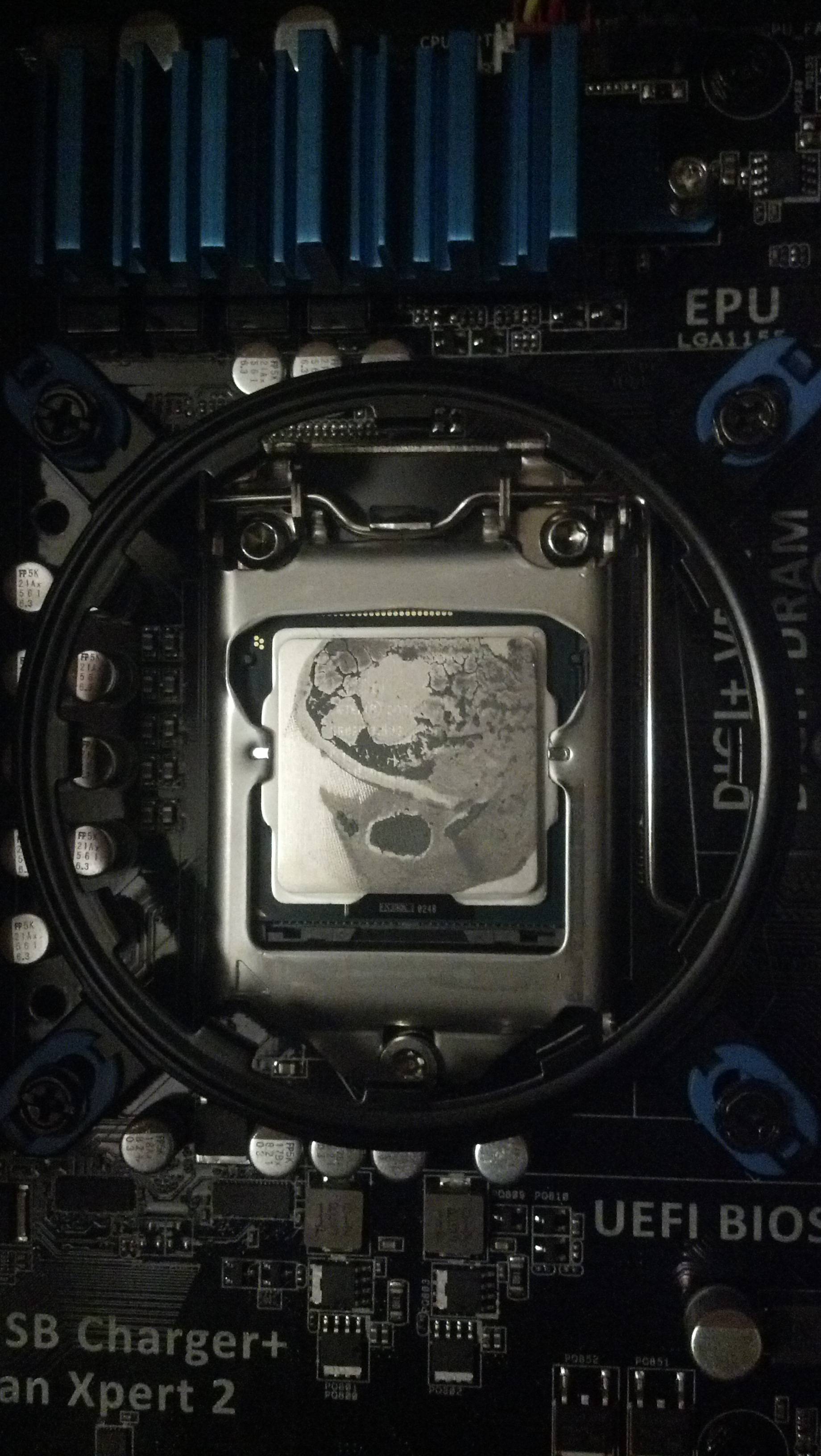
I'm going to 100% kick myself in the head for such a simple mistake as this:

xMO2Hmj.jpg


It isn't 100% confirmed yet, but judging by the looks of it....I know exactly what the problem was. I blame myself for not checking this sooner. I didn't figure something this elementary would be the problem. I will say that I didn't install the CPU. I had a store do it for me since it was my first liquid cooler. I plan on giving them a call with some strong words. I want to thank all of you that were patient enough to help me out. I can say I feel like a PC diagnostic whiz after chatting with you all.

Once again. THANK YOU!
 

My Computer My Computer

At a glance

Windows 7 Professional x64i7 3770k16 gbSapphire 7970 OC
Computer Manufacturer/Model Number
N/A
OS
Windows 7 Professional x64
CPU
i7 3770k
Motherboard
Asus P8z77-v
Memory
16 gb
Graphics Card(s)
Sapphire 7970 OC
Sound Card
on board
Monitor(s) Displays
3 22" Samsung LED
Hard Drives
Scan Disk 240 gb SSD

1 TB Seagate
PSU
1100w Majesty
Case
CoolerMaster
Cooling
Antec 620
Ouch. Evidently the damage has already been done. I coulda sworn we checked temps in the past. Oh well, anyways, glad to be able to work it out with ya. Hope things turn out better!
 

My Computer My Computer

At a glance

Windows 7 64-bit
OS
Windows 7 64-bit
Yea I'm pretty sure my cores are cooked. Kinda makes me lose faith in that stores professionalism. Adding new paste didn't help. It still ends up BSODing. As far as checking temps, they were running normal, but they spike so fast that it was hard to notice. I almost didn't catch it myself. That particular game just works the CPU so hard.

Thanks again.
 

My Computer My Computer

At a glance

Windows 7 Professional x64i7 3770k16 gbSapphire 7970 OC
Computer Manufacturer/Model Number
N/A
OS
Windows 7 Professional x64
CPU
i7 3770k
Motherboard
Asus P8z77-v
Memory
16 gb
Graphics Card(s)
Sapphire 7970 OC
Sound Card
on board
Monitor(s) Displays
3 22" Samsung LED
Hard Drives
Scan Disk 240 gb SSD

1 TB Seagate
PSU
1100w Majesty
Case
CoolerMaster
Cooling
Antec 620
I repasted the CPU. I did a prime95 test on the CPU and at 100% load I got maximum of 60 degrees. Unfortunately I still experience crashes. Should I go ahead and replace the CPU?

Latest dumps.

UPDATE:

I've installed another CPU and GPU. Both yield the same results. A BSOD after a few minutes to an hour. Temperatures were all in check. CPU never exceeded 55 and GPU 60. I'm assuming at this point I have a bad motherboard? Seeing as my ram passed the memtest. Or could it possibly be my hard drives even though they passed disk checks twice with no errors.
 
Last edited:

My Computer My Computer

At a glance

Windows 7 Professional x64i7 3770k16 gbSapphire 7970 OC
Computer Manufacturer/Model Number
N/A
OS
Windows 7 Professional x64
CPU
i7 3770k
Motherboard
Asus P8z77-v
Memory
16 gb
Graphics Card(s)
Sapphire 7970 OC
Sound Card
on board
Monitor(s) Displays
3 22" Samsung LED
Hard Drives
Scan Disk 240 gb SSD

1 TB Seagate
PSU
1100w Majesty
Case
CoolerMaster
Cooling
Antec 620
I'd blame the motherboard if that's the case. Btw, having the CPU reach 60 degrees is stretching it. It isn't critical, but it will accelerate degradation of the CPU and shorten its lifespan. I guess if it's only hitting 60 that's fine, but any more and it shows it needs more cooling.

The crashdumps won't help much without Driver Verifier, and even so if it's a hardware issue it's not going to help much at all period.
 

My Computer My Computer

At a glance

Windows 7 64-bit
OS
Windows 7 64-bit
Back
Top