Hard Disk Check Fails In Normal Mode

DanglaGT

New member
Local time
2:52 AM
Messages
5
I just bought a Western Digital Black hard drive: WD Caviar Black 1TB Internal Serial ATA Hard Drive for Desktops WDBAAZ0010HNC-NRSN - Best Buy

I have it attached to this motherboard: GIGABYTE - Motherboard - Socket 775 - GA-P35-S3G (rev. 1.0)

The symptoms of my computer are that Windows may run very slow, disk usage is high, and Windows explorer will stop responding often. When I boot into safe mode and run Western Digital's Data Lifeguard Diagnostic the extended test succeeds. When I'm not in safe mode it fails and says "too many bad sectors." The quick test does not finish in Normal mode and says something like "error code 02 - interrupted by a hard or soft reset."

Windows update will also say "Windows cannot search for updates with error code C80001FE."

What could be the reason for this and how can I trouble shoot it?

I have installed all the drivers necessary on my computer. I have AHCI set in the BIOS also. It is a fresh install of Windows 7 Ultimate.
 

My Computer My Computer

OS
Windows 7 Ultimate x64
I would RMA the drive back to Best Buy and get a replacement. The drive is obviously bad. It happens a lot more often than many people think. Erase the drive and take it back and tell them it is defective and failed Western Digital's diagnostic test.
 

My Computers My Computers

System One System Two

  • Computer type
    PC/Desktop
    Computer Manufacturer/Model Number
    ALWAYS UNDER CONSTRUCTION
    OS
    Windows 11 Pro
    CPU
    Ryzen 9 5900X
    Motherboard
    Asus X570 Crosshair Viii Hero
    Memory
    32GB G Skill DDR4-3600
    Graphics Card(s)
    EVGA RTX 3080 FTW 3 Ultra
    Sound Card
    On Board/Sennheiser PC37X Headset
    Monitor(s) Displays
    3 X Asus 27"
    Screen Resolution
    2560x1440
    Hard Drives
    2 X 1 TB NVME drives
    PSU
    EVGA 850
    Case
    Phanteks Eclipse P400A
    Cooling
    EVGA 280 AIO
    Keyboard
    Logitech G510s/ Logitech G13
    Mouse
    Logitech G502
    Internet Speed
    24/1
    Antivirus
    ESET/MBAM Pro/SAS Pro
    Browser
    Chrome/ Firefox/ Edge
  • Computer type
    Laptop
    System Manufacturer/Model Number
    Dell 16 Plus
    OS
    Windows 11 Pro
    CPU
    Intel Ultra 9 288V
    Memory
    32 GB LPDDR5X 8533
    Monitor(s) Displays
    16" Mini-LED HDR600 Touch 90 Hz
    Screen Resolution
    2560X1600
    Hard Drives
    1 TB NVME
I have done that already and had the same problem with both disks. I am assuming that 2 brand new hard drives would not both be bad right out of the box. Otherwise, I am extremely unlucky.

I see this on my motherboard's detail page: 4 x SATA 3Gb/s connectors (SATAII0, SATAII1, SATAII4, SATAII5) supporting up to 4 SATA 3Gb/s devices

Could it be because my hard drive is 6Gb/s??
 

My Computer My Computer

OS
Windows 7 Ultimate x64
No. Sata is backward compatable, meaning it will run on sata II or sata III. It does happen. I once recently bought 4 motherboards before I got one that worked. It's not just your luck. Just hook it up to sata II0, and disconnect 1 of the cables from any other hard drive you have in the machine before you install on the next one. Sorry you're having the problem. Actually, it's Western Digital having the problem. You are just the one catching it. The cavier Black drives are usually good drives, noisy but good.
 

My Computers My Computers

System One System Two

  • Computer type
    PC/Desktop
    Computer Manufacturer/Model Number
    ALWAYS UNDER CONSTRUCTION
    OS
    Windows 11 Pro
    CPU
    Ryzen 9 5900X
    Motherboard
    Asus X570 Crosshair Viii Hero
    Memory
    32GB G Skill DDR4-3600
    Graphics Card(s)
    EVGA RTX 3080 FTW 3 Ultra
    Sound Card
    On Board/Sennheiser PC37X Headset
    Monitor(s) Displays
    3 X Asus 27"
    Screen Resolution
    2560x1440
    Hard Drives
    2 X 1 TB NVME drives
    PSU
    EVGA 850
    Case
    Phanteks Eclipse P400A
    Cooling
    EVGA 280 AIO
    Keyboard
    Logitech G510s/ Logitech G13
    Mouse
    Logitech G502
    Internet Speed
    24/1
    Antivirus
    ESET/MBAM Pro/SAS Pro
    Browser
    Chrome/ Firefox/ Edge
  • Computer type
    Laptop
    System Manufacturer/Model Number
    Dell 16 Plus
    OS
    Windows 11 Pro
    CPU
    Intel Ultra 9 288V
    Memory
    32 GB LPDDR5X 8533
    Monitor(s) Displays
    16" Mini-LED HDR600 Touch 90 Hz
    Screen Resolution
    2560X1600
    Hard Drives
    1 TB NVME
Ok, one more question. Do you have any idea why even the extended test ran perfectly fine in safe mode? That is why I am hesitant to return it again.. it makes me think it could be a Windows issue.


No. Sata is backward compatable, meaning it will run on sata II or sata III. It does happen. I once recently bought 4 motherboards before I got one that worked. It's not just your luck. Just hook it up to sata II0, and disconnect 1 of the cables from any other hard drive you have in the machine before you install on the next one. Sorry you're having the problem.
 

My Computer My Computer

OS
Windows 7 Ultimate x64
No, I have no idea. Safe mode usually only loads Windows drivers and only enough to make the system run. There is nothing you can do to make the drive have bad sectors in or out of safe mode. The only thing I can think of at the moment is that safe mode does not load some of the drivers for the diagnostic program to run correctly.

EDIT: If it concerns you, tell them to put it in their machine and run the diagnostic test. Bad sectors is a physical defect in the drive itself.
 

My Computers My Computers

System One System Two

  • Computer type
    PC/Desktop
    Computer Manufacturer/Model Number
    ALWAYS UNDER CONSTRUCTION
    OS
    Windows 11 Pro
    CPU
    Ryzen 9 5900X
    Motherboard
    Asus X570 Crosshair Viii Hero
    Memory
    32GB G Skill DDR4-3600
    Graphics Card(s)
    EVGA RTX 3080 FTW 3 Ultra
    Sound Card
    On Board/Sennheiser PC37X Headset
    Monitor(s) Displays
    3 X Asus 27"
    Screen Resolution
    2560x1440
    Hard Drives
    2 X 1 TB NVME drives
    PSU
    EVGA 850
    Case
    Phanteks Eclipse P400A
    Cooling
    EVGA 280 AIO
    Keyboard
    Logitech G510s/ Logitech G13
    Mouse
    Logitech G502
    Internet Speed
    24/1
    Antivirus
    ESET/MBAM Pro/SAS Pro
    Browser
    Chrome/ Firefox/ Edge
  • Computer type
    Laptop
    System Manufacturer/Model Number
    Dell 16 Plus
    OS
    Windows 11 Pro
    CPU
    Intel Ultra 9 288V
    Memory
    32 GB LPDDR5X 8533
    Monitor(s) Displays
    16" Mini-LED HDR600 Touch 90 Hz
    Screen Resolution
    2560X1600
    Hard Drives
    1 TB NVME
Thanks for your help. I found a jumper laying around so I am going to try to jump it to 3Gb/s and do a clean install as the motherboard is pretty old so maybe there are some compatibility issues. If this doesn't work I will return it and get a new one.
 

My Computer My Computer

OS
Windows 7 Ultimate x64
DanglaGT, I'm not sure what you mean by 'jump it'. It should hook up with a sata cable from port 0 on the motherboard to the hard drive with a sata power cable to give it power. But, if it has bad sectors, that is a physical defect in the drive.
 

My Computers My Computers

System One System Two

  • Computer type
    PC/Desktop
    Computer Manufacturer/Model Number
    ALWAYS UNDER CONSTRUCTION
    OS
    Windows 11 Pro
    CPU
    Ryzen 9 5900X
    Motherboard
    Asus X570 Crosshair Viii Hero
    Memory
    32GB G Skill DDR4-3600
    Graphics Card(s)
    EVGA RTX 3080 FTW 3 Ultra
    Sound Card
    On Board/Sennheiser PC37X Headset
    Monitor(s) Displays
    3 X Asus 27"
    Screen Resolution
    2560x1440
    Hard Drives
    2 X 1 TB NVME drives
    PSU
    EVGA 850
    Case
    Phanteks Eclipse P400A
    Cooling
    EVGA 280 AIO
    Keyboard
    Logitech G510s/ Logitech G13
    Mouse
    Logitech G502
    Internet Speed
    24/1
    Antivirus
    ESET/MBAM Pro/SAS Pro
    Browser
    Chrome/ Firefox/ Edge
  • Computer type
    Laptop
    System Manufacturer/Model Number
    Dell 16 Plus
    OS
    Windows 11 Pro
    CPU
    Intel Ultra 9 288V
    Memory
    32 GB LPDDR5X 8533
    Monitor(s) Displays
    16" Mini-LED HDR600 Touch 90 Hz
    Screen Resolution
    2560X1600
    Hard Drives
    1 TB NVME
By jumping it i mean to put a jumper on 2 of the pins on the back of the hard drive to force it to run at 3Gb/s, which would be pins 5 & 6 on the WD Black hard drive.

DanglaGT, I'm not sure what you mean by 'jump it'. It should hook up with a sata cable from port 0 on the motherboard to the hard drive with a sata power cable to give it power. But, if it has bad sectors, that is a physical defect in the drive.
 

My Computer My Computer

OS
Windows 7 Ultimate x64
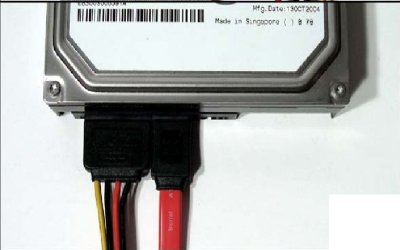
This is the way it should be connected. Whether it is connected to sata II or SATA III does not matter. As a practical matter, the drive can't run at sata III. It is not capable of those speeds. No mechanical hard drive can even run as fast as SATA II is capable. Some SSDs can but not mechanical hard drives. But, yhis is what the connections should look like. 1 power cable and 1 sata cable, hooked up as shown.

SATA-cable.jpg
 

My Computers My Computers

System One System Two

  • Computer type
    PC/Desktop
    Computer Manufacturer/Model Number
    ALWAYS UNDER CONSTRUCTION
    OS
    Windows 11 Pro
    CPU
    Ryzen 9 5900X
    Motherboard
    Asus X570 Crosshair Viii Hero
    Memory
    32GB G Skill DDR4-3600
    Graphics Card(s)
    EVGA RTX 3080 FTW 3 Ultra
    Sound Card
    On Board/Sennheiser PC37X Headset
    Monitor(s) Displays
    3 X Asus 27"
    Screen Resolution
    2560x1440
    Hard Drives
    2 X 1 TB NVME drives
    PSU
    EVGA 850
    Case
    Phanteks Eclipse P400A
    Cooling
    EVGA 280 AIO
    Keyboard
    Logitech G510s/ Logitech G13
    Mouse
    Logitech G502
    Internet Speed
    24/1
    Antivirus
    ESET/MBAM Pro/SAS Pro
    Browser
    Chrome/ Firefox/ Edge
  • Computer type
    Laptop
    System Manufacturer/Model Number
    Dell 16 Plus
    OS
    Windows 11 Pro
    CPU
    Intel Ultra 9 288V
    Memory
    32 GB LPDDR5X 8533
    Monitor(s) Displays
    16" Mini-LED HDR600 Touch 90 Hz
    Screen Resolution
    2560X1600
    Hard Drives
    1 TB NVME
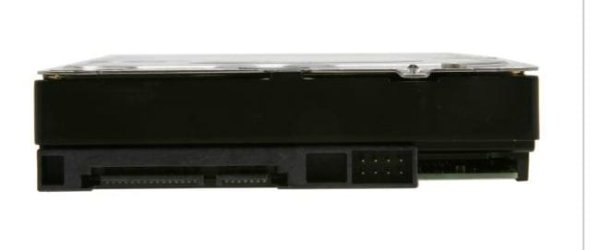
This is your hard drive
Sata Hard drive.JPG

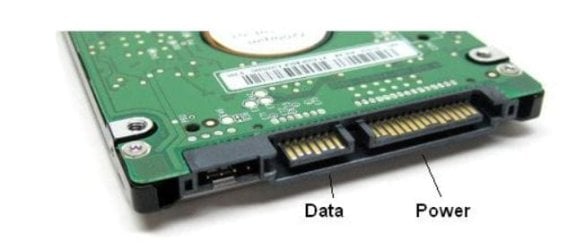
This is the location of the connections to use
sata data - power cable location.JPG

This is the cables connected

SATA-cable.jpg
 

My Computers My Computers

System One System Two

  • Computer type
    PC/Desktop
    Computer Manufacturer/Model Number
    ALWAYS UNDER CONSTRUCTION
    OS
    Windows 11 Pro
    CPU
    Ryzen 9 5900X
    Motherboard
    Asus X570 Crosshair Viii Hero
    Memory
    32GB G Skill DDR4-3600
    Graphics Card(s)
    EVGA RTX 3080 FTW 3 Ultra
    Sound Card
    On Board/Sennheiser PC37X Headset
    Monitor(s) Displays
    3 X Asus 27"
    Screen Resolution
    2560x1440
    Hard Drives
    2 X 1 TB NVME drives
    PSU
    EVGA 850
    Case
    Phanteks Eclipse P400A
    Cooling
    EVGA 280 AIO
    Keyboard
    Logitech G510s/ Logitech G13
    Mouse
    Logitech G502
    Internet Speed
    24/1
    Antivirus
    ESET/MBAM Pro/SAS Pro
    Browser
    Chrome/ Firefox/ Edge
  • Computer type
    Laptop
    System Manufacturer/Model Number
    Dell 16 Plus
    OS
    Windows 11 Pro
    CPU
    Intel Ultra 9 288V
    Memory
    32 GB LPDDR5X 8533
    Monitor(s) Displays
    16" Mini-LED HDR600 Touch 90 Hz
    Screen Resolution
    2560X1600
    Hard Drives
    1 TB NVME
Back
Top