Solved Gadgets resizing customization

M18XR2

New member
theres this program called Hwinfo64 that I am using to monitor my CPU/GPU temperature as well as Fan RPM in my laptops. it comes with it's own gadget file but only problem is it doesn't have a resize option unlike CPU/GPU meter or other window default gadgets, and on a 20 inch laptop it's really hard to see small text so I really would like to resize it.

I have been reading stuff online, some suggested opening gadget file with winzip/winrar to get pictures out to edit them, but this doesnt resize text, only pictures. I spoke with the person on techinferno who made hwinfo and he said he doesnt know much about gadgets.

wondering if theres anyway to mod this and add resize option.

in CPU/GPU meter if right click on gadget it'll have an extra "option" selection and in it, shows resize 100% to 200% etc, this right-click selection isn't there for Hwinfo64 gadget and I'd like to add it.

any tips/help is highly appreciated, thank you for your time!
 

My Computer

OS
window 7 64 bit
I do not know how to add the resizing option but if you zip up the gadget folder and post it here I will look and see if there's a way to increase the size of the text and/or gadget window.
That folder would be located at C:\Users\YOUR USER NAME\AppData\Local\Microsoft\Windows Sidebar\Gadgets
AppData is hidden use step 3 of this tutorial to unhide it http://www.sevenforums.com/tutorials/56005-file-folder-hide-unhide.html

Jerry
 

My Computer

Computer type
Laptop
Computer Manufacturer/Model Number
Sager NP9170
OS
Win 7 Pro x64 / Win 10 Pro
CPU
Intel(R) Core(TM) i7-3630QM CPU @ 2.40GHz
Motherboard
CLEVO P170EM
Memory
12 GB
Graphics Card(s)
(1) Intel(R) HD Graphics 4000 (2) NVIDIA GeForce GTX 675M
Sound Card
(1) Realtek High Definition Audio (2) Intel(R) Display Aud
Monitor(s) Displays
17.3
Screen Resolution
1920x1080
Hard Drives
(1) Samsung 860 EVO 500GB(OS) (1) Samsung 860 EVO 500GB(Data)
Keyboard
Backlite
Antivirus
MSE, Malwarebytes Pro
Browser
Firefox
Other Info
DESKTOP: Custom-built.
OS: Win 10 Pro x64.
CASE: Rosewill R5.
CPU: Intel I5 4670K CPU @ 3.40GHz.
CPU COOLER: Cool Master Hyper 212 EVO.
MOTHERBOARD: Asus Z87-A.
MEMORY: Kingston HyperX 2x4 GB.
GPU: Nvidia Geforce 650 TI.
PSU: Corsair TX750.
DRIVES: (1) Samsung 840 120 GB SSD (2) Western Digital blue 500 GB 7200 RPM.
thanks a lot for the help Bongo!, I realized I am able to change the text this morning cause it's HTML and everything I could edit. changing text/font size would work, but it'll have to go along changing the pictures as well but this is only a temporary fix.

real problem is still with the resize and that is because I have multiple laptops. 13, 15, 17, 18 and two 20 inch laptop. text and font would work for say 17-20 inch but too big for 13/15 and vice versa.
 

My Computer

OS
window 7 64 bit
I see what you're saying, you would have to edit each gadget for each laptop.

Jerry
 

My Computer

Computer type
Laptop
Computer Manufacturer/Model Number
Sager NP9170
OS
Win 7 Pro x64 / Win 10 Pro
CPU
Intel(R) Core(TM) i7-3630QM CPU @ 2.40GHz
Motherboard
CLEVO P170EM
Memory
12 GB
Graphics Card(s)
(1) Intel(R) HD Graphics 4000 (2) NVIDIA GeForce GTX 675M
Sound Card
(1) Realtek High Definition Audio (2) Intel(R) Display Aud
Monitor(s) Displays
17.3
Screen Resolution
1920x1080
Hard Drives
(1) Samsung 860 EVO 500GB(OS) (1) Samsung 860 EVO 500GB(Data)
Keyboard
Backlite
Antivirus
MSE, Malwarebytes Pro
Browser
Firefox
Other Info
DESKTOP: Custom-built.
OS: Win 10 Pro x64.
CASE: Rosewill R5.
CPU: Intel I5 4670K CPU @ 3.40GHz.
CPU COOLER: Cool Master Hyper 212 EVO.
MOTHERBOARD: Asus Z87-A.
MEMORY: Kingston HyperX 2x4 GB.
GPU: Nvidia Geforce 650 TI.
PSU: Corsair TX750.
DRIVES: (1) Samsung 840 120 GB SSD (2) Western Digital blue 500 GB 7200 RPM.
I see what you're saying, you would have to edit each gadget for each laptop.

Jerry

it looks like I have to do it this way, so next issue im facing is that is there a way to change a single .gadget file to a different .gadget file that when running the two, it doesnt replace the previous? since I will be changing picture size, html nstuff I wouldnt want to erase my own thing so work isnt wasted.
 

My Computer

OS
window 7 64 bit
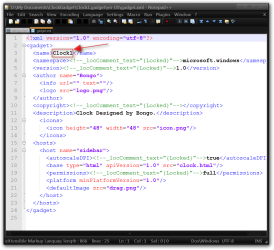
In the gadget folder there will be a gadget.xml and you need to change the name there and on the gadget name.gadget folder itself.

I used Notepad ++ and took a screenshot to show you.

Jerry
DMy DocumentsClockGadgetClock1.gadgeten-USgadget.xml - Notepad++.png
 

My Computer

Computer type
Laptop
Computer Manufacturer/Model Number
Sager NP9170
OS
Win 7 Pro x64 / Win 10 Pro
CPU
Intel(R) Core(TM) i7-3630QM CPU @ 2.40GHz
Motherboard
CLEVO P170EM
Memory
12 GB
Graphics Card(s)
(1) Intel(R) HD Graphics 4000 (2) NVIDIA GeForce GTX 675M
Sound Card
(1) Realtek High Definition Audio (2) Intel(R) Display Aud
Monitor(s) Displays
17.3
Screen Resolution
1920x1080
Hard Drives
(1) Samsung 860 EVO 500GB(OS) (1) Samsung 860 EVO 500GB(Data)
Keyboard
Backlite
Antivirus
MSE, Malwarebytes Pro
Browser
Firefox
Other Info
DESKTOP: Custom-built.
OS: Win 10 Pro x64.
CASE: Rosewill R5.
CPU: Intel I5 4670K CPU @ 3.40GHz.
CPU COOLER: Cool Master Hyper 212 EVO.
MOTHERBOARD: Asus Z87-A.
MEMORY: Kingston HyperX 2x4 GB.
GPU: Nvidia Geforce 650 TI.
PSU: Corsair TX750.
DRIVES: (1) Samsung 840 120 GB SSD (2) Western Digital blue 500 GB 7200 RPM.
Back
Top