Solved Problem with windows 7 desktop gadgets, displaying as white squares

Aliaslol

New member
Local time
9:03 PM
Messages
8
The desktop gadgets, all cpu meter version 3.9, and the msn weather gadget (my only two gadgets) have recently become white square with left facing arrows in the lower right corner. Could anyone tell me what caused this issue and how to fix it? Windows gadget platform is on, I have used the solution at Windows Sidebar - Gadget Not Displayed Correctly - Vista Forums , UAC is turned on, I have tried opening Notepad then pasting the following text:..............................................................................................................
Windows Registry Editor Version 5.00 [HKEY_CURRENT_USER\Software\Microsoft\Windows\CurrentVersion\Policies\Windows\Sidebar]
“TurnOffSidebar”=- [HKEY_LOCAL_MACHINE\SOFTWARE\Microsoft\Windows\CurrentVersion\Policies\Windows\Sidebar]
“TurnOffSidebar”=-
....................................................................................................................
And saving it as Gadget_fix.reg. then running it and rebooting. Still nothing, any ideas?
 
Last edited:

My Computer My Computer

At a glance

Windows 7 x64
OS
Windows 7 x64
Last edited by a moderator:

My Computer My Computer

At a glance

Win7 64bit UltIntel Q8200 Skt 7758gb Corsair DDR3 @ 1333mhzNvidia 9500gt 1gb
Computer Manufacturer/Model Number
Custom Build
OS
Win7 64bit Ult
CPU
Intel Q8200 Skt 775
Motherboard
Asus
Memory
8gb Corsair DDR3 @ 1333mhz
Graphics Card(s)
Nvidia 9500gt 1gb
Sound Card
Onboard
Monitor(s) Displays
Acer Daul 22"
Screen Resolution
1600 * 900
Hard Drives
O/S 500gb 3x 1tb bkups
PSU
1000w
Case
Icute jet terbine
Cooling
Air Cooled mainly Zalmans
Keyboard
Microsoft Media
Mouse
Rat 9
Internet Speed
Talk Talk upto 10mb
No, it did not.. "Windows Resource Protection did not find and integrity violation." Thank you though, any other suggestions?
 

My Computer My Computer

At a glance

Windows 7 x64
OS
Windows 7 x64
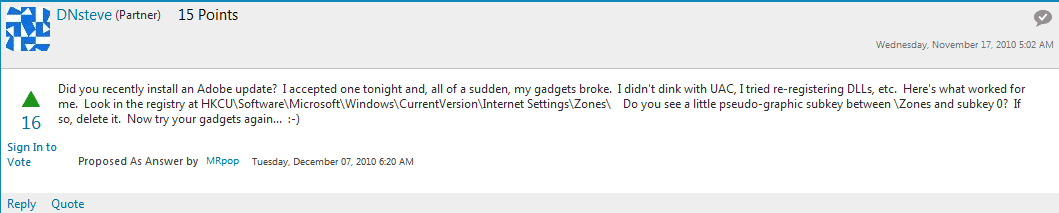
I have even tried this (see image) to no avail, there was no pseudo-graphic subkey. Can anyone help me out?
 

Attachments

  • Gadgets not working properly in windows 7.png
    Gadgets not working properly in windows 7.png
    9.6 KB · Views: 45

My Computer My Computer

At a glance

Windows 7 x64
OS
Windows 7 x64
Right try this next hope this works for you because i'm out of idea's after this one :confused:
1. Open (admin) Command Prompt, click Start, click All Programs, click Accessories, right-click Command Prompt, and then click Run as administrator.
2. In the Command Prompt window, type the following command and press ENTER:
regsvr32 msxml3.dll
3. Similarly, run these commands:
regsvr32 scrrun.dll
regsvr32 jscript.dll
You should see the DllRegisterServer in <filename> succeeded message for each command executed.
4. Logoff and login back to your user account and see if the Gadgets display correctly.
 

My Computer My Computer

At a glance

Win7 64bit UltIntel Q8200 Skt 7758gb Corsair DDR3 @ 1333mhzNvidia 9500gt 1gb
Computer Manufacturer/Model Number
Custom Build
OS
Win7 64bit Ult
CPU
Intel Q8200 Skt 775
Motherboard
Asus
Memory
8gb Corsair DDR3 @ 1333mhz
Graphics Card(s)
Nvidia 9500gt 1gb
Sound Card
Onboard
Monitor(s) Displays
Acer Daul 22"
Screen Resolution
1600 * 900
Hard Drives
O/S 500gb 3x 1tb bkups
PSU
1000w
Case
Icute jet terbine
Cooling
Air Cooled mainly Zalmans
Keyboard
Microsoft Media
Mouse
Rat 9
Internet Speed
Talk Talk upto 10mb
Welcome to Seven Forums Aliaslol. Try this:

Start> In search box type

Default programs

Enter

Set program access and computer defaults> Choose Microsoft Windows> Click OK

kbvaeo.jpg


You may have to make your favored browser, media player, and/or email program defaults again after. I have not needed to do this myself, so I am uncertain.

A Guy
 

My Computer My Computer

At a glance

Windows 10 Home x64INTEL Core i5-750 Quad-Core 3.37GHzHyperX Fury Black Series 8GB (2 x 4GB) 1866MhzEVGA GeForce GTX 750 Superclocked 1GB 128-Bit...
Computer type
PC/Desktop
OS
Windows 10 Home x64
CPU
INTEL Core i5-750 Quad-Core 3.37GHz
Motherboard
ASUS P7P55D
Memory
HyperX Fury Black Series 8GB (2 x 4GB) 1866Mhz
Graphics Card(s)
EVGA GeForce GTX 750 Superclocked 1GB 128-Bit GDDR5
Monitor(s) Displays
LG 32MA68HY 32" IPS
Screen Resolution
1920 x 1080
Hard Drives
Samsung 840 Evo 120GB, SEAGATE 500GB Barracuda® 7200.12, SATA 3 Gb/s, 7200 RPM, 16MB cache
PSU
ANTEC TruePower New TP-550, 80 PLUS, 550W
Case
ANTEC Three Hundred Illusion
Cooling
COOLER MASTER Hyper 212 Plus, 4 x 120mm 1 x 140mm Noctua's
Internet Speed
85 + Mbps
Antivirus
Avast
Browser
Vivaldi
Sorry, this thread should have been closed a while ago. I found what was causing the issue a short while later. The newest update of adobe flash broke the gadgets, so I merely downgraded the version and viola, the gadgets were functioning again. Thank you for all the help!
 

My Computer My Computer

At a glance

Windows 7 x64
OS
Windows 7 x64
Thanks for reporting back. My method usually works for that problem as well, but good to know there is an alternative. Although Adobe usually updates for security issues, so you may be opening yourself to attack so you can have gadgets that themselves may be a vector for attack. Just sayin' A Guy
 

My Computer My Computer

At a glance

Windows 10 Home x64INTEL Core i5-750 Quad-Core 3.37GHzHyperX Fury Black Series 8GB (2 x 4GB) 1866MhzEVGA GeForce GTX 750 Superclocked 1GB 128-Bit...
Computer type
PC/Desktop
OS
Windows 10 Home x64
CPU
INTEL Core i5-750 Quad-Core 3.37GHz
Motherboard
ASUS P7P55D
Memory
HyperX Fury Black Series 8GB (2 x 4GB) 1866Mhz
Graphics Card(s)
EVGA GeForce GTX 750 Superclocked 1GB 128-Bit GDDR5
Monitor(s) Displays
LG 32MA68HY 32" IPS
Screen Resolution
1920 x 1080
Hard Drives
Samsung 840 Evo 120GB, SEAGATE 500GB Barracuda® 7200.12, SATA 3 Gb/s, 7200 RPM, 16MB cache
PSU
ANTEC TruePower New TP-550, 80 PLUS, 550W
Case
ANTEC Three Hundred Illusion
Cooling
COOLER MASTER Hyper 212 Plus, 4 x 120mm 1 x 140mm Noctua's
Internet Speed
85 + Mbps
Antivirus
Avast
Browser
Vivaldi
Back
Top