
Solved Windows 7 won't boot after reinstalling over Windows 8

jamerst

New member
Member
Local time
11:45 PM
Messages
35
Location
Manchester
Hi all,

So, I recently bought my granddad a new laptop, however it came with Windows 8, which he is not familar with. So I decided that I would buy it and simply reinstall Windows 7 over the top again. Surprisingly I simply ran the setup from inside Windows 8 and it seemed to work fine to downgrade. The installation process completed successfully as far as I can see however, when it booted up again it simply stuck on the registry settings boot screen. After a while it then rebooted and started up again but this time froze on the starting windows normal boot screen. I left it for a while to see what happened and it just rebooted after a while again and simply did the same thing. I cannot get it to boot into safe mode either. Could this be something to do with the CPU being AMD? I don't know if Windows fully supports AMD cpu's as I have only used Intel in the past. Any help would be greatly appreciated!
 

My Computer My Computer

At a glance

Windows 7 Ultimate x64Intel Core i5-2320 @ 3GHz8 GBGigabyte Windforce GTX 780 GHz Edition
Computer type
PC/Desktop
Computer Manufacturer/Model Number
Custom Build in Progress
OS
Windows 7 Ultimate x64
CPU
Intel Core i5-2320 @ 3GHz
Motherboard
Old Dell OEM (to be replaced)
Memory
8 GB
Graphics Card(s)
Gigabyte Windforce GTX 780 GHz Edition
Sound Card
Onboard HD Sound
Monitor(s) Displays
HP 2311x and HP 2011x
Screen Resolution
1920x1080 and 1600x900
Hard Drives
Samsung 840 Evo 750GB SSD and Seagate 1TB HDD
PSU
Corsair RM 750
Case
Fractal Design Arc Midi R2
Cooling
Stock
Keyboard
Corsair K70 (MX Blues) and Dell AT102 (ALPS Salmon)
Mouse
Razer Deathstalker 2013 Gaming Mouse
Internet Speed
D: 70MB U: 20MB
Antivirus
Malwarebytes Pro, Microsoft Security Essentials
Browser
Chrome
Other Info
Custom Build in Progress (saving up for parts)
I can't use this tutorial though as I cannot access any operating system!

EDIT: Never mind - thought I needed to use PoweShell for something else :P
 

My Computer My Computer

At a glance

Windows 7 Ultimate x64Intel Core i5-2320 @ 3GHz8 GBGigabyte Windforce GTX 780 GHz Edition
Computer type
PC/Desktop
Computer Manufacturer/Model Number
Custom Build in Progress
OS
Windows 7 Ultimate x64
CPU
Intel Core i5-2320 @ 3GHz
Motherboard
Old Dell OEM (to be replaced)
Memory
8 GB
Graphics Card(s)
Gigabyte Windforce GTX 780 GHz Edition
Sound Card
Onboard HD Sound
Monitor(s) Displays
HP 2311x and HP 2011x
Screen Resolution
1920x1080 and 1600x900
Hard Drives
Samsung 840 Evo 750GB SSD and Seagate 1TB HDD
PSU
Corsair RM 750
Case
Fractal Design Arc Midi R2
Cooling
Stock
Keyboard
Corsair K70 (MX Blues) and Dell AT102 (ALPS Salmon)
Mouse
Razer Deathstalker 2013 Gaming Mouse
Internet Speed
D: 70MB U: 20MB
Antivirus
Malwarebytes Pro, Microsoft Security Essentials
Browser
Chrome
Other Info
Custom Build in Progress (saving up for parts)
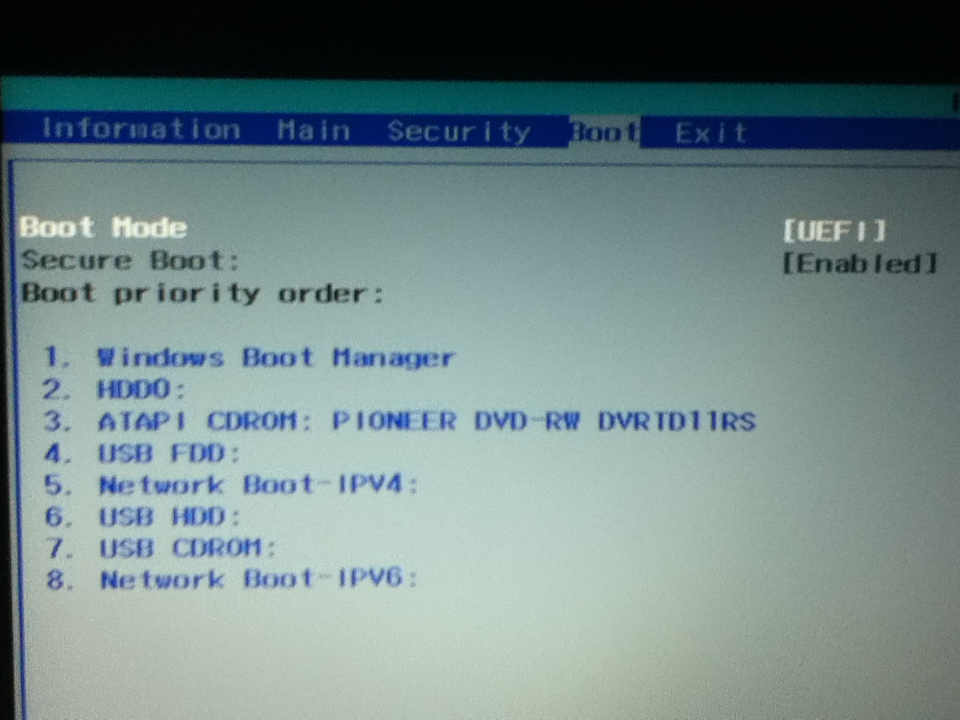
The tutorial you posted tells me to disable secure boot, however, I cannot select this option in the BIOS it simply skips over the option.
VJMPxhR.jpg
gDDCBHG.jpg


EDIT: Setting the supervisor password in the BIOS fixed :)
 

My Computer My Computer

At a glance

Windows 7 Ultimate x64Intel Core i5-2320 @ 3GHz8 GBGigabyte Windforce GTX 780 GHz Edition
Computer type
PC/Desktop
Computer Manufacturer/Model Number
Custom Build in Progress
OS
Windows 7 Ultimate x64
CPU
Intel Core i5-2320 @ 3GHz
Motherboard
Old Dell OEM (to be replaced)
Memory
8 GB
Graphics Card(s)
Gigabyte Windforce GTX 780 GHz Edition
Sound Card
Onboard HD Sound
Monitor(s) Displays
HP 2311x and HP 2011x
Screen Resolution
1920x1080 and 1600x900
Hard Drives
Samsung 840 Evo 750GB SSD and Seagate 1TB HDD
PSU
Corsair RM 750
Case
Fractal Design Arc Midi R2
Cooling
Stock
Keyboard
Corsair K70 (MX Blues) and Dell AT102 (ALPS Salmon)
Mouse
Razer Deathstalker 2013 Gaming Mouse
Internet Speed
D: 70MB U: 20MB
Antivirus
Malwarebytes Pro, Microsoft Security Essentials
Browser
Chrome
Other Info
Custom Build in Progress (saving up for parts)
What Make & Model of PC do you have?
 

My Computer My Computer

At a glance

ME/XP/Vista/Win7
OS
ME/XP/Vista/Win7
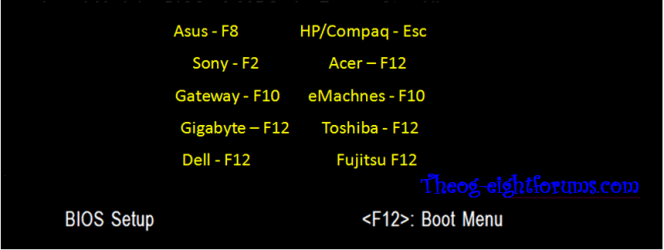
Packard Bell Easy Note TE. Also, changing the secure boot mode didn't make it boot and I can't seem to find the boot options menu button so I cannot simply reinstall as the Windows 7 installer is on a flash drive.
 

My Computer My Computer

At a glance

Windows 7 Ultimate x64Intel Core i5-2320 @ 3GHz8 GBGigabyte Windforce GTX 780 GHz Edition
Computer type
PC/Desktop
Computer Manufacturer/Model Number
Custom Build in Progress
OS
Windows 7 Ultimate x64
CPU
Intel Core i5-2320 @ 3GHz
Motherboard
Old Dell OEM (to be replaced)
Memory
8 GB
Graphics Card(s)
Gigabyte Windforce GTX 780 GHz Edition
Sound Card
Onboard HD Sound
Monitor(s) Displays
HP 2311x and HP 2011x
Screen Resolution
1920x1080 and 1600x900
Hard Drives
Samsung 840 Evo 750GB SSD and Seagate 1TB HDD
PSU
Corsair RM 750
Case
Fractal Design Arc Midi R2
Cooling
Stock
Keyboard
Corsair K70 (MX Blues) and Dell AT102 (ALPS Salmon)
Mouse
Razer Deathstalker 2013 Gaming Mouse
Internet Speed
D: 70MB U: 20MB
Antivirus
Malwarebytes Pro, Microsoft Security Essentials
Browser
Chrome
Other Info
Custom Build in Progress (saving up for parts)
Downgrade Windows 8 to Windows 7

You to do step 3 first.


theog said:
3) Reset BIOS to default, and reboot to BIOS make sure Secure Boot is disabled.
Make sure CSM is ENABLED, & set to UEFI boot.
NOTE: Check your manufacturer's uEFI BIOS manual for settings.

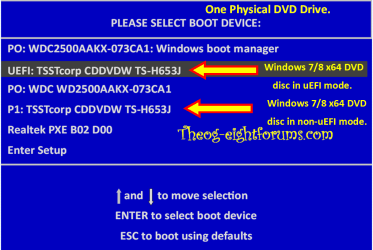
If you have done all of Step Three, to boot the Windows 7 DVD use the one time boot menu.
Check your manufacturer's uEFI BIOS manual for settings.

Windows 8 Downgrade-005 SB.PNG

Boot the DVD in uEFI mode.

Windows 8 Downgrade-006 SB for posting.PNG
 

My Computer My Computer

At a glance

ME/XP/Vista/Win7
OS
ME/XP/Vista/Win7
Finally, looks like it might be booting from the CD (hopefully!). Hopefully I won't have any compatibility issues as my disc is actually meant for Dell machines :P
 

My Computer My Computer

At a glance

Windows 7 Ultimate x64Intel Core i5-2320 @ 3GHz8 GBGigabyte Windforce GTX 780 GHz Edition
Computer type
PC/Desktop
Computer Manufacturer/Model Number
Custom Build in Progress
OS
Windows 7 Ultimate x64
CPU
Intel Core i5-2320 @ 3GHz
Motherboard
Old Dell OEM (to be replaced)
Memory
8 GB
Graphics Card(s)
Gigabyte Windforce GTX 780 GHz Edition
Sound Card
Onboard HD Sound
Monitor(s) Displays
HP 2311x and HP 2011x
Screen Resolution
1920x1080 and 1600x900
Hard Drives
Samsung 840 Evo 750GB SSD and Seagate 1TB HDD
PSU
Corsair RM 750
Case
Fractal Design Arc Midi R2
Cooling
Stock
Keyboard
Corsair K70 (MX Blues) and Dell AT102 (ALPS Salmon)
Mouse
Razer Deathstalker 2013 Gaming Mouse
Internet Speed
D: 70MB U: 20MB
Antivirus
Malwarebytes Pro, Microsoft Security Essentials
Browser
Chrome
Other Info
Custom Build in Progress (saving up for parts)
Looks like it is still stuck on the bootscreen even when I boot from the disk. I think it may be because I have seen 2 settings for secure boot, but I can only change one of them. I will edit if it unfreezes.
 

My Computer My Computer

At a glance

Windows 7 Ultimate x64Intel Core i5-2320 @ 3GHz8 GBGigabyte Windforce GTX 780 GHz Edition
Computer type
PC/Desktop
Computer Manufacturer/Model Number
Custom Build in Progress
OS
Windows 7 Ultimate x64
CPU
Intel Core i5-2320 @ 3GHz
Motherboard
Old Dell OEM (to be replaced)
Memory
8 GB
Graphics Card(s)
Gigabyte Windforce GTX 780 GHz Edition
Sound Card
Onboard HD Sound
Monitor(s) Displays
HP 2311x and HP 2011x
Screen Resolution
1920x1080 and 1600x900
Hard Drives
Samsung 840 Evo 750GB SSD and Seagate 1TB HDD
PSU
Corsair RM 750
Case
Fractal Design Arc Midi R2
Cooling
Stock
Keyboard
Corsair K70 (MX Blues) and Dell AT102 (ALPS Salmon)
Mouse
Razer Deathstalker 2013 Gaming Mouse
Internet Speed
D: 70MB U: 20MB
Antivirus
Malwarebytes Pro, Microsoft Security Essentials
Browser
Chrome
Other Info
Custom Build in Progress (saving up for parts)
Finally, looks like it might be booting from the CD (hopefully!). Hopefully I won't have any compatibility issues as my disc is actually meant for Dell machines :P

You can not use a OEM manufacturer's DVD & product key, that would be a illegal install.

You may like to get a DVD & license key from a good source like:
Windows Download and Shop - Microsoft Windows
 

My Computer My Computer

At a glance

ME/XP/Vista/Win7
OS
ME/XP/Vista/Win7
:O Good job it wouldn't let me install then!! I'm going to buy a key then use a stock iso to create a Uefi flash drive so that it will work :)
 

My Computer My Computer

At a glance

Windows 7 Ultimate x64Intel Core i5-2320 @ 3GHz8 GBGigabyte Windforce GTX 780 GHz Edition
Computer type
PC/Desktop
Computer Manufacturer/Model Number
Custom Build in Progress
OS
Windows 7 Ultimate x64
CPU
Intel Core i5-2320 @ 3GHz
Motherboard
Old Dell OEM (to be replaced)
Memory
8 GB
Graphics Card(s)
Gigabyte Windforce GTX 780 GHz Edition
Sound Card
Onboard HD Sound
Monitor(s) Displays
HP 2311x and HP 2011x
Screen Resolution
1920x1080 and 1600x900
Hard Drives
Samsung 840 Evo 750GB SSD and Seagate 1TB HDD
PSU
Corsair RM 750
Case
Fractal Design Arc Midi R2
Cooling
Stock
Keyboard
Corsair K70 (MX Blues) and Dell AT102 (ALPS Salmon)
Mouse
Razer Deathstalker 2013 Gaming Mouse
Internet Speed
D: 70MB U: 20MB
Antivirus
Malwarebytes Pro, Microsoft Security Essentials
Browser
Chrome
Other Info
Custom Build in Progress (saving up for parts)
My Computer My Computer

At a glance

ME/XP/Vista/Win7
OS
ME/XP/Vista/Win7
I know it is easier but I currently have no DVDs available and I have already found that tutorial will sort later thanks
 

My Computer My Computer

At a glance

Windows 7 Ultimate x64Intel Core i5-2320 @ 3GHz8 GBGigabyte Windforce GTX 780 GHz Edition
Computer type
PC/Desktop
Computer Manufacturer/Model Number
Custom Build in Progress
OS
Windows 7 Ultimate x64
CPU
Intel Core i5-2320 @ 3GHz
Motherboard
Old Dell OEM (to be replaced)
Memory
8 GB
Graphics Card(s)
Gigabyte Windforce GTX 780 GHz Edition
Sound Card
Onboard HD Sound
Monitor(s) Displays
HP 2311x and HP 2011x
Screen Resolution
1920x1080 and 1600x900
Hard Drives
Samsung 840 Evo 750GB SSD and Seagate 1TB HDD
PSU
Corsair RM 750
Case
Fractal Design Arc Midi R2
Cooling
Stock
Keyboard
Corsair K70 (MX Blues) and Dell AT102 (ALPS Salmon)
Mouse
Razer Deathstalker 2013 Gaming Mouse
Internet Speed
D: 70MB U: 20MB
Antivirus
Malwarebytes Pro, Microsoft Security Essentials
Browser
Chrome
Other Info
Custom Build in Progress (saving up for parts)
Well I followed the instructions in the tutorial on eightforums but I still can't get it to boot (check the reply on the tutorial for details) as far as I know there are no USB 3.0 sockets on the laptop but I cannot really tell as very little documentation was included with the laptop.
 

My Computer My Computer

At a glance

Windows 7 Ultimate x64Intel Core i5-2320 @ 3GHz8 GBGigabyte Windforce GTX 780 GHz Edition
Computer type
PC/Desktop
Computer Manufacturer/Model Number
Custom Build in Progress
OS
Windows 7 Ultimate x64
CPU
Intel Core i5-2320 @ 3GHz
Motherboard
Old Dell OEM (to be replaced)
Memory
8 GB
Graphics Card(s)
Gigabyte Windforce GTX 780 GHz Edition
Sound Card
Onboard HD Sound
Monitor(s) Displays
HP 2311x and HP 2011x
Screen Resolution
1920x1080 and 1600x900
Hard Drives
Samsung 840 Evo 750GB SSD and Seagate 1TB HDD
PSU
Corsair RM 750
Case
Fractal Design Arc Midi R2
Cooling
Stock
Keyboard
Corsair K70 (MX Blues) and Dell AT102 (ALPS Salmon)
Mouse
Razer Deathstalker 2013 Gaming Mouse
Internet Speed
D: 70MB U: 20MB
Antivirus
Malwarebytes Pro, Microsoft Security Essentials
Browser
Chrome
Other Info
Custom Build in Progress (saving up for parts)

My Computer My Computer

At a glance

Windows 10 Pro x64Intel Core i7 6700KGSkill TridentZ RGB 16GB 3600 16-16-16-36EVGA GTX 980 Ti SC x2
Computer type
PC/Desktop
Computer Manufacturer/Model Number
Skylake Special #666
OS
Windows 10 Pro x64
CPU
Intel Core i7 6700K
Motherboard
Asus Sabertooth Z170 Mark 1
Memory
GSkill TridentZ RGB 16GB 3600 16-16-16-36
Graphics Card(s)
EVGA GTX 980 Ti SC x2
Sound Card
Realtek High Definition
Monitor(s) Displays
AOC G2460PG
Screen Resolution
1920 x 1080 144Hz
Hard Drives
Samsung 860 Pro 256GB, Seagate Barracuda 4TB x2
PSU
EVGA 1000 P2, EVGA White Custom Braided Cables
Case
Corsair Vengeance C70 Gunmetal Black
Cooling
Corsair H100i v2, Corsair ML120 x2, Thermal Grizzly Kryonaut
Keyboard
Logitech G910 Orion Spectrum
Mouse
Logitech G700s
Internet Speed
Verizon Fios Quantum Gateway 75/75
Antivirus
Windows Defender, Malwarebytes Free 3.8.3
Browser
Chrome
Other Info
Corsair SP120 x4, LG Blu-ray Drive, Durabrand HT-395 100 Watt Dolby Digital Amp, Corsair H2100 Wireless 7.1 Headset
The flash drive (sorry if that wasn't clear will edit now) I've got it reformating with diskpart now to see if it will let me install normally.
 

My Computer My Computer

At a glance

Windows 7 Ultimate x64Intel Core i5-2320 @ 3GHz8 GBGigabyte Windforce GTX 780 GHz Edition
Computer type
PC/Desktop
Computer Manufacturer/Model Number
Custom Build in Progress
OS
Windows 7 Ultimate x64
CPU
Intel Core i5-2320 @ 3GHz
Motherboard
Old Dell OEM (to be replaced)
Memory
8 GB
Graphics Card(s)
Gigabyte Windforce GTX 780 GHz Edition
Sound Card
Onboard HD Sound
Monitor(s) Displays
HP 2311x and HP 2011x
Screen Resolution
1920x1080 and 1600x900
Hard Drives
Samsung 840 Evo 750GB SSD and Seagate 1TB HDD
PSU
Corsair RM 750
Case
Fractal Design Arc Midi R2
Cooling
Stock
Keyboard
Corsair K70 (MX Blues) and Dell AT102 (ALPS Salmon)
Mouse
Razer Deathstalker 2013 Gaming Mouse
Internet Speed
D: 70MB U: 20MB
Antivirus
Malwarebytes Pro, Microsoft Security Essentials
Browser
Chrome
Other Info
Custom Build in Progress (saving up for parts)
Make sure to follow the steps for installing to UEFI (Unified Extensible Firmware Interface) - Install Windows 7 with - Windows 7 Forums.

Were you able to disable Secure Boot? if the setting is shown in BIOS it should be changeable, then Save changes and Exit. On some BIOS you must also enable a BIOS password to change the setting. Read your BIOS manual if you have any questions, avaialable always on its model's Support Downloads webpage.

If all else fails you can Bypass UEFI to Install WIn7 which has worked for everyone, if you want a normal BIOS install to MBR disk and not UEFI.
 

My Computer My Computer

At a glance

ME/XP/Vista/Win7
OS
ME/XP/Vista/Win7
Finally fixed by simply bypassing UEFI completely :). It wasn't really needed for my uses as it is only my granddad using it so nothing advanced is needed. Thanks for the help!
 

My Computer My Computer

At a glance

Windows 7 Ultimate x64Intel Core i5-2320 @ 3GHz8 GBGigabyte Windforce GTX 780 GHz Edition
Computer type
PC/Desktop
Computer Manufacturer/Model Number
Custom Build in Progress
OS
Windows 7 Ultimate x64
CPU
Intel Core i5-2320 @ 3GHz
Motherboard
Old Dell OEM (to be replaced)
Memory
8 GB
Graphics Card(s)
Gigabyte Windforce GTX 780 GHz Edition
Sound Card
Onboard HD Sound
Monitor(s) Displays
HP 2311x and HP 2011x
Screen Resolution
1920x1080 and 1600x900
Hard Drives
Samsung 840 Evo 750GB SSD and Seagate 1TB HDD
PSU
Corsair RM 750
Case
Fractal Design Arc Midi R2
Cooling
Stock
Keyboard
Corsair K70 (MX Blues) and Dell AT102 (ALPS Salmon)
Mouse
Razer Deathstalker 2013 Gaming Mouse
Internet Speed
D: 70MB U: 20MB
Antivirus
Malwarebytes Pro, Microsoft Security Essentials
Browser
Chrome
Other Info
Custom Build in Progress (saving up for parts)
You need to do all of the step 3 first.


theog said:
3) Reset BIOS to default, and reboot to BIOS make sure Secure Boot is disabled.
Make sure CSM is ENABLED, & set to UEFI boot.
NOTE: Check your manufacturer's uEFI BIOS manual for settings.

Take a look at this post.
UEFI Bootable USB Flash Drive - Create in Windows - Page 7

Finally fixed by simply bypassing UEFI completely :). It wasn't really needed for my uses as it is only my granddad using it so nothing advanced is needed. Thanks for the help!

So at last you did Step Three.
but set to legacy, not uEFI.
 

My Computer My Computer

At a glance

ME/XP/Vista/Win7
OS
ME/XP/Vista/Win7
Back
Top