Solved Windows 7 won't boot after reinstalling over Windows 8

I had already tried step three, that didn't solve the problem so I used Legacy and converted the drive to mbr and reformatted with diskpart once setup had loaded. Works just fine now :)
 

My Computer My Computer

At a glance

Windows 7 Ultimate x64Intel Core i5-2320 @ 3GHz8 GBGigabyte Windforce GTX 780 GHz Edition
Computer type
PC/Desktop
Computer Manufacturer/Model Number
Custom Build in Progress
OS
Windows 7 Ultimate x64
CPU
Intel Core i5-2320 @ 3GHz
Motherboard
Old Dell OEM (to be replaced)
Memory
8 GB
Graphics Card(s)
Gigabyte Windforce GTX 780 GHz Edition
Sound Card
Onboard HD Sound
Monitor(s) Displays
HP 2311x and HP 2011x
Screen Resolution
1920x1080 and 1600x900
Hard Drives
Samsung 840 Evo 750GB SSD and Seagate 1TB HDD
PSU
Corsair RM 750
Case
Fractal Design Arc Midi R2
Cooling
Stock
Keyboard
Corsair K70 (MX Blues) and Dell AT102 (ALPS Salmon)
Mouse
Razer Deathstalker 2013 Gaming Mouse
Internet Speed
D: 70MB U: 20MB
Antivirus
Malwarebytes Pro, Microsoft Security Essentials
Browser
Chrome
Other Info
Custom Build in Progress (saving up for parts)
You need to do all of the step 3 first.


theog said:
3) Reset BIOS to default, and reboot to BIOS make sure Secure Boot is disabled.
Make sure CSM is ENABLED, & set to UEFI boot.
NOTE: Check your manufacturer's uEFI BIOS manual for settings.

Take a look at this post.
UEFI Bootable USB Flash Drive - Create in Windows - Page 7

Finally fixed by simply bypassing UEFI completely :). It wasn't really needed for my uses as it is only my granddad using it so nothing advanced is needed. Thanks for the help!

So at last you did Step Three.
but set to legacy, not uEFI.

I had already tried step three, that didn't solve the problem so I used Legacy and converted the drive to mbr and reformatted with diskpart once setup had loaded. Works just fine now :)

You have to do Step Three to set to LEGACY.
 

My Computer My Computer

At a glance

ME/XP/Vista/Win7
OS
ME/XP/Vista/Win7
What I'm saying is that I did do step 3 but this had no effect to rectify the boot problem. Anyway as I said before it is now working fine and I don't really want to carry on trying to get uEFI to work if I don't need it.
 

My Computer My Computer

At a glance

Windows 7 Ultimate x64Intel Core i5-2320 @ 3GHz8 GBGigabyte Windforce GTX 780 GHz Edition
Computer type
PC/Desktop
Computer Manufacturer/Model Number
Custom Build in Progress
OS
Windows 7 Ultimate x64
CPU
Intel Core i5-2320 @ 3GHz
Motherboard
Old Dell OEM (to be replaced)
Memory
8 GB
Graphics Card(s)
Gigabyte Windforce GTX 780 GHz Edition
Sound Card
Onboard HD Sound
Monitor(s) Displays
HP 2311x and HP 2011x
Screen Resolution
1920x1080 and 1600x900
Hard Drives
Samsung 840 Evo 750GB SSD and Seagate 1TB HDD
PSU
Corsair RM 750
Case
Fractal Design Arc Midi R2
Cooling
Stock
Keyboard
Corsair K70 (MX Blues) and Dell AT102 (ALPS Salmon)
Mouse
Razer Deathstalker 2013 Gaming Mouse
Internet Speed
D: 70MB U: 20MB
Antivirus
Malwarebytes Pro, Microsoft Security Essentials
Browser
Chrome
Other Info
Custom Build in Progress (saving up for parts)
OEM manufacturer's PC with
uEFI/BIOS firmware
Secure Boot
Three HDD's


uEFI is set to Step Three.
theog said:
3) Reset BIOS to default, and reboot to BIOS make sure Secure Boot is disabled.
Make sure CSM is ENABLED, & set to UEFI boot.
NOTE: Check your manufacturer's uEFI BIOS manual for settings.

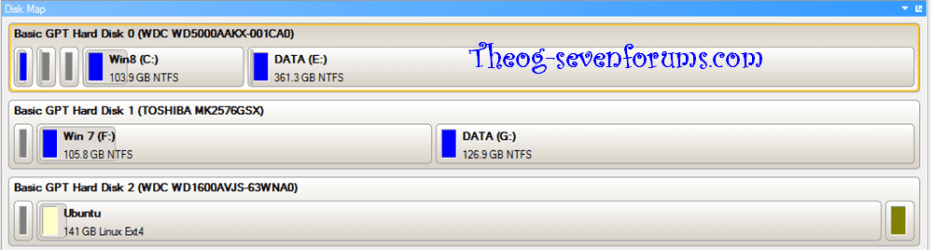
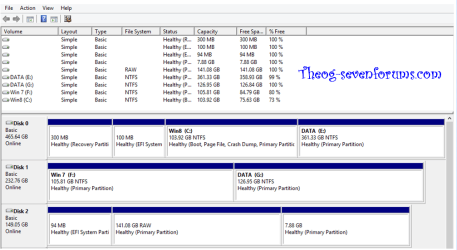
HDD one has Windows 8 install in uEFI mode.
HDD two has Windows 7 install in uEFI mode.
HDD three has Ubuntu (Linux) install in uEFI mode.

As seen from Disk management.

8-7-Linux-001.PNG

As seen from Paragon 12.

8-7-Linux-002.PNG
 

My Computer My Computer

At a glance

ME/XP/Vista/Win7
OS
ME/XP/Vista/Win7
Back
Top