Solved How to access the machine with the “administrator” user?

Jamal NUMAN

New member
Member
VIP
Local time
11:07 PM
Messages
144
How to access the machine with the “administrator” user?

How to access the machine with the “administrator” user?


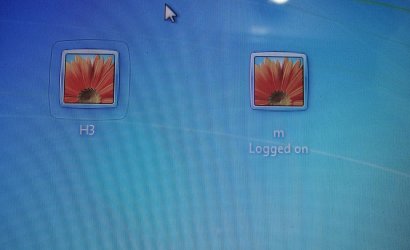
I couldn’t figure out how the machine can be accessed by the “administrator” of the guest user (attached).


Thank you

Best

Jamal
 

Attachments

  • Clip_16.jpg
    Clip_16.jpg
    72 KB · Views: 10
  • DSC05234.jpg
    DSC05234.jpg
    722.8 KB · Views: 4

My Computer My Computer

OS
Windows 7 Ultimate x64

My Computer My Computer

Computer type
Laptop
Computer Manufacturer/Model Number
HP ENVY 17-1150eg
OS
Windows 10 Pro x64 EN-GB
CPU
1.6 GHz Intel Core i7-720QM Processor
Memory
6 GB
Graphics Card(s)
ATI Mobility Radeon HD 5850 Graphics
Sound Card
Beats sound system with integrated subwoofer
Monitor(s) Displays
17" laptop display, 22" LED and 32" Full HD TV through HDMI
Screen Resolution
1600*900 (1), 1920*1080 (2&3)
Hard Drives
Internal: 2 x 500 GB SATA Hard Disk Drive 7200 rpm
External: 2TB for backups, 3TB USB3 network drive for media
Cooling
As Envy runs a bit warm, I have it on a Cooler Master pad
Keyboard
Logitech diNovo Media Desktop Laser (bluetooth)
Mouse
Logitech Performance Mouse MX
Internet Speed
50/10 Mbps VDSL
Antivirus
Windows Defender 4.3.9431.0
Browser
Maxthon 3.5.2., IE11
Yep. The first screenshot shows that the Administrator account is disabled. Enable it and set a password and you should be OK--however I would recommend adding an existing user or creating a new one and adding it to the Administrators group as a safer route.
 

My Computer My Computer

Computer Manufacturer/Model Number
Custom Build
OS
Windows 7 Ultimate x64, BackTrack Linux 5 R2, Windows XP
CPU
Intel Core i7 920 OC to 3.6GHz
Motherboard
ASUS P6T Deluxe V2
Memory
Corsair 6GB DDR3
Graphics Card(s)
ATI Radeon 4890
Monitor(s) Displays
ASUS 23"
Screen Resolution
1920x1080
Hard Drives
150GB Velociraptor
640GB
PSU
Corsair 850w
Case
CoolerMaster HAF932
Cooling
CoolerMaster V8
Internet Speed
30Mbps
Yep. The first screenshot shows that the Administrator account is disabled. Enable it and set a password and you should be OK--however I would recommend adding an existing user or creating a new one and adding it to the Administrators group as a safer route.

sorry to bother you again

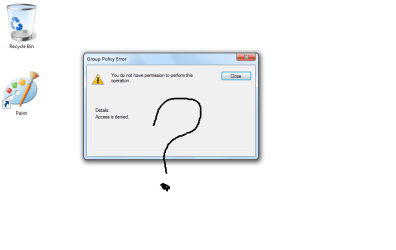
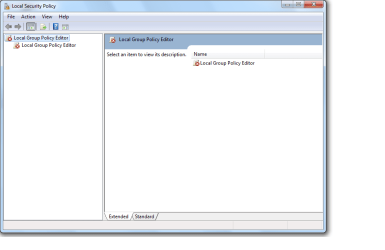
in my case, i just have one user who doesn't have any of the permissions (and can't give himself privileges) and thus I'm not able to apply any of these methods!

what might be the solution?

best

Jamal
 

Attachments

  • Untitled.png
    Untitled.png
    49.4 KB · Views: 9
  • 4.png
    4.png
    16.8 KB · Views: 5
  • 3.png
    3.png
    14.2 KB · Views: 4

My Computer My Computer

OS
Windows 7 Ultimate x64
Screenshots in your first post show your user M is an administrator. Did you try this logged in as M? And then run Command Prompt elevated (= Run as administrator)?
 

My Computer My Computer

Computer type
Laptop
Computer Manufacturer/Model Number
HP ENVY 17-1150eg
OS
Windows 10 Pro x64 EN-GB
CPU
1.6 GHz Intel Core i7-720QM Processor
Memory
6 GB
Graphics Card(s)
ATI Mobility Radeon HD 5850 Graphics
Sound Card
Beats sound system with integrated subwoofer
Monitor(s) Displays
17" laptop display, 22" LED and 32" Full HD TV through HDMI
Screen Resolution
1600*900 (1), 1920*1080 (2&3)
Hard Drives
Internal: 2 x 500 GB SATA Hard Disk Drive 7200 rpm
External: 2TB for backups, 3TB USB3 network drive for media
Cooling
As Envy runs a bit warm, I have it on a Cooler Master pad
Keyboard
Logitech diNovo Media Desktop Laser (bluetooth)
Mouse
Logitech Performance Mouse MX
Internet Speed
50/10 Mbps VDSL
Antivirus
Windows Defender 4.3.9431.0
Browser
Maxthon 3.5.2., IE11
Screenshots in your first post show your user M is an administrator. Did you try this logged in as M? And then run Command Prompt elevated (= Run as administrator)?

Thank you Kari for the prompt answer.

At the movement, I have just one user and it has no privileges to do anything! Then how can I access the machine with the administrator user?

Sorry, this is another case!
 

My Computer My Computer

OS
Windows 7 Ultimate x64
Back
Top