Startup Repair Offline, No Root Cause Windows 7

ymi7

New member
Local time
3:12 PM
Messages
11
Hi all,

I did clean install because my Asus UX32A keep going into Startup Repair mode but was unable to determine problem and find solution. I also had black screen at the logging screen. Prior clean install I've tried system restore, last good configuration etc did not work.

During the clean install, I had to update BIOS due to the windows7 installation unable to read driver despite numeruous attempts to solve this. I have UEFI BIOS and have follow this forum UEFI clean install guideline.

I still have the black screen problem after the clean install but prevx fix seems to fix this so far. However, my laptop start restarting into Startup Repair again and cant fix the problem.

Prob event name: StartupRepairOffline
Prob signature 01: 6.1.7600.16385
Prob signature 02: 6.1.7600.16385
Prob signature 03: unknown
Prob signature 04: 2
Prob signature 05: Auto failover
Prob signature 06: 1
Prob signature 07: NoRootCause
OS Version: 6.1.7601.2.1.0.256.1
Locale ID: 1033

Appreciate help here.
 

My Computer My Computer

At a glance

Windows 7 Ultimate Home Premium 64bit
OS
Windows 7 Ultimate Home Premium 64bit
Hi all,

I did clean install because my Asus UX32A keep going into Startup Repair mode but was unable to determine problem and find solution. I also had black screen at the logging screen. Prior clean install I've tried system restore, last good configuration etc did not work.

During the clean install, I had to update BIOS due to the windows7 installation unable to read driver despite numeruous attempts to solve this. I have UEFI BIOS and have follow this forum UEFI clean install guideline.

I still have the black screen problem after the clean install but prevx fix seems to fix this so far. However, my laptop start restarting into Startup Repair again and cant fix the problem.

Prob event name: StartupRepairOffline
Prob signature 01: 6.1.7600.16385
Prob signature 02: 6.1.7600.16385
Prob signature 03: unknown
Prob signature 04: 2
Prob signature 05: Auto failover
Prob signature 06: 1
Prob signature 07: NoRootCause
OS Version: 6.1.7601.2.1.0.256.1
Locale ID: 1033

Appreciate help here.
Click on "view diagnostics results" after performing startup repair. What tests don't end in status 0x0?
 

My Computer My Computer

At a glance

Microsoft Windows 7 Home Premium 64-bits 7601...Intel(R) Core(TM) i3 CPU M 370 @ 2.40GHz4,00 GBATI Mobility Radeon HD 5400 Series
Computer type
Laptop
Computer Manufacturer/Model Number
ACER ASPIRE 5742G
OS
Microsoft Windows 7 Home Premium 64-bits 7601 Multiprocessor Free Service Pack 1
CPU
Intel(R) Core(TM) i3 CPU M 370 @ 2.40GHz
Motherboard
Acer Aspire 5742G
Memory
4,00 GB
Graphics Card(s)
ATI Mobility Radeon HD 5400 Series
Sound Card
(1) AMD High Definition Audio Device (2) Realtek High Defi
Screen Resolution
1366 x 768 x 32 bits (4294967296 colors) @ 60 Hz
Hard Drives
WDC WD5000BEVT-22ZAT0
Did this problem start just after clean install or after applying prevx fix?
What prevx fix did you apply?

Did black screen appear before windows animation, during windows animation, or after logon? Did you see a text cursor on top left of screen, and was it blinking? Or a mouse pointer, and was it moveable?
 

My Computer My Computer

At a glance

Microsoft Windows 7 Home Premium 64-bits 7601...Intel(R) Core(TM) i3 CPU M 370 @ 2.40GHz4,00 GBATI Mobility Radeon HD 5400 Series
Computer type
Laptop
Computer Manufacturer/Model Number
ACER ASPIRE 5742G
OS
Microsoft Windows 7 Home Premium 64-bits 7601 Multiprocessor Free Service Pack 1
CPU
Intel(R) Core(TM) i3 CPU M 370 @ 2.40GHz
Motherboard
Acer Aspire 5742G
Memory
4,00 GB
Graphics Card(s)
ATI Mobility Radeon HD 5400 Series
Sound Card
(1) AMD High Definition Audio Device (2) Realtek High Defi
Screen Resolution
1366 x 768 x 32 bits (4294967296 colors) @ 60 Hz
Hard Drives
WDC WD5000BEVT-22ZAT0
I did another Startup Repair so I can get the diagnostic result. The Prob Signature 04 and 06 has changed than what I have posted before:

Prob event name: StartupRepairOffline
Prob signature 01: 6.1.7600.16385
Prob signature 02: 6.1.7600.16385
Prob signature 03: unknown
Prob signature 04: 1
Prob signature 05: Manual Repair
Prob signature 06: 1
Prob signature 07: NoRootCause
OS Version: 6.1.7601.2.1.0.256.1
Locale ID: 1033

Diagnostic result:

Session details
------------------------------------
System Disk = \Device\Harddisk1
Windows directory = C:\Windows
AutoChk Run = 0
Number of root causes =1

Test Performed:
----------------------------------
Name : Check for updates, System disk test, Disk failure diagnosis, Disk metadata test, Target OS test, VOlume content check, Boot manager diagnosis, System boot log diagnosis, Event log diagnosis, Internal state check, Boot status test, Setup state check, Registry hivest test, Windows boot log diagnosis, Bugcheck analysis, Access control test, File system test (chkdsk), Software installation log diagnosis, Fallback diagnosis
Result: Completed successfully. Error code = 0 x0

Root cause found:
------------------------------------
Unspecified changes to system configuration might have caused the problem

Repair action: System Restore
Result: Cancelled

Repair action: System files integrity check and repair
Result: Failed. Error code = 0x490
Time taken = 858240ms

------------------------------------------
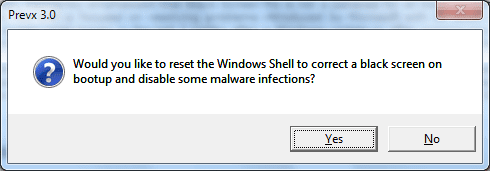
The problem happen after applying Pervex 3.0 Black Screen Fix following this guide Windows 7 Black Screen . After applying this fix, Intel Graphic Media icon tray has appeared on the left side of taskbar. Prior applying pervex fix, I have uninstall Display Adapter driver in Safe Mode and reinstall again but didnt fix the black screen.

Black screen appear after windows animation, no logon screen, no text or mouse cursor. Ctrl+Alt+Delete do nothing, although if I press enter after this then I can hear login sound, still black screen. I can put the laptop to sleep (fn+f1 key) during black screen and upon wake up, this can sometimes fix the black screen.
 

My Computer My Computer

At a glance

Windows 7 Ultimate Home Premium 64bit
OS
Windows 7 Ultimate Home Premium 64bit
Did you do this?
2. Black Screens of Death Fix with Pervex

David Kennerley has developed this useful app “Black Screen Fix” Pervex 3.0 fix windows 7 black screen of Death. If you’re facing Windows 7 Black Screen of Death issue then get Pervex 3.0 Black Screen Fix and reboot after you run this app.
windows-7-black-screen-of-death-Pervex-.png

windows-7-black-screen-of-death-Pervex-Reboot.png


How did you do that if you only see a black screen???? Did it from safe mode?

If that did solve it.... windows shell in regsitry was wrong.... but why?? Virus infection maybe. this happened immediately after clean install? Where did you get the win7 install dvd from?
 

My Computer My Computer

At a glance

Microsoft Windows 7 Home Premium 64-bits 7601...Intel(R) Core(TM) i3 CPU M 370 @ 2.40GHz4,00 GBATI Mobility Radeon HD 5400 Series
Computer type
Laptop
Computer Manufacturer/Model Number
ACER ASPIRE 5742G
OS
Microsoft Windows 7 Home Premium 64-bits 7601 Multiprocessor Free Service Pack 1
CPU
Intel(R) Core(TM) i3 CPU M 370 @ 2.40GHz
Motherboard
Acer Aspire 5742G
Memory
4,00 GB
Graphics Card(s)
ATI Mobility Radeon HD 5400 Series
Sound Card
(1) AMD High Definition Audio Device (2) Realtek High Defi
Screen Resolution
1366 x 768 x 32 bits (4294967296 colors) @ 60 Hz
Hard Drives
WDC WD5000BEVT-22ZAT0
Yes I did the solution 2.

I have to force shut-down from the black screen and sometimes I manage to get to windows7 as usual. I did not apply the fix in the safe mode.
 

My Computer My Computer

At a glance

Windows 7 Ultimate Home Premium 64bit
OS
Windows 7 Ultimate Home Premium 64bit
Repair action: System files integrity check and repair
Result: Failed. Error code = 0x490
Time taken = 858240ms

That's the problem.

In recovery environment where also is "startup repair" select command prompt
Code:
[B]sfc   /scannow   /offbootdir=[COLOR=#ff0000]c[/COLOR]:\    /offwindir=[COLOR=#ff0000]c[/COLOR]:\windows[/B]

Post results
 

My Computer My Computer

At a glance

Microsoft Windows 7 Home Premium 64-bits 7601...Intel(R) Core(TM) i3 CPU M 370 @ 2.40GHz4,00 GBATI Mobility Radeon HD 5400 Series
Computer type
Laptop
Computer Manufacturer/Model Number
ACER ASPIRE 5742G
OS
Microsoft Windows 7 Home Premium 64-bits 7601 Multiprocessor Free Service Pack 1
CPU
Intel(R) Core(TM) i3 CPU M 370 @ 2.40GHz
Motherboard
Acer Aspire 5742G
Memory
4,00 GB
Graphics Card(s)
ATI Mobility Radeon HD 5400 Series
Sound Card
(1) AMD High Definition Audio Device (2) Realtek High Defi
Screen Resolution
1366 x 768 x 32 bits (4294967296 colors) @ 60 Hz
Hard Drives
WDC WD5000BEVT-22ZAT0

My Computer My Computer

At a glance

Microsoft Windows 7 Home Premium 64-bits 7601...Intel(R) Core(TM) i3 CPU M 370 @ 2.40GHz4,00 GBATI Mobility Radeon HD 5400 Series
Computer type
Laptop
Computer Manufacturer/Model Number
ACER ASPIRE 5742G
OS
Microsoft Windows 7 Home Premium 64-bits 7601 Multiprocessor Free Service Pack 1
CPU
Intel(R) Core(TM) i3 CPU M 370 @ 2.40GHz
Motherboard
Acer Aspire 5742G
Memory
4,00 GB
Graphics Card(s)
ATI Mobility Radeon HD 5400 Series
Sound Card
(1) AMD High Definition Audio Device (2) Realtek High Defi
Screen Resolution
1366 x 768 x 32 bits (4294967296 colors) @ 60 Hz
Hard Drives
WDC WD5000BEVT-22ZAT0
I got the installation cd from Amazon.

I have no black screen problem now since applying the Prevex fix.

The current problem is the laptop is automatically go into Startup Repair when booting.

Can you pls confirm which task I need to do now?
 

My Computer My Computer

At a glance

Windows 7 Ultimate Home Premium 64bit
OS
Windows 7 Ultimate Home Premium 64bit
I got the installation cd from Amazon.

I have no black screen problem now since applying the Prevex fix.

The current problem is the laptop is automatically go into Startup Repair when booting.

Can you pls confirm which task I need to do now?
If possible #8
Otherwise post #7
 

My Computer My Computer

At a glance

Microsoft Windows 7 Home Premium 64-bits 7601...Intel(R) Core(TM) i3 CPU M 370 @ 2.40GHz4,00 GBATI Mobility Radeon HD 5400 Series
Computer type
Laptop
Computer Manufacturer/Model Number
ACER ASPIRE 5742G
OS
Microsoft Windows 7 Home Premium 64-bits 7601 Multiprocessor Free Service Pack 1
CPU
Intel(R) Core(TM) i3 CPU M 370 @ 2.40GHz
Motherboard
Acer Aspire 5742G
Memory
4,00 GB
Graphics Card(s)
ATI Mobility Radeon HD 5400 Series
Sound Card
(1) AMD High Definition Audio Device (2) Realtek High Defi
Screen Resolution
1366 x 768 x 32 bits (4294967296 colors) @ 60 Hz
Hard Drives
WDC WD5000BEVT-22ZAT0
I did post #8 instruction.

Result :- Windows Resource Protection did not find any integrity violations
 

My Computer My Computer

At a glance

Windows 7 Ultimate Home Premium 64bit
OS
Windows 7 Ultimate Home Premium 64bit
I did post #8 instruction.

Result :- Windows Resource Protection did not find any integrity violations

So file integrity is fine. But you told me it wasn't(?)

Repair action: System files integrity check and repair
Result: Failed. Error code = 0x490
Time taken = 858240ms

The problem isn't always there. Sometimes it boots normally. In how many percentage of boots it boots normally?
"Safe mode" always boots fine without issues?
 

My Computer My Computer

At a glance

Microsoft Windows 7 Home Premium 64-bits 7601...Intel(R) Core(TM) i3 CPU M 370 @ 2.40GHz4,00 GBATI Mobility Radeon HD 5400 Series
Computer type
Laptop
Computer Manufacturer/Model Number
ACER ASPIRE 5742G
OS
Microsoft Windows 7 Home Premium 64-bits 7601 Multiprocessor Free Service Pack 1
CPU
Intel(R) Core(TM) i3 CPU M 370 @ 2.40GHz
Motherboard
Acer Aspire 5742G
Memory
4,00 GB
Graphics Card(s)
ATI Mobility Radeon HD 5400 Series
Sound Card
(1) AMD High Definition Audio Device (2) Realtek High Defi
Screen Resolution
1366 x 768 x 32 bits (4294967296 colors) @ 60 Hz
Hard Drives
WDC WD5000BEVT-22ZAT0
I just simply copy and paste on the Diagnostic result, I didnt mean to tell you something that is not.

At the moment the StartupRepair boot happen lesser than 50% of booting. But this is not something that is supposed to happen to a laptop that is only few months old. I am just concern that this problem will lead to more frequent StartupRepair booting and this may lead to bigger problem.

Any other test I should do?
 

My Computer My Computer

At a glance

Windows 7 Ultimate Home Premium 64bit
OS
Windows 7 Ultimate Home Premium 64bit
I just simply copy and paste on the Diagnostic result, I didnt mean to tell you something that is not.

At the moment the StartupRepair boot happen lesser than 50% of booting. But this is not something that is supposed to happen to a laptop that is only few months old. I am just concern that this problem will lead to more frequent StartupRepair booting and this may lead to bigger problem.

Any other test I should do?
In "safe mode" it always boots fine? A reboot (instead of boot) always boots fine?
First boot (when system is not warm) works always?
 

My Computer My Computer

At a glance

Microsoft Windows 7 Home Premium 64-bits 7601...Intel(R) Core(TM) i3 CPU M 370 @ 2.40GHz4,00 GBATI Mobility Radeon HD 5400 Series
Computer type
Laptop
Computer Manufacturer/Model Number
ACER ASPIRE 5742G
OS
Microsoft Windows 7 Home Premium 64-bits 7601 Multiprocessor Free Service Pack 1
CPU
Intel(R) Core(TM) i3 CPU M 370 @ 2.40GHz
Motherboard
Acer Aspire 5742G
Memory
4,00 GB
Graphics Card(s)
ATI Mobility Radeon HD 5400 Series
Sound Card
(1) AMD High Definition Audio Device (2) Realtek High Defi
Screen Resolution
1366 x 768 x 32 bits (4294967296 colors) @ 60 Hz
Hard Drives
WDC WD5000BEVT-22ZAT0
safe mode seems to boot fine.

So far reboot also seem to be fine.
 

My Computer My Computer

At a glance

Windows 7 Ultimate Home Premium 64bit
OS
Windows 7 Ultimate Home Premium 64bit
safe mode seems to boot fine.

So far reboot also seem to be fine.
Sure safe mode ALWAYS works? Assume you boot normally and it fails for sure when booting 10 times... boot to safe mode 10 times. Then you're sure it works in safe mode.

Also try to reboot a few times ..... no problem at all?
 

My Computer My Computer

At a glance

Microsoft Windows 7 Home Premium 64-bits 7601...Intel(R) Core(TM) i3 CPU M 370 @ 2.40GHz4,00 GBATI Mobility Radeon HD 5400 Series
Computer type
Laptop
Computer Manufacturer/Model Number
ACER ASPIRE 5742G
OS
Microsoft Windows 7 Home Premium 64-bits 7601 Multiprocessor Free Service Pack 1
CPU
Intel(R) Core(TM) i3 CPU M 370 @ 2.40GHz
Motherboard
Acer Aspire 5742G
Memory
4,00 GB
Graphics Card(s)
ATI Mobility Radeon HD 5400 Series
Sound Card
(1) AMD High Definition Audio Device (2) Realtek High Defi
Screen Resolution
1366 x 768 x 32 bits (4294967296 colors) @ 60 Hz
Hard Drives
WDC WD5000BEVT-22ZAT0
ok i'll try to boot to safe mode 10 times
I'll also reboot 10 times in normal mode.
 

My Computer My Computer

At a glance

Windows 7 Ultimate Home Premium 64bit
OS
Windows 7 Ultimate Home Premium 64bit
ok i'll try to boot to safe mode 10 times
I'll also reboot 10 times in normal mode.
You have results already?
 

My Computer My Computer

At a glance

Microsoft Windows 7 Home Premium 64-bits 7601...Intel(R) Core(TM) i3 CPU M 370 @ 2.40GHz4,00 GBATI Mobility Radeon HD 5400 Series
Computer type
Laptop
Computer Manufacturer/Model Number
ACER ASPIRE 5742G
OS
Microsoft Windows 7 Home Premium 64-bits 7601 Multiprocessor Free Service Pack 1
CPU
Intel(R) Core(TM) i3 CPU M 370 @ 2.40GHz
Motherboard
Acer Aspire 5742G
Memory
4,00 GB
Graphics Card(s)
ATI Mobility Radeon HD 5400 Series
Sound Card
(1) AMD High Definition Audio Device (2) Realtek High Defi
Screen Resolution
1366 x 768 x 32 bits (4294967296 colors) @ 60 Hz
Hard Drives
WDC WD5000BEVT-22ZAT0
Sorry its taking a while as it is very hard to get the into recovery mode!

10 x reboot in normal mode is fine.
10 x boot in safe mode is fine

However, during the process of booting into the recovery mode but failed, the windows proceed to normal mode. The black screen problem appeared again. I used the sleep button trick and it manage to bring me to login screen.

I am worrying here (because I have deleted Asus partiton recovery and I dont think Asus will see the warranty valid!)
 

My Computer My Computer

At a glance

Windows 7 Ultimate Home Premium 64bit
OS
Windows 7 Ultimate Home Premium 64bit
Sorry its taking a while as it is very hard to get the into recovery mode!

10 x reboot in normal mode is fine.
10 x boot in safe mode is fine

However, during the process of booting into the recovery mode but failed, the windows proceed to normal mode. The black screen problem appeared again. I used the sleep button trick and it manage to bring me to login screen.

I am worrying here (because I have deleted Asus partiton recovery and I dont think Asus will see the warranty valid!)
No problem with warranty! You can always clean install yourself form win7 install DVD. If so, use product key on back of laptop. Maybe even under battery.

What about recovery mode.... did it start automatically? How did you boot to recovery mode? Do you mean asus recovery or win7 recovery?
 

My Computer My Computer

At a glance

Microsoft Windows 7 Home Premium 64-bits 7601...Intel(R) Core(TM) i3 CPU M 370 @ 2.40GHz4,00 GBATI Mobility Radeon HD 5400 Series
Computer type
Laptop
Computer Manufacturer/Model Number
ACER ASPIRE 5742G
OS
Microsoft Windows 7 Home Premium 64-bits 7601 Multiprocessor Free Service Pack 1
CPU
Intel(R) Core(TM) i3 CPU M 370 @ 2.40GHz
Motherboard
Acer Aspire 5742G
Memory
4,00 GB
Graphics Card(s)
ATI Mobility Radeon HD 5400 Series
Sound Card
(1) AMD High Definition Audio Device (2) Realtek High Defi
Screen Resolution
1366 x 768 x 32 bits (4294967296 colors) @ 60 Hz
Hard Drives
WDC WD5000BEVT-22ZAT0
Back
Top