I am just curious Mitchell65 - the C drive that appears down the side of my screen as an option as a place to store items - Is this a drive for the computer and not used much?
I am just curious.
I am also having problems with Adobe - you must have known. Thank you for your post before - I printed out for future use and I promise to post a bit more information so I get the best assistance on the forum
My Computer
At a glance
Windows 7 Home Premium 64bitWindows 7 Service Pack 1 x86 NTFS4 GB
I am just curious Mitchell65 - the C drive that appears down the side of my screen as an option as a place to store items - Is this a drive for the computer and not used much?
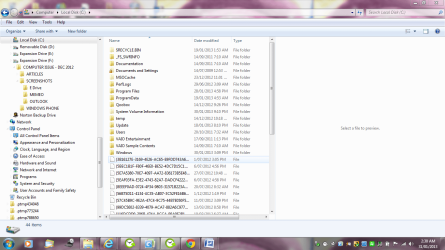
Can you post a screenshot of your screen showing this "C drive that appears down the side" please?
My Computer
At a glance
Microsoft Windows 7 Home Premium 64-bit 7601 ...Intel(R) Core(TM) i7-3770 CPU @ 3.40GHz8.00 GBIntel(R) HD Graphics 4000
Computer type
PC/Desktop
OS
Microsoft Windows 7 Home Premium 64-bit 7601 Multiprocessor Free Service Pack 1
CPU
Intel(R) Core(TM) i7-3770 CPU @ 3.40GHz
Motherboard
ASUSTeK COMPUTER INC. P8H77-M
Memory
8.00 GB
Graphics Card(s)
Intel(R) HD Graphics 4000
Sound Card
On Board
Monitor(s) Displays
Dell 24"
Screen Resolution
1920 x 1080
Hard Drives
(1) INTEL SSDSC2CT180A3 ATA Device (2) ST500DM002-1BD142 ATA Device (3) WDC WD3200AAKS-75L9A0 ATA Device (4) Generic- Compact Flash USB Device (5) Generic- MS/MS-Pro USB Device (6) Generic- SD/MMC USB Device (7) Generic- SM/xD-Picture USB
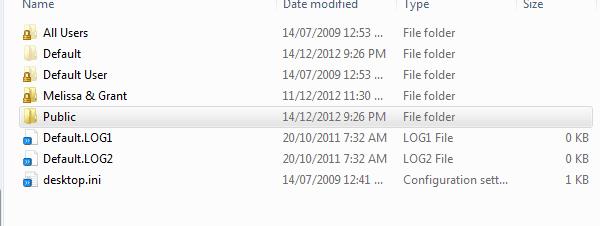
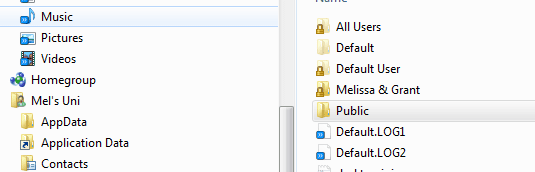
Sorry but i am totally confused. The C Drive is the only internal hard drive that you have on this PC. It is VERY VERY important. As you can see on the right pane of your screenshot it contains your Operating System and all your programs. It is the "Works" of your PC!
My Computer
At a glance
Microsoft Windows 7 Home Premium 64-bit 7601 ...Intel(R) Core(TM) i7-3770 CPU @ 3.40GHz8.00 GBIntel(R) HD Graphics 4000
Computer type
PC/Desktop
OS
Microsoft Windows 7 Home Premium 64-bit 7601 Multiprocessor Free Service Pack 1
CPU
Intel(R) Core(TM) i7-3770 CPU @ 3.40GHz
Motherboard
ASUSTeK COMPUTER INC. P8H77-M
Memory
8.00 GB
Graphics Card(s)
Intel(R) HD Graphics 4000
Sound Card
On Board
Monitor(s) Displays
Dell 24"
Screen Resolution
1920 x 1080
Hard Drives
(1) INTEL SSDSC2CT180A3 ATA Device (2) ST500DM002-1BD142 ATA Device (3) WDC WD3200AAKS-75L9A0 ATA Device (4) Generic- Compact Flash USB Device (5) Generic- MS/MS-Pro USB Device (6) Generic- SD/MMC USB Device (7) Generic- SM/xD-Picture USB
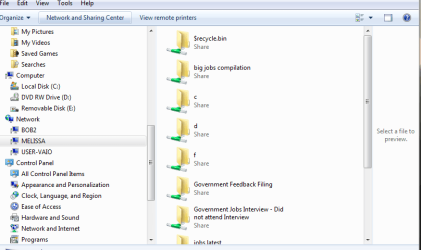
Melissa, no folders are shared unless you share them and it will have a small picture of 2 people on the icon of the shared folder. As mentioned C is where windows gets installed, don`t make any changes to it. It seems you are doing a lot of worrying over nothing. Just use your pc and enjoy W7. But we`re always here to help.
Looks like your recycle bin needs to be emptied, check it b4 you empty it. You don`t want to delete any Top Secret documents.
My Computer
At a glance
Windows 10 Pro x64Intel Core i7 6700KGSkill TridentZ RGB 16GB 3600 16-16-16-36EVGA GTX 980 Ti SC x2
Hi Melissa
Why are you still tinkering with this sharing thing you have with your two machines. The very best way to solve all your problems once and for all is to back up all your data on an external hard drive from both PC's and do a clean install of the operating systems on both. Then don't touch networking or sharing without coming to the Forum and one of us will give you step by step guidance to a perfect network and sharing setup. But really stop worrying about the files you are sharing, you are only sharing them with yourself anyway. Nobody else can see then other than you and Grant and he is not that computer savvy as you have said so don't loose any sleep over it!
My Computer
At a glance
Microsoft Windows 7 Home Premium 64-bit 7601 ...Intel(R) Core(TM) i7-3770 CPU @ 3.40GHz8.00 GBIntel(R) HD Graphics 4000
Computer type
PC/Desktop
OS
Microsoft Windows 7 Home Premium 64-bit 7601 Multiprocessor Free Service Pack 1
CPU
Intel(R) Core(TM) i7-3770 CPU @ 3.40GHz
Motherboard
ASUSTeK COMPUTER INC. P8H77-M
Memory
8.00 GB
Graphics Card(s)
Intel(R) HD Graphics 4000
Sound Card
On Board
Monitor(s) Displays
Dell 24"
Screen Resolution
1920 x 1080
Hard Drives
(1) INTEL SSDSC2CT180A3 ATA Device (2) ST500DM002-1BD142 ATA Device (3) WDC WD3200AAKS-75L9A0 ATA Device (4) Generic- Compact Flash USB Device (5) Generic- MS/MS-Pro USB Device (6) Generic- SD/MMC USB Device (7) Generic- SM/xD-Picture USB
Hi Melissa
You seem to have misinterpreted my last email. I am perfectly serious in suggesting that you do a clean install of your two machines. I say this in the knowledge that it will be much quicker and easier for you to have a good robust system that you can sit back and enjoy with no stress and worry. That I think is important to you.As you are posting over 7 posts a day you must be spending a lot of time here often I see as now very late into the night! That's your choice, of course but I am concerned that your poorly health will suffer even more if you don't get enough rest! Sorry to get pesonal but we are all friends here just trying to help. A clean install can be achieved within a couple of hours and it really would be of benefit to you. There is more than one expert on this subject here on this Forum and there is a very good tutorial giving step by step instructions. Very easy to follow if you take your time. Surely the thought of solving all your outhstanding problems in a few hours would be worth considering!
There is no question of people here not posting in your threads, all I can see is people trying to help! Just look at this one thread!
My Computer
At a glance
Microsoft Windows 7 Home Premium 64-bit 7601 ...Intel(R) Core(TM) i7-3770 CPU @ 3.40GHz8.00 GBIntel(R) HD Graphics 4000
Computer type
PC/Desktop
OS
Microsoft Windows 7 Home Premium 64-bit 7601 Multiprocessor Free Service Pack 1
CPU
Intel(R) Core(TM) i7-3770 CPU @ 3.40GHz
Motherboard
ASUSTeK COMPUTER INC. P8H77-M
Memory
8.00 GB
Graphics Card(s)
Intel(R) HD Graphics 4000
Sound Card
On Board
Monitor(s) Displays
Dell 24"
Screen Resolution
1920 x 1080
Hard Drives
(1) INTEL SSDSC2CT180A3 ATA Device (2) ST500DM002-1BD142 ATA Device (3) WDC WD3200AAKS-75L9A0 ATA Device (4) Generic- Compact Flash USB Device (5) Generic- MS/MS-Pro USB Device (6) Generic- SD/MMC USB Device (7) Generic- SM/xD-Picture USB
I have been reading some articles and tuturiols on accessing network passwords etc.
I do not have a disc in which to put Windows 7 and clean the disk back. I have back ups done by the Antivirus and also did a system back up and restore point.
That is why I can not do a clean system.
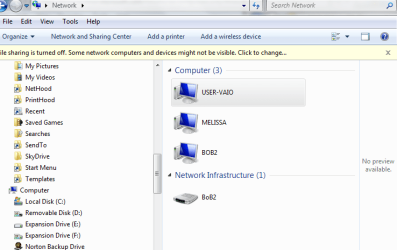
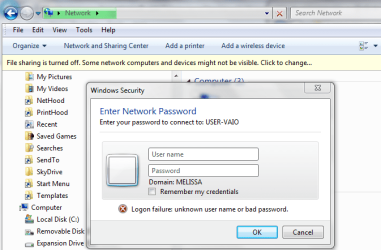
I have this message which comes up when I try and access the other computer. I read your last post and I completely understand where you are coming from. I am trying to understand how the computers are connected and if I was the stupid person that connected them by pressing the wrong button.
Is it a common problem?
I will try not loosing sleep about it.
Attachments
network capture.PNG
24.2 KB
· Views: 1
network password.PNG
30.3 KB
· Views: 2
My Computer
At a glance
Windows 7 Home Premium 64bitWindows 7 Service Pack 1 x86 NTFS4 GB
Melissa
Have you read Gregrockers post in this thread of yours? http://www.sevenforums.com/general-discussion/275784-format-disk-issue-code-7.html
This is why I suggested you solve one problem at a time. As you have now added a new item on Network passwords you will only cloud the issue. I really would urge you to ake up Gregs offer.
My Computer
At a glance
Microsoft Windows 7 Home Premium 64-bit 7601 ...Intel(R) Core(TM) i7-3770 CPU @ 3.40GHz8.00 GBIntel(R) HD Graphics 4000
Computer type
PC/Desktop
OS
Microsoft Windows 7 Home Premium 64-bit 7601 Multiprocessor Free Service Pack 1
CPU
Intel(R) Core(TM) i7-3770 CPU @ 3.40GHz
Motherboard
ASUSTeK COMPUTER INC. P8H77-M
Memory
8.00 GB
Graphics Card(s)
Intel(R) HD Graphics 4000
Sound Card
On Board
Monitor(s) Displays
Dell 24"
Screen Resolution
1920 x 1080
Hard Drives
(1) INTEL SSDSC2CT180A3 ATA Device (2) ST500DM002-1BD142 ATA Device (3) WDC WD3200AAKS-75L9A0 ATA Device (4) Generic- Compact Flash USB Device (5) Generic- MS/MS-Pro USB Device (6) Generic- SD/MMC USB Device (7) Generic- SM/xD-Picture USB
I have not had enough time to reformat all my items and back up my computer as I had to have emergency surgery.
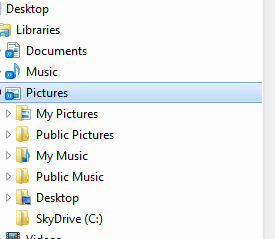
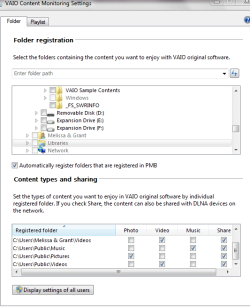
I am on the other computer and I am just wondering why I would have six locations for My Pictures?
I have been told it may be the manufacturer of the computer and it's VIAO link. Both computers are Sony VIAO's. Just different folders.
I am now understanding that it is very tough to troubleshooting without being physically near the persons computer.
I have tried going into the Libraries section and restore default settings.
Can you just reset it to the default ones that originally was set up with (of which I do not know how I would find out what files they would be) by removing the other locations?
I understand that I do not have to stress that much about it.
It just is annoying when posting pics to my friends.
Attachments
sharing pictures.doc
637.5 KB
· Views: 1
pictures - share.PNG
7.9 KB
· Views: 1
My Computer
At a glance
Windows 7 Home Premium 64bitWindows 7 Service Pack 1 x86 NTFS4 GB
Quick question - what is the difference between the documents that have the path
Mel's Uni
and the others
Users/Melissa&Grant
I know that it may be basic questions - but I do not understand the different paths.
Thanks for your past assistance - it has assisted me a lot.
I have been informed by the manufacturer that the software for the media section for both computers was required to be updated - that is when I think it was linked together.
I guess without me telling you or remembering that - I could not answer your questions.
In my state of mind - it is also hard for me to remember what I have done.
If you could assist me in the above question, that would be fantastic - then I will never do it again.
Attachments
users.PNG
7.1 KB
· Views: 1
users1.PNG
5.6 KB
· Views: 1
My Computer
At a glance
Windows 7 Home Premium 64bitWindows 7 Service Pack 1 x86 NTFS4 GB
Hi melissa
I see you have another problem on this thread. Are we to assume that you are not going to take up Gregs offer of assistance with a Clean Install of Windows? I really feel this is the only way you will clear up the myriad of niggling (to you|) problems that you are having.You really will not regret it, I'm sure!
My Computer
At a glance
Microsoft Windows 7 Home Premium 64-bit 7601 ...Intel(R) Core(TM) i7-3770 CPU @ 3.40GHz8.00 GBIntel(R) HD Graphics 4000
Computer type
PC/Desktop
OS
Microsoft Windows 7 Home Premium 64-bit 7601 Multiprocessor Free Service Pack 1
CPU
Intel(R) Core(TM) i7-3770 CPU @ 3.40GHz
Motherboard
ASUSTeK COMPUTER INC. P8H77-M
Memory
8.00 GB
Graphics Card(s)
Intel(R) HD Graphics 4000
Sound Card
On Board
Monitor(s) Displays
Dell 24"
Screen Resolution
1920 x 1080
Hard Drives
(1) INTEL SSDSC2CT180A3 ATA Device (2) ST500DM002-1BD142 ATA Device (3) WDC WD3200AAKS-75L9A0 ATA Device (4) Generic- Compact Flash USB Device (5) Generic- MS/MS-Pro USB Device (6) Generic- SD/MMC USB Device (7) Generic- SM/xD-Picture USB
I had to update software - Antivirus (Norton) - had to delete back ups - had encryption issues.
Doing my reboot CD and it will not save some of the contents - of which is from the location above.
I will just leave it or forget about using a computer in the future.
I am sorry that I have a niggling feeling about what behaviour my computer had to cause issues.
Had a discussion with someone today that I am an answers based person and that if I do not know what I did wrong with this computer - I may do without thinking anything about it and cause the same issue again.
I will close off and not look at my computer again.
Life just seems to sap it out of me - sorry - you have assisted me - I will stick to links on "How to .........."
My Computer
At a glance
Windows 7 Home Premium 64bitWindows 7 Service Pack 1 x86 NTFS4 GB