Windows media player "find album info" provides wrong information

JJbrain

New member
Local time
10:13 AM
Messages
3
Windows media player "find album info" provides wrong information

I am having real problems with Windows Media Player when I add new albums to the library. The album information does not automatically appear (I have it set so it is supposed to appear automatically) and when I use the "find album info" I get the wrong information. I am usually given some 500 albums to choose from. That is absurd and it makes the information unusable. I am tired of having to put in the track info manually.

I have had no trouble using Rhapsody to rip my CDs to my computer. That program finds the correct album information every time. Is the look up service that Windows media Player is using just bad? Can I do something to change this situation or should I just use Rhapsody and forget about Windows Media Player?
 

My Computer My Computer

At a glance

windows 7 64 bit professionalAMD 3.2 Phenom II x 42-CORSAIR XMS3 DHX 4GB ( 2 X 2GB ) PC3-10666 ...ATI Radeon HD 5600 series
Computer Manufacturer/Model Number
custom
OS
windows 7 64 bit professional
CPU
AMD 3.2 Phenom II x 4
Motherboard
msi NF750-G55 (MS-7578) 1.0
Memory
2-CORSAIR XMS3 DHX 4GB ( 2 X 2GB ) PC3-10666 1333MHz 240-pin
Graphics Card(s)
ATI Radeon HD 5600 series
Sound Card
ATI
Monitor(s) Displays
Sony GDM-FW900
Hard Drives
2- 500gb Western Digital caviar green
PSU
Antec EA-650
Case
cooler master
Cooling
2 case fans
I am having real problems with Windows Media Player when I add new albums to the library. The album information does not automatically appear (I have it set so it is supposed to appear automatically) and when I use the "find album info" I get the wrong information. I am usually given some 500 albums to choose from. That is absurd and it makes the information unusable. I am tired of having to put in the track info manually.

I have had no trouble using Rhapsody to rip my CDs to my computer. That program finds the correct album information every time. Is the look up service that Windows media Player is using just bad? Can I do something to change this situation or should I just use Rhapsody and forget about Windows Media Player?

No answers to this query? I've come across this before as well and now I have some album info that is wrong and that I'd like to delete. Where is this stuff stored?

:huh: :rolleyes: :huh:
 

My Computer My Computer

At a glance

Windows 7 x64 SP1Athlon II x2 2154.0 GBOnboard
Computer Manufacturer/Model Number
Compaq desktop
OS
Windows 7 x64 SP1
CPU
Athlon II x2 215
Memory
4.0 GB
Graphics Card(s)
Onboard
Sound Card
Creative SB X-Fi Titanium HD (nice)
Monitor(s) Displays
24" Dell LCD
Screen Resolution
1900 x 1200
Hard Drives
320 GB, 500 GB and 750 GB 7200 rpm
PSU
430w
Keyboard
USB
Mouse
USB
Internet Speed
approx 10 Mbps
I have had the same thing happened to me, I have used this Mp3tag - the universal Tag Editor (ID3v2, MP4, OGG, FLAC, ...) to get the right information back.

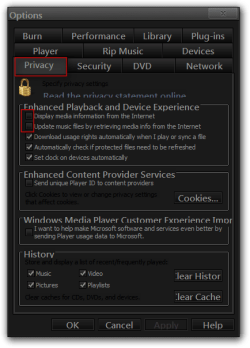
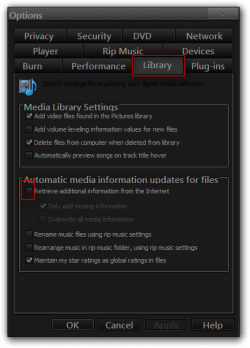
Before you use the above tool I would go to Media player Options and check your settings, look at the two screenshots I have provided I have highlighted the tabs and the options that should be unchecked that way it will not mess up your album art again.

Jerry

1.png2.png
 

My Computer My Computer

At a glance

Win 7 Pro x64 / Win 10 ProIntel(R) Core(TM) i7-3630QM CPU @ 2.40GHz12 GB(1) Intel(R) HD Graphics 4000 (2) NVIDIA GeFo...
Computer type
Laptop
Computer Manufacturer/Model Number
Sager NP9170
OS
Win 7 Pro x64 / Win 10 Pro
CPU
Intel(R) Core(TM) i7-3630QM CPU @ 2.40GHz
Motherboard
CLEVO P170EM
Memory
12 GB
Graphics Card(s)
(1) Intel(R) HD Graphics 4000 (2) NVIDIA GeForce GTX 675M
Sound Card
(1) Realtek High Definition Audio (2) Intel(R) Display Aud
Monitor(s) Displays
17.3
Screen Resolution
1920x1080
Hard Drives
(1) Samsung 860 EVO 500GB(OS) (1) Samsung 860 EVO 500GB(Data)
Keyboard
Backlite
Antivirus
MSE, Malwarebytes Pro
Browser
Firefox
Other Info
DESKTOP: Custom-built.
OS: Win 10 Pro x64.
CASE: Rosewill R5.
CPU: Intel I5 4670K CPU @ 3.40GHz.
CPU COOLER: Cool Master Hyper 212 EVO.
MOTHERBOARD: Asus Z87-A.
MEMORY: Kingston HyperX 2x4 GB.
GPU: Nvidia Geforce 650 TI.
PSU: Corsair TX750.
DRIVES: (1) Samsung 840 120 GB SSD (2) Western Digital blue 500 GB 7200 RPM.
I have had the same thing happened to me, I have used this Mp3tag - the universal Tag Editor (ID3v2, MP4, OGG, FLAC, ...) to get the right information back.

Before you use the above tool I would go to Media player Options and check your settings, look at the two screenshots I have provided I have highlighted the tabs and the options that should be unchecked that way it will not mess up your album art again.

Jerry

View attachment 253233View attachment 253234

Thanks Jerry

I had WMP set up to not use the Internet other than getting DRM rights (BBC iPlayer) but I inadvertently clicked the 'Update Album Info' rather than the 'look for album info'. Seems I have a CD set that differ in title arrangement although look the same so some changes perhaps over the years or different versions for different countries. I'll look into the programme you've quoted and perhaps the Rhapsody programme. I have been quite happy with WMP basically as I just rip to 320 kbps and add some tracks to playlists.

Thanks again - I think the OP has a point if WMP only looks to one location to get album info. I got the CDs from Amazon so Mp3tag should find them.

;) :) ;)
 

My Computer My Computer

At a glance

Windows 7 x64 SP1Athlon II x2 2154.0 GBOnboard
Computer Manufacturer/Model Number
Compaq desktop
OS
Windows 7 x64 SP1
CPU
Athlon II x2 215
Memory
4.0 GB
Graphics Card(s)
Onboard
Sound Card
Creative SB X-Fi Titanium HD (nice)
Monitor(s) Displays
24" Dell LCD
Screen Resolution
1900 x 1200
Hard Drives
320 GB, 500 GB and 750 GB 7200 rpm
PSU
430w
Keyboard
USB
Mouse
USB
Internet Speed
approx 10 Mbps
i use winamp to find album info, tracklists etc. it has been 99% acurate to date.
it isnt so good at finding album art, i mostly use google images for this as you can choose better images .
as long as i name the image "folder" it shows fine and shows as the image on the folder.
 

My Computer My Computer

At a glance

Microsoft Windows 7 Home Premium 64-bit 7600IIx4 amd athelon 635 processor2x2gbati radeon HD 5450
Computer Manufacturer/Model Number
Hewlett packard/p6512uk
OS
Microsoft Windows 7 Home Premium 64-bit 7600
CPU
IIx4 amd athelon 635 processor
Motherboard
FOXCONN 2AA9
Memory
2x2gb
Graphics Card(s)
ati radeon HD 5450
Sound Card
(1) Realtek High Definition Audio (2) AMD High Definition
Monitor(s) Displays
samsung lcd tv 32"
Screen Resolution
1360x 768
Hard Drives
(1) WDC WD10 01FAES-60Z2A0 SATA Disk Device (2) Maxtor OneTouch USB Device (3) ST310003 33AS USB Device (4) WD My Book 1111 USB Device
PSU
?
Cooling
air!
Keyboard
wireless hp
Mouse
wireless Hp,optical
Internet Speed
1.10mb/s
Antivirus
MSE
Browser
Firefox
I have had the same thing happened to me, I have used this Mp3tag - the universal Tag Editor (ID3v2, MP4, OGG, FLAC, ...) to get the right information back.

Before you use the above tool I would go to Media player Options and check your settings, look at the two screenshots I have provided I have highlighted the tabs and the options that should be unchecked that way it will not mess up your album art again.

Jerry

View attachment 253233View attachment 253234

Thanks Jerry

I had WMP set up to not use the Internet other than getting DRM rights (BBC iPlayer) but I inadvertently clicked the 'Update Album Info' rather than the 'look for album info'. Seems I have a CD set that differ in title arrangement although look the same so some changes perhaps over the years or different versions for different countries. I'll look into the programme you've quoted and perhaps the Rhapsody programme. I have been quite happy with WMP basically as I just rip to 320 kbps and add some tracks to playlists.

Thanks again - I think the OP has a point if WMP only looks to one location to get album info. I got the CDs from Amazon so Mp3tag should find them.

;) :) ;)

You're welcome
 

My Computer My Computer

At a glance

Win 7 Pro x64 / Win 10 ProIntel(R) Core(TM) i7-3630QM CPU @ 2.40GHz12 GB(1) Intel(R) HD Graphics 4000 (2) NVIDIA GeFo...
Computer type
Laptop
Computer Manufacturer/Model Number
Sager NP9170
OS
Win 7 Pro x64 / Win 10 Pro
CPU
Intel(R) Core(TM) i7-3630QM CPU @ 2.40GHz
Motherboard
CLEVO P170EM
Memory
12 GB
Graphics Card(s)
(1) Intel(R) HD Graphics 4000 (2) NVIDIA GeForce GTX 675M
Sound Card
(1) Realtek High Definition Audio (2) Intel(R) Display Aud
Monitor(s) Displays
17.3
Screen Resolution
1920x1080
Hard Drives
(1) Samsung 860 EVO 500GB(OS) (1) Samsung 860 EVO 500GB(Data)
Keyboard
Backlite
Antivirus
MSE, Malwarebytes Pro
Browser
Firefox
Other Info
DESKTOP: Custom-built.
OS: Win 10 Pro x64.
CASE: Rosewill R5.
CPU: Intel I5 4670K CPU @ 3.40GHz.
CPU COOLER: Cool Master Hyper 212 EVO.
MOTHERBOARD: Asus Z87-A.
MEMORY: Kingston HyperX 2x4 GB.
GPU: Nvidia Geforce 650 TI.
PSU: Corsair TX750.
DRIVES: (1) Samsung 840 120 GB SSD (2) Western Digital blue 500 GB 7200 RPM.
It still is not working. The Database at All Music is a joke. Adding more search terms expands, rather than narrows, the search. And the Advance Search is a farce.

The only reason I am using Windows Media Player is my SO uses it. I'm the one who gets to manually add the tracks, because Microsoft can't tell the difference between "The Essential King James Bible Complete Stories from the Old & New Testaments Disc 3" (a collection of spoken narrations) and "Disc 3 Mix".
 

My Computer My Computer

At a glance

win7 64
Computer type
PC/Desktop
OS
win7 64
From a musicians's point of view

I'm not sure if anyone can help, but Windows Media player currently links to the wrong information for one of my albums, and it is causing problems with buyers who think the CD itself is the problem. At the moment, when someone plays my 2nd album newly purchased, on WMP for the first time, it links to track listings for my fist album which then obviously doesn't match what's actually playing.

How do I correct this?

(The CD works fine on itunes, and directly on any player that reads the track listing directly from the album.)
 

My Computer My Computer

At a glance

None
Computer type
PC/Desktop
OS
None
Sorry - I should add that I am a professional musician on an indy label.
 

My Computer My Computer

At a glance

None
Computer type
PC/Desktop
OS
None
i use winamp to find album info, tracklists etc. it has been 99% acurate to date.
it isnt so good at finding album art, i mostly use google images for this as you can choose better images .
as long as i name the image "folder" it shows fine and shows as the image on the folder.

But Winamp quit looking for album information months ago!
 

My Computer My Computer

At a glance

Microsoft Windows 7 Home Premium 64-bit Servi...AMD A10-6800K APU with Radeon(tm)™ HD Graphic...(2) G.Skill F3-12800CL10-8GBXLASUS R7 250 Series (0x6610)
Computer type
PC/Desktop
Computer Manufacturer/Model Number
Custom
OS
Microsoft Windows 7 Home Premium 64-bit Service Pack 1
CPU
AMD A10-6800K APU with Radeon(tm)™ HD Graphics 4100
Motherboard
ASRock FM2A85X Extreme4-M
Memory
(2) G.Skill F3-12800CL10-8GBXL
Graphics Card(s)
ASUS R7 250 Series (0x6610)
Sound Card
Realtek High Definition Audio
Monitor(s) Displays
Acer X213H LCD monitor, 21"
Screen Resolution
1920 x 1080 x 32 bits @ 60 Hz
Hard Drives
WD Black, 1.0TB, WDC WD1002FAEX-00Z3A0
PSU
Rosewill Quark-650
Case
Raidmax Comet SECC Steel ATX Mid Tower Computer Case
Cooling
1 x 80mm + 2 x 120mm + Stock cooler
Mouse
Gear Head Wireless Optical 5-button mouse
Internet Speed
FTTx 6000 / 1000
Antivirus
Avast! Free Antivirus 2015.10.0.2208
Browser
Google Chrome Version 40.0.2214.115
Other Info
*AMD Dual-Graphics
*Uses OpenDNS
*Uses Folding@Home
*HP 16x Super-Multi DVD Writer
*Superspeed 74-in-1 Card Reader
*Maximum overclock has not been determined.
Back
Top