
How can i move files (Including Windows) Onto a New HDD From a old one

The last screenshot shows he is booted into the old Win7 on C - look at the Boot flag to determine which is booted. The clone is correctly marked System Active.
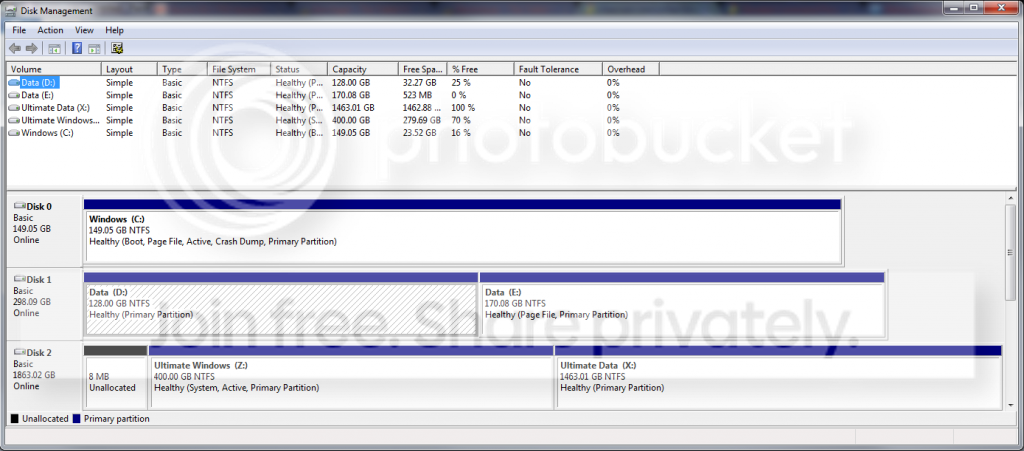


Now when booting into the clone, is it correctly showing as C drive? That is the question which has not been answered yet. If it is still Z I would clone it over correctly using Auto drive letter setting, set Active and Primary.

If it doesn't start up then this time run the 3 Startup Repairs to correctly repair or rewrite the System boot files while checking all parameters, which BCD commands do not do.
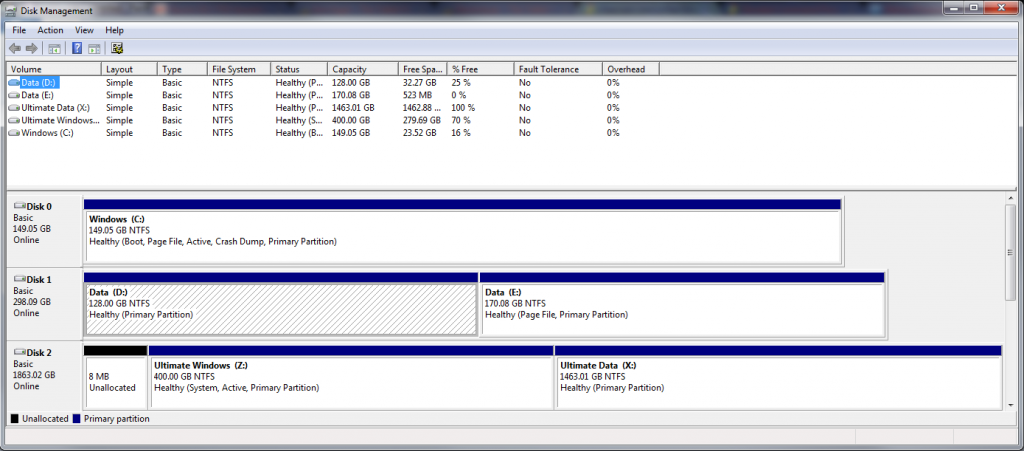
 
When you boot into the clone now is it C? It should be lettered C if the cloning was done correctly set to Auto. If not I would do it over.

Also since you cloned to a Logical partition, the Win7 boot files cannot be placed on a Logical partition until it is converted to Primary, marked Active and then run Startup Repair up to 3 separate times.

Since you were not told to run the Startup Repairs, but instead manually edited the BCD, chances are the job was not done completely. When you reboot and tap the F8 key, do you have the Repair My Computer choice at the top of Advanced Boot Options? If not run Startup Repair several times.

I would also want the new OS drive in Disk0 slot and set first HD to boot in BIOS setup, no other partition marked Active.
Greg I know he did the clone the wrong way. He only has to do my registry trick and a startup repair. But that doesn't cleanup the bcd store. Why clone again.... only drive lettering in bcd store and registry is not good. Startup repair doesn't swap Z and C!!
 

My Computer My Computer

At a glance

Microsoft Windows 7 Home Premium 64-bits 7601...Intel(R) Core(TM) i3 CPU M 370 @ 2.40GHz4,00 GBATI Mobility Radeon HD 5400 Series
Computer type
Laptop
Computer Manufacturer/Model Number
ACER ASPIRE 5742G
OS
Microsoft Windows 7 Home Premium 64-bits 7601 Multiprocessor Free Service Pack 1
CPU
Intel(R) Core(TM) i3 CPU M 370 @ 2.40GHz
Motherboard
Acer Aspire 5742G
Memory
4,00 GB
Graphics Card(s)
ATI Mobility Radeon HD 5400 Series
Sound Card
(1) AMD High Definition Audio Device (2) Realtek High Defi
Screen Resolution
1366 x 768 x 32 bits (4294967296 colors) @ 60 Hz
Hard Drives
WDC WD5000BEVT-22ZAT0
How do we know for sure the clone is not now starting up as C? We have not seen a screenshot since he booted into the clone, which is shown as Z in his last screenshot only because he was booted into the original Win7 on C.
 
The last screenshot shows he is booted into the old Win7 on C - look at the Boot flag to determine which is booted. The clone is correctly marked System Active.


Now when booting into the clone, is it correctly showing as C drive? That is the question.
Z is marked SYSTEM as you can see. So Z has the boot menu. But it has a bot entry still pointing to C.
I let him do: bcdboot z:\windows
It created a multiboot succesfully. He can boot to what was called Z now!
He only has to swap C and Z in HKEY_LOCAL_MACHINE\SYSTEM\MountedDevices

And do a startup repair or doning a bcd cleanup manually
 

My Computer My Computer

At a glance

Microsoft Windows 7 Home Premium 64-bits 7601...Intel(R) Core(TM) i3 CPU M 370 @ 2.40GHz4,00 GBATI Mobility Radeon HD 5400 Series
Computer type
Laptop
Computer Manufacturer/Model Number
ACER ASPIRE 5742G
OS
Microsoft Windows 7 Home Premium 64-bits 7601 Multiprocessor Free Service Pack 1
CPU
Intel(R) Core(TM) i3 CPU M 370 @ 2.40GHz
Motherboard
Acer Aspire 5742G
Memory
4,00 GB
Graphics Card(s)
ATI Mobility Radeon HD 5400 Series
Sound Card
(1) AMD High Definition Audio Device (2) Realtek High Defi
Screen Resolution
1366 x 768 x 32 bits (4294967296 colors) @ 60 Hz
Hard Drives
WDC WD5000BEVT-22ZAT0
How do we know for sure the clone is not now starting up as C? We have not seen a screenshot since he booted into the clone, which is shown as Z in his last screenshot only because he was booted into the original Win7 on C.

I know.. let's wait for disk mangement screenshot
 

My Computer My Computer

At a glance

Microsoft Windows 7 Home Premium 64-bits 7601...Intel(R) Core(TM) i3 CPU M 370 @ 2.40GHz4,00 GBATI Mobility Radeon HD 5400 Series
Computer type
Laptop
Computer Manufacturer/Model Number
ACER ASPIRE 5742G
OS
Microsoft Windows 7 Home Premium 64-bits 7601 Multiprocessor Free Service Pack 1
CPU
Intel(R) Core(TM) i3 CPU M 370 @ 2.40GHz
Motherboard
Acer Aspire 5742G
Memory
4,00 GB
Graphics Card(s)
ATI Mobility Radeon HD 5400 Series
Sound Card
(1) AMD High Definition Audio Device (2) Realtek High Defi
Screen Resolution
1366 x 768 x 32 bits (4294967296 colors) @ 60 Hz
Hard Drives
WDC WD5000BEVT-22ZAT0
Correct.

If it is booting as C then the next question is if he has Repair My Computer on the F8 Advanced Boot Options which is only rewritten by Startup Repair. This is why we settled four years ago on runnning Startup Repair - Run up to 3 Separate Times as the best practice for moving the System boot files, since it tests and repairs all parameters.

If clone is not booting as C then no registry edit will fix that. The clone needs to be redone with Auto drive letter setting, set to Active Primary partition while copying the MBR and Track0. If it won't boot after removing the source HD and setting first to boot in BIOS, run the 3 Startup Repairs with reboots.
 
Correct.

If it is booting as C then the next question is if he has Repair My Computer on the F8 Advanced Boot Options which is only rewritten by Startup Repair. This is why we settled four years ago on runnning Startup Repair - Run up to 3 Separate Times as the best practice for moving the System boot files, since it tests and repairs all parameters.

If clone is not booting as C then no registry edit will fix that. The clone needs to be redone with Auto drive letter setting, set to Active Primary partition while copying the MBR and Track0. If it won't boot after removing the source HD and setting first to boot in BIOS, run the 3 Startup Repairs with reboots.
I used this registry fix at least 5 times. All succeeds succesfully (even after detaching old drive afterwards). MBR (partition table, disk signature, boot code) is fine. It boots from physical disk where Z is on. Z has a good volume boot sector well.

What references to old C will still be interfering? I know you are a smart guy with years of experience... Just want to learn
 

My Computer My Computer

At a glance

Microsoft Windows 7 Home Premium 64-bits 7601...Intel(R) Core(TM) i3 CPU M 370 @ 2.40GHz4,00 GBATI Mobility Radeon HD 5400 Series
Computer type
Laptop
Computer Manufacturer/Model Number
ACER ASPIRE 5742G
OS
Microsoft Windows 7 Home Premium 64-bits 7601 Multiprocessor Free Service Pack 1
CPU
Intel(R) Core(TM) i3 CPU M 370 @ 2.40GHz
Motherboard
Acer Aspire 5742G
Memory
4,00 GB
Graphics Card(s)
ATI Mobility Radeon HD 5400 Series
Sound Card
(1) AMD High Definition Audio Device (2) Realtek High Defi
Screen Resolution
1366 x 768 x 32 bits (4294967296 colors) @ 60 Hz
Hard Drives
WDC WD5000BEVT-22ZAT0
I have never seen a method to change the drive letter of Win7 partition without ruining it. Maybe you have discovered one! You work with internal BCD commands while I specialize in automated methods which are more user-friendly for a consumer audience.

My point about Startup Repair being the most comprehensive to move the System boot files is because it runs many different tests and fixes checking all parameters and not just the BCD edits. So for example WinRE is relinked to F8 which is not done with BCD commands that I've seen.
 
I have never seen a method to change the drive letter of Win7 partition without ruining it. Maybe you have discovered one! You work with internal BCD commands while I specialize in automated methods which are more user-friendly for a consumer audience.

My point about Startup Repair being the most comprehensive to move the System boot files is because it runs many different tests and fixes checking all parameters and not just the BCD edits. So for example WinRE is relinked to F8 which is not done with BCD commands that I've seen.
Your point to startup repair is totally true.

To change a drive letter in win7 is just editting registry key HKEY_LOCAL_MACHINE\SYSTEM\MountedDevices

If windows doesn't boot you can do it from winre. For example OS disk is called E in winre
Code:
reg  load  HKLM\MY_SYSTEM   E:Windows\System32\config\system
regedit. Navigate to HKLM\MY_SYSTEM\MountedDevices. Delete drive letters like \DosDevices\D: there, or rename. 
reg unload  HKLM\MY_SYSTEM

Best thing to do is delete \DosDevices\C: (so it can be reused). And delete \DosDevices\?: That should become C. Don't know what \DosDevices\?: to take.. look in winre what drive letter it is and it's value in mounteddevices. Lookup same value in HKLM\MY_SYSTEM\MountedDevices
 

My Computer My Computer

At a glance

Microsoft Windows 7 Home Premium 64-bits 7601...Intel(R) Core(TM) i3 CPU M 370 @ 2.40GHz4,00 GBATI Mobility Radeon HD 5400 Series
Computer type
Laptop
Computer Manufacturer/Model Number
ACER ASPIRE 5742G
OS
Microsoft Windows 7 Home Premium 64-bits 7601 Multiprocessor Free Service Pack 1
CPU
Intel(R) Core(TM) i3 CPU M 370 @ 2.40GHz
Motherboard
Acer Aspire 5742G
Memory
4,00 GB
Graphics Card(s)
ATI Mobility Radeon HD 5400 Series
Sound Card
(1) AMD High Definition Audio Device (2) Realtek High Defi
Screen Resolution
1366 x 768 x 32 bits (4294967296 colors) @ 60 Hz
Hard Drives
WDC WD5000BEVT-22ZAT0
Why? I called it Z on purpose, coz i wanted windos to be in Z
 

My Computer My Computer

At a glance

Windows 7 Ultimate 64-bitIntel i7-3820 @ 3.60GHz24GB2xNvidea GTS 450 SLI
Computer type
PC/Desktop
Computer Manufacturer/Model Number
Custom Build
OS
Windows 7 Ultimate 64-bit
CPU
Intel i7-3820 @ 3.60GHz
Motherboard
MSI X79A-GD45 8D
Memory
24GB
Graphics Card(s)
2xNvidea GTS 450 SLI
Monitor(s) Displays
HP w2408h 24" monitor
Screen Resolution
1920x1200
Hard Drives
2 Terrabyte 6GB/s HDD
Case
Cooler Master 912 HAF
Cooling
Intel Water Cooling for CPU, 6 Fans.
Internet Speed
100MB/s
Antivirus
None - Like a Boss
Why? I called it Z on purpose, coz i wanted windos to be in Z
You want new windows in partition that's called Z now. I just want you to rename it to C. Only to C in new win7. old windows still sees it as Z.

Registry, and all windows stuff refers to C. So you have to adjust what's called C.

Do what I askd you to do in #57
Do it and post disk managemnet screenshot afterwards
 

My Computer My Computer

At a glance

Microsoft Windows 7 Home Premium 64-bits 7601...Intel(R) Core(TM) i3 CPU M 370 @ 2.40GHz4,00 GBATI Mobility Radeon HD 5400 Series
Computer type
Laptop
Computer Manufacturer/Model Number
ACER ASPIRE 5742G
OS
Microsoft Windows 7 Home Premium 64-bits 7601 Multiprocessor Free Service Pack 1
CPU
Intel(R) Core(TM) i3 CPU M 370 @ 2.40GHz
Motherboard
Acer Aspire 5742G
Memory
4,00 GB
Graphics Card(s)
ATI Mobility Radeon HD 5400 Series
Sound Card
(1) AMD High Definition Audio Device (2) Realtek High Defi
Screen Resolution
1366 x 768 x 32 bits (4294967296 colors) @ 60 Hz
Hard Drives
WDC WD5000BEVT-22ZAT0
After that
remove "win7 old" from bootmenu using msconfig
And do what I asked you to do in #58

Do you have an win7 repair disk or win7 installation dvd? If not create one. http://www.sevenforums.com/tutorials/2083-system-repair-disc-create.html

Now boot from dvd and do startup repair 3 times with reboots in between.
http://www.sevenforums.com/tutorials/681-startup-repair.html
This will adjust bootmenu and makes F8 "repair your computer" functionality active again.

remove "win7 old" from bootmenu using msconfig if startup repair did add it

Still waiting for screenshot of disk management from win7 new (after registry tricks and reboot)
 

My Computer My Computer

At a glance

Microsoft Windows 7 Home Premium 64-bits 7601...Intel(R) Core(TM) i3 CPU M 370 @ 2.40GHz4,00 GBATI Mobility Radeon HD 5400 Series
Computer type
Laptop
Computer Manufacturer/Model Number
ACER ASPIRE 5742G
OS
Microsoft Windows 7 Home Premium 64-bits 7601 Multiprocessor Free Service Pack 1
CPU
Intel(R) Core(TM) i3 CPU M 370 @ 2.40GHz
Motherboard
Acer Aspire 5742G
Memory
4,00 GB
Graphics Card(s)
ATI Mobility Radeon HD 5400 Series
Sound Card
(1) AMD High Definition Audio Device (2) Realtek High Defi
Screen Resolution
1366 x 768 x 32 bits (4294967296 colors) @ 60 Hz
Hard Drives
WDC WD5000BEVT-22ZAT0
Crazy, I was referring to Win7 seeing itself as C when it's booted as it's is intended to do when correctly installed from boot and not another OS on C, or when drive imaging is set correctly to Auto drive letter.
 
Last edited:
Why? I called it Z on purpose, coz i wanted windos to be in Z

Crasykilla, the new windows partition Z is only Z because you are looking at it from windows C, the partition you are in now. Once you get booting into the new hard drive ( that`s what i`ll call it ) windows will be C. There is nothing you can do about that, nor should you try. Do you understand that. Let us know what you want to do when you come back on. This could have been done a lot faster and neater with windows built in imaging. ;)
 

My Computer My Computer

At a glance

Windows 10 Pro x64Intel Core i7 6700KGSkill TridentZ RGB 16GB 3600 16-16-16-36EVGA GTX 980 Ti SC x2
Computer type
PC/Desktop
Computer Manufacturer/Model Number
Skylake Special #666
OS
Windows 10 Pro x64
CPU
Intel Core i7 6700K
Motherboard
Asus Sabertooth Z170 Mark 1
Memory
GSkill TridentZ RGB 16GB 3600 16-16-16-36
Graphics Card(s)
EVGA GTX 980 Ti SC x2
Sound Card
Realtek High Definition
Monitor(s) Displays
AOC G2460PG
Screen Resolution
1920 x 1080 144Hz
Hard Drives
Samsung 860 Pro 256GB, Seagate Barracuda 4TB x2
PSU
EVGA 1000 P2, EVGA White Custom Braided Cables
Case
Corsair Vengeance C70 Gunmetal Black
Cooling
Corsair H100i v2, Corsair ML120 x2, Thermal Grizzly Kryonaut
Keyboard
Logitech G910 Orion Spectrum
Mouse
Logitech G700s
Internet Speed
Verizon Fios Quantum Gateway 75/75
Antivirus
Windows Defender, Malwarebytes Free 3.8.3
Browser
Chrome
Other Info
Corsair SP120 x4, LG Blu-ray Drive, Durabrand HT-395 100 Watt Dolby Digital Amp, Corsair H2100 Wireless 7.1 Headset
What? Are you saying im still using windows from my old HDD? or can't i use letter Z: for windows? i know that everything is working fine and im booted from Z:, the windows from the NEW Hdd, when i swapped SATA cables that didn't change the letters/drives around if thats what your thinking...
 

My Computer My Computer

At a glance

Windows 7 Ultimate 64-bitIntel i7-3820 @ 3.60GHz24GB2xNvidea GTS 450 SLI
Computer type
PC/Desktop
Computer Manufacturer/Model Number
Custom Build
OS
Windows 7 Ultimate 64-bit
CPU
Intel i7-3820 @ 3.60GHz
Motherboard
MSI X79A-GD45 8D
Memory
24GB
Graphics Card(s)
2xNvidea GTS 450 SLI
Monitor(s) Displays
HP w2408h 24" monitor
Screen Resolution
1920x1200
Hard Drives
2 Terrabyte 6GB/s HDD
Case
Cooler Master 912 HAF
Cooling
Intel Water Cooling for CPU, 6 Fans.
Internet Speed
100MB/s
Antivirus
None - Like a Boss
We're still waiting to see the screenshot of your maximized Disk Mgmt drive map showing that you're booted into the cloned Win7. Once you boot into it then it should show as C drive. This is how Windows always works when it's correctly installed from boot and the installer is not run incorrectly from another OS.

So unplug your other HD's, swap the old C drive data cable to the new clone HD, make sure it remains set first HD to boot in BIOS setup, boot it to see if it can boot on its own - which it should considering it was already holding the System Active flags in the old screenshot.

What you have not done yet is show us a Disk Mgmt screenshot of the newly cloned Win7 when it is booted. In that screenshot the old C drive was booted.
 
Erm, i may have just fuqed my pc up, i somehow ended up changing letter opd hdd and now it dont boot well, i wanted to put it i to a diff pc but incant have 2 C's on the same pc can i? How so i change this back?
 

My Computer My Computer

At a glance

Windows 7 Ultimate 64-bitIntel i7-3820 @ 3.60GHz24GB2xNvidea GTS 450 SLI
Computer type
PC/Desktop
Computer Manufacturer/Model Number
Custom Build
OS
Windows 7 Ultimate 64-bit
CPU
Intel i7-3820 @ 3.60GHz
Motherboard
MSI X79A-GD45 8D
Memory
24GB
Graphics Card(s)
2xNvidea GTS 450 SLI
Monitor(s) Displays
HP w2408h 24" monitor
Screen Resolution
1920x1200
Hard Drives
2 Terrabyte 6GB/s HDD
Case
Cooler Master 912 HAF
Cooling
Intel Water Cooling for CPU, 6 Fans.
Internet Speed
100MB/s
Antivirus
None - Like a Boss
Alright i fixed the crap that i did to my pc, i ended up formatting Z: and i thought that im not gonna bother anymore, i was going to try what AddRam said but i thought that ill just simply reinstall windows, it would get rid of all my problems and programs that slow my pc down that i don't ever bother removing...
 

My Computer My Computer

At a glance

Windows 7 Ultimate 64-bitIntel i7-3820 @ 3.60GHz24GB2xNvidea GTS 450 SLI
Computer type
PC/Desktop
Computer Manufacturer/Model Number
Custom Build
OS
Windows 7 Ultimate 64-bit
CPU
Intel i7-3820 @ 3.60GHz
Motherboard
MSI X79A-GD45 8D
Memory
24GB
Graphics Card(s)
2xNvidea GTS 450 SLI
Monitor(s) Displays
HP w2408h 24" monitor
Screen Resolution
1920x1200
Hard Drives
2 Terrabyte 6GB/s HDD
Case
Cooler Master 912 HAF
Cooling
Intel Water Cooling for CPU, 6 Fans.
Internet Speed
100MB/s
Antivirus
None - Like a Boss
Why do you bother asking for help here when you don't read or pay attention to a single thing we've said? I told you exactly what you needed to do and you never even bothered to ask any questions if you didn't understand it, then went off and did something nonsensical and random. So why are you even here? You came to the best place on the web to learn and then ignore everything.
 
Jesus man, i changed the letter of the deive that i thought ill take out and use for emergencies, not knowing that windows was still using it, sorry for wasting your time, dont over exagerate
 

My Computer My Computer

At a glance

Windows 7 Ultimate 64-bitIntel i7-3820 @ 3.60GHz24GB2xNvidea GTS 450 SLI
Computer type
PC/Desktop
Computer Manufacturer/Model Number
Custom Build
OS
Windows 7 Ultimate 64-bit
CPU
Intel i7-3820 @ 3.60GHz
Motherboard
MSI X79A-GD45 8D
Memory
24GB
Graphics Card(s)
2xNvidea GTS 450 SLI
Monitor(s) Displays
HP w2408h 24" monitor
Screen Resolution
1920x1200
Hard Drives
2 Terrabyte 6GB/s HDD
Case
Cooler Master 912 HAF
Cooling
Intel Water Cooling for CPU, 6 Fans.
Internet Speed
100MB/s
Antivirus
None - Like a Boss
Back
Top