usb, sata etc load AFTER log in, please help

peugot

New member
Member
Local time
7:16 PM
Messages
77
so, i got this problem. after i log in, the pc finds all discs and other peripherals AFTER log in, every single time.. this is a problem because my dropbox etc cant find the disc its files are in when the program loads in. also, there are like 10 autoruns opening when i turn on my pc, everytime and that is very annoying. so what can i do about that? i want it to be normal, like no autoruns everytime i log in, and that the discs etc are loaded before programs etc loads
 

My Computer My Computer

Computer type
PC/Desktop
Computer Manufacturer/Model Number
home build
OS
windows 7 professional 64-bit
CPU
intel [email protected] ghz (oc @4.675 ghz)
Motherboard
asus p9x79 deluxe
Memory
16gb corsair vengeance @ 1600mhz
Graphics Card(s)
nvidia geforce gtx 680 SLI(X2)
Sound Card
realtek 898 / logitech G930
Monitor(s) Displays
47" philips + Benq 24"
Screen Resolution
1920x1080p
Hard Drives
intel SSD 330 series 120GB
samsung 830 SSD 128GB
seagate 520gb X 2
10 TB internal + 2 TB external
PSU
silver power 850w modular
Case
cm stormtrooper black full tower w/windowed sidepanel
Cooling
H100i
Keyboard
logitech dinovo
Mouse
trust 17063
Internet Speed
70/10 mbps
Type msconfig in the :orb: search, go to the Startup tab and uncheck everything except you security programs, reboot, log off/on and see if that's what you want.
 

My Computer My Computer

Computer type
PC/Desktop
Computer Manufacturer/Model Number
Home Built Desktop By DataTech
OS
Windows 7 Ultimate X64 SP1
CPU
Intel i5-2550K, Differing ~4.4-4.8GHz No built in GPU
Motherboard
ASUS P8Z68-V PRO/GEN3
Memory
16GB G.Skill Sniper 1866MHz @ 2133MHz 2x8GB
Graphics Card(s)
ASUS GTX650TIB-DC2OC-2GD5, (650TI Boost)
Sound Card
Onboard Realtek 5-1
Monitor(s) Displays
Samsung P2570HD
Screen Resolution
1920x1080
Hard Drives
Samsung 840 Pro 256GB SSD for OS, 500GB Seagate Constellation (Enterprise drive) for Data
PSU
Corsair HX650W
Case
Inwin Dragon Rider
Cooling
Hyper 212 EVO w/two Noctua fans, push-pull, @1300 RPM
Keyboard
E-Z Eyes, bright yellow keys with large characters
Mouse
steelseries SENSEI Laser Pro Gaming
Internet Speed
48-51Mbs Mbs down, 11 Mbs up Xfinity Cable
Antivirus
Norton Internet Security 2013
Browser
IE 10, Opera, Pale Moon if needed
Other Info
4 case fans, LG BluRay-RE, ASUS DVD-RW, Mr. Fusion power supply, 1.21 gigawatts.
Type msconfig in the :orb: search, go to the Startup tab and uncheck everything except you security programs, reboot, log off/on and see if that's what you want.

already done, but it doesent stop my pc from find all the harddiscs everytime(like it have never seen them before) i turn it on. why would it not find them before logging in? like installing drivers for all the harddiscs etc everytime?
 

My Computer My Computer

Computer type
PC/Desktop
Computer Manufacturer/Model Number
home build
OS
windows 7 professional 64-bit
CPU
intel [email protected] ghz (oc @4.675 ghz)
Motherboard
asus p9x79 deluxe
Memory
16gb corsair vengeance @ 1600mhz
Graphics Card(s)
nvidia geforce gtx 680 SLI(X2)
Sound Card
realtek 898 / logitech G930
Monitor(s) Displays
47" philips + Benq 24"
Screen Resolution
1920x1080p
Hard Drives
intel SSD 330 series 120GB
samsung 830 SSD 128GB
seagate 520gb X 2
10 TB internal + 2 TB external
PSU
silver power 850w modular
Case
cm stormtrooper black full tower w/windowed sidepanel
Cooling
H100i
Keyboard
logitech dinovo
Mouse
trust 17063
Internet Speed
70/10 mbps
When an account is logged off it's, well, off. Nothing can be loaded in an off state. If the drives are USB this sounds normal to me, mine does it too.
 

My Computer My Computer

Computer type
PC/Desktop
Computer Manufacturer/Model Number
Home Built Desktop By DataTech
OS
Windows 7 Ultimate X64 SP1
CPU
Intel i5-2550K, Differing ~4.4-4.8GHz No built in GPU
Motherboard
ASUS P8Z68-V PRO/GEN3
Memory
16GB G.Skill Sniper 1866MHz @ 2133MHz 2x8GB
Graphics Card(s)
ASUS GTX650TIB-DC2OC-2GD5, (650TI Boost)
Sound Card
Onboard Realtek 5-1
Monitor(s) Displays
Samsung P2570HD
Screen Resolution
1920x1080
Hard Drives
Samsung 840 Pro 256GB SSD for OS, 500GB Seagate Constellation (Enterprise drive) for Data
PSU
Corsair HX650W
Case
Inwin Dragon Rider
Cooling
Hyper 212 EVO w/two Noctua fans, push-pull, @1300 RPM
Keyboard
E-Z Eyes, bright yellow keys with large characters
Mouse
steelseries SENSEI Laser Pro Gaming
Internet Speed
48-51Mbs Mbs down, 11 Mbs up Xfinity Cable
Antivirus
Norton Internet Security 2013
Browser
IE 10, Opera, Pale Moon if needed
Other Info
4 case fans, LG BluRay-RE, ASUS DVD-RW, Mr. Fusion power supply, 1.21 gigawatts.
When an account is logged off it's, well, off. Nothing can be loaded in an off state. If the drives are USB this sounds normal to me, mine does it too.

oh.. but they werent like this before! this is crashing with dropbox etc on one of the discs.. if so, how come they are seen in the bios but after login the pc finds them again?
 

My Computer My Computer

Computer type
PC/Desktop
Computer Manufacturer/Model Number
home build
OS
windows 7 professional 64-bit
CPU
intel [email protected] ghz (oc @4.675 ghz)
Motherboard
asus p9x79 deluxe
Memory
16gb corsair vengeance @ 1600mhz
Graphics Card(s)
nvidia geforce gtx 680 SLI(X2)
Sound Card
realtek 898 / logitech G930
Monitor(s) Displays
47" philips + Benq 24"
Screen Resolution
1920x1080p
Hard Drives
intel SSD 330 series 120GB
samsung 830 SSD 128GB
seagate 520gb X 2
10 TB internal + 2 TB external
PSU
silver power 850w modular
Case
cm stormtrooper black full tower w/windowed sidepanel
Cooling
H100i
Keyboard
logitech dinovo
Mouse
trust 17063
Internet Speed
70/10 mbps
oh.. but they werent like this before! this is crashing with dropbox etc on one of the discs.. if so, how come they are seen in the bios but after login the pc finds them again?
BIOS and w7 are not the same, BIOS can see what is connected to the board even though Windows can't. Maybe I'm misunderstanding the problem, please post a snip of Disk management. http://www.sevenforums.com/tutorial...nt-post-screen-capture-image.html#post2261610

If it worked before, when did you notice a change and what happened right before the change?
 

My Computer My Computer

Computer type
PC/Desktop
Computer Manufacturer/Model Number
Home Built Desktop By DataTech
OS
Windows 7 Ultimate X64 SP1
CPU
Intel i5-2550K, Differing ~4.4-4.8GHz No built in GPU
Motherboard
ASUS P8Z68-V PRO/GEN3
Memory
16GB G.Skill Sniper 1866MHz @ 2133MHz 2x8GB
Graphics Card(s)
ASUS GTX650TIB-DC2OC-2GD5, (650TI Boost)
Sound Card
Onboard Realtek 5-1
Monitor(s) Displays
Samsung P2570HD
Screen Resolution
1920x1080
Hard Drives
Samsung 840 Pro 256GB SSD for OS, 500GB Seagate Constellation (Enterprise drive) for Data
PSU
Corsair HX650W
Case
Inwin Dragon Rider
Cooling
Hyper 212 EVO w/two Noctua fans, push-pull, @1300 RPM
Keyboard
E-Z Eyes, bright yellow keys with large characters
Mouse
steelseries SENSEI Laser Pro Gaming
Internet Speed
48-51Mbs Mbs down, 11 Mbs up Xfinity Cable
Antivirus
Norton Internet Security 2013
Browser
IE 10, Opera, Pale Moon if needed
Other Info
4 case fans, LG BluRay-RE, ASUS DVD-RW, Mr. Fusion power supply, 1.21 gigawatts.
oh.. but they werent like this before! this is crashing with dropbox etc on one of the discs.. if so, how come they are seen in the bios but after login the pc finds them again?
BIOS and w7 are not the same, BIOS can see what is connected to the board even though Windows can't. Maybe I'm misunderstanding the problem, please post a snip of Disk management. http://www.sevenforums.com/tutorial...nt-post-screen-capture-image.html#post2261610

If it worked before, when did you notice a change and what happened right before the change?

yes i know, and thats why i also know its already detected hardware-wise. so the question is really, why does it take windows that long time to detect it? i want it to be der when i log on, not after.... it's there 5 sec after log on... but by then i have many errors from programs that are using those discs... what do you need a pic of disc manager btw, it's on norwegian... but i can have it if you want anyway after this info?
 

My Computer My Computer

Computer type
PC/Desktop
Computer Manufacturer/Model Number
home build
OS
windows 7 professional 64-bit
CPU
intel [email protected] ghz (oc @4.675 ghz)
Motherboard
asus p9x79 deluxe
Memory
16gb corsair vengeance @ 1600mhz
Graphics Card(s)
nvidia geforce gtx 680 SLI(X2)
Sound Card
realtek 898 / logitech G930
Monitor(s) Displays
47" philips + Benq 24"
Screen Resolution
1920x1080p
Hard Drives
intel SSD 330 series 120GB
samsung 830 SSD 128GB
seagate 520gb X 2
10 TB internal + 2 TB external
PSU
silver power 850w modular
Case
cm stormtrooper black full tower w/windowed sidepanel
Cooling
H100i
Keyboard
logitech dinovo
Mouse
trust 17063
Internet Speed
70/10 mbps
Don't worry about the snip. It is helpful to us IF you want help, or not, up to you.
Have a good one.
 

My Computer My Computer

Computer type
PC/Desktop
Computer Manufacturer/Model Number
Home Built Desktop By DataTech
OS
Windows 7 Ultimate X64 SP1
CPU
Intel i5-2550K, Differing ~4.4-4.8GHz No built in GPU
Motherboard
ASUS P8Z68-V PRO/GEN3
Memory
16GB G.Skill Sniper 1866MHz @ 2133MHz 2x8GB
Graphics Card(s)
ASUS GTX650TIB-DC2OC-2GD5, (650TI Boost)
Sound Card
Onboard Realtek 5-1
Monitor(s) Displays
Samsung P2570HD
Screen Resolution
1920x1080
Hard Drives
Samsung 840 Pro 256GB SSD for OS, 500GB Seagate Constellation (Enterprise drive) for Data
PSU
Corsair HX650W
Case
Inwin Dragon Rider
Cooling
Hyper 212 EVO w/two Noctua fans, push-pull, @1300 RPM
Keyboard
E-Z Eyes, bright yellow keys with large characters
Mouse
steelseries SENSEI Laser Pro Gaming
Internet Speed
48-51Mbs Mbs down, 11 Mbs up Xfinity Cable
Antivirus
Norton Internet Security 2013
Browser
IE 10, Opera, Pale Moon if needed
Other Info
4 case fans, LG BluRay-RE, ASUS DVD-RW, Mr. Fusion power supply, 1.21 gigawatts.
Try sysinternals autoruns to control those 10 startup items

Autoruns for Windows

Introduction

This utility, which has the most comprehensive knowledge of auto-starting locations of any startup monitor, shows you what programs are configured to run during system bootup or login, and shows you the entries in the order Windows processes them. These programs include ones in your startup folder, Run, RunOnce, and other Registry keys. You can configure Autoruns to show other locations, including Explorer shell extensions, toolbars, browser helper objects, Winlogon notifications, auto-start services, and much more. Autoruns goes way beyond the MSConfig utility bundled with Windows Me and XP.

Autoruns' Hide Signed Microsoft Entries option helps you to zoom in on third-party auto-starting images that have been added to your system and it has support for looking at the auto-starting images configured for other accounts configured on a system. Also included in the download package is a command-line equivalent that can output in CSV format, Autorunsc.
You'll probably be surprised at how many executables are launched automatically!
 

My Computer My Computer

Computer type
Laptop
Computer Manufacturer/Model Number
HP Pavilion dv6-6c10us
OS
x64 (6.3.9600) Win8.1 Pro & soon dual boot x64 (6.1.7601) Win7_SP1 HomePrem
CPU
AMD A6-3420M APU with Radeon(tm) HD Graphics
Motherboard
Hewlett-Packard 1805
Memory
6.00 GB
Graphics Card(s)
AMD Radeon(TM) HD 6520G
Sound Card
(1) AMD High Definition Audio Device (2) IDT High Definiti
Monitor(s) Displays
HP W2072a 20" LCD (1600 x 900) @ 60 Hz
Screen Resolution
1366 x 768 x 32 bits (4294967296 colors) @ 60 Hz
Hard Drives
ST640LM0 00 HM641JI SATA Disk Device
Keyboard
Logitech k520 wireless KB
Mouse
Logitech m320 wireless mouse (bundled with KB)
Internet Speed
15/5 | 54 MB Wireless 'n'
Antivirus
Realtime: Defender or Avast | On-demand: Malwarebytes, ESET
Browser
IE 11 on Win8, IE 10 on win 7
Other Info
Media: [Gimp, Audacity, VLC] || Comm: [WEmail 2012, Skype] || Productivity: [OpenOffice,| Textpad] || Utils: [Sysinternals, cCleaner, Speccy, Defraggler]
Don't worry about the snip. It is helpful to us IF you want help, or not, up to you.
Have a good one.

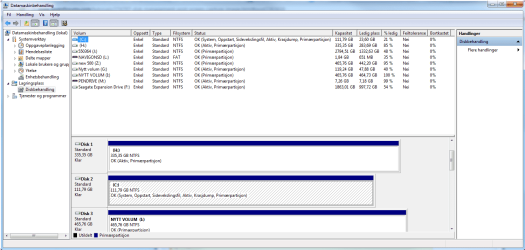
of course, i just asked if you still needed it =) here it is
 

Attachments

  • skjermbilde..png
    skjermbilde..png
    40.7 KB · Views: 12

My Computer My Computer

Computer type
PC/Desktop
Computer Manufacturer/Model Number
home build
OS
windows 7 professional 64-bit
CPU
intel [email protected] ghz (oc @4.675 ghz)
Motherboard
asus p9x79 deluxe
Memory
16gb corsair vengeance @ 1600mhz
Graphics Card(s)
nvidia geforce gtx 680 SLI(X2)
Sound Card
realtek 898 / logitech G930
Monitor(s) Displays
47" philips + Benq 24"
Screen Resolution
1920x1080p
Hard Drives
intel SSD 330 series 120GB
samsung 830 SSD 128GB
seagate 520gb X 2
10 TB internal + 2 TB external
PSU
silver power 850w modular
Case
cm stormtrooper black full tower w/windowed sidepanel
Cooling
H100i
Keyboard
logitech dinovo
Mouse
trust 17063
Internet Speed
70/10 mbps
If you only boot from C:\ then all other disks marked active need to be inactive.

Launch diskpart in an elevated command and for each disk marked active (F, G, H, M),
select the disk, then select the marked active.

Diskpart is basically a command line Disk Mngmt, but it has additional functions.
Be careful, double check that you select the correct disk and correct partition
- execute list disk and list part BEFORE any other Diskpart command, the selected object has an asterisk to the left of it.

DO NOT MARK C:\ inactive

For example, the commands for H:\
list disk -----> make sure you select the correct disk
select disk 0 -----> Diskpart ennumerates from 0, Disk Mgmnt ennumerates from 1
list part -----> make sure you select the correct partition
select part 1 -----> only one partition on H:\
list part -----> the partition selected will have an asterisk on the left
detail part -----> this will tell you if the partition is marked active
inactive -----> set it inactive

When all partitions are inactive, exit diskpart, exit command prompt.

Reboot

I can't tell the other Disk / partitions because teh screenshot is cut off. If you're not familiar with Diskpart, please post a full screen of disk mngmt showing all disks in the lower section.

Do you know how / why the disk were set active?

Bill
.
 

My Computer My Computer

Computer type
Laptop
Computer Manufacturer/Model Number
HP Pavilion dv6-6c10us
OS
x64 (6.3.9600) Win8.1 Pro & soon dual boot x64 (6.1.7601) Win7_SP1 HomePrem
CPU
AMD A6-3420M APU with Radeon(tm) HD Graphics
Motherboard
Hewlett-Packard 1805
Memory
6.00 GB
Graphics Card(s)
AMD Radeon(TM) HD 6520G
Sound Card
(1) AMD High Definition Audio Device (2) IDT High Definiti
Monitor(s) Displays
HP W2072a 20" LCD (1600 x 900) @ 60 Hz
Screen Resolution
1366 x 768 x 32 bits (4294967296 colors) @ 60 Hz
Hard Drives
ST640LM0 00 HM641JI SATA Disk Device
Keyboard
Logitech k520 wireless KB
Mouse
Logitech m320 wireless mouse (bundled with KB)
Internet Speed
15/5 | 54 MB Wireless 'n'
Antivirus
Realtime: Defender or Avast | On-demand: Malwarebytes, ESET
Browser
IE 11 on Win8, IE 10 on win 7
Other Info
Media: [Gimp, Audacity, VLC] || Comm: [WEmail 2012, Skype] || Productivity: [OpenOffice,| Textpad] || Utils: [Sysinternals, cCleaner, Speccy, Defraggler]
If you only boot from C:\ then all other disks marked active need to be inactive.

Launch diskpart in an elevated command and for each disk marked active (F, G, H, M),
select the disk, then select the marked active.

Diskpart is basically a command line Disk Mngmt, but it has additional functions.
Be careful, double check that you select the correct disk and correct partition
- execute list disk and list part BEFORE any other Diskpart command, the selected object has an asterisk to the left of it.

DO NOT MARK C:\ inactive

For example, the commands for H:\
list disk -----> make sure you select the correct disk
select disk 0 -----> Diskpart ennumerates from 0, Disk Mgmnt ennumerates from 1
list part -----> make sure you select the correct partition
select part 1 -----> only one partition on H:\
list part -----> the partition selected will have an asterisk on the left
detail part -----> this will tell you if the partition is marked active
inactive -----> set it inactive

When all partitions are inactive, exit diskpart, exit command prompt.

Reboot

I can't tell the other Disk / partitions because teh screenshot is cut off. If you're not familiar with Diskpart, please post a full screen of disk mngmt showing all disks in the lower section.

Do you know how / why the disk were set active?

Bill
.

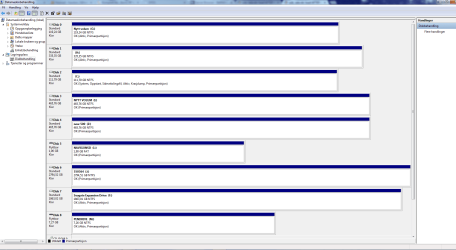
ah, like this`? there was no way i could fit all of them in a pic, så my 2 dvd drives were cut of, there are not use for them anyway?
 

Attachments

  • Uten navn.png
    Uten navn.png
    44.3 KB · Views: 19

My Computer My Computer

Computer type
PC/Desktop
Computer Manufacturer/Model Number
home build
OS
windows 7 professional 64-bit
CPU
intel [email protected] ghz (oc @4.675 ghz)
Motherboard
asus p9x79 deluxe
Memory
16gb corsair vengeance @ 1600mhz
Graphics Card(s)
nvidia geforce gtx 680 SLI(X2)
Sound Card
realtek 898 / logitech G930
Monitor(s) Displays
47" philips + Benq 24"
Screen Resolution
1920x1080p
Hard Drives
intel SSD 330 series 120GB
samsung 830 SSD 128GB
seagate 520gb X 2
10 TB internal + 2 TB external
PSU
silver power 850w modular
Case
cm stormtrooper black full tower w/windowed sidepanel
Cooling
H100i
Keyboard
logitech dinovo
Mouse
trust 17063
Internet Speed
70/10 mbps
so, i got this problem. after i log in, the pc finds all discs and other peripherals AFTER log in, every single time.. this is a problem because my dropbox etc cant find the disc its files are in when the program loads in. also, there are like 10 autoruns opening when i turn on my pc, everytime and that is very annoying. so what can i do about that? i want it to be normal, like no autoruns everytime i log in, and that the discs etc are loaded before programs etc loads
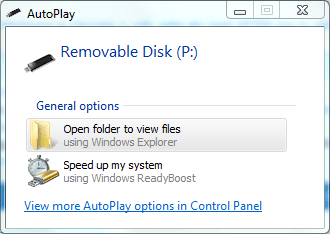
So your saying every time you login a message pops up down the bottom about installing drivers then 10 of these Autoplays pop up,
Autoplay.png

Is this correct?
 

My Computer My Computer

Computer Manufacturer/Model Number
Self built
OS
Windows 7 Ultimate x64
CPU
Intel Pentium Dual Core E5200 2.5GHz (3.77GHz OC)
Motherboard
Asus P5Q-E
Memory
Corsair 4GB DDR2 (4x1GB CM2X1024-6400C4)
Graphics Card(s)
Palit GeForce GTS 250 (1024MB)
Sound Card
On Board (ADI AD2000B 8ch HD)
Monitor(s) Displays
Samsung 32in LCD TV
Screen Resolution
1360x768
Hard Drives
2 x 1TB Samsung 103SJ (Raid0)
2 x External 500GB Samsung 502IJ (NexStar 3 HD Enclosures)
PSU
550W Antec Neo HE 550
Case
Antec P180
Cooling
Xigmatex Red Scorpion CPU Cooler. 3x120mm Fans
Keyboard
Logitech MX5000 Laser (Combo)
Mouse
Logitech MX5000 Laser (Combo)
Internet Speed
ADSL2+ (avg 10 Mbps Down, 0.80 Mbps up)
Other Info
Gigabyte GN-WP01GS 54g Wireless Lan Card
Right - DVD drives don't matter in this case.

Note, I incorrectly stated that Diskpart and Disk Mngr enumerate disks differently. I should have looked at my machine to verify. They both use the same enumeration. My apologies. Please double check when you execute the commands - you can always

Here are the commands to mark the other (non C:\) drives inactive
G:\ = disk 0
H:\ = disk 1
F:\ = disk 7
M:\ = disk 8

all drives have only one partition, so that makes it easy

Elevated Command Prompt (right click - > run as admin)

Code:
diskpart
 
list disk
select disk 0
list disk
list part
select part 1
list part
detail part
inactive
 
list disk
select disk 1
list disk
list part
select part 1
list part
detail part
inactive
 
list disk
select disk 7
list disk
list part
select part 1
list part
detail part
inactive
 
list disk
select disk 8
list disk
list part
select part 1
list part
detail part
inactive
 
exit
exit

reboot and post another disk mngmt screen shot

Note: Duzzy asks a good question - Is what he describes what you see - Autoplay?

Thanks,

Bill
 

My Computer My Computer

Computer type
Laptop
Computer Manufacturer/Model Number
HP Pavilion dv6-6c10us
OS
x64 (6.3.9600) Win8.1 Pro & soon dual boot x64 (6.1.7601) Win7_SP1 HomePrem
CPU
AMD A6-3420M APU with Radeon(tm) HD Graphics
Motherboard
Hewlett-Packard 1805
Memory
6.00 GB
Graphics Card(s)
AMD Radeon(TM) HD 6520G
Sound Card
(1) AMD High Definition Audio Device (2) IDT High Definiti
Monitor(s) Displays
HP W2072a 20" LCD (1600 x 900) @ 60 Hz
Screen Resolution
1366 x 768 x 32 bits (4294967296 colors) @ 60 Hz
Hard Drives
ST640LM0 00 HM641JI SATA Disk Device
Keyboard
Logitech k520 wireless KB
Mouse
Logitech m320 wireless mouse (bundled with KB)
Internet Speed
15/5 | 54 MB Wireless 'n'
Antivirus
Realtime: Defender or Avast | On-demand: Malwarebytes, ESET
Browser
IE 11 on Win8, IE 10 on win 7
Other Info
Media: [Gimp, Audacity, VLC] || Comm: [WEmail 2012, Skype] || Productivity: [OpenOffice,| Textpad] || Utils: [Sysinternals, cCleaner, Speccy, Defraggler]
so, i got this problem. after i log in, the pc finds all discs and other peripherals AFTER log in, every single time.. this is a problem because my dropbox etc cant find the disc its files are in when the program loads in. also, there are like 10 autoruns opening when i turn on my pc, everytime and that is very annoying. so what can i do about that? i want it to be normal, like no autoruns everytime i log in, and that the discs etc are loaded before programs etc loads
So your saying every time you login a message pops up down the bottom about installing drivers then 10 of these Autoplays pop up,
View attachment 253271

Is this correct?

yes, i checked. this seems to only be usb's .. 2 usb harddiscs and usb sticks etc...
 

My Computer My Computer

Computer type
PC/Desktop
Computer Manufacturer/Model Number
home build
OS
windows 7 professional 64-bit
CPU
intel [email protected] ghz (oc @4.675 ghz)
Motherboard
asus p9x79 deluxe
Memory
16gb corsair vengeance @ 1600mhz
Graphics Card(s)
nvidia geforce gtx 680 SLI(X2)
Sound Card
realtek 898 / logitech G930
Monitor(s) Displays
47" philips + Benq 24"
Screen Resolution
1920x1080p
Hard Drives
intel SSD 330 series 120GB
samsung 830 SSD 128GB
seagate 520gb X 2
10 TB internal + 2 TB external
PSU
silver power 850w modular
Case
cm stormtrooper black full tower w/windowed sidepanel
Cooling
H100i
Keyboard
logitech dinovo
Mouse
trust 17063
Internet Speed
70/10 mbps

My Computer My Computer

Computer type
PC/Desktop
Computer Manufacturer/Model Number
Home Built Desktop By DataTech
OS
Windows 7 Ultimate X64 SP1
CPU
Intel i5-2550K, Differing ~4.4-4.8GHz No built in GPU
Motherboard
ASUS P8Z68-V PRO/GEN3
Memory
16GB G.Skill Sniper 1866MHz @ 2133MHz 2x8GB
Graphics Card(s)
ASUS GTX650TIB-DC2OC-2GD5, (650TI Boost)
Sound Card
Onboard Realtek 5-1
Monitor(s) Displays
Samsung P2570HD
Screen Resolution
1920x1080
Hard Drives
Samsung 840 Pro 256GB SSD for OS, 500GB Seagate Constellation (Enterprise drive) for Data
PSU
Corsair HX650W
Case
Inwin Dragon Rider
Cooling
Hyper 212 EVO w/two Noctua fans, push-pull, @1300 RPM
Keyboard
E-Z Eyes, bright yellow keys with large characters
Mouse
steelseries SENSEI Laser Pro Gaming
Internet Speed
48-51Mbs Mbs down, 11 Mbs up Xfinity Cable
Antivirus
Norton Internet Security 2013
Browser
IE 10, Opera, Pale Moon if needed
Other Info
4 case fans, LG BluRay-RE, ASUS DVD-RW, Mr. Fusion power supply, 1.21 gigawatts.
As I said earlier, this sounds normal if it's the Auto Play you're seeing, it happens on my system if I reboot and have, say, a USB drive still plugged in. Auto Play is not drivers installing it's asking what to do with the device.

Try this: http://www.sevenforums.com/tutorials/216706-autoplay-enable-disable.html

yes i know that you said it, and have it in mind =) now i am trying to find som sort of bypass for it.. but it seems like the only fix is to make them internal(take them out of their cabinets? then i must have a raid card, damn :(
 

My Computer My Computer

Computer type
PC/Desktop
Computer Manufacturer/Model Number
home build
OS
windows 7 professional 64-bit
CPU
intel [email protected] ghz (oc @4.675 ghz)
Motherboard
asus p9x79 deluxe
Memory
16gb corsair vengeance @ 1600mhz
Graphics Card(s)
nvidia geforce gtx 680 SLI(X2)
Sound Card
realtek 898 / logitech G930
Monitor(s) Displays
47" philips + Benq 24"
Screen Resolution
1920x1080p
Hard Drives
intel SSD 330 series 120GB
samsung 830 SSD 128GB
seagate 520gb X 2
10 TB internal + 2 TB external
PSU
silver power 850w modular
Case
cm stormtrooper black full tower w/windowed sidepanel
Cooling
H100i
Keyboard
logitech dinovo
Mouse
trust 17063
Internet Speed
70/10 mbps
I think we need to be sure of what we're trying to solve. I'm still a bit confused.

The issue I see in post# talks about autoruns, I pointed to the sysinternals autoruns as a way to control that.

BIOS won't see USB drives.

Britton asked about disk mgmnt and from the posted screen shot, I noticed a common error (partitions set to active). I believe that eorr has been corrected - please let me know if you have set the F, G, H, & M partitions inactive.

Britton also asked about autoplay - and provided a way to disable it. You can also just turn it off in Control Panel
http://www.sevenforums.com/tutorials/174838-autoplay-turn-off.html.

There is no need to "convert" an external USB drive to an internal drive. I'm assuming that we're just not on the same page and while the recommendations are helpful to your system, we're not solving the issue on your machine.

Please post what has been done and what hasn't - that's a good first step. Include every step you've taken and post updated images. Sure, this requires that you revisit what has been posted, but we're here to help and we need you're help.

Take your time, don't shortcut (i.e. post 2 done!....instead report exactly what you did, any errors, any questions about the instructions)

There aren't too many posts and this doesn't seem to be a difficult thing to solve - if we're on the correct trajectory. If we are trying to solve a different issue, then nothing anyone recommends will fix it.

If you could grab a screenshot of the autoruns/autoplays whatever that you see as the problem and post that, I'd be happy.

Use the print screen (PrtScn/SysRq) button on your keyboard to capture what's on your screen and then open paint, paste the captured image, save it and attach it to a post here on sevenforums.

Sysinternals autorun and turning off Autoplay in Control panel satisfies what you've described. More details on the problem is need from your side.

Thanks,

Bill
 

My Computer My Computer

Computer type
Laptop
Computer Manufacturer/Model Number
HP Pavilion dv6-6c10us
OS
x64 (6.3.9600) Win8.1 Pro & soon dual boot x64 (6.1.7601) Win7_SP1 HomePrem
CPU
AMD A6-3420M APU with Radeon(tm) HD Graphics
Motherboard
Hewlett-Packard 1805
Memory
6.00 GB
Graphics Card(s)
AMD Radeon(TM) HD 6520G
Sound Card
(1) AMD High Definition Audio Device (2) IDT High Definiti
Monitor(s) Displays
HP W2072a 20" LCD (1600 x 900) @ 60 Hz
Screen Resolution
1366 x 768 x 32 bits (4294967296 colors) @ 60 Hz
Hard Drives
ST640LM0 00 HM641JI SATA Disk Device
Keyboard
Logitech k520 wireless KB
Mouse
Logitech m320 wireless mouse (bundled with KB)
Internet Speed
15/5 | 54 MB Wireless 'n'
Antivirus
Realtime: Defender or Avast | On-demand: Malwarebytes, ESET
Browser
IE 11 on Win8, IE 10 on win 7
Other Info
Media: [Gimp, Audacity, VLC] || Comm: [WEmail 2012, Skype] || Productivity: [OpenOffice,| Textpad] || Utils: [Sysinternals, cCleaner, Speccy, Defraggler]
From what I see you have about ~8TB of storage scattered over 8 drives. Perhaps you can have some different storage strategy so you don't need all of the externals.

Your motherboard has 8 SATA ports so a RAID card shouldn't be needed.
 

My Computer My Computer

Computer type
PC/Desktop
Computer Manufacturer/Model Number
Home Built Desktop By DataTech
OS
Windows 7 Ultimate X64 SP1
CPU
Intel i5-2550K, Differing ~4.4-4.8GHz No built in GPU
Motherboard
ASUS P8Z68-V PRO/GEN3
Memory
16GB G.Skill Sniper 1866MHz @ 2133MHz 2x8GB
Graphics Card(s)
ASUS GTX650TIB-DC2OC-2GD5, (650TI Boost)
Sound Card
Onboard Realtek 5-1
Monitor(s) Displays
Samsung P2570HD
Screen Resolution
1920x1080
Hard Drives
Samsung 840 Pro 256GB SSD for OS, 500GB Seagate Constellation (Enterprise drive) for Data
PSU
Corsair HX650W
Case
Inwin Dragon Rider
Cooling
Hyper 212 EVO w/two Noctua fans, push-pull, @1300 RPM
Keyboard
E-Z Eyes, bright yellow keys with large characters
Mouse
steelseries SENSEI Laser Pro Gaming
Internet Speed
48-51Mbs Mbs down, 11 Mbs up Xfinity Cable
Antivirus
Norton Internet Security 2013
Browser
IE 10, Opera, Pale Moon if needed
Other Info
4 case fans, LG BluRay-RE, ASUS DVD-RW, Mr. Fusion power supply, 1.21 gigawatts.
I think we need to be sure of what we're trying to solve. I'm still a bit confused.

The issue I see in post# talks about autoruns, I pointed to the sysinternals autoruns as a way to control that.

BIOS won't see USB drives.

Britton asked about disk mgmnt and from the posted screen shot, I noticed a common error (partitions set to active). I believe that eorr has been corrected - please let me know if you have set the F, G, H, & M partitions inactive.

Britton also asked about autoplay - and provided a way to disable it. You can also just turn it off in Control Panel
http://www.sevenforums.com/tutorials/174838-autoplay-turn-off.html.

There is no need to "convert" an external USB drive to an internal drive. I'm assuming that we're just not on the same page and while the recommendations are helpful to your system, we're not solving the issue on your machine.

Please post what has been done and what hasn't - that's a good first step. Include every step you've taken and post updated images. Sure, this requires that you revisit what has been posted, but we're here to help and we need you're help.

Take your time, don't shortcut (i.e. post 2 done!....instead report exactly what you did, any errors, any questions about the instructions)

There aren't too many posts and this doesn't seem to be a difficult thing to solve - if we're on the correct trajectory. If we are trying to solve a different issue, then nothing anyone recommends will fix it.

If you could grab a screenshot of the autoruns/autoplays whatever that you see as the problem and post that, I'd be happy.

Use the print screen (PrtScn/SysRq) button on your keyboard to capture what's on your screen and then open paint, paste the captured image, save it and attach it to a post here on sevenforums.

Sysinternals autorun and turning off Autoplay in Control panel satisfies what you've described. More details on the problem is need from your side.

Thanks,

Bill

it was just to point out whats happen. the main problem is that windows find the discs too late, so programs that use storage on them will shout errors in all directions. the autoplay etc is not a problem for me. also everything is normal after i just OK'ing the errors. what does the "active" really do? i havent tried anything yet, i will after pointing out exactly how i fix my main problem .. and, thank you all very much for helping me! i can be a pain sometimes, but i want everything to be right so i dont **** anything up or do it wrong =)
 
Last edited:

My Computer My Computer

Computer type
PC/Desktop
Computer Manufacturer/Model Number
home build
OS
windows 7 professional 64-bit
CPU
intel [email protected] ghz (oc @4.675 ghz)
Motherboard
asus p9x79 deluxe
Memory
16gb corsair vengeance @ 1600mhz
Graphics Card(s)
nvidia geforce gtx 680 SLI(X2)
Sound Card
realtek 898 / logitech G930
Monitor(s) Displays
47" philips + Benq 24"
Screen Resolution
1920x1080p
Hard Drives
intel SSD 330 series 120GB
samsung 830 SSD 128GB
seagate 520gb X 2
10 TB internal + 2 TB external
PSU
silver power 850w modular
Case
cm stormtrooper black full tower w/windowed sidepanel
Cooling
H100i
Keyboard
logitech dinovo
Mouse
trust 17063
Internet Speed
70/10 mbps
Back
Top