How to Create a Desktop Shortcut to Turn Num Lock ON or OFF
Information
Some modern laptop keyboards have no Num Lock key. Instead the user needs to set Num Lock in BIOS.
Various applications might turn Num Lock ON or OFF without user knowing of it.
This tutorial will show you how to create a shortcut to turn the Num Lock on or off when you want to in XP, Vista, Windows 7, and Windows 8.
Various applications might turn Num Lock ON or OFF without user knowing of it.
This tutorial will show you how to create a shortcut to turn the Num Lock on or off when you want to in XP, Vista, Windows 7, and Windows 8.
This is how:
1. Open Notepad
2. Copy the following code into a new text document:
Code:
set WshShell = CreateObject("WScript.Shell")
WshShell.SendKeys "{NUMLOCK}"
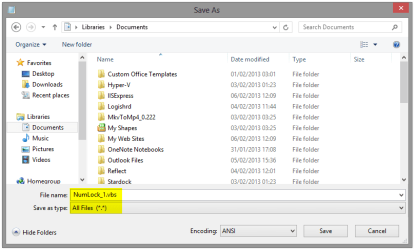
3. Select Save as type: All Files (*.*), name the file as you wish and give it a .vbs extension to save your file as a Visual Basic Script:
4. Create a shortcut for your NumLock script on your desktop (Create Shortcut & Change Shortcut Icon tutorials)
Note
Now you have a Num Lock shortcut which toggles NumLock ON and OFF every time it is clicked. Please notice that when script is run it gives you no sign or message; it simply turns Num Lock ON if it was OFF and vice versa.
That's it,
Kari
Last edited: