Bootmgr is missing - Fix

How to Fix the "Bootmgr is missing" Error in Windows

You may get this error while booting your computer.
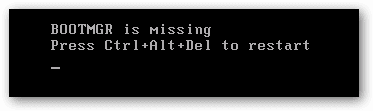
1.png

   Information
This problem is not hardware related and can be fixed with a Windows 7 DVD OR a system repair disc.


Here's How:

NOTE: Sometimes it may take running a startup repair a few times before it fully fixes the startup issue.

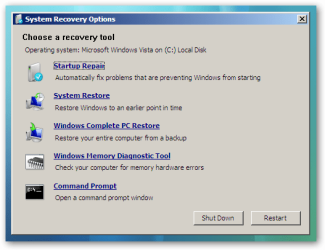
1. Boot to the System Recovery Options screen.

2. Select the Startup Repair option. (See screenshot below)
2.png
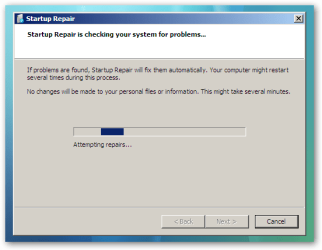
3. Now click on Startup Repair. Run the startup repair and it will attempt to fix this issue.
3.png
NOTE: It will ask you to reboot your system. Reboot to see if it works. If it doesn't work, follow step 4.


4. Click on Command Prompt.
A) Type c: and press <Enter>.

   Note
C:\ is the drive letter where Windows 7 is installed. You may replace it with whatever drive letter you want where you have installed Windows 7.


B) At the C:\ prompt, type cd boot and press <Enter>.

C) At the C:\Boot prompt, type the following commands and press Enter after each command.

Code:
[B]bootrec /FixMbr[/B]
[B]bootrec /FixBoot[/B]
[B]bootrec /RebuildBcd[/B]
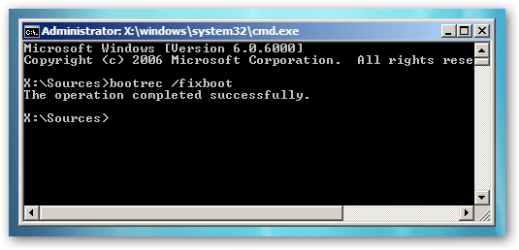
4.png

D) Now close the command prompt, remove the DVD and reboot your computer.
That's it,
Dinesh.


Last edited by a moderator:
after doing these steps it still says the same message
i also did the following
bcdedit /export C:\BCD_Backup
c:
cd boot
attrib bcd -s -h -r
ren c:\boot\bcd bcd.old
bootrec /RebuildBcd
but it didnt work so i tried again but it gave me an error that ren c:\boot\bcd bcd.old already exsits
thanks any help is really appreciated

Hello Yiberu, and welcome to Seven Forums.

That error is normal since you already created a bcd.old backup the first time you did this. You would just need to change the command below a bit to be different each time you do it.

For example, add a 2 at the end. If you do it again, use 3 instead, and etc.... to avoid the already exists error.

ren c:\boot\bcd bcd.old2


Sometimes, it may take running startup repair 3 times.

http://www.sevenforums.com/tutorials/105541-startup-repair-run-3-separate-times.html

Hope this helps, :)
Shawn
 
Last edited:

My Computer

Computer type
PC/Desktop
Computer Manufacturer/Model Number
Self built custom
OS
64-bit Windows 11 Pro for Workstations
CPU
Intel i7-8700K OC'd to 5 GHz
Motherboard
ASUS ROG Maximus XI Formula Z390
Memory
64 GB (4x16GB) G.SKILL TridentZ RGB DDR4 3600 MHz
Graphics Card(s)
ASUS ROG-STRIX-GTX1080TI-O11G-GAMING
Sound Card
Integrated
Monitor(s) Displays
2 x Samsung Odyssey G7 27"
Screen Resolution
2560x1440
Hard Drives
1TB Samsung 990 PRO M.2,
4TB Samsung 990 PRO PRO M.2,
TerraMaster F8 SSD Plus NAS
PSU
Seasonic Prime Titanium 850W
Case
Thermaltake Core P3
Cooling
Corsair Hydro H115i
Keyboard
Logitech wireless K800
Mouse
Logitech MX Master 4
Internet Speed
2 Gb/s Download and 100 Mb/s Upload
Antivirus
Malwarebyte Anti-Malware Premium
Browser
Google Chrome
Other Info
Logitech Z625 speaker system,
Logitech BRIO 4K Pro webcam,
HP Color LaserJet Pro MFP M477fdn,
APC SMART-UPS RT 1000 XL - SURT1000XLI,
Galaxy S23 Plus phone
thanks for your reply
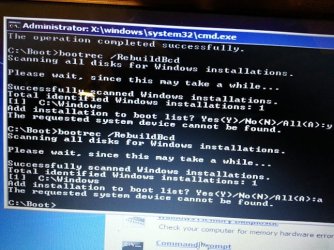
it then says add installation to boot list? yes (y) no (n) /all (a)
which one should i chose the last time i just said "yes"
 

My Computer

OS
win7 home premium
I would say all.

Before doing that, type bcdedit and press Enter, then post the results here.
 
Last edited:

My Computer

Computer type
PC/Desktop
Computer Manufacturer/Model Number
Self built custom
OS
64-bit Windows 11 Pro for Workstations
CPU
Intel i7-8700K OC'd to 5 GHz
Motherboard
ASUS ROG Maximus XI Formula Z390
Memory
64 GB (4x16GB) G.SKILL TridentZ RGB DDR4 3600 MHz
Graphics Card(s)
ASUS ROG-STRIX-GTX1080TI-O11G-GAMING
Sound Card
Integrated
Monitor(s) Displays
2 x Samsung Odyssey G7 27"
Screen Resolution
2560x1440
Hard Drives
1TB Samsung 990 PRO M.2,
4TB Samsung 990 PRO PRO M.2,
TerraMaster F8 SSD Plus NAS
PSU
Seasonic Prime Titanium 850W
Case
Thermaltake Core P3
Cooling
Corsair Hydro H115i
Keyboard
Logitech wireless K800
Mouse
Logitech MX Master 4
Internet Speed
2 Gb/s Download and 100 Mb/s Upload
Antivirus
Malwarebyte Anti-Malware Premium
Browser
Google Chrome
Other Info
Logitech Z625 speaker system,
Logitech BRIO 4K Pro webcam,
HP Color LaserJet Pro MFP M477fdn,
APC SMART-UPS RT 1000 XL - SURT1000XLI,
Galaxy S23 Plus phone
In the same command prompt at boot.
 

My Computer

Computer type
PC/Desktop
Computer Manufacturer/Model Number
Self built custom
OS
64-bit Windows 11 Pro for Workstations
CPU
Intel i7-8700K OC'd to 5 GHz
Motherboard
ASUS ROG Maximus XI Formula Z390
Memory
64 GB (4x16GB) G.SKILL TridentZ RGB DDR4 3600 MHz
Graphics Card(s)
ASUS ROG-STRIX-GTX1080TI-O11G-GAMING
Sound Card
Integrated
Monitor(s) Displays
2 x Samsung Odyssey G7 27"
Screen Resolution
2560x1440
Hard Drives
1TB Samsung 990 PRO M.2,
4TB Samsung 990 PRO PRO M.2,
TerraMaster F8 SSD Plus NAS
PSU
Seasonic Prime Titanium 850W
Case
Thermaltake Core P3
Cooling
Corsair Hydro H115i
Keyboard
Logitech wireless K800
Mouse
Logitech MX Master 4
Internet Speed
2 Gb/s Download and 100 Mb/s Upload
Antivirus
Malwarebyte Anti-Malware Premium
Browser
Google Chrome
Other Info
Logitech Z625 speaker system,
Logitech BRIO 4K Pro webcam,
HP Color LaserJet Pro MFP M477fdn,
APC SMART-UPS RT 1000 XL - SURT1000XLI,
Galaxy S23 Plus phone
hi thankyou for your post. but can you please be much more specific.
because whatever it is you are saying i am not doing it correctly.
thanks
 

My Computer

OS
win7 home premium
Sorry that was bcdedit and press Enter. :o
 

My Computer

Computer type
PC/Desktop
Computer Manufacturer/Model Number
Self built custom
OS
64-bit Windows 11 Pro for Workstations
CPU
Intel i7-8700K OC'd to 5 GHz
Motherboard
ASUS ROG Maximus XI Formula Z390
Memory
64 GB (4x16GB) G.SKILL TridentZ RGB DDR4 3600 MHz
Graphics Card(s)
ASUS ROG-STRIX-GTX1080TI-O11G-GAMING
Sound Card
Integrated
Monitor(s) Displays
2 x Samsung Odyssey G7 27"
Screen Resolution
2560x1440
Hard Drives
1TB Samsung 990 PRO M.2,
4TB Samsung 990 PRO PRO M.2,
TerraMaster F8 SSD Plus NAS
PSU
Seasonic Prime Titanium 850W
Case
Thermaltake Core P3
Cooling
Corsair Hydro H115i
Keyboard
Logitech wireless K800
Mouse
Logitech MX Master 4
Internet Speed
2 Gb/s Download and 100 Mb/s Upload
Antivirus
Malwarebyte Anti-Malware Premium
Browser
Google Chrome
Other Info
Logitech Z625 speaker system,
Logitech BRIO 4K Pro webcam,
HP Color LaserJet Pro MFP M477fdn,
APC SMART-UPS RT 1000 XL - SURT1000XLI,
Galaxy S23 Plus phone
after doing bcdedit I receive the following
but when I reboot I get the same error
not sure what to do from here.
please any advice is really appreciated.

windows boot manager
-----------------------------
identifier {bootmgr}
device partition=c:
path \bootmgr
description windows boot manager
locale en-us
default {default}
displayorder {default}
timeout 30

windows boot loader
-------------------------
identifier {default}
device partition=c:
path \windows\system32\winload.exe
description windows 7 professional
locale en-us
osdevice partition=c:
systemroot \windows
 

My Computer

OS
win7 home premium
Double check your boot priority list in your BIOS to make sure that your Windows 7 drive is set to be first to boot from, save your settings, then see if you still get the "Bootmgr is missing" error.

In addition, you might use SeaTools for Dos (click on downloads at link) to scan your hard drive with at boot see if it may be bad or dead.
 

My Computer

Computer type
PC/Desktop
Computer Manufacturer/Model Number
Self built custom
OS
64-bit Windows 11 Pro for Workstations
CPU
Intel i7-8700K OC'd to 5 GHz
Motherboard
ASUS ROG Maximus XI Formula Z390
Memory
64 GB (4x16GB) G.SKILL TridentZ RGB DDR4 3600 MHz
Graphics Card(s)
ASUS ROG-STRIX-GTX1080TI-O11G-GAMING
Sound Card
Integrated
Monitor(s) Displays
2 x Samsung Odyssey G7 27"
Screen Resolution
2560x1440
Hard Drives
1TB Samsung 990 PRO M.2,
4TB Samsung 990 PRO PRO M.2,
TerraMaster F8 SSD Plus NAS
PSU
Seasonic Prime Titanium 850W
Case
Thermaltake Core P3
Cooling
Corsair Hydro H115i
Keyboard
Logitech wireless K800
Mouse
Logitech MX Master 4
Internet Speed
2 Gb/s Download and 100 Mb/s Upload
Antivirus
Malwarebyte Anti-Malware Premium
Browser
Google Chrome
Other Info
Logitech Z625 speaker system,
Logitech BRIO 4K Pro webcam,
HP Color LaserJet Pro MFP M477fdn,
APC SMART-UPS RT 1000 XL - SURT1000XLI,
Galaxy S23 Plus phone
Bootmgr is missing - or is it ??

I thought it would be helpful to share my recent experience:

Today I upgraded a 60Gig SSD to a 90Gig as I was running out of space .... .... ...

The meant I had to disconnect SATA cables to 3 drives in total, and remove a memory stick in order to remove the SSD I planned to replace

When it was all done - I turned on - and "Bootmgr is missing" appeared :cry:

Like many before me, I searched online (luckily I had a laptop that was still working) for a solution, but none of them seemed to help !

Luckily I had a full disk backup and my operating system and programs are on a separate drive from my data - So I reached for my Acronis recovery disc !

After restoring the entire SSD with operating system and programs ... ...

I turned on - and "Bootmgr is missing" appeared, just as before :cry: :cry:

By now you may be experiencing some of my frustration (When is he going to get to the point? I hear you say) :shock:

More searching online, but nothing seemed to work ... ...

However, there was a clue in one of the responses .... something about a poor SATA connection ??

I reopened the case, and realised that I had inadvertantly connected my boot drive to SATA socket "1" instead of socket "0". I switched them back and immediately all was well. :D :D :D
 

My Computer

Computer Manufacturer/Model Number
Custom
OS
Windows 7 Ultimate 64 bit SP1
CPU
3.30 gigahertz Intel Core i5-2500K (running at 4ghz)
Motherboard
Gigabyte Z68MX-UD2H-B3 Rev 1.3
Memory
8 Gig (2 x 4Gig) Corsair Vengeance 1600hz DDR3
Graphics Card(s)
On board Intel(R) HD Graphics 3000
Sound Card
On board High Definition Audio Device
Monitor(s) Displays
BenQ BL2410PT 24ins (no PWM)
Screen Resolution
1920 x 1080
Hard Drives
Corsair Force 3 SSD SCSI Disk Device (60.02 GB)
Hitachi HDS721616PLA380 ATA Device [Hard drive] (160.04 GB)
Hitachi HDS721616PLA380 SCSI Disk Device (160.04 GB)
PSU
Serena ATX 650
Case
Mini ATX
Cooling
Freezer Extreme
Glad to hear that you figured it out. :thumbsup:
 

My Computer

Computer Manufacturer/Model Number
Samsung NP530U4B-S02IN
OS
Windows® 8 Pro (64-bit)
CPU
Intel® Core™ i5 Processor 2467M (1.60GHz, 3MB L3 Cache)
Motherboard
Samsung Electronics
Memory
6GB DDR3 System Memory at 1,333MHz (on BD 4GB + 2GB x 1)
Graphics Card(s)
AMD Radeon™ HD7550M 1GB DDR3 (Ext. Graphic)
Sound Card
Realtek High Definition Audio
Monitor(s) Displays
35.56cm (14.0) SuperBright 300nit HD LED Display
Screen Resolution
1366x768
Hard Drives
1TB S-ATA II Hard Drive (5400RPM) with ExpressCache 16GB SSD
Internet Speed
sucks
Antivirus
Microsoft Security Essentials
Browser
Google Chrome (Sync enabled)
I got on my computer boot manager is missing. I have a compaq desk top. My husband has a dell computer. He has the windows 7 disc for his dell, I do not have the windows 7 disc for my compaq. Can I use the windows 7 disc for his dell for my compaq? I don't want to screw up my computer any more than it is!
 

My Computer

OS
windows7
Hello Woodsy,

If the disc is a factory recovery disc, then no.

If his computer is the same 32/64 bit as your computer, then you could create a system repair disc on his computer to use on yours for this.

Hope this helps, :)
Shawn
 

My Computer

Computer type
PC/Desktop
Computer Manufacturer/Model Number
Self built custom
OS
64-bit Windows 11 Pro for Workstations
CPU
Intel i7-8700K OC'd to 5 GHz
Motherboard
ASUS ROG Maximus XI Formula Z390
Memory
64 GB (4x16GB) G.SKILL TridentZ RGB DDR4 3600 MHz
Graphics Card(s)
ASUS ROG-STRIX-GTX1080TI-O11G-GAMING
Sound Card
Integrated
Monitor(s) Displays
2 x Samsung Odyssey G7 27"
Screen Resolution
2560x1440
Hard Drives
1TB Samsung 990 PRO M.2,
4TB Samsung 990 PRO PRO M.2,
TerraMaster F8 SSD Plus NAS
PSU
Seasonic Prime Titanium 850W
Case
Thermaltake Core P3
Cooling
Corsair Hydro H115i
Keyboard
Logitech wireless K800
Mouse
Logitech MX Master 4
Internet Speed
2 Gb/s Download and 100 Mb/s Upload
Antivirus
Malwarebyte Anti-Malware Premium
Browser
Google Chrome
Other Info
Logitech Z625 speaker system,
Logitech BRIO 4K Pro webcam,
HP Color LaserJet Pro MFP M477fdn,
APC SMART-UPS RT 1000 XL - SURT1000XLI,
Galaxy S23 Plus phone
Thanks for this!!! I was just trying to remove a 100mb boot partition with easybcd and totally screwed my boot loader somehow. Fixed it in no time with command line...
 

My Computer

Computer Manufacturer/Model Number
XPS 420
OS
Windows 7
Screen Resolution
1376x768
Hard Drives
11tb+
Thanks for this!!! I was just trying to remove a 100mb boot partition with easybcd and totally screwed my boot loader somehow. Fixed it in no time with command line...

Glad to hear you were able to fix it. :)
 

My Computer

Computer Manufacturer/Model Number
Samsung NP530U4B-S02IN
OS
Windows® 8 Pro (64-bit)
CPU
Intel® Core™ i5 Processor 2467M (1.60GHz, 3MB L3 Cache)
Motherboard
Samsung Electronics
Memory
6GB DDR3 System Memory at 1,333MHz (on BD 4GB + 2GB x 1)
Graphics Card(s)
AMD Radeon™ HD7550M 1GB DDR3 (Ext. Graphic)
Sound Card
Realtek High Definition Audio
Monitor(s) Displays
35.56cm (14.0) SuperBright 300nit HD LED Display
Screen Resolution
1366x768
Hard Drives
1TB S-ATA II Hard Drive (5400RPM) with ExpressCache 16GB SSD
Internet Speed
sucks
Antivirus
Microsoft Security Essentials
Browser
Google Chrome (Sync enabled)
I'm working on a friends sony vaio with this issue and I'm getting this error... (updating)
 

Attachments

  • 13_110.jpg
    13_110.jpg
    122.1 KB · Views: 1,991
Last edited:

My Computer

Computer Manufacturer/Model Number
HP Pavilion AY747AA-ABA p6310y
OS
Windows 7 Home Premium 64-bit (6.1, Build 7600)
CPU
AMD Athlon(tm) II X4 630 Processor (4 CPUs), ~2.8GHz
Motherboard
PEGATRON Violet-6
Memory
6144MB RAM
Graphics Card(s)
NVIDIA GeForce GTX 560
Sound Card
Realtek High Definition Audio
Monitor(s) Displays
DX-LCD32 (Dynex 32" LCD HDTV)
Screen Resolution
1360x768
Hard Drives
WDC WD10 EADS-65M2B0 SCSI Disk Device
PSU
Antec 650w
Case
Old Alienware case from 2005 lol
Internet Speed
30MB dl 5MB ul
BootMgr Tutorial

Works Great! Recieved an error message while booting up my computer that BootMgr was compressed. My system would not boot up, but once I followed the tutorial BootMgr is missing - Fix step by step my system is up and running. I went to my other computer and made a recovery disk then when system attempted to boot up at CD/DVD it ask to press any key. Then once at command prompt typed c: and followed commands. Once that was complete it started loading files. So happy that this worked.

Thanks for the tutorial,
Ethel
 

My Computer

OS
Window 7 32
Works Great! Recieved an error message while booting up my computer that BootMgr was compressed. My system would not boot up, but once I followed the tutorial BootMgr is missing - Fix step by step my system is up and running. I went to my other computer and made a recovery disk then when system attempted to boot up at CD/DVD it ask to press any key. Then once at command prompt typed c: and followed commands. Once that was complete it started loading files. So happy that this worked.

Thanks for the tutorial,
Ethel

Glad to know that Ethel. :thumbsup:
 

My Computer

Computer Manufacturer/Model Number
Samsung NP530U4B-S02IN
OS
Windows® 8 Pro (64-bit)
CPU
Intel® Core™ i5 Processor 2467M (1.60GHz, 3MB L3 Cache)
Motherboard
Samsung Electronics
Memory
6GB DDR3 System Memory at 1,333MHz (on BD 4GB + 2GB x 1)
Graphics Card(s)
AMD Radeon™ HD7550M 1GB DDR3 (Ext. Graphic)
Sound Card
Realtek High Definition Audio
Monitor(s) Displays
35.56cm (14.0) SuperBright 300nit HD LED Display
Screen Resolution
1366x768
Hard Drives
1TB S-ATA II Hard Drive (5400RPM) with ExpressCache 16GB SSD
Internet Speed
sucks
Antivirus
Microsoft Security Essentials
Browser
Google Chrome (Sync enabled)
Dinesh: Like many of us, I too have the Bootmgr is missing. In my case I was slowly moving everything from Win XP Pro to Win 7. I partitioned my boot drive and installed Win 7 on the second partition and then would normally boot to XP, but since I had a menu option at boot up to boot to either XP or 7, I could choose which OS to boot too. I made a backup image of the Win7 partition only when I was ready to move to 7, with Ghost, and imaged a new Hard Drive. At boot I got the missing Bootmgr error. I found this forum and tried to follow Fix-4, however when I typed cd boot and hit enter, nothing was found. I did a DIR and saw that there is no Boot directory on C:\ drive. There was a Boot directory under Windows. (c:\windows\boot). I did not try the 3 bootrec commands in that directory since you specifically said to launch the Boot directory in C:\. Could it be that in Windows 7 (Ultimate) there is no Boot directory in C:\? By the way, I had previously tried to do a Win7 repair that did not work, thus your fix was my next try. Any ideas why I don't have a Boot directory on my boot drive (C:\) and how to repair my OS?
 

My Computer

Computer type
PC/Desktop
Computer Manufacturer/Model Number
Custom Build
OS
Win 7
CPU
Intel i5
Motherboard
Asus
Memory
8 gigs
Hard Drives
3 WD Sata 3
Antivirus
Eset
Browser
Firefox

My Computer

Computer Manufacturer/Model Number
Samsung NP530U4B-S02IN
OS
Windows® 8 Pro (64-bit)
CPU
Intel® Core™ i5 Processor 2467M (1.60GHz, 3MB L3 Cache)
Motherboard
Samsung Electronics
Memory
6GB DDR3 System Memory at 1,333MHz (on BD 4GB + 2GB x 1)
Graphics Card(s)
AMD Radeon™ HD7550M 1GB DDR3 (Ext. Graphic)
Sound Card
Realtek High Definition Audio
Monitor(s) Displays
35.56cm (14.0) SuperBright 300nit HD LED Display
Screen Resolution
1366x768
Hard Drives
1TB S-ATA II Hard Drive (5400RPM) with ExpressCache 16GB SSD
Internet Speed
sucks
Antivirus
Microsoft Security Essentials
Browser
Google Chrome (Sync enabled)
Back
Top