
Bootmgr is missing - Fix

How to Fix the "Bootmgr is missing" Error in Windows

You may get this error while booting your computer.
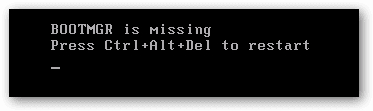
1.png

   Information
This problem is not hardware related and can be fixed with a Windows 7 DVD OR a system repair disc.


Here's How:

NOTE: Sometimes it may take running a startup repair a few times before it fully fixes the startup issue.

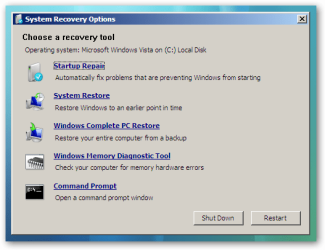
1. Boot to the System Recovery Options screen.

2. Select the Startup Repair option. (See screenshot below)
2.png
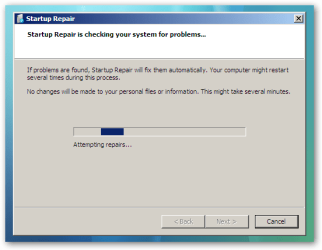
3. Now click on Startup Repair. Run the startup repair and it will attempt to fix this issue.
3.png
NOTE: It will ask you to reboot your system. Reboot to see if it works. If it doesn't work, follow step 4.


4. Click on Command Prompt.
A) Type c: and press <Enter>.

   Note
C:\ is the drive letter where Windows 7 is installed. You may replace it with whatever drive letter you want where you have installed Windows 7.


B) At the C:\ prompt, type cd boot and press <Enter>.

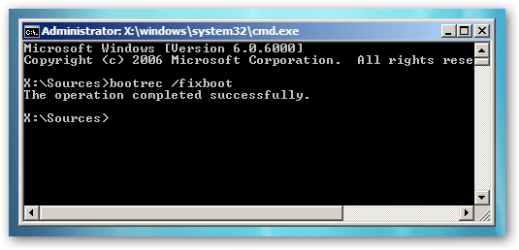
C) At the C:\Boot prompt, type the following commands and press Enter after each command.

Code:
[B]bootrec /FixMbr[/B]
[B]bootrec /FixBoot[/B]
[B]bootrec /RebuildBcd[/B]
4.png

D) Now close the command prompt, remove the DVD and reboot your computer.
That's it,
Dinesh.


Last edited by a moderator:
I already tried that, but it didn't find Windows 7 installation on the new hard drive, this is why I was trying to do it manually.
If I boot with my regular boot drive, I can use Explorer and see the contents of the new hard drive with Win7 on it, I just can't boot with this new drive.
 
Last edited:

My Computer

Computer type
PC/Desktop
Computer Manufacturer/Model Number
Custom Build
OS
Win 7
CPU
Intel i5
Motherboard
Asus
Memory
8 gigs
Hard Drives
3 WD Sata 3
Antivirus
Eset
Browser
Firefox

My Computer

Computer type
PC/Desktop
Computer Manufacturer/Model Number
Self Built
OS
Win 10 Pro x64
CPU
Intel I5-2500K @3.3GHz
Motherboard
Asrock P67 Extreme4
Memory
16GB G.Skill Ripjaws X (4x4GB)
Graphics Card(s)
EVGA GeForce 750 Ti SC 2GB
Sound Card
ASUS Xonar DG 5.1 Channels 24-bit 96KHz PCI Interface Sound
Monitor(s) Displays
auria eq2367
Screen Resolution
1920 x 1080
Hard Drives
250GB Samsung 850 EVO SSD
1TB WD Blue
1TB Hitachi
PSU
SeaSonic X 650W 80 Plus Gold
Case
Corsair Obsidian 750D
Cooling
Corsair H60, Three 140mm case fans
Keyboard
Logitech Wireless Keyboard K520
Mouse
Logitech Wireless Mouse M310
Internet Speed
Wave Broadband ~ 100 dn 5 up
Antivirus
Windows Defender, Malwarebytes Premium
Browser
Edge, IE11, Chrome
Other Info
Laptop specs: HP g7-1365dx /
CPU: AMD A6-3420M APU with Radeon(tm) HD Graphics /
RAM: Crucial 8Gb (2x4Gb) /
SSD: Crucial M4-CT128M4SSD2 ATA Device/ FW 000F /
GFX: AMD Radeon HD 6520G /
OS: Windows 10 Pro x64
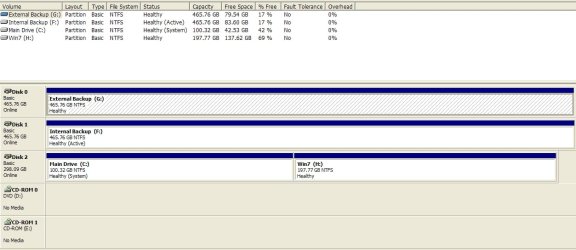
Here it is with my current drives attached to my computer. The new Win7 drive that will not boot is NOT attached to the computer in this screen shot.
 

Attachments

  • ScreenShot001.jpg
    ScreenShot001.jpg
    270.8 KB · Views: 238

My Computer

Computer type
PC/Desktop
Computer Manufacturer/Model Number
Custom Build
OS
Win 7
CPU
Intel i5
Motherboard
Asus
Memory
8 gigs
Hard Drives
3 WD Sata 3
Antivirus
Eset
Browser
Firefox
Hello!
If my broken Windows 7 is the Home Premium, can I use the Windows Ultimate DVD to acces the System Recovery Options screen in order to fix BOOTMGR is missing?
 

My Computer

OS
Windows 7
Hello Kesepian,

As long as the Windows Ultimate DVD is the same 32-bit or 64-bit that you have installed, then yes you could. :)
 

My Computer

Computer type
PC/Desktop
Computer Manufacturer/Model Number
Self built custom
OS
64-bit Windows 11 Pro for Workstations
CPU
Intel i7-8700K OC'd to 5 GHz
Motherboard
ASUS ROG Maximus XI Formula Z390
Memory
64 GB (4x16GB) G.SKILL TridentZ RGB DDR4 3600 MHz
Graphics Card(s)
ASUS ROG-STRIX-GTX1080TI-O11G-GAMING
Sound Card
Integrated
Monitor(s) Displays
2 x Samsung Odyssey G7 27"
Screen Resolution
2560x1440
Hard Drives
1TB Samsung 990 PRO M.2,
4TB Samsung 990 PRO PRO M.2,
TerraMaster F8 SSD Plus NAS
PSU
Seasonic Prime Titanium 850W
Case
Thermaltake Core P3
Cooling
Corsair Hydro H115i
Keyboard
Logitech wireless K800
Mouse
Logitech MX Master 4
Internet Speed
2 Gb/s Download and 100 Mb/s Upload
Antivirus
Malwarebyte Anti-Malware Premium
Browser
Google Chrome
Other Info
Logitech Z625 speaker system,
Logitech BRIO 4K Pro webcam,
HP Color LaserJet Pro MFP M477fdn,
APC SMART-UPS RT 1000 XL - SURT1000XLI,
Galaxy S23 Plus phone
I already tried that, but it didn't find Windows 7 installation on the new hard drive, this is why I was trying to do it manually.
If I boot with my regular boot drive, I can use Explorer and see the contents of the new hard drive with Win7 on it, I just can't boot with this new drive.
Have you looked at msconfig? Click start, type msconfig and check your boot tab.
 

My Computer

Computer type
PC/Desktop
OS
Windows 8 Pro x64
When the Fix steps work, but the RebuildBcd fails like this

I'm working on a friends sony vaio with this issue and I'm getting this error... (updating)

I found that the problem was that if the hard drive where you're reconstructing the MBR isn't listed in the BIOS Boot list (in the BIOS screens) then the RebuildBcd fails as happened with otakucho...you get that "Requested system device cannot be found message" Once I entered the drive that I wanted the MBR rebuilt on in the BIOS boot list, I could successfully do the RebuilBcd step.
 

My Computer

Computer type
PC/Desktop
Computer Manufacturer/Model Number
Alienware Aurora
OS
W7 64bit
hi guys, I really need your help.
I got a big virus. My laptop went from crashing in the middle of a video to not booting up at all in the space of 5 hours I tried reinstalling windows with the DVD after trying to repair so many times without sucess but the installation stopped at a third of the way going to a blue error screen. I got very frustrated and did something stupid : I formatted every partitions, including the boot partition.
I looked online for solution and was told to make a bootable USB, change the boot priority and to enter the command you mention. If i don't enter the command, same as the DVD, the installation will stop and tell me an error ocured. If I enter the command, exit and restart, I am then stock with a black screen and a white dot on the top left corner. What should I do? Sorry for the grammar, I am French.
 

My Computer

Computer type
Laptop
Computer Manufacturer/Model Number
custom built from pc specialist
OS
windows 7 ultimate 64
CPU
quad core i7 2.2gz
Memory
8 gb
Graphics Card(s)
gt 540m
Does it allow you to boot from Win7 DVD and re-install windows?
At what stage do you experience an issue while attempting to reinstall the OS?
 

My Computer

Computer Manufacturer/Model Number
Samsung NP530U4B-S02IN
OS
Windows® 8 Pro (64-bit)
CPU
Intel® Core™ i5 Processor 2467M (1.60GHz, 3MB L3 Cache)
Motherboard
Samsung Electronics
Memory
6GB DDR3 System Memory at 1,333MHz (on BD 4GB + 2GB x 1)
Graphics Card(s)
AMD Radeon™ HD7550M 1GB DDR3 (Ext. Graphic)
Sound Card
Realtek High Definition Audio
Monitor(s) Displays
35.56cm (14.0) SuperBright 300nit HD LED Display
Screen Resolution
1366x768
Hard Drives
1TB S-ATA II Hard Drive (5400RPM) with ExpressCache 16GB SSD
Internet Speed
sucks
Antivirus
Microsoft Security Essentials
Browser
Google Chrome (Sync enabled)
I can boot from the windows DVD but the installation process never goes pass 40% of the "expanding windows files" step (second step).
it then says "windows cannot install required files. The file may be corrupt or missing. Make sure all files required for installation are available, and restart the installation.
error code: 0x80070570".
the DVD is clean and was used not so long ago for a windows reinstallation without any problem.
I made a bootable USB with the DVD, it goes faster but same results.
if I enter the bootrec or bootsec commands before the install without restarting, nothing changes.
if I restart after entering the codes it give me a black screen with a white dot (top left corner)
and sometimes all I get is a blue screen saying it went to this state to prevent harm to the computer and showing a bunch off error code
 

My Computer

Computer type
Laptop
Computer Manufacturer/Model Number
custom built from pc specialist
OS
windows 7 ultimate 64
CPU
quad core i7 2.2gz
Memory
8 gb
Graphics Card(s)
gt 540m
Change the installation DVD.
If it still doesnt work then try running a test on your hard drive. It could be faulty.

And if nothing works, then install Ubuntu using a bootable USB stick or a DVD. Once done, then delete and format all the partitions and re-install Windows 7.
 

My Computer

Computer Manufacturer/Model Number
Samsung NP530U4B-S02IN
OS
Windows® 8 Pro (64-bit)
CPU
Intel® Core™ i5 Processor 2467M (1.60GHz, 3MB L3 Cache)
Motherboard
Samsung Electronics
Memory
6GB DDR3 System Memory at 1,333MHz (on BD 4GB + 2GB x 1)
Graphics Card(s)
AMD Radeon™ HD7550M 1GB DDR3 (Ext. Graphic)
Sound Card
Realtek High Definition Audio
Monitor(s) Displays
35.56cm (14.0) SuperBright 300nit HD LED Display
Screen Resolution
1366x768
Hard Drives
1TB S-ATA II Hard Drive (5400RPM) with ExpressCache 16GB SSD
Internet Speed
sucks
Antivirus
Microsoft Security Essentials
Browser
Google Chrome (Sync enabled)
ok thanks I will try all that and post the results.
 

My Computer

Computer type
Laptop
Computer Manufacturer/Model Number
custom built from pc specialist
OS
windows 7 ultimate 64
CPU
quad core i7 2.2gz
Memory
8 gb
Graphics Card(s)
gt 540m
I think I have my windows on drive e:, but there isn't folder "boot". I tried fixing boot sectors, for all the others it seemed to work, drive e: the access was denied. If I tried to use those cmd commands for c: but it found 0 Windows installed.
Any ideas what to do now?
Cheers!
 

My Computer

Computer type
PC/Desktop
OS
State
And if it won't work then?

Dinesh, things were going along swimmingly for several months, with absolutely no problems. Last week, probably at new year's, when I booted up it said there was issue with the E drive (I think it is a partition of the C drive). It has done this several times (going thru check disk), and this time, rather than go thru a silly exercise, I just booted up, and then, after seeing that nothing was on the E drive, formatted it. The next time I tried to reboot, several days later, it wouldn't, and I got various errors: missing MBR, missing boot mgr, the system you are trying to restore is incompatible with the disc you are using (the original Win 7 disc, btw). I found my way to this site, and tried your method. the first time I used the command prompt, I switched to C:, but couldn't change the directory to anything (system cannot find the drive specified). The next time I tried to go to C: from the x:\sources, it couldn't find the C: drive. The system is not a RAID, and the last time it worked (after formatting the E drive), I could not find a specific folder.

Sadly, this is not the first time this has happened, and after wasting a lot of time trying to repair it, I reinstalled Windows. I am truly disgusted with Microsoft, but more so with the late Steve Jobs, who thru his actions, allowed this monstrosity to be inflicted upon us. Do you have any other ideas, or do I just get the information off the hard drive and redo things. And at that point, how often should I expect to do it? thanks.
 

My Computer

Computer type
PC/Desktop
Computer Manufacturer/Model Number
custom
OS
Win 7 pro 64 bit
CPU
AMD FX
Motherboard
asus M5a99x evo r2.0
Memory
8G
Graphics Card(s)
gforce gt 430
Hard Drives
WD caviar Black 1T
Browser
chrome
dosent work

it dosent accept the cd boot
my win 7 on drive c:
it dosent go to the c:\boot
so i cant get to the bootrec /fixmbr or /fixboot or /rebuildbcd
what am i doing wrong
i had a xp drive and a win 7 drive and the xp drive was actavice un acativade it
win 7 start up dosent find my win 7
i went to the x:sourcess> it accepeted the bootrec /fixmbr
but not the bootrec /fixboot or bootrec /rebuildbcd
 

My Computer

Computer type
PC/Desktop
OS
7 home premium 64.bit
nice and very good tutorial :P
 

My Computer

Computer type
Laptop
Computer Manufacturer/Model Number
Dell,N4050
OS
windows 7 64bit, windows 7 ultimate 64bit
CPU
B970
Motherboard
Dell inc
Memory
8gb
Graphics Card(s)
intel R graphics Family
Hard Drives
500gb, western digital
Antivirus
Microsoft Essentials
Browser
Google Chrome
Nice work and Thanks my one hard drive with windows 7 ultimate 32 bit has no boot folder but boots i have no idea why my other hard drive wont but i have an idea i will do what im thinking of later
 

My Computer

Computer type
Laptop
Computer Manufacturer/Model Number
Acer 5349 2592 (Heavily Upgraded)
OS
Windows 7 Ultimate x64
CPU
Intel Core i5 2450M @ 2.50GHzx2 Sandy Bridge 32nm Technology
Motherboard
Acer HMA51_HR
Memory
8.00GB Dual-Channel DDR3
Graphics Card(s)
Generic PnP Monitor (1366x768@60Hz) Intel HD Graphics Family
Hard Drives
465GB Seagate ST95005620AS (SATA) 800 GB Intel DC S3700 SATA 6 Gb/s 500 MB/s / 460 MB/s
Antivirus
Avast Premier
Browser
Google Chrome
it dosent accept the cd boot
my win 7 on drive c:
it dosent go to the c:\boot
so i cant get to the bootrec /fixmbr or /fixboot or /rebuildbcd
what am i doing wrong
i had a xp drive and a win 7 drive and the xp drive was actavice un acativade it
win 7 start up dosent find my win 7
i went to the x:sourcess> it accepeted the bootrec /fixmbr
but not the bootrec /fixboot or bootrec /rebuildbcd
that is because there is no boot folder on C:/ i found that out my self and fixed it
 

My Computer

Computer type
Laptop
Computer Manufacturer/Model Number
Acer 5349 2592 (Heavily Upgraded)
OS
Windows 7 Ultimate x64
CPU
Intel Core i5 2450M @ 2.50GHzx2 Sandy Bridge 32nm Technology
Motherboard
Acer HMA51_HR
Memory
8.00GB Dual-Channel DDR3
Graphics Card(s)
Generic PnP Monitor (1366x768@60Hz) Intel HD Graphics Family
Hard Drives
465GB Seagate ST95005620AS (SATA) 800 GB Intel DC S3700 SATA 6 Gb/s 500 MB/s / 460 MB/s
Antivirus
Avast Premier
Browser
Google Chrome
Thanks to you guys, for all the help. It will come in handy for my Dell Laptop.
At present is not working. Cannot boot.

Oh! My Dell Laptop is Window 7 Home Edition 64 bits.
 
Last edited:

My Computer

Computer type
PC/Desktop
Computer Manufacturer/Model Number
Custom Build
OS
Window 7 Ultimate 32bit
CPU
Pentium Dual Core
Motherboard
Asustek
Memory
2gig
Graphics Card(s)
Nvidia
Sound Card
Asutech
Monitor(s) Displays
Viewsonic
Screen Resolution
-
Hard Drives
WD 500gigs
Antivirus
Asus
Browser
Firefox
non system disk error

I used this to fix error. very well explained & worked. Many thanks
 

My Computer

Computer type
PC/Desktop
Computer Manufacturer/Model Number
dell xps 8300
OS
windows 7 Home Premium 64 bit
Antivirus
zone alarm
Browser
firefox
Back
Top