Solved Resource Monitor window is totally transparent.

From your RAM, CPU and mobo specs I don't think disabling aero would not be noticeable in performance. I suspect you also have quite a capable GPU too.
 
Last edited:

My Computer My Computer

Computer type
PC/Desktop
Computer Manufacturer/Model Number
Home Built Desktop By DataTech
OS
Windows 7 Ultimate X64 SP1
CPU
Intel i5-2550K, Differing ~4.4-4.8GHz No built in GPU
Motherboard
ASUS P8Z68-V PRO/GEN3
Memory
16GB G.Skill Sniper 1866MHz @ 2133MHz 2x8GB
Graphics Card(s)
ASUS GTX650TIB-DC2OC-2GD5, (650TI Boost)
Sound Card
Onboard Realtek 5-1
Monitor(s) Displays
Samsung P2570HD
Screen Resolution
1920x1080
Hard Drives
Samsung 840 Pro 256GB SSD for OS, 500GB Seagate Constellation (Enterprise drive) for Data
PSU
Corsair HX650W
Case
Inwin Dragon Rider
Cooling
Hyper 212 EVO w/two Noctua fans, push-pull, @1300 RPM
Keyboard
E-Z Eyes, bright yellow keys with large characters
Mouse
steelseries SENSEI Laser Pro Gaming
Internet Speed
48-51Mbs Mbs down, 11 Mbs up Xfinity Cable
Antivirus
Norton Internet Security 2013
Browser
IE 10, Opera, Pale Moon if needed
Other Info
4 case fans, LG BluRay-RE, ASUS DVD-RW, Mr. Fusion power supply, 1.21 gigawatts.
Oh, it's noticeable, but it's not significant. Maybe it's because I still have the Performance Options set to Adjust for Best Performance. So, even with Areo, many of the superfluous visual effects are disabled. I dunno. All I know for sure is that it isn't enough of a drop in performance to be bothersome, but that's just my subjective opinion, of course.

Almost forgot to mention, still researching GPU's. I'd like to find a good bargain. Not a big gamer or video editing kind of guy, so I don't really need too much to be content.
 

My Computer My Computer

OS
Windows 7 Home Premium 64 bit/Fedora 17 LXDE
CPU
i7 3770K
Motherboard
ASUS P8Z77-V Pro/Thunderbolt
Memory
2x4GB G.skill Trident X series 2400
Hard Drives
60GB Intel 520
500GB Western Digital spinner
Internet Speed
5-6 Mb/s
Could you post a snip of this transparent Resource Monitor.
 

My Computer My Computer

Computer type
PC/Desktop
Computer Manufacturer/Model Number
Skylake Special #666
OS
Windows 10 Pro x64
CPU
Intel Core i7 6700K
Motherboard
Asus Sabertooth Z170 Mark 1
Memory
GSkill TridentZ RGB 16GB 3600 16-16-16-36
Graphics Card(s)
EVGA GTX 980 Ti SC x2
Sound Card
Realtek High Definition
Monitor(s) Displays
AOC G2460PG
Screen Resolution
1920 x 1080 144Hz
Hard Drives
Samsung 860 Pro 256GB, Seagate Barracuda 4TB x2
PSU
EVGA 1000 P2, EVGA White Custom Braided Cables
Case
Corsair Vengeance C70 Gunmetal Black
Cooling
Corsair H100i v2, Corsair ML120 x2, Thermal Grizzly Kryonaut
Keyboard
Logitech G910 Orion Spectrum
Mouse
Logitech G700s
Internet Speed
Verizon Fios Quantum Gateway 75/75
Antivirus
Windows Defender, Malwarebytes Free 3.8.3
Browser
Chrome
Other Info
Corsair SP120 x4, LG Blu-ray Drive, Durabrand HT-395 100 Watt Dolby Digital Amp, Corsair H2100 Wireless 7.1 Headset
There's a snip of it on page 1. As per Britton30's suggestion, I checked and although the problem disappears with Aero themes, it still persists with the Windows Classic theme as well as all other non-Aero themes. Odd, eh? I'm still fairly new to Windows 7, but I'm eventually going to chase this bug down if it kills me.

Update: I have to walk it back a little bit. Resource Monitor also works fine when using the Windows 7 Basic theme as well and it doesn't seem to matter if I customize it or not.

On a hunch, I set Performance Options to both Let Windows Decide and Adjust for Best Appearance, but that, in various theme combinations, had no effect.

The hunt continues.
 
Last edited:

My Computer My Computer

OS
Windows 7 Home Premium 64 bit/Fedora 17 LXDE
CPU
i7 3770K
Motherboard
ASUS P8Z77-V Pro/Thunderbolt
Memory
2x4GB G.skill Trident X series 2400
Hard Drives
60GB Intel 520
500GB Western Digital spinner
Internet Speed
5-6 Mb/s
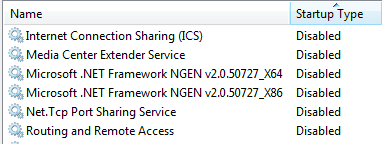
.........I'll go through all the disabled services, enable them one at a time....

...the problem disappears with Aero themes, it still persists with the Windows Classic theme as well as all other non-Aero themes....
~~~
The hunt continues.

Did you disable some services or are you talking about the few services that are disabled in a fresh install?
disabled.png
 

My Computer My Computer

Computer type
Laptop
Computer Manufacturer/Model Number
Employer provided Dell Latitude
OS
W7 Pro SP1 64bit
CPU
i7
Memory
8GB
Graphics Card(s)
Intel HD Graphics
Hard Drives
crappy SSD
Antivirus
Employer mandated Symantec Endpoint Protection
Browser
Pale Moon 64bit, IE11 64bit & Chrome 64bit
UsenameIssues, I modified several services, but have since reset them to their default settings and it had no effect on the problem.

Since it looks like themes are related to the problem, I thought for sure it would be somehow be related to visual effects in performance options, but that doesn't seem to be it. However, When I disable visual effects with the Aero themes or the Windows 7 Basic them, I still have that effect of that semi-transparent window appearing over desktop icons when I mouseover them (which I hate with a passion). Whenever that effect is in operation, the Resource Monitor looks fine. When it isn't, it doesn't. I can't help but think there is a causal relationship there somewhere.
 

My Computer My Computer

OS
Windows 7 Home Premium 64 bit/Fedora 17 LXDE
CPU
i7 3770K
Motherboard
ASUS P8Z77-V Pro/Thunderbolt
Memory
2x4GB G.skill Trident X series 2400
Hard Drives
60GB Intel 520
500GB Western Digital spinner
Internet Speed
5-6 Mb/s
I'm unable to replicate that type of a window - so my guess is that it is a combination of your video driver and the theme settings.
 

My Computer My Computer

Computer type
Laptop
Computer Manufacturer/Model Number
Employer provided Dell Latitude
OS
W7 Pro SP1 64bit
CPU
i7
Memory
8GB
Graphics Card(s)
Intel HD Graphics
Hard Drives
crappy SSD
Antivirus
Employer mandated Symantec Endpoint Protection
Browser
Pale Moon 64bit, IE11 64bit & Chrome 64bit
Just to be clear, it is this mouseover effect that I'm talking about and I hate:

mouseover.PNG

Maybe it's unrelated, but whenever this effect is...well, in effect...Resource Monitor looks fine. When it isn't, Resource Monitor is 100% transparent. I thought disabling visual effects would get rid of this mouseover behavior, but, at least in Areo themes and the Windows 7 Basic theme, it doesn't.

There are no updates available for the video driver. Maybe I should reinstall the existing driver? Maybe I'll be getting a GPU sooner rather than later. :D

EDIT: I never really solved the issue, but concluded that it must have had something to do with setting up User Data on a separate drive from the OS (I may have included Program Data. I can't remember for sure now). Anyway, I installed Windows 8 in the same configuration via relocate.xml and it is no longer an issue so I thought I should mark this thread as solved.
 
Last edited:

My Computer My Computer

OS
Windows 7 Home Premium 64 bit/Fedora 17 LXDE
CPU
i7 3770K
Motherboard
ASUS P8Z77-V Pro/Thunderbolt
Memory
2x4GB G.skill Trident X series 2400
Hard Drives
60GB Intel 520
500GB Western Digital spinner
Internet Speed
5-6 Mb/s
IML8 - Discovered an identical 'Resource Monitor' issue today. After toggling desktop backgrounds from a JPEG image of earth from mars, back to a Aero Theme the Resource Manager started working as advertised. I left Resource Manager running and cycled the back to the JPEG. From there I opening a second minimized instantiation of Resource Manager - with borders and header, all else is transparent. I'm new to this forum and have read you've moved onto Win8, wanted to inquire if you're still around, or if others have any additional thoughts?
 

Attachments

  • Resource Monitor Error Transparent Screenshot.png
    Resource Monitor Error Transparent Screenshot.png
    62.8 KB · Views: 2

My Computer My Computer

Computer type
Laptop
Computer Manufacturer/Model Number
Toshiba Satellite P505D S8007
OS
Windows 7 Home Premium (64-bit) 6.1.7601
CPU
AMD Turion™ II Dual-Core Mobile Processor M520
Motherboard
PSPHJU-00J005B
Memory
4GB DDR2 800MHz memory
Graphics Card(s)
ATI® : AMD M880G w/ATI Mobility Radeon HD 4200
Hard Drives
500GB HDD (5400rpm, Serial ATA)
Antivirus
MSE
Browser
Firefox, with Chrome as Back Up Don't use IE.
Welcome to the Seven Forums, ebbing82310.

Nice additional info.

Let's see if other members can help you with this.
 

My Computer My Computer

Computer type
Laptop
Computer Manufacturer/Model Number
Employer provided Dell Latitude
OS
W7 Pro SP1 64bit
CPU
i7
Memory
8GB
Graphics Card(s)
Intel HD Graphics
Hard Drives
crappy SSD
Antivirus
Employer mandated Symantec Endpoint Protection
Browser
Pale Moon 64bit, IE11 64bit & Chrome 64bit
Yes, I know this discussion happened 3+ years ago ... but the answers were never clear. And some of us are still running Win7 and do not consider downgrading to Win8 to be a solution. In fact, some of us only recently installed Win7 ... like me.

I'm glad I found this thread, because the inability to run Resource Manager (RM) was a mystery to me.

Just to be clear about the symptoms: the RM window isn't really transparent. Rather, RM never draws to the window. This is obvious when I launch RM on a system that's already busy, no desktop visible. Initially RM appears to be invisible -- I see the application(s) behind it though the frame. But then when I move its window, a copy of what I was seeing in the RM window moves with the window. RM just never draws over it.

It's definitely linked to the theme -- in particular, the theme that is active when RM is launched. If Windows Classic is active at RM launch, RM never draws to its window, not even if I change the theme to Win7 Basic. If Win7 Basic is active at RM launch, RM operates normally, and even continues operating normally if I then switch back to Windows Classic. (Which I will. There are various things about the appears of Classic that I prefer to Win7 Basic or to any of the aero themes. My preference is based on appearance, not performance.) My guess is that RM picks a mode of drawing when it launches and sticks with it, and that what it picks when Classic is active doesn't work.

I did not try any of the high contrast or aero themes. Presumably RM works fine with aero. The high contrast themes probably affect it the same way as either Basic or Classic; if this matters to anyone, they can quickly figure out which it is.

Edward
 

My Computer My Computer

Computer type
Laptop
Computer Manufacturer/Model Number
Toshiba Satellite C655
OS
seven home premium x64
FWIW, five years later this is still an irritant. Found this thread while researching why my Resource Monitor was just a title bar, menu bar, and frame. Interesting "solutions", but not for me. I run my computer like a business - if all employees get along except for one recalcitrant person, guess who gets replaced. I'm now seeking a replacement for Resource Monitor.
 

My Computers My Computers

System One System Two

  • Computer type
    PC/Desktop
    Computer Manufacturer/Model Number
    custom
    OS
    win7 Pro SP1 x86
    CPU
    64x2 6000+
    Motherboard
    winfast
    Memory
    2gig
    Graphics Card(s)
    GTX950
    Antivirus
    Avast
    Browser
    Brave
  • Computer type
    PC/Desktop
    Antivirus
    Avast
That is a bug.
Resource Monitor doesn't work if you're using Classic theme.
If you choose any aero theme it will work.
 

My Computers My Computers

System One System Two

  • Computer type
    PC/Desktop
    Computer Manufacturer/Model Number
    custom build
    OS
    Windows 7 HP 64
    CPU
    i5 6600K - 800MHz to 4200MHz
    Motherboard
    GA-Z170-HD3P
    Memory
    4+4G GSkill DDR4 3000
    Graphics Card(s)
    IG - Intel 530
    Monitor(s) Displays
    Samsung 226BW
    Screen Resolution
    1680x1050
    Hard Drives
    (1) -1 SM951 – 128GB M.2 AHCI PCIe SSD drive for Windows 7 and Lubuntu
    (2) -1 WD SATA 3 - 1T for Data
    (3) -1 WD SATA 3 - 1T for backup
    PSU
    Thermaltake 450W TR2 gold
    Keyboard
    Old and good Chicony mechanical keyboard
    Mouse
    Logitech mX performance - 9 buttons (had to disable some)
    Internet Speed
    500Mb/s
    Browser
    Firefox 64
    Other Info
    TinyWall firewall
  • Computer type
    Laptop
    System Manufacturer/Model Number
    Asus Q550LF
    OS
    Windows 7 Pro
    CPU
    i7-4500U 800MHz to 3.0GHz
    Motherboard
    Asus Q550LF
    Memory
    (4+4)G DDR3 1600
    Graphics Card(s)
    IG intel 4400 + NVIDIA GeForce GT 745M
    Sound Card
    Realtek
    Monitor(s) Displays
    LG Display LP156WF4-SPH1
    Screen Resolution
    1920 x 1080
    Hard Drives
    BX500 120G SSD for Windows and programs +
    1T HDD for data
    Internet Speed
    500 Mb/s
    Browser
    Firefox
    Other Info
    TinyWall firewall
Back
Top