Solved Windows Search yielding No Results after changing Users Location

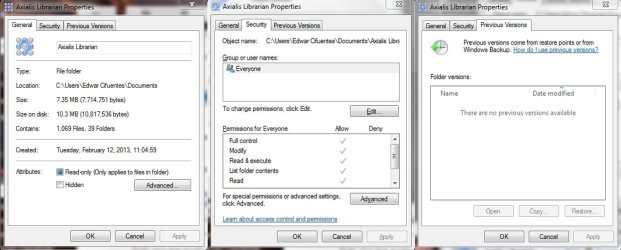
Right click that Axialis (folder or file), select Properties, take screenshot, post it here.

I mean this window:
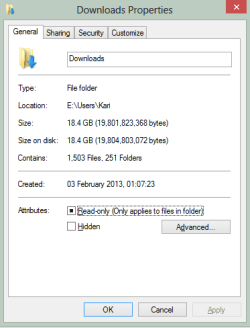
Properties.png

I want to see properties window of that Axialis thing you do not find.

Kari
 

My Computer My Computer

At a glance

Windows 10 Pro x64 EN-GB1.6 GHz Intel Core i7-720QM Processor6 GBATI Mobility Radeon HD 5850 Graphics
Computer type
Laptop
Computer Manufacturer/Model Number
HP ENVY 17-1150eg
OS
Windows 10 Pro x64 EN-GB
CPU
1.6 GHz Intel Core i7-720QM Processor
Memory
6 GB
Graphics Card(s)
ATI Mobility Radeon HD 5850 Graphics
Sound Card
Beats sound system with integrated subwoofer
Monitor(s) Displays
17" laptop display, 22" LED and 32" Full HD TV through HDMI
Screen Resolution
1600*900 (1), 1920*1080 (2&3)
Hard Drives
Internal: 2 x 500 GB SATA Hard Disk Drive 7200 rpm
External: 2TB for backups, 3TB USB3 network drive for media
Cooling
As Envy runs a bit warm, I have it on a Cooler Master pad
Keyboard
Logitech diNovo Media Desktop Laser (bluetooth)
Mouse
Logitech Performance Mouse MX
Internet Speed
50/10 Mbps VDSL
Antivirus
Windows Defender 4.3.9431.0
Browser
Maxthon 3.5.2., IE11
It's not only that Axialis folder what I can't find. I can't find anything through the libraries (but If I search in computer>local disk for example, search will work and find them) including files, folders, music, photos, shortcuts, hidden folders and everything else. Nothing can be found on the libraries.

screenshot.jpg
 

My Computer My Computer

At a glance

Windows 7 Home Premium x64AMD Dual-Core A4-3300M Accelerated ProcessorDDR3 6144 MBytesAMD Radeon™ HD 6480G
Computer Manufacturer/Model Number
Toshiba Satellite® L755D-S5348 15.6" widescreen Laptop
OS
Windows 7 Home Premium x64
CPU
AMD Dual-Core A4-3300M Accelerated Processor
Motherboard
AMD Torpedo
Memory
DDR3 6144 MBytes
Graphics Card(s)
AMD Radeon™ HD 6480G
Monitor(s) Displays
15.6" Widescreen, 1366x768 (HD), 16:9 aspect ratio
Hard Drives
Hitachi HTS547550A9E384 500 GB
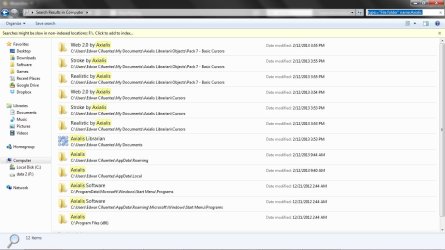
OK, and now one more screenshot:

Open Windows Explorer in Computer view. Type this to Search field:
Code:
type:="File folder" name:Axialis
Post the screenshot as this one here below, showing that A) you really search on whole computer and B) you use the search term I gave you (important parts highlighted):

Folder_Search.png

Please, no explanations without the screenshot!

Kari
 

My Computer My Computer

At a glance

Windows 10 Pro x64 EN-GB1.6 GHz Intel Core i7-720QM Processor6 GBATI Mobility Radeon HD 5850 Graphics
Computer type
Laptop
Computer Manufacturer/Model Number
HP ENVY 17-1150eg
OS
Windows 10 Pro x64 EN-GB
CPU
1.6 GHz Intel Core i7-720QM Processor
Memory
6 GB
Graphics Card(s)
ATI Mobility Radeon HD 5850 Graphics
Sound Card
Beats sound system with integrated subwoofer
Monitor(s) Displays
17" laptop display, 22" LED and 32" Full HD TV through HDMI
Screen Resolution
1600*900 (1), 1920*1080 (2&3)
Hard Drives
Internal: 2 x 500 GB SATA Hard Disk Drive 7200 rpm
External: 2TB for backups, 3TB USB3 network drive for media
Cooling
As Envy runs a bit warm, I have it on a Cooler Master pad
Keyboard
Logitech diNovo Media Desktop Laser (bluetooth)
Mouse
Logitech Performance Mouse MX
Internet Speed
50/10 Mbps VDSL
Antivirus
Windows Defender 4.3.9431.0
Browser
Maxthon 3.5.2., IE11
screenshot02.jpg
 

My Computer My Computer

At a glance

Windows 7 Home Premium x64AMD Dual-Core A4-3300M Accelerated ProcessorDDR3 6144 MBytesAMD Radeon™ HD 6480G
Computer Manufacturer/Model Number
Toshiba Satellite® L755D-S5348 15.6" widescreen Laptop
OS
Windows 7 Home Premium x64
CPU
AMD Dual-Core A4-3300M Accelerated Processor
Motherboard
AMD Torpedo
Memory
DDR3 6144 MBytes
Graphics Card(s)
AMD Radeon™ HD 6480G
Monitor(s) Displays
15.6" Widescreen, 1366x768 (HD), 16:9 aspect ratio
Hard Drives
Hitachi HTS547550A9E384 500 GB

OK, and what was your problem? The folder can be found as we can clearly see from your screenshot. Your Windows Search works as it should work.

In the very beginning of this thread I asked you to do something:
However before you try this you could try a bit modified search. I noticed that the thing you used as an example is a folder. Try to search folders by typing this to Explorer search field:
Code:
type:="File folder" name:Axialis
A few posts later I repeated my request, and you told you did try but it did not work:
Did you try searching as I asked you to do in my first post:
However before you try this you could try a bit modified search. I noticed that the thing you used as an example is a folder. Try to search folders by typing this to Explorer search field:
Code:
type:="File folder" name:Axialis

The modified search didn't work

I've already said it didn't work!
But now when I asked the same thing the third time, only difference being I asked you to show a screenshot, now it suddenly works!
OK, and now one more screenshot:

Open Windows Explorer in Computer view. Type this to Search field:
Code:
type:="File folder" name:Axialis
Post the screenshot as this one here below, showing that A) you really search on whole computer and B) you use the search term I gave you (important parts highlighted):

View attachment 255272

Please, no explanations without the screenshot!

Kari

It's a strange world!

Anyway, your Windows Search seems to work just fine so please mark this thread solved.

Kari
 

My Computer My Computer

At a glance

Windows 10 Pro x64 EN-GB1.6 GHz Intel Core i7-720QM Processor6 GBATI Mobility Radeon HD 5850 Graphics
Computer type
Laptop
Computer Manufacturer/Model Number
HP ENVY 17-1150eg
OS
Windows 10 Pro x64 EN-GB
CPU
1.6 GHz Intel Core i7-720QM Processor
Memory
6 GB
Graphics Card(s)
ATI Mobility Radeon HD 5850 Graphics
Sound Card
Beats sound system with integrated subwoofer
Monitor(s) Displays
17" laptop display, 22" LED and 32" Full HD TV through HDMI
Screen Resolution
1600*900 (1), 1920*1080 (2&3)
Hard Drives
Internal: 2 x 500 GB SATA Hard Disk Drive 7200 rpm
External: 2TB for backups, 3TB USB3 network drive for media
Cooling
As Envy runs a bit warm, I have it on a Cooler Master pad
Keyboard
Logitech diNovo Media Desktop Laser (bluetooth)
Mouse
Logitech Performance Mouse MX
Internet Speed
50/10 Mbps VDSL
Antivirus
Windows Defender 4.3.9431.0
Browser
Maxthon 3.5.2., IE11
No. Search (including your modified search) works only on computer, but Not on the libraries.
When you asked me to use the modified search and I told you it gave me no results it was because I was looking on the libraries. The last time it worked because I was simply searching on the whole computer (which is slower). The issue is that: The search works when you use it directly (e.g. in the disk partition) but not in the libraries. This is not solved yet.
 
Last edited:

My Computer My Computer

At a glance

Windows 7 Home Premium x64AMD Dual-Core A4-3300M Accelerated ProcessorDDR3 6144 MBytesAMD Radeon™ HD 6480G
Computer Manufacturer/Model Number
Toshiba Satellite® L755D-S5348 15.6" widescreen Laptop
OS
Windows 7 Home Premium x64
CPU
AMD Dual-Core A4-3300M Accelerated Processor
Motherboard
AMD Torpedo
Memory
DDR3 6144 MBytes
Graphics Card(s)
AMD Radeon™ HD 6480G
Monitor(s) Displays
15.6" Widescreen, 1366x768 (HD), 16:9 aspect ratio
Hard Drives
Hitachi HTS547550A9E384 500 GB
In which library should the Axialis folder be? Documents?
 

My Computer My Computer

At a glance

Windows 10 Pro x64 EN-GB1.6 GHz Intel Core i7-720QM Processor6 GBATI Mobility Radeon HD 5850 Graphics
Computer type
Laptop
Computer Manufacturer/Model Number
HP ENVY 17-1150eg
OS
Windows 10 Pro x64 EN-GB
CPU
1.6 GHz Intel Core i7-720QM Processor
Memory
6 GB
Graphics Card(s)
ATI Mobility Radeon HD 5850 Graphics
Sound Card
Beats sound system with integrated subwoofer
Monitor(s) Displays
17" laptop display, 22" LED and 32" Full HD TV through HDMI
Screen Resolution
1600*900 (1), 1920*1080 (2&3)
Hard Drives
Internal: 2 x 500 GB SATA Hard Disk Drive 7200 rpm
External: 2TB for backups, 3TB USB3 network drive for media
Cooling
As Envy runs a bit warm, I have it on a Cooler Master pad
Keyboard
Logitech diNovo Media Desktop Laser (bluetooth)
Mouse
Logitech Performance Mouse MX
Internet Speed
50/10 Mbps VDSL
Antivirus
Windows Defender 4.3.9431.0
Browser
Maxthon 3.5.2., IE11
Yes, in documents.
 

My Computer My Computer

At a glance

Windows 7 Home Premium x64AMD Dual-Core A4-3300M Accelerated ProcessorDDR3 6144 MBytesAMD Radeon™ HD 6480G
Computer Manufacturer/Model Number
Toshiba Satellite® L755D-S5348 15.6" widescreen Laptop
OS
Windows 7 Home Premium x64
CPU
AMD Dual-Core A4-3300M Accelerated Processor
Motherboard
AMD Torpedo
Memory
DDR3 6144 MBytes
Graphics Card(s)
AMD Radeon™ HD 6480G
Monitor(s) Displays
15.6" Widescreen, 1366x768 (HD), 16:9 aspect ratio
Hard Drives
Hitachi HTS547550A9E384 500 GB
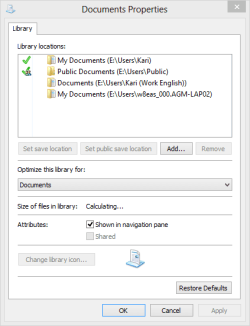
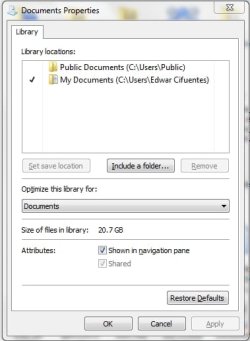
OK, please do this now:

Open Explorer in Libraries view. Right click Documents library, post screenshot:

Documents Properties.png
 

My Computer My Computer

At a glance

Windows 10 Pro x64 EN-GB1.6 GHz Intel Core i7-720QM Processor6 GBATI Mobility Radeon HD 5850 Graphics
Computer type
Laptop
Computer Manufacturer/Model Number
HP ENVY 17-1150eg
OS
Windows 10 Pro x64 EN-GB
CPU
1.6 GHz Intel Core i7-720QM Processor
Memory
6 GB
Graphics Card(s)
ATI Mobility Radeon HD 5850 Graphics
Sound Card
Beats sound system with integrated subwoofer
Monitor(s) Displays
17" laptop display, 22" LED and 32" Full HD TV through HDMI
Screen Resolution
1600*900 (1), 1920*1080 (2&3)
Hard Drives
Internal: 2 x 500 GB SATA Hard Disk Drive 7200 rpm
External: 2TB for backups, 3TB USB3 network drive for media
Cooling
As Envy runs a bit warm, I have it on a Cooler Master pad
Keyboard
Logitech diNovo Media Desktop Laser (bluetooth)
Mouse
Logitech Performance Mouse MX
Internet Speed
50/10 Mbps VDSL
Antivirus
Windows Defender 4.3.9431.0
Browser
Maxthon 3.5.2., IE11
screenshot03.jpg
 

My Computer My Computer

At a glance

Windows 7 Home Premium x64AMD Dual-Core A4-3300M Accelerated ProcessorDDR3 6144 MBytesAMD Radeon™ HD 6480G
Computer Manufacturer/Model Number
Toshiba Satellite® L755D-S5348 15.6" widescreen Laptop
OS
Windows 7 Home Premium x64
CPU
AMD Dual-Core A4-3300M Accelerated Processor
Motherboard
AMD Torpedo
Memory
DDR3 6144 MBytes
Graphics Card(s)
AMD Radeon™ HD 6480G
Monitor(s) Displays
15.6" Widescreen, 1366x768 (HD), 16:9 aspect ratio
Hard Drives
Hitachi HTS547550A9E384 500 GB
OK.

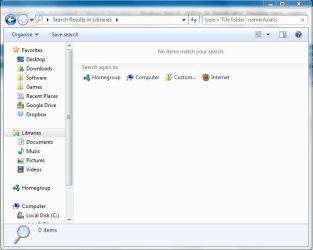
And now, with screenshot please: Open Explorer in Libraries view, use the same search string:
Code:
type:="File folder" name:Axialis
Please post screenshot with results.
 

My Computer My Computer

At a glance

Windows 10 Pro x64 EN-GB1.6 GHz Intel Core i7-720QM Processor6 GBATI Mobility Radeon HD 5850 Graphics
Computer type
Laptop
Computer Manufacturer/Model Number
HP ENVY 17-1150eg
OS
Windows 10 Pro x64 EN-GB
CPU
1.6 GHz Intel Core i7-720QM Processor
Memory
6 GB
Graphics Card(s)
ATI Mobility Radeon HD 5850 Graphics
Sound Card
Beats sound system with integrated subwoofer
Monitor(s) Displays
17" laptop display, 22" LED and 32" Full HD TV through HDMI
Screen Resolution
1600*900 (1), 1920*1080 (2&3)
Hard Drives
Internal: 2 x 500 GB SATA Hard Disk Drive 7200 rpm
External: 2TB for backups, 3TB USB3 network drive for media
Cooling
As Envy runs a bit warm, I have it on a Cooler Master pad
Keyboard
Logitech diNovo Media Desktop Laser (bluetooth)
Mouse
Logitech Performance Mouse MX
Internet Speed
50/10 Mbps VDSL
Antivirus
Windows Defender 4.3.9431.0
Browser
Maxthon 3.5.2., IE11
screenshot04.jpg
 

My Computer My Computer

At a glance

Windows 7 Home Premium x64AMD Dual-Core A4-3300M Accelerated ProcessorDDR3 6144 MBytesAMD Radeon™ HD 6480G
Computer Manufacturer/Model Number
Toshiba Satellite® L755D-S5348 15.6" widescreen Laptop
OS
Windows 7 Home Premium x64
CPU
AMD Dual-Core A4-3300M Accelerated Processor
Motherboard
AMD Torpedo
Memory
DDR3 6144 MBytes
Graphics Card(s)
AMD Radeon™ HD 6480G
Monitor(s) Displays
15.6" Widescreen, 1366x768 (HD), 16:9 aspect ratio
Hard Drives
Hitachi HTS547550A9E384 500 GB
OK, that must be an indexing error, you might have accidentally removed Documents from indexing.

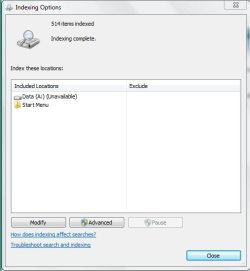
Please click Start, type Indexing Options and hit Enter. Post the screenshot of your Indexing Options.
 

My Computer My Computer

At a glance

Windows 10 Pro x64 EN-GB1.6 GHz Intel Core i7-720QM Processor6 GBATI Mobility Radeon HD 5850 Graphics
Computer type
Laptop
Computer Manufacturer/Model Number
HP ENVY 17-1150eg
OS
Windows 10 Pro x64 EN-GB
CPU
1.6 GHz Intel Core i7-720QM Processor
Memory
6 GB
Graphics Card(s)
ATI Mobility Radeon HD 5850 Graphics
Sound Card
Beats sound system with integrated subwoofer
Monitor(s) Displays
17" laptop display, 22" LED and 32" Full HD TV through HDMI
Screen Resolution
1600*900 (1), 1920*1080 (2&3)
Hard Drives
Internal: 2 x 500 GB SATA Hard Disk Drive 7200 rpm
External: 2TB for backups, 3TB USB3 network drive for media
Cooling
As Envy runs a bit warm, I have it on a Cooler Master pad
Keyboard
Logitech diNovo Media Desktop Laser (bluetooth)
Mouse
Logitech Performance Mouse MX
Internet Speed
50/10 Mbps VDSL
Antivirus
Windows Defender 4.3.9431.0
Browser
Maxthon 3.5.2., IE11
5.jpg

Hey there's something wrong here, isn't it? I wasn't like that before! I'm gonna delete that entry and add C:/

What do you say?
 

My Computer My Computer

At a glance

Windows 7 Home Premium x64AMD Dual-Core A4-3300M Accelerated ProcessorDDR3 6144 MBytesAMD Radeon™ HD 6480G
Computer Manufacturer/Model Number
Toshiba Satellite® L755D-S5348 15.6" widescreen Laptop
OS
Windows 7 Home Premium x64
CPU
AMD Dual-Core A4-3300M Accelerated Processor
Motherboard
AMD Torpedo
Memory
DDR3 6144 MBytes
Graphics Card(s)
AMD Radeon™ HD 6480G
Monitor(s) Displays
15.6" Widescreen, 1366x768 (HD), 16:9 aspect ratio
Hard Drives
Hitachi HTS547550A9E384 500 GB
This is a very good thread. Keep going I'm learning.
 

My Computer My Computer

At a glance

Windows 10 Pro. 64/ version 1709 Windows 7 Pr...Intel i7-6800K @ 4.3Corsair Platinum 16 gig @2400EVGA GTX 1070 OC
Computer type
PC/Desktop
Computer Manufacturer/Model Number
Home made Desktop
OS
Windows 10 Pro. 64/ version 1709 Windows 7 Pro/64
CPU
Intel i7-6800K @ 4.3
Motherboard
ASUS X-99 Deluxe II
Memory
Corsair Platinum 16 gig @2400
Graphics Card(s)
EVGA GTX 1070 OC
Monitor(s) Displays
Asus 27" LED LCD/VE278Q
Screen Resolution
1920-1080 or 1280-720 HDMI
Hard Drives
INTEL SSD 730-240 Gb Sata 3.0/
PSU
EVGA Platium 1200W
Case
Phanteks Luxe Tempered Glass 8 fans/ one radiator
Cooling
XSPC/ Water Cooled CPU
Keyboard
Das 4 Professional
Mouse
Logitech M705/MX Anywhere 2-S
Internet Speed
100 mbits
Antivirus
Microsoft Security Essentials/ Malwarebytes Premium 3.0/ SAS
Browser
I.E. 11 default/Firefox/ ISP Time Warner Cable/Spectrum
Other Info
LG BluRay Burner/
Sound system-KLipsch-THX/
Icy Dock ssd Hot Swap bays.

My Computer My Computer

At a glance

Windows 10 Pro x64 EN-GB1.6 GHz Intel Core i7-720QM Processor6 GBATI Mobility Radeon HD 5850 Graphics
Computer type
Laptop
Computer Manufacturer/Model Number
HP ENVY 17-1150eg
OS
Windows 10 Pro x64 EN-GB
CPU
1.6 GHz Intel Core i7-720QM Processor
Memory
6 GB
Graphics Card(s)
ATI Mobility Radeon HD 5850 Graphics
Sound Card
Beats sound system with integrated subwoofer
Monitor(s) Displays
17" laptop display, 22" LED and 32" Full HD TV through HDMI
Screen Resolution
1600*900 (1), 1920*1080 (2&3)
Hard Drives
Internal: 2 x 500 GB SATA Hard Disk Drive 7200 rpm
External: 2TB for backups, 3TB USB3 network drive for media
Cooling
As Envy runs a bit warm, I have it on a Cooler Master pad
Keyboard
Logitech diNovo Media Desktop Laser (bluetooth)
Mouse
Logitech Performance Mouse MX
Internet Speed
50/10 Mbps VDSL
Antivirus
Windows Defender 4.3.9431.0
Browser
Maxthon 3.5.2., IE11
This is a very good thread. Keep going I'm learning.
Me too.

I totally ignored the fact that when he moved his Users folders back from that not recommended drive A:, the index basically had to get screwed; it simply could not survive.

Again one reason why I use the environment variable method for moving Users, index does not have to know where the Users folder is and I can move it every day to a new location if I want to, index staying always intact.
 

My Computer My Computer

At a glance

Windows 10 Pro x64 EN-GB1.6 GHz Intel Core i7-720QM Processor6 GBATI Mobility Radeon HD 5850 Graphics
Computer type
Laptop
Computer Manufacturer/Model Number
HP ENVY 17-1150eg
OS
Windows 10 Pro x64 EN-GB
CPU
1.6 GHz Intel Core i7-720QM Processor
Memory
6 GB
Graphics Card(s)
ATI Mobility Radeon HD 5850 Graphics
Sound Card
Beats sound system with integrated subwoofer
Monitor(s) Displays
17" laptop display, 22" LED and 32" Full HD TV through HDMI
Screen Resolution
1600*900 (1), 1920*1080 (2&3)
Hard Drives
Internal: 2 x 500 GB SATA Hard Disk Drive 7200 rpm
External: 2TB for backups, 3TB USB3 network drive for media
Cooling
As Envy runs a bit warm, I have it on a Cooler Master pad
Keyboard
Logitech diNovo Media Desktop Laser (bluetooth)
Mouse
Logitech Performance Mouse MX
Internet Speed
50/10 Mbps VDSL
Antivirus
Windows Defender 4.3.9431.0
Browser
Maxthon 3.5.2., IE11
Well I also read this.

The index will not include search results from any drive or partition with the A and B drive letters, even if you add their location to the index. This is because the A and B drive letters are reserved for floppy drives. Since a floppy drive is considered to be a removable device, it will not be indexed. Even if this is a hard drive you assigned with the A or B drive letter, it will still be treated the same.
Just as you recommended.
 
Last edited:

My Computer My Computer

At a glance

Windows 10 Pro. 64/ version 1709 Windows 7 Pr...Intel i7-6800K @ 4.3Corsair Platinum 16 gig @2400EVGA GTX 1070 OC
Computer type
PC/Desktop
Computer Manufacturer/Model Number
Home made Desktop
OS
Windows 10 Pro. 64/ version 1709 Windows 7 Pro/64
CPU
Intel i7-6800K @ 4.3
Motherboard
ASUS X-99 Deluxe II
Memory
Corsair Platinum 16 gig @2400
Graphics Card(s)
EVGA GTX 1070 OC
Monitor(s) Displays
Asus 27" LED LCD/VE278Q
Screen Resolution
1920-1080 or 1280-720 HDMI
Hard Drives
INTEL SSD 730-240 Gb Sata 3.0/
PSU
EVGA Platium 1200W
Case
Phanteks Luxe Tempered Glass 8 fans/ one radiator
Cooling
XSPC/ Water Cooled CPU
Keyboard
Das 4 Professional
Mouse
Logitech M705/MX Anywhere 2-S
Internet Speed
100 mbits
Antivirus
Microsoft Security Essentials/ Malwarebytes Premium 3.0/ SAS
Browser
I.E. 11 default/Firefox/ ISP Time Warner Cable/Spectrum
Other Info
LG BluRay Burner/
Sound system-KLipsch-THX/
Icy Dock ssd Hot Swap bays.
Yes, that's what I said earlier: A & B are reserved for removable storage. Windows does not index removable storage. Ergo, this is where OP's problem began.

The issue got carried further to "new" setup when he finally moved Users back from A: to C:, index could no longer repair itself.

Two things have been proved:
  1. Drive letters A and B may not be used for HD partitions
  2. Windows Search works as intended

Kari
 

My Computer My Computer

At a glance

Windows 10 Pro x64 EN-GB1.6 GHz Intel Core i7-720QM Processor6 GBATI Mobility Radeon HD 5850 Graphics
Computer type
Laptop
Computer Manufacturer/Model Number
HP ENVY 17-1150eg
OS
Windows 10 Pro x64 EN-GB
CPU
1.6 GHz Intel Core i7-720QM Processor
Memory
6 GB
Graphics Card(s)
ATI Mobility Radeon HD 5850 Graphics
Sound Card
Beats sound system with integrated subwoofer
Monitor(s) Displays
17" laptop display, 22" LED and 32" Full HD TV through HDMI
Screen Resolution
1600*900 (1), 1920*1080 (2&3)
Hard Drives
Internal: 2 x 500 GB SATA Hard Disk Drive 7200 rpm
External: 2TB for backups, 3TB USB3 network drive for media
Cooling
As Envy runs a bit warm, I have it on a Cooler Master pad
Keyboard
Logitech diNovo Media Desktop Laser (bluetooth)
Mouse
Logitech Performance Mouse MX
Internet Speed
50/10 Mbps VDSL
Antivirus
Windows Defender 4.3.9431.0
Browser
Maxthon 3.5.2., IE11
By the way, while waiting OP to re-index I thought this would be a good place and time to explain a bit more how to fine tune Windows Search using the search string used in this thread as an example.

We have asked OP to search his missing folder using the string Exact_Object_Type Partial_object_name:
Code:
[B][COLOR="DarkRed"]type:="File folder"[/COLOR][/B] [B][COLOR="DarkGreen"]name:Axialis[/COLOR][/B]
The difference between exact and partial is the = sign. When OP searched for a folder name:Axialis the search found all folders where Axialis is A) name of the folder and B) part of the folder name.

We can modify that search to Exact_Object_Type Exact_object_name simply by adding one = sign:
Code:
[B][COLOR="DarkRed"]type:="File folder"[/COLOR][/B] [B][COLOR="DarkGreen"]name:=Axialis[/COLOR][/B]
Examples

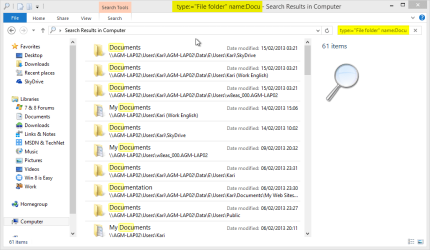
Try this search:
Code:
[B][COLOR="DarkRed"]type:="File folder"[/COLOR][/B] [B][COLOR="DarkGreen"]name:Docu[/COLOR][/B]
It finds all folders with folder name Docu or partial folder name Docu so it will for instance find Documents and My Documents:

Search_1.png

Now edit the search to search exact match Docu:
Code:
[B][COLOR="DarkRed"]type:="File folder"[/COLOR][/B] [B][COLOR="DarkGreen"]name:=Docu[/COLOR][/B]
As it only finds exact matches, folders named Docu, it finds nothing on my computer:

Search_2.png

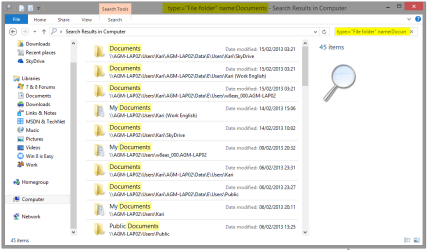
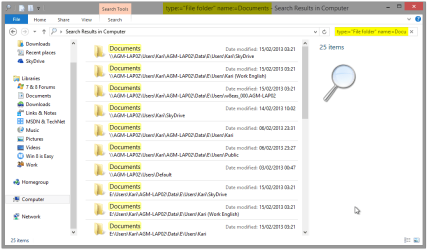
Now let's search for folders with partial folder name Documents:
Code:
[B][COLOR="DarkRed"]type:="File folder"[/COLOR][/B] [B][COLOR="DarkGreen"]name:Documents[/COLOR][/B]
This search finds for instance Documents and My Documents:

Search_3.png

And last, let's search for exact folder name Documents:
Code:
[B][COLOR="DarkRed"]type:="File folder"[/COLOR][/B] [B][COLOR="DarkGreen"]name:=Documents[/COLOR][/B]
You noticed how the My Documents are filtered from our last search for now we are searching an exact match:

Search_4.png

That's the power of one single = sign ;)!

Kari
 

My Computer My Computer

At a glance

Windows 10 Pro x64 EN-GB1.6 GHz Intel Core i7-720QM Processor6 GBATI Mobility Radeon HD 5850 Graphics
Computer type
Laptop
Computer Manufacturer/Model Number
HP ENVY 17-1150eg
OS
Windows 10 Pro x64 EN-GB
CPU
1.6 GHz Intel Core i7-720QM Processor
Memory
6 GB
Graphics Card(s)
ATI Mobility Radeon HD 5850 Graphics
Sound Card
Beats sound system with integrated subwoofer
Monitor(s) Displays
17" laptop display, 22" LED and 32" Full HD TV through HDMI
Screen Resolution
1600*900 (1), 1920*1080 (2&3)
Hard Drives
Internal: 2 x 500 GB SATA Hard Disk Drive 7200 rpm
External: 2TB for backups, 3TB USB3 network drive for media
Cooling
As Envy runs a bit warm, I have it on a Cooler Master pad
Keyboard
Logitech diNovo Media Desktop Laser (bluetooth)
Mouse
Logitech Performance Mouse MX
Internet Speed
50/10 Mbps VDSL
Antivirus
Windows Defender 4.3.9431.0
Browser
Maxthon 3.5.2., IE11
Back
Top