Solved Fonts - why do some work, others dont - anybody know?

AndyF

New member
Local time
11:57 AM
Messages
22
Hi...

I have a bunch of fonts that have been with me since the advent of Windows (it seems). Recently I upgraded the machines on my network to Windows 7 and oddly, when I loaded the fonts back on board, some worked, some did not, without any real rhyme or reason.

Now, I find that opening some documents (in MS Word, and Publisher) present that substitute font dialog thats well, a bit of a pain in the backside.

Anybody know anything about this? Why do some come across just fine, others dont? I am happy to send samples if it helps - but I just dont know if this can be fixed or not, and would love to hear some kind of expertise though I know fonts are kind of "no worries, until they dont" type things.

Thanks!
 

My Computer My Computer

At a glance

Windows 7 Ultimate 32 bitIntel4GBnVidia GEForce
Computer Manufacturer/Model Number
Dell XPS410
OS
Windows 7 Ultimate 32 bit
CPU
Intel
Motherboard
Intel
Memory
4GB
Graphics Card(s)
nVidia GEForce
Sound Card
Creative XB-fi
Monitor(s) Displays
ViewSonic / Dell
Hard Drives
(2) WD 1 TB Sata
(1) WD 1 TB Usb External
Installed or Copied?

Did you install the fonts or simply copy them to the Fonts folder?
In W7 you have to manually install fonts.
 
Last edited:

My Computer My Computer

At a glance

W7 Ultimate SP1, LM19.2 MATE, W10 Home 1703, ...AMD Phenom II x6 1100T, 3.3 GHz12GB DDR3 1333 G-Skill (4GB x 2), G-Skill (2G...NVIDIA GeForce GTX 660
Computer type
PC/Desktop
Computer Manufacturer/Model Number
n/a
OS
W7 Ultimate SP1, LM19.2 MATE, W10 Home 1703, W10 Pro 1703 VM, #All 64 bit
CPU
AMD Phenom II x6 1100T, 3.3 GHz
Motherboard
ASUS M4A88T-M/USB3 (AM3)
Memory
12GB DDR3 1333 G-Skill (4GB x 2), G-Skill (2GB x 2)
Graphics Card(s)
NVIDIA GeForce GTX 660
Sound Card
Realtek?
Monitor(s) Displays
Samsung S23B350
Screen Resolution
1920x1080
Hard Drives
WD Green 2TB (SATA), WD Green 3TB (SATA), WD Blue 4TB (SATA), WD Blue 6TB (SATA)
PSU
Cooler Master
Case
Antec GX300 Tower
Cooling
3x Antec TRICOOL 120mm Fans
Mouse
Wired Optical
Internet Speed
DSL
Antivirus
Avast
Browser
Pale Moon (64 bit)
Other Info
2018-12-27 Upgraded HDDs
2015-12-10 Upgraded case, graphics card, storage
2015-08-15 Upgraded motherboard & RAM
2015-07-15 Upgraded LM17.1 to LM17.2
Did you install the fonts or simply copy them to the Fonts folder?
In W7 you have to manually install fonts.

Soz pal, but you can install fonts in win7 by either selecting multiple fonts then "right mouse button" "install" or you can just select multiple fonts then copy and paste them into the "windows" "fonts" directory with no problems, I don't quite understand when you say you have to manually do it :confused: in XP you had to copy them into the "fonts directory" there was no install option ;)
 

My Computer My Computer

At a glance

Windows 7 Ultimate 64bitAMD Phenom Quad core 9950 black edition16Gb2x XFX Radeon 5850
Computer type
PC/Desktop
Computer Manufacturer/Model Number
Self Built
OS
Windows 7 Ultimate 64bit
CPU
AMD Phenom Quad core 9950 black edition
Motherboard
Gigabyte
Memory
16Gb
Graphics Card(s)
2x XFX Radeon 5850
Sound Card
PCI Express X-Fi Titanium / Logitech G35
Monitor(s) Displays
2x HP 2410i
Screen Resolution
1920x1080
Hard Drives
2x 500Gb Seagate
1x 300Gb Seagate
1x 1Tb Seagate
2x 1Tb Hitatchi
PSU
Jean Tech Storm 700W
Case
Cooler Master COSMOS S
Cooling
Akasa Evo Blue Pro
Keyboard
Logitech G15
Mouse
Mad Catz M.M.O. 7
Internet Speed
12mb
Umm ...

Did you install the fonts or simply copy them to the Fonts folder?
In W7 you have to manually install fonts.

Soz pal, but you can install fonts in win7 by either selecting multiple fonts then "right mouse button" "install" or you can just select multiple fonts then copy and paste them into the "windows" "fonts" directory with no problems, I don't quite understand when you say you have to manually do it :confused: in XP you had to copy them into the "fonts directory" there was no install option ;)

Sorry I should have been more specific.
I was trying to find out what the OP had done with his font files.

What I mean by "manually" is that in XP, you just had to copy the font into the "Fonts" folder and they would install automatically (no additional actions required).

In W7, you "manually" have to choose the install option or the fonts won't be available.
On my PC, any font that I copy into the Fonts folder, is not available until I install it. (see Additional below and Post #6)

Worse still, once they are in the "Fonts" folder, they aren't considered to be normal files by many (if not all) programs.

  • Open Word
  • Navigate to the "Fonts" folder.
  • Set the file selector to "All Files (*.*)"
  • The folder is empty!
Fonts Folder.png
A "wonderful improvement" in W7. :sarc:

You can install multiple fonts simultaneously, as you describe (right click on the selection and choose "Install").

"So what I told you was true, from a certain point of view." ;)

Additional
My previous install must have had a glitch.
My current install behaves as you suggest
Thanks for the information about how your install works, PooMan UK. :)
 
Last edited:

My Computer My Computer

At a glance

W7 Ultimate SP1, LM19.2 MATE, W10 Home 1703, ...AMD Phenom II x6 1100T, 3.3 GHz12GB DDR3 1333 G-Skill (4GB x 2), G-Skill (2G...NVIDIA GeForce GTX 660
Computer type
PC/Desktop
Computer Manufacturer/Model Number
n/a
OS
W7 Ultimate SP1, LM19.2 MATE, W10 Home 1703, W10 Pro 1703 VM, #All 64 bit
CPU
AMD Phenom II x6 1100T, 3.3 GHz
Motherboard
ASUS M4A88T-M/USB3 (AM3)
Memory
12GB DDR3 1333 G-Skill (4GB x 2), G-Skill (2GB x 2)
Graphics Card(s)
NVIDIA GeForce GTX 660
Sound Card
Realtek?
Monitor(s) Displays
Samsung S23B350
Screen Resolution
1920x1080
Hard Drives
WD Green 2TB (SATA), WD Green 3TB (SATA), WD Blue 4TB (SATA), WD Blue 6TB (SATA)
PSU
Cooler Master
Case
Antec GX300 Tower
Cooling
3x Antec TRICOOL 120mm Fans
Mouse
Wired Optical
Internet Speed
DSL
Antivirus
Avast
Browser
Pale Moon (64 bit)
Other Info
2018-12-27 Upgraded HDDs
2015-12-10 Upgraded case, graphics card, storage
2015-08-15 Upgraded motherboard & RAM
2015-07-15 Upgraded LM17.1 to LM17.2
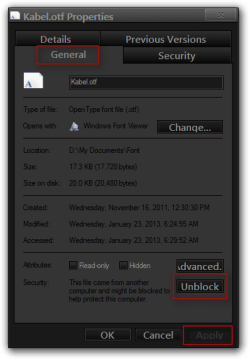
I have had some fonts not show up in programs and I have to go in to the font properties and unblock it and install it again and then it showed up. :confused:

Jerry
Kabel.otf Properties.png
 

My Computer My Computer

At a glance

Win 7 Pro x64 / Win 10 ProIntel(R) Core(TM) i7-3630QM CPU @ 2.40GHz12 GB(1) Intel(R) HD Graphics 4000 (2) NVIDIA GeFo...
Computer type
Laptop
Computer Manufacturer/Model Number
Sager NP9170
OS
Win 7 Pro x64 / Win 10 Pro
CPU
Intel(R) Core(TM) i7-3630QM CPU @ 2.40GHz
Motherboard
CLEVO P170EM
Memory
12 GB
Graphics Card(s)
(1) Intel(R) HD Graphics 4000 (2) NVIDIA GeForce GTX 675M
Sound Card
(1) Realtek High Definition Audio (2) Intel(R) Display Aud
Monitor(s) Displays
17.3
Screen Resolution
1920x1080
Hard Drives
(1) Samsung 860 EVO 500GB(OS) (1) Samsung 860 EVO 500GB(Data)
Keyboard
Backlite
Antivirus
MSE, Malwarebytes Pro
Browser
Firefox
Other Info
DESKTOP: Custom-built.
OS: Win 10 Pro x64.
CASE: Rosewill R5.
CPU: Intel I5 4670K CPU @ 3.40GHz.
CPU COOLER: Cool Master Hyper 212 EVO.
MOTHERBOARD: Asus Z87-A.
MEMORY: Kingston HyperX 2x4 GB.
GPU: Nvidia Geforce 650 TI.
PSU: Corsair TX750.
DRIVES: (1) Samsung 840 120 GB SSD (2) Western Digital blue 500 GB 7200 RPM.
Interesting

I have had some fonts not show up in programs and I have to go in to the font properties and unblock it and install it again and then it showed up. :confused:

Interesting.

My previous install must have had a glitch (or two).

My previous install had problems with search in the Libraries (folder search worked correctly).
Since I reinstalled my W7 OS (in September) that problem hasn't reappeared (despite using the same settings).

Since I had font install problems previously, I always just select fonts (wherever they are) and use the install option.
What would happen previously, is that I could copy the file to the Font folder, but it would remain greyed out and it wouldn't appear in any programs, unless I installed it.

I just tried copying a font from my backup folder and it automatically installed. :confused:

Maybe they were being blocked.
I'm sure I tried it with fonts I copied from my W7 betas to a folder on my PC (not from the Internet).

These weird incidents always intrigue me (like how Firefox won't run for some people). :confused:
 
Last edited:

My Computer My Computer

At a glance

W7 Ultimate SP1, LM19.2 MATE, W10 Home 1703, ...AMD Phenom II x6 1100T, 3.3 GHz12GB DDR3 1333 G-Skill (4GB x 2), G-Skill (2G...NVIDIA GeForce GTX 660
Computer type
PC/Desktop
Computer Manufacturer/Model Number
n/a
OS
W7 Ultimate SP1, LM19.2 MATE, W10 Home 1703, W10 Pro 1703 VM, #All 64 bit
CPU
AMD Phenom II x6 1100T, 3.3 GHz
Motherboard
ASUS M4A88T-M/USB3 (AM3)
Memory
12GB DDR3 1333 G-Skill (4GB x 2), G-Skill (2GB x 2)
Graphics Card(s)
NVIDIA GeForce GTX 660
Sound Card
Realtek?
Monitor(s) Displays
Samsung S23B350
Screen Resolution
1920x1080
Hard Drives
WD Green 2TB (SATA), WD Green 3TB (SATA), WD Blue 4TB (SATA), WD Blue 6TB (SATA)
PSU
Cooler Master
Case
Antec GX300 Tower
Cooling
3x Antec TRICOOL 120mm Fans
Mouse
Wired Optical
Internet Speed
DSL
Antivirus
Avast
Browser
Pale Moon (64 bit)
Other Info
2018-12-27 Upgraded HDDs
2015-12-10 Upgraded case, graphics card, storage
2015-08-15 Upgraded motherboard & RAM
2015-07-15 Upgraded LM17.1 to LM17.2
Hi guys...

Thanks to you all for replies, but I think this is now a bit more confusing... I did install the fonts - that is, these old fonts (circa 80's in some cases) came on floppy disk (which I still have) and I ran the installs on those disks presuming it copied all the fonts to the fonts folder.

However, when you say "right click and select install" well, if I go to Fonts in control panel, NONE of the fonts listed show any "install" selection, but I can see that many fonts on those disks just are not there. For example, I have a disk of Agfa fonts (the camera, etc. people) and yet I notice only two of the fonts on their disk of about 30 actually appear in Fonts in the control panel. I also have a four disk set of fonts from the old Parsons Technology - all these fonts start with "PT" and there are about 100 of them - but I only see ONE in Fonts in the Control Panel?!?!

When I look at the fonts on the floppy disks, most have a filetail of "._tf" and somehow become ".ttf" (True Type Font) AFTER they are installed.

Do you think its worth trying to just copy them and THEN see if "Install" is available through the Fonts selection in Control Panel?

...and sorry to ask such an obvious question, but where is the Fonts folder - hanging off of "Windows"?

Thanks so much for the help.
 

My Computer My Computer

At a glance

Windows 7 Ultimate 32 bitIntel4GBnVidia GEForce
Computer Manufacturer/Model Number
Dell XPS410
OS
Windows 7 Ultimate 32 bit
CPU
Intel
Motherboard
Intel
Memory
4GB
Graphics Card(s)
nVidia GEForce
Sound Card
Creative XB-fi
Monitor(s) Displays
ViewSonic / Dell
Hard Drives
(2) WD 1 TB Sata
(1) WD 1 TB Usb External
Hello again guys...

Well, I found the fonts folder itself and went through all my floppy disk installs for fonts. First, it seems as though when you copy a valid font to the fonts folder, it (Win7) installs the font itself. So its really just a matter of copying them over.

I found that in some cases, even if the font file had a weird name like "A36543._tf" it would install with a valid name in some cases. In other cases I got a dialog saying "This is not a valid font" so I guess in some cases, older fonts just are not going to cut it.

I'd say I got about 40-50% of the Fonts installed, and the others just wont install - not sure why but clearly things have changed in the many years since I got a lot of these so who knows what exactly the problem is, and I have resigned myself to the assumption that its going to be unlikely I can get any updated copies.

I guess I will just have to replace fonts in documents as the need arises, though I am going to research this a bit more to see if maybe there is some program or app that might update these, as in some cases, I have lost fonts which I made some heavy use of in old documents.

Thanks for all your help and if I learn anything more, I will post it here.
 

My Computer My Computer

At a glance

Windows 7 Ultimate 32 bitIntel4GBnVidia GEForce
Computer Manufacturer/Model Number
Dell XPS410
OS
Windows 7 Ultimate 32 bit
CPU
Intel
Motherboard
Intel
Memory
4GB
Graphics Card(s)
nVidia GEForce
Sound Card
Creative XB-fi
Monitor(s) Displays
ViewSonic / Dell
Hard Drives
(2) WD 1 TB Sata
(1) WD 1 TB Usb External
I'm not sure what ...

Thanks to you all for replies, but I think this is now a bit more confusing... I did install the fonts - that is, these old fonts (circa 80's in some cases) came on floppy disk (which I still have) and I ran the installs on those disks presuming it copied all the fonts to the fonts folder.

However, when you say "right click and select install" well, if I go to Fonts in control panel, NONE of the fonts listed show any "install" selection, but I can see that many fonts on those disks just are not there. For example, I have a disk of Agfa fonts (the camera, etc. people) and yet I notice only two of the fonts on their disk of about 30 actually appear in Fonts in the control panel. I also have a four disk set of fonts from the old Parsons Technology - all these fonts start with "PT" and there are about 100 of them - but I only see ONE in Fonts in the Control Panel?!?!

Do you get the "Install" option if you right click on the files on the floppy?

When I look at the fonts on the floppy disks, most have a filetail of "._tf" and somehow become ".ttf" (True Type Font) AFTER they are installed.

I'm not sure what a "._tf" file is.

I couldn't find a result on File-Extensions.org - File extension library

...and sorry to ask such an obvious question, but where is the Fonts folder - hanging off of "Windows"?

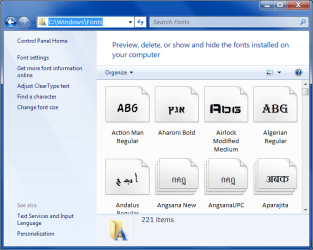
Location
C:\Windows\Fonts
Fonts Folder Location.png
I'd say I got about 40-50% of the Fonts installed, and the others just wont install - not sure why but clearly things have changed in the many years since I got a lot of these so who knows what exactly the problem is, and I have resigned myself to the assumption that its going to be unlikely I can get any updated copies.

I guess I will just have to replace fonts in documents as the need arises, though I am going to research this a bit more to see if maybe there is some program or app that might update these, as in some cases, I have lost fonts which I made some heavy use of in old documents.

There is a site that will try to match pictures of a font to a Font face.
http://www.myfonts.com/WhatTheFont/
 
Last edited:

My Computer My Computer

At a glance

W7 Ultimate SP1, LM19.2 MATE, W10 Home 1703, ...AMD Phenom II x6 1100T, 3.3 GHz12GB DDR3 1333 G-Skill (4GB x 2), G-Skill (2G...NVIDIA GeForce GTX 660
Computer type
PC/Desktop
Computer Manufacturer/Model Number
n/a
OS
W7 Ultimate SP1, LM19.2 MATE, W10 Home 1703, W10 Pro 1703 VM, #All 64 bit
CPU
AMD Phenom II x6 1100T, 3.3 GHz
Motherboard
ASUS M4A88T-M/USB3 (AM3)
Memory
12GB DDR3 1333 G-Skill (4GB x 2), G-Skill (2GB x 2)
Graphics Card(s)
NVIDIA GeForce GTX 660
Sound Card
Realtek?
Monitor(s) Displays
Samsung S23B350
Screen Resolution
1920x1080
Hard Drives
WD Green 2TB (SATA), WD Green 3TB (SATA), WD Blue 4TB (SATA), WD Blue 6TB (SATA)
PSU
Cooler Master
Case
Antec GX300 Tower
Cooling
3x Antec TRICOOL 120mm Fans
Mouse
Wired Optical
Internet Speed
DSL
Antivirus
Avast
Browser
Pale Moon (64 bit)
Other Info
2018-12-27 Upgraded HDDs
2015-12-10 Upgraded case, graphics card, storage
2015-08-15 Upgraded motherboard & RAM
2015-07-15 Upgraded LM17.1 to LM17.2
Hi lehnerus2000,

Just to follow up on a few of your questions - Did I get an install option if I right-clicked the file on the floppy? No. But as I mentioned, if I copied the file from the floppy (drag and drop), when I dropped it into the Fonts folder, it installed itself. A little dialog comes up and says installing...

I found out that all a "._tf" file is the pre-installed "*.ttf" file, eg, a True Type Font File. Cheesey though it is these days, when I got a few of these font disks (probably late 80's) the Install program simply copied the file and renamed it. You could tell how old that was because it copied the files NOT to the now-well-known Font folder - but the \Windows\System! So it must have been Win 3.1, maybe Win 95.

Yeah, sorry about that - I figured out the Font Folder by going up to MSDN (duh...) and reading about it. That was when I did all the manual copying with some working, some not.

Thanks for the link to the Font Face site - I will check it out.

Thanks again!
 

My Computer My Computer

At a glance

Windows 7 Ultimate 32 bitIntel4GBnVidia GEForce
Computer Manufacturer/Model Number
Dell XPS410
OS
Windows 7 Ultimate 32 bit
CPU
Intel
Motherboard
Intel
Memory
4GB
Graphics Card(s)
nVidia GEForce
Sound Card
Creative XB-fi
Monitor(s) Displays
ViewSonic / Dell
Hard Drives
(2) WD 1 TB Sata
(1) WD 1 TB Usb External
Back
Top