- Local time
- 9:19 AM
- Messages
- 1,251
Gave Fancy Cache a Go!
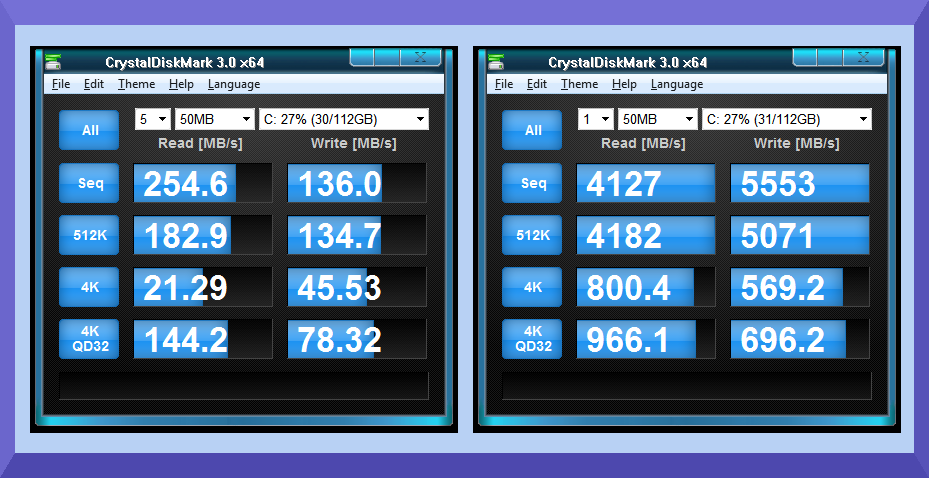
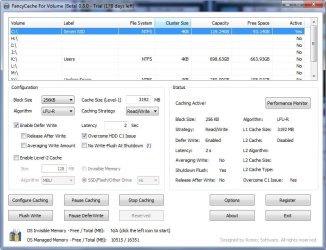
When I first heard of Fancy Cache here on the Win 7 Forums I downloaded it and set it the same day on my Win 7 desktop and I then used Crystal Disk Mark x64 to fine tune the settings. As you can see from the screenshots above there was an amazing improvement in the computer's Intel 320 120 GB SSD after setting up Fancy Cache.
I ran a number of tests to see what impact Fancy Cache was having on the performance of my computer and the one and only improvement I found was that my graphics program opened up in 3 seconds which was twice as fast as it used to.
After about 6 hours of running Fancy Cache all of the drives suddenly disappeared in explorer and while I was trying to figure out how to rectify the problem the computer blue screened! Since this very stable Win 7 OS has never blue screened since I installed it in July of 2010 I attributed the problem to the most recently installed software and I felt it was best to part with the amazingly fast benchtests that Fancy Cache renders.

When I first heard of Fancy Cache here on the Win 7 Forums I downloaded it and set it the same day on my Win 7 desktop and I then used Crystal Disk Mark x64 to fine tune the settings. As you can see from the screenshots above there was an amazing improvement in the computer's Intel 320 120 GB SSD after setting up Fancy Cache.
I ran a number of tests to see what impact Fancy Cache was having on the performance of my computer and the one and only improvement I found was that my graphics program opened up in 3 seconds which was twice as fast as it used to.
After about 6 hours of running Fancy Cache all of the drives suddenly disappeared in explorer and while I was trying to figure out how to rectify the problem the computer blue screened! Since this very stable Win 7 OS has never blue screened since I installed it in July of 2010 I attributed the problem to the most recently installed software and I felt it was best to part with the amazingly fast benchtests that Fancy Cache renders.
My Computer
At a glance
Windows 7 x64 Home PremiumIntel Core i7 930 @ 2.8 Ghz Socket 1366 LGA8 GB 1366 Mhz DDR3 (PC3-10700) RAMATI Radeon 5770 1 GB DDR5 RAM
- Computer Manufacturer/Model Number
- HP HPE 270f
- OS
- Windows 7 x64 Home Premium
- CPU
- Intel Core i7 930 @ 2.8 Ghz Socket 1366 LGA
- Motherboard
- Pegatron Truckee v1.04E41
- Memory
- 8 GB 1366 Mhz DDR3 (PC3-10700) RAM
- Graphics Card(s)
- ATI Radeon 5770 1 GB DDR5 RAM
- Sound Card
- Realtech High Definition
- Monitor(s) Displays
- 32" Sony Bravia
- Screen Resolution
- 1366 X 768
- Hard Drives
- Intel 25nm 120 GB Series 320 SSD HD Tune- 265 MBps Read/ 130 MBps Write
LaCie 1TB + 1TB RAID 0 eSATA Drive HD Tune- 160 MBps Read/ 90 MBps Write
- Keyboard
- Logitech Illuminated
- Mouse
- Logitech MX Revolution
- Internet Speed
- 36.4 Mbps Maximum on a 37 Mbps Motorola SB501 Modem