can not turn on windows auto update

lucasxiii

New member
Local time
6:08 AM
Messages
19
Hi all,

I using Dell Studio XPS 1640 and Windows 7 7600 RTM, already dupated 8 hot fix. Today I have a problem with the Auto Update of windows, it can not be turned on even when i tried to switch it on in Action Center or in Windows Update in Control Panel.

There is always a message like this: "Action Center can't change your window update setting"'. When I choose "Change setting manually", there is nothing happens.

Please help me with this case. Thanks.
 

My Computer My Computer

Computer Manufacturer/Model Number
Dell Studio XPS 1640
OS
Window 7 - 7600 RTM
CPU
Intel P8700
Memory
3 GB DDR2
Graphics Card(s)
Ati Radeo Mobility HD 3670
Is your computer a member of a domain? Was it once a member of a domain (and then you upgraded it?)

It sounds like your policy settings are being overriden.
 

My Computer My Computer

Computer Manufacturer/Model Number
Self-Built
OS
Windows 7 64 bit SP1
CPU
Core i7 920
Motherboard
Gigabyte GA-X58A-UD3R
Memory
12 GB (6x2GB Corsair)
Graphics Card(s)
nVidia 250GTS
Sound Card
Built-in
Monitor(s) Displays
2x Samsung SyncMaster 2343 (23" Widescreen)
Keyboard
Microsoft Natural Keyboard
Mouse
Logitech Laser
Is your computer a member of a domain? Was it once a member of a domain (and then you upgraded it?)

It sounds like your policy settings are being overriden.

It is a laptop and does not join any network. I upgraded it normally after a clean install but suddenly this problem occur.
 

My Computer My Computer

Computer Manufacturer/Model Number
Dell Studio XPS 1640
OS
Window 7 - 7600 RTM
CPU
Intel P8700
Memory
3 GB DDR2
Graphics Card(s)
Ati Radeo Mobility HD 3670
Is there any solution for this, please ?
 

My Computer My Computer

Computer Manufacturer/Model Number
Dell Studio XPS 1640
OS
Window 7 - 7600 RTM
CPU
Intel P8700
Memory
3 GB DDR2
Graphics Card(s)
Ati Radeo Mobility HD 3670
Is there any solution for this, please ?

Hi Lucas,

Click the startorb, type services.msc and press enter.

You're now in services.

Look for Windows Update
It should be started and on automatic. If not

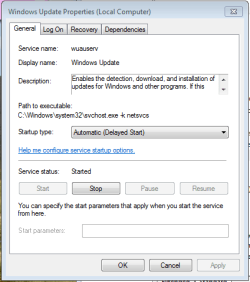
1. Rightclick the service, chose properties,
2. in the next field you see a combobox named "Startup Type",
3. chose Automatic(Delayed start)
4. click apply,

5. Now click on start. that's it.

Example below.


service.PNG
 

My Computer My Computer

OS
Win7 Build 7600 x86
CPU
Pentium II 300MHz
Motherboard
Asus
Memory
32mb EDO RAM
Graphics Card(s)
Diamond Viper
Sound Card
Soundblaster 16
Monitor(s) Displays
14" AOC CRT 16K color
Screen Resolution
800x600
Hard Drives
300mb Quantum fireball
PSU
110 Watts
Cooling
Passive
Keyboard
Trust Ergonomic
Mouse
Generic
Internet Speed
256K u 128K d
Hi Lucas,

Click the startorb, type services.msc and press enter.

You're now in services.

Look for Windows Update
It should be started and on automatic. If not

1. Rightclick the service, chose properties,
2. in the next field you see a combobox named "Startup Type",
3. chose Automatic(Delayed start)
4. click apply,

5. Now click on start. that's it.

Example below.


View attachment 23988

Hi squonksc,

Thanks for solution, but I can not find Windows Update in the Sevice table. There is no tab with this name.
 

My Computer My Computer

Computer Manufacturer/Model Number
Dell Studio XPS 1640
OS
Window 7 - 7600 RTM
CPU
Intel P8700
Memory
3 GB DDR2
Graphics Card(s)
Ati Radeo Mobility HD 3670
Try 'Component Services' then click 'Services (local)', Windows Update should be there towards the bottom.
 

My Computer My Computer

Computer Manufacturer/Model Number
Fisher Price
OS
Windows 7 RTM (My daddy installed it for me)
Motherboard
I hope not, I need feeding soon
Memory
Getting better by the day
Hi squonksc,

Thanks for solution, but I can not find Windows Update in the Sevice table. There is no tab with this name.

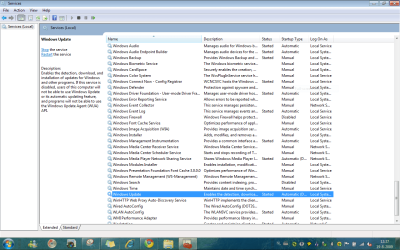
It's not a tab, look at my picture of the services window.

services2.PNG
 

My Computer My Computer

OS
Win7 Build 7600 x86
CPU
Pentium II 300MHz
Motherboard
Asus
Memory
32mb EDO RAM
Graphics Card(s)
Diamond Viper
Sound Card
Soundblaster 16
Monitor(s) Displays
14" AOC CRT 16K color
Screen Resolution
800x600
Hard Drives
300mb Quantum fireball
PSU
110 Watts
Cooling
Passive
Keyboard
Trust Ergonomic
Mouse
Generic
Internet Speed
256K u 128K d

Attachments

  • Untitled.jpg
    Untitled.jpg
    69.7 KB · Views: 55

My Computer My Computer

Computer Manufacturer/Model Number
Dell Studio XPS 1640
OS
Window 7 - 7600 RTM
CPU
Intel P8700
Memory
3 GB DDR2
Graphics Card(s)
Ati Radeo Mobility HD 3670
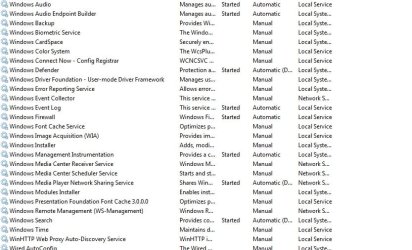
That's what I mean: I do not see this Windows Update in the list. Maybe there is a missing component for this.

Do you have some sort of lite version of Win7? Or have you done any tweaking?

The service not being there means you should do a repair from the boot cd, and hope it gets restored.

Greetz
 

My Computer My Computer

OS
Win7 Build 7600 x86
CPU
Pentium II 300MHz
Motherboard
Asus
Memory
32mb EDO RAM
Graphics Card(s)
Diamond Viper
Sound Card
Soundblaster 16
Monitor(s) Displays
14" AOC CRT 16K color
Screen Resolution
800x600
Hard Drives
300mb Quantum fireball
PSU
110 Watts
Cooling
Passive
Keyboard
Trust Ergonomic
Mouse
Generic
Internet Speed
256K u 128K d
Do you have some sort of lite version of Win7? Or have you done any tweaking?

The service not being there means you should do a repair from the boot cd, and hope it gets restored.

Greetz

My install CD is downloading from MSDN. And as I said, this Auto Updade was working well since yesterday the problem occur.

Does Windows 7 CD has a repair feature ? I do not see it when installed.
 

My Computer My Computer

Computer Manufacturer/Model Number
Dell Studio XPS 1640
OS
Window 7 - 7600 RTM
CPU
Intel P8700
Memory
3 GB DDR2
Graphics Card(s)
Ati Radeo Mobility HD 3670
Does Windows 7 CD has a repair feature ? I do not see it when installed.

Yes it does.

You can find how to in our tutorials.

good luck
 

My Computer My Computer

OS
Win7 Build 7600 x86
CPU
Pentium II 300MHz
Motherboard
Asus
Memory
32mb EDO RAM
Graphics Card(s)
Diamond Viper
Sound Card
Soundblaster 16
Monitor(s) Displays
14" AOC CRT 16K color
Screen Resolution
800x600
Hard Drives
300mb Quantum fireball
PSU
110 Watts
Cooling
Passive
Keyboard
Trust Ergonomic
Mouse
Generic
Internet Speed
256K u 128K d

My Computer My Computer

Computer Manufacturer/Model Number
Fisher Price
OS
Windows 7 RTM (My daddy installed it for me)
Motherboard
I hope not, I need feeding soon
Memory
Getting better by the day
@ squonksc: Thank you for your help.

@ Attomic Shark: I think maybe a Repair is good for me now.

Thanks to all. This forum is really awesome to a chick of Windows like me :D

Edit: Now I know what make my Windows got problem, there are 2 trojan horse in my PC from a crack. After follow the Windows 7 Repair step guide, everything is okay now. Thanks again.
 
Last edited:

My Computer My Computer

Computer Manufacturer/Model Number
Dell Studio XPS 1640
OS
Window 7 - 7600 RTM
CPU
Intel P8700
Memory
3 GB DDR2
Graphics Card(s)
Ati Radeo Mobility HD 3670
Back
Top