
No sounds playing on my T.V. when connected to my laptop.

seth168

New member
Local time
2:43 PM
Messages
14
hey everyone,

Please help, i've searched the interwebs and have not found a solution to my particular problem.

I have connected my Asus K52Jr to my Lg flatscreen via HDMI cable.
the display is awesome and is working on the t.v., but no sound comes out, instead the sound stays with the laptop.

now i know everyone says go set the tv to default device in sound setting from control panel. well if only it were that easy.

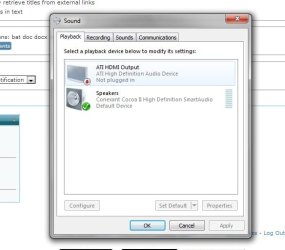
when i do go to the list showing the possible sources for my sound, it only shows either my laptop speakers or the other one that has a picture of a t.v., which i assume is what i want. only problem is that it says its not plugged in, even though it is...

i don't know if im missing something, but please help!

i've tried connecting my laptop and then restarting it, but it didnt work. i cant set the tv to default because it says its not plugged in. my audio driver is updated to latest version.

i'll attach a picture showing what i mean.

FYI its not the t.v. or cable as i can play my ps3 and it works normally.
 

Attachments
  • sound issue.jpg
    sound issue.jpg
    29.4 KB · Views: 12

My Computer My Computer

At a glance

windows 7 home premium 64bitATI mobility Radeon hd 5470 1GB
Computer type
Laptop
Computer Manufacturer/Model Number
Asus K52Jr
OS
windows 7 home premium 64bit
Graphics Card(s)
ATI mobility Radeon hd 5470 1GB
Enable the ati hdmi output, right click on it and set as default device. From that screen shot I see that your speakers are what are enabled and not the hdmi audio. I think that will probably fix it and if not try updating your drivers.
 

My Computer My Computer

At a glance

Windows 10 64bitAMD Phenom II X4 925 (Deneb)(2.8GHz) OC 3.4GHzCorsair Vengeance DDR3 4GBX2 (8192MB)XFX HD 6870 1GB (OC)- 940MHz core, mem 1150MHz
Computer type
PC/Desktop
Computer Manufacturer/Model Number
custom build
OS
Windows 10 64bit
CPU
AMD Phenom II X4 925 (Deneb)(2.8GHz) OC 3.4GHz
Motherboard
M5A78L-MLX Plus
Memory
Corsair Vengeance DDR3 4GBX2 (8192MB)
Graphics Card(s)
XFX HD 6870 1GB (OC)- 940MHz core, mem 1150MHz
Monitor(s) Displays
Vizio 26' 1920x1080 / Acer 1336x768
Screen Resolution
1920x1080 60Hz /1336x768
Hard Drives
Kingston Digital 60GB SSDNow V300/500gb HDD Western Digital 7200rpm (/WD 160GB HDD 7200rpm
PSU
CORSAIR CX600 600w
Case
AZZA Orion 202 EVO
Cooling
cooler master hyper TX3 cpu cooler
Keyboard
Razer DeathStalker
Mouse
Logitech Optical Gaming Mouse G400
Antivirus
Defualt on win 10
Browser
Firefox
Other Info
cpu is overclocked in bios
Enable the ati hdmi output, right click on it and set as default device. From that screen shot I see that your speakers are what are enabled and not the hdmi audio. I think that will probably fix it and if not try updating your drivers.

thats the problem, i right click on it, but the only option available is to disable. the option to set as default is greyed out.

i have checked and my drivers are up to date
 

My Computer My Computer

At a glance

windows 7 home premium 64bitATI mobility Radeon hd 5470 1GB
Computer type
Laptop
Computer Manufacturer/Model Number
Asus K52Jr
OS
windows 7 home premium 64bit
Graphics Card(s)
ATI mobility Radeon hd 5470 1GB
When you connect the hdmi, do you have the tv on already or do you have it off with the laptop already booted up? Try turning on the tv first then turning on the laptop with it already being connected. Also if you have any speakers connected to the laptop make sure they are unplugged. Also try disabling the laptop audio and see if the hdmi audio option un-greys and lets you enable.
 

My Computer My Computer

At a glance

Windows 10 64bitAMD Phenom II X4 925 (Deneb)(2.8GHz) OC 3.4GHzCorsair Vengeance DDR3 4GBX2 (8192MB)XFX HD 6870 1GB (OC)- 940MHz core, mem 1150MHz
Computer type
PC/Desktop
Computer Manufacturer/Model Number
custom build
OS
Windows 10 64bit
CPU
AMD Phenom II X4 925 (Deneb)(2.8GHz) OC 3.4GHz
Motherboard
M5A78L-MLX Plus
Memory
Corsair Vengeance DDR3 4GBX2 (8192MB)
Graphics Card(s)
XFX HD 6870 1GB (OC)- 940MHz core, mem 1150MHz
Monitor(s) Displays
Vizio 26' 1920x1080 / Acer 1336x768
Screen Resolution
1920x1080 60Hz /1336x768
Hard Drives
Kingston Digital 60GB SSDNow V300/500gb HDD Western Digital 7200rpm (/WD 160GB HDD 7200rpm
PSU
CORSAIR CX600 600w
Case
AZZA Orion 202 EVO
Cooling
cooler master hyper TX3 cpu cooler
Keyboard
Razer DeathStalker
Mouse
Logitech Optical Gaming Mouse G400
Antivirus
Defualt on win 10
Browser
Firefox
Other Info
cpu is overclocked in bios
When you connect the hdmi, do you have the tv on already or do you have it off with the laptop already booted up? Try turning on the tv first then turning on the laptop with it already being connected. Also if you have any speakers connected to the laptop make sure they are unplugged. Also try disabling the laptop audio and see if the hdmi audio option un-greys and lets you enable.

i think i have only tried it when my laptop was already on. i'll give it a try next time i use it.
i have tried disabling the laptop audio, but it did not allow for me to use the hmdi still.

now, a peculiar thing happend. on thursday night, i restarted my computer after it installed some updates and i cant rememeber if i had it plugged in to the tv when it restarted or not, but the audio worked on the tv. i tried again last night without restarting, i usually only put my laptop on hibernate, and it didnt work again.
 

My Computer My Computer

At a glance

windows 7 home premium 64bitATI mobility Radeon hd 5470 1GB
Computer type
Laptop
Computer Manufacturer/Model Number
Asus K52Jr
OS
windows 7 home premium 64bit
Graphics Card(s)
ATI mobility Radeon hd 5470 1GB
I have heard of hibernate messing with hdmi before. I think when you leave your laptop idle for a while then goes into hibernate it turns off the hdmi then it bugs up when it wakes up. That's what I think might be happening.
 

My Computer My Computer

At a glance

Windows 10 64bitAMD Phenom II X4 925 (Deneb)(2.8GHz) OC 3.4GHzCorsair Vengeance DDR3 4GBX2 (8192MB)XFX HD 6870 1GB (OC)- 940MHz core, mem 1150MHz
Computer type
PC/Desktop
Computer Manufacturer/Model Number
custom build
OS
Windows 10 64bit
CPU
AMD Phenom II X4 925 (Deneb)(2.8GHz) OC 3.4GHz
Motherboard
M5A78L-MLX Plus
Memory
Corsair Vengeance DDR3 4GBX2 (8192MB)
Graphics Card(s)
XFX HD 6870 1GB (OC)- 940MHz core, mem 1150MHz
Monitor(s) Displays
Vizio 26' 1920x1080 / Acer 1336x768
Screen Resolution
1920x1080 60Hz /1336x768
Hard Drives
Kingston Digital 60GB SSDNow V300/500gb HDD Western Digital 7200rpm (/WD 160GB HDD 7200rpm
PSU
CORSAIR CX600 600w
Case
AZZA Orion 202 EVO
Cooling
cooler master hyper TX3 cpu cooler
Keyboard
Razer DeathStalker
Mouse
Logitech Optical Gaming Mouse G400
Antivirus
Defualt on win 10
Browser
Firefox
Other Info
cpu is overclocked in bios
I have heard of hibernate messing with hdmi before. I think when you leave your laptop idle for a while then goes into hibernate it turns off the hdmi then it bugs up when it wakes up. That's what I think might be happening.


yes, i tested it and it appears that the hibernation is what is affecting it. its inconvientent, but oh well at least it works lol. thanks for the help :)
 

My Computer My Computer

At a glance

windows 7 home premium 64bitATI mobility Radeon hd 5470 1GB
Computer type
Laptop
Computer Manufacturer/Model Number
Asus K52Jr
OS
windows 7 home premium 64bit
Graphics Card(s)
ATI mobility Radeon hd 5470 1GB
Have you tried unplugging the HDMI cable when you're finished--Before it goes into hibernation? Then just plug it back in when you need it.
 

My Computer My Computer

At a glance

Windows 7 Pro-x64i7-2600 3.4GHz - 3.8GHz Turbo8Gb - 2x4GB, Muskin 991770 PC3-1333Integrated Intel HD 2000
Computer type
PC/Desktop
Computer Manufacturer/Model Number
Built 2/11/2011
OS
Windows 7 Pro-x64
CPU
i7-2600 3.4GHz - 3.8GHz Turbo
Motherboard
Intel DH67BL-B3
Memory
8Gb - 2x4GB, Muskin 991770 PC3-1333
Graphics Card(s)
Integrated Intel HD 2000
Sound Card
Integrated Intel 10.1 HD, RealTek ALC892
Monitor(s) Displays
Asus LCD VH222H, Haier HL24XSL2a
Screen Resolution
1920x1080, 1920x1080
Hard Drives
Crucial SSD C300-128Gb,
Western Digital WD5002AALX - 500Gb,
Western Digital WD7501AALS - 750Gb
PSU
Seasonic 650W 80+ Gold Modular
Case
Rosewill Defender
Cooling
Stock CPU, Four 120mm case fans, PCH fan added
Keyboard
Logitech EX100 Y-RBH94 Wireless
Mouse
Logitech EX100 M-RCE95 Wireless
Internet Speed
3.0/1.5 Mbs
Antivirus
Microsoft Security Essentials
Browser
Microsoft Internet Explorer 11
Other Info
Antec Veris Premier-Multimedia IR Station,
Cyber Accoustics-3602 Speakers,
AFT XM-5U Card Reader,
Hauppauge TV-HVR-2250,
Sony LX300 USB Turntable
Have you tried unplugging the HDMI cable when you're finished--Before it goes into hibernation? Then just plug it back in when you need it.

yea, it doesnt work after i hibernate once, when its plugged in or not.
 

My Computer My Computer

At a glance

windows 7 home premium 64bitATI mobility Radeon hd 5470 1GB
Computer type
Laptop
Computer Manufacturer/Model Number
Asus K52Jr
OS
windows 7 home premium 64bit
Graphics Card(s)
ATI mobility Radeon hd 5470 1GB
There's a pot full of updates for that thing. Are you up to date on the BIOS and Chip set? Wouldn't hurt to look for an update to your display drivers too. The specs say that laptop has VGA. Did you add a new GPU card?

ASUS - Notebooks- ASUS K52Jr

Ops. I see that the camera is VGA.
 
Last edited:

My Computer My Computer

At a glance

Windows 7 Pro-x64i7-2600 3.4GHz - 3.8GHz Turbo8Gb - 2x4GB, Muskin 991770 PC3-1333Integrated Intel HD 2000
Computer type
PC/Desktop
Computer Manufacturer/Model Number
Built 2/11/2011
OS
Windows 7 Pro-x64
CPU
i7-2600 3.4GHz - 3.8GHz Turbo
Motherboard
Intel DH67BL-B3
Memory
8Gb - 2x4GB, Muskin 991770 PC3-1333
Graphics Card(s)
Integrated Intel HD 2000
Sound Card
Integrated Intel 10.1 HD, RealTek ALC892
Monitor(s) Displays
Asus LCD VH222H, Haier HL24XSL2a
Screen Resolution
1920x1080, 1920x1080
Hard Drives
Crucial SSD C300-128Gb,
Western Digital WD5002AALX - 500Gb,
Western Digital WD7501AALS - 750Gb
PSU
Seasonic 650W 80+ Gold Modular
Case
Rosewill Defender
Cooling
Stock CPU, Four 120mm case fans, PCH fan added
Keyboard
Logitech EX100 Y-RBH94 Wireless
Mouse
Logitech EX100 M-RCE95 Wireless
Internet Speed
3.0/1.5 Mbs
Antivirus
Microsoft Security Essentials
Browser
Microsoft Internet Explorer 11
Other Info
Antec Veris Premier-Multimedia IR Station,
Cyber Accoustics-3602 Speakers,
AFT XM-5U Card Reader,
Hauppauge TV-HVR-2250,
Sony LX300 USB Turntable
i think so? ive checked my drivers, they say they are updated.
im not much of a computer guy, but i assume bios is operating system? if so yes, it should be updated.

and im not sure if a chip is the same as a driver. but if its not then idk if my chips are updated
 

My Computer My Computer

At a glance

windows 7 home premium 64bitATI mobility Radeon hd 5470 1GB
Computer type
Laptop
Computer Manufacturer/Model Number
Asus K52Jr
OS
windows 7 home premium 64bit
Graphics Card(s)
ATI mobility Radeon hd 5470 1GB
Well, no the BIOS is hardware level as is the chip set. These won't be updated by Windows Update. Follow the link above and verify that the updates to at least your BIOS and chip set are applied. It's hard to tell on the chip set as this may be INF file updates only. It won't hurt to run them again.
 

My Computer My Computer

At a glance

Windows 7 Pro-x64i7-2600 3.4GHz - 3.8GHz Turbo8Gb - 2x4GB, Muskin 991770 PC3-1333Integrated Intel HD 2000
Computer type
PC/Desktop
Computer Manufacturer/Model Number
Built 2/11/2011
OS
Windows 7 Pro-x64
CPU
i7-2600 3.4GHz - 3.8GHz Turbo
Motherboard
Intel DH67BL-B3
Memory
8Gb - 2x4GB, Muskin 991770 PC3-1333
Graphics Card(s)
Integrated Intel HD 2000
Sound Card
Integrated Intel 10.1 HD, RealTek ALC892
Monitor(s) Displays
Asus LCD VH222H, Haier HL24XSL2a
Screen Resolution
1920x1080, 1920x1080
Hard Drives
Crucial SSD C300-128Gb,
Western Digital WD5002AALX - 500Gb,
Western Digital WD7501AALS - 750Gb
PSU
Seasonic 650W 80+ Gold Modular
Case
Rosewill Defender
Cooling
Stock CPU, Four 120mm case fans, PCH fan added
Keyboard
Logitech EX100 Y-RBH94 Wireless
Mouse
Logitech EX100 M-RCE95 Wireless
Internet Speed
3.0/1.5 Mbs
Antivirus
Microsoft Security Essentials
Browser
Microsoft Internet Explorer 11
Other Info
Antec Veris Premier-Multimedia IR Station,
Cyber Accoustics-3602 Speakers,
AFT XM-5U Card Reader,
Hauppauge TV-HVR-2250,
Sony LX300 USB Turntable
Hi Seth,
Can you open an elevated command prompt by clicking on :orb: type in CMD in the search box and right click on CMD under Programs (1) and choose Run as Adminstrator . Enter this command

Code:
systeminfo | find "BIOS Version:"
   Tip
You could highlight the command choose Copy . Then right click inside the Command Prompt and choose Paste . Press ENTER

   Note
The | pipe symbol can be found using SHIFT+\ (just above the Enter key).


Let us know the BIOS version
 

My Computer My Computer

At a glance

Windows 7 Ultimate 32-Bit & Windows 7 Ultimat...Intel Core i7 CPU 950 @ 3.07GHzOCZ 6GB (3 x 2GB) 240-Pin DDR3 SDRAM DDR3 160...ATI Radeon HD 5700 Series
Computer Manufacturer/Model Number
Custom Built
OS
Windows 7 Ultimate 32-Bit & Windows 7 Ultimate 64-Bit
CPU
Intel Core i7 CPU 950 @ 3.07GHz
Motherboard
ASUS P6T DELUXE V2
Memory
OCZ 6GB (3 x 2GB) 240-Pin DDR3 SDRAM DDR3 1600 OCZ3X1600R2
Graphics Card(s)
ATI Radeon HD 5700 Series
Sound Card
OnBoard
Hard Drives
WD6400AACS-00M3B0 (640GB SATA )
PSU
CORSAIR 850w
Case
NZXT LEXA
Cooling
Intel Stock Heatsink Fan
Keyboard
Microsoft Wireless Laser Keyboard 7000
Mouse
Microsoft Wireless Laser Mouse 7000
Hi Seth,
Can you open an elevated command prompt by clicking on :orb: type in CMD in the search box and right click on CMD under Programs (1) and choose Run as Adminstrator . Enter this command

Code:
systeminfo | find "BIOS Version:"
   Tip
You could highlight the command choose Copy . Then right click inside the Command Prompt and choose Paste . Press ENTER

   Note
The | pipe symbol can be found using SHIFT+\ (just above the Enter key).


Let us know the BIOS version

ok this is what popped up after i did that.

BIOS Version: American Megatrend inc. K52Jr.207, 05/02/2010
 

My Computer My Computer

At a glance

windows 7 home premium 64bitATI mobility Radeon hd 5470 1GB
Computer type
Laptop
Computer Manufacturer/Model Number
Asus K52Jr
OS
windows 7 home premium 64bit
Graphics Card(s)
ATI mobility Radeon hd 5470 1GB
Last edited:

My Computer My Computer

At a glance

Windows 7 Ultimate 32-Bit & Windows 7 Ultimat...Intel Core i7 CPU 950 @ 3.07GHzOCZ 6GB (3 x 2GB) 240-Pin DDR3 SDRAM DDR3 160...ATI Radeon HD 5700 Series
Computer Manufacturer/Model Number
Custom Built
OS
Windows 7 Ultimate 32-Bit & Windows 7 Ultimate 64-Bit
CPU
Intel Core i7 CPU 950 @ 3.07GHz
Motherboard
ASUS P6T DELUXE V2
Memory
OCZ 6GB (3 x 2GB) 240-Pin DDR3 SDRAM DDR3 1600 OCZ3X1600R2
Graphics Card(s)
ATI Radeon HD 5700 Series
Sound Card
OnBoard
Hard Drives
WD6400AACS-00M3B0 (640GB SATA )
PSU
CORSAIR 850w
Case
NZXT LEXA
Cooling
Intel Stock Heatsink Fan
Keyboard
Microsoft Wireless Laser Keyboard 7000
Mouse
Microsoft Wireless Laser Mouse 7000
thanks, but the link you provided didnt work. i went to the asus site, but im not sure which link i should click for downloading the update. the : global (DLM) or just global

the DLM asks me to dl some installer thing and then download the update, while the normal global one just gives me a zip file and asks if i want to open, save, or save as.
 

My Computer My Computer

At a glance

windows 7 home premium 64bitATI mobility Radeon hd 5470 1GB
Computer type
Laptop
Computer Manufacturer/Model Number
Asus K52Jr
OS
windows 7 home premium 64bit
Graphics Card(s)
ATI mobility Radeon hd 5470 1GB
Seth I updated the download link give it a shot now
 

My Computer My Computer

At a glance

Windows 7 Ultimate 32-Bit & Windows 7 Ultimat...Intel Core i7 CPU 950 @ 3.07GHzOCZ 6GB (3 x 2GB) 240-Pin DDR3 SDRAM DDR3 160...ATI Radeon HD 5700 Series
Computer Manufacturer/Model Number
Custom Built
OS
Windows 7 Ultimate 32-Bit & Windows 7 Ultimate 64-Bit
CPU
Intel Core i7 CPU 950 @ 3.07GHz
Motherboard
ASUS P6T DELUXE V2
Memory
OCZ 6GB (3 x 2GB) 240-Pin DDR3 SDRAM DDR3 1600 OCZ3X1600R2
Graphics Card(s)
ATI Radeon HD 5700 Series
Sound Card
OnBoard
Hard Drives
WD6400AACS-00M3B0 (640GB SATA )
PSU
CORSAIR 850w
Case
NZXT LEXA
Cooling
Intel Stock Heatsink Fan
Keyboard
Microsoft Wireless Laser Keyboard 7000
Mouse
Microsoft Wireless Laser Mouse 7000
it says i do not have permission to view the link
 

My Computer My Computer

At a glance

windows 7 home premium 64bitATI mobility Radeon hd 5470 1GB
Computer type
Laptop
Computer Manufacturer/Model Number
Asus K52Jr
OS
windows 7 home premium 64bit
Graphics Card(s)
ATI mobility Radeon hd 5470 1GB
Try it now . It didn't give me that message

   Note
You would need to download both the WINFLASH utility and the BIOS file to upgrade your BIOS version from 207 to 214.
 

My Computer My Computer

At a glance

Windows 7 Ultimate 32-Bit & Windows 7 Ultimat...Intel Core i7 CPU 950 @ 3.07GHzOCZ 6GB (3 x 2GB) 240-Pin DDR3 SDRAM DDR3 160...ATI Radeon HD 5700 Series
Computer Manufacturer/Model Number
Custom Built
OS
Windows 7 Ultimate 32-Bit & Windows 7 Ultimate 64-Bit
CPU
Intel Core i7 CPU 950 @ 3.07GHz
Motherboard
ASUS P6T DELUXE V2
Memory
OCZ 6GB (3 x 2GB) 240-Pin DDR3 SDRAM DDR3 1600 OCZ3X1600R2
Graphics Card(s)
ATI Radeon HD 5700 Series
Sound Card
OnBoard
Hard Drives
WD6400AACS-00M3B0 (640GB SATA )
PSU
CORSAIR 850w
Case
NZXT LEXA
Cooling
Intel Stock Heatsink Fan
Keyboard
Microsoft Wireless Laser Keyboard 7000
Mouse
Microsoft Wireless Laser Mouse 7000
ok the first link worked. sorry i was talking about the second one. this pops up:

Referral Denied

You don't have permission to access "http://dlm3cdnet.asus.com/pub/ASUS/nb/Apps/WinFlash/Winflash_WIN7_32_64_z2301.zip" on this server.
Reference #24.edcade18.1362445880.5713ae2
 

My Computer My Computer

At a glance

windows 7 home premium 64bitATI mobility Radeon hd 5470 1GB
Computer type
Laptop
Computer Manufacturer/Model Number
Asus K52Jr
OS
windows 7 home premium 64bit
Graphics Card(s)
ATI mobility Radeon hd 5470 1GB
Back
Top