Monitor No Signal or Going to Sleep When Connected To Laptop?

paulyjames

New member
Member
VIP
Local time
4:47 PM
Messages
657
My laptop is Asus u45jc-a1


i3 m370 @ 2.4 ghz processor

4gb ram but i recently upgraded it to 8gb ram

250gb ssd samsung


Last year i bought a monitor that is hp la2405x because it has 1920x1200 resolution which i need because i need it to play online poker. I would connect my laptop to the monitor by vga cable. I noticed that the monitor would keep on going to sleep. Example i would be on the computer for few hours or play poker for few hours, then this message would show up. Then my HP monitor screen gets the no signal and then go to sleep and when im playing, i have to wait like 1 minute or so, then hold the power button on my laptop for a few seconds then it turns off. The i press it immediately and then it would show resuming windows. This was the fastest way for me to get back on the tables when not sitting out longer.


However if i dont wait 1 minute or so and then i just press/hold the power button immediately, then i would shut down my laptop which is horrible because if im playing tables, then i have to wait a few minutes due to having to power up the laptop again.


I then wondered if this was my monitor or it could be my laptop as i read it has something to do with video card? Well what happened was later on, i didn't seem to have this issue anymore then after a while it came back again. This is very annoying when playing on pokerstars due to you going to miss out few minutes if you close the computer while playing because you going to be sitting out etc.


I then later on tried my laptop on another monitor a dell one. Note this monitor is very old, like 8 years at least. Similarly it had the same issue. It would go to sleep just like the HP one which when i bought it was brand new. The thing is you never know when its coming, it might happen once a day, twice a day, or 3 times, sometimes none. Im currently using another monitor and i had this issue yet again. This monitors an Acer. However, it doesn't say go to sleep like the HP one. All it does is have the no signal message. All of these monitors i connect to my asus laptop by the vga cable.
 

My Computer My Computer

At a glance

Windows 10 Pro
Computer type
Laptop
OS
Windows 10 Pro
Does this mean this is 100 percent my laptops fault then? Does anyone know what i can do to fix this issue? Does anyone know why is it that if you wait 40 seconds then press/hold the power button, after few seconds it turns off then you press it again, then it shows RESUMING WINDOWS but if you do this too quickly after the no signal, then press/hold the power button basically turns off the computer, then powering it on again makes you start windows as oppose to resuming windows which takes much more time?


Its very annoying when playing poker and many tables and this happens b/c im going to be sitting out tables due to this.


Another thing i notice is let say im on the computer most of the day but not playing poker, the monitor would go out once a day maybe or not at all. However when im playing poker all day, it will happen at least 1 time a day, sometimes 2 or 3 etc. Rarely does it never have the no signal.


Of course when im on the laptop only and dont connect it to any monitor, i never have this issue.


Does this mean its my laptop and probably the overheating or using too much electricity on the computer? The vga is plugged to my laptop so it isn't loose. Im really confused at this and i basically cannot play poker if this happens as there is going to be at least 2 minutes downtime each time it happens.
 

My Computer My Computer

At a glance

Windows 10 Pro
Computer type
Laptop
OS
Windows 10 Pro
Hi paulyjames and welcome to Sevenforums
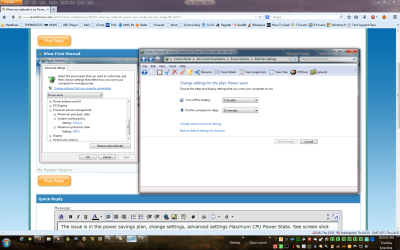
What you need to do is adjust the power options relating to the monitor. This can be found under Control Panel, Power Options and then the plan you are using. You can either select "Choose when to turn off the display" on the left or Select Power Option in the plan. See screenshots.
 

Attachments

  • Power.png
    Power.png
    144.4 KB · Views: 2
  • Power Screen.png
    Power Screen.png
    85.5 KB · Views: 1
  • Power 3.png
    Power 3.png
    67.3 KB · Views: 1

My Computer My Computer

At a glance

Windows 7 x64 Ultimate and numerous virtual m...AMD FX-8350 Vishera 32nm Technology @ 4.2 GHz...G Skill 32.0GB Dual-Channel DDR3 @ 1204MHz (1...EVGA GeForce GTX 960 4GB Super SC ACX 2.0+ wi...
Computer type
PC/Desktop
Computer Manufacturer/Model Number
Bluethunder II
OS
Windows 7 x64 Ultimate and numerous virtual machines
CPU
AMD FX-8350 Vishera 32nm Technology @ 4.2 GHz default
Motherboard
ASUSTeK COMPUTER INC. SABERTOOTH 990FX R2.0 (Socket 942)
Memory
G Skill 32.0GB Dual-Channel DDR3 @ 1204MHz (11-13-13-31)
Graphics Card(s)
EVGA GeForce GTX 960 4GB Super SC ACX 2.0+ with Back Plate
Sound Card
Creative X-Fi Titanium HD Audiophile PCIe
Monitor(s) Displays
LG L227WTG x 3
Screen Resolution
1680 x 1050 16:10
Hard Drives
238GB Samsung850 PRO SATA Disk Device (SSD)
1863GB Seagate ST2000DM 001-1CH164 (SATA)
1397GB Seagate ST1500DL 003-9VT16L(SATA)
466GB Western Digital WDC WD50 03AZEX-00K1GA0 (SATA) x 2
932GB Seagate ST310005 28AS SATA Disk Device (SATA)
PSU
Enermax Revolution87+ 1000 Watts Gold Certified Power Supply
Case
Rocketfish Full Tower
Cooling
Cooler Master Hyper 212 EVO Push Pull 120mm Fans
Keyboard
Logitech K740
Mouse
Logitech G100S Laser LED + Logitech Gamepad F310
Internet Speed
500 mbs down and 30mbs up
Antivirus
Malwarebytes Pro & Avast and MSE on certain Virtual Machines
Browser
Firefox (Main) Chrome, Internet Explorer (Back Up)
Other Info
Logitech X 230 2.1 Stereo System and 5.1 Yamaha RX V2090
B&W DM6 Monitor Speakers + Center and Surround Speakers
Using Mouse Without Borders (Google it)
Hi I done that already. I put never for all of these options...
 

My Computer My Computer

At a glance

Windows 10 Pro
Computer type
Laptop
OS
Windows 10 Pro
Hi I done that already. I put never for all of these options...
Is the laptop under warranty? I would suggest you send it back and get it repaired as if the settings are set to never and it shuts off the displays after a time there is an issue with the video chip. One other possibility you have most likely tried is to update the video drivers. Other than that looks like a hardware issue.
 

My Computer My Computer

At a glance

Windows 7 x64 Ultimate and numerous virtual m...AMD FX-8350 Vishera 32nm Technology @ 4.2 GHz...G Skill 32.0GB Dual-Channel DDR3 @ 1204MHz (1...EVGA GeForce GTX 960 4GB Super SC ACX 2.0+ wi...
Computer type
PC/Desktop
Computer Manufacturer/Model Number
Bluethunder II
OS
Windows 7 x64 Ultimate and numerous virtual machines
CPU
AMD FX-8350 Vishera 32nm Technology @ 4.2 GHz default
Motherboard
ASUSTeK COMPUTER INC. SABERTOOTH 990FX R2.0 (Socket 942)
Memory
G Skill 32.0GB Dual-Channel DDR3 @ 1204MHz (11-13-13-31)
Graphics Card(s)
EVGA GeForce GTX 960 4GB Super SC ACX 2.0+ with Back Plate
Sound Card
Creative X-Fi Titanium HD Audiophile PCIe
Monitor(s) Displays
LG L227WTG x 3
Screen Resolution
1680 x 1050 16:10
Hard Drives
238GB Samsung850 PRO SATA Disk Device (SSD)
1863GB Seagate ST2000DM 001-1CH164 (SATA)
1397GB Seagate ST1500DL 003-9VT16L(SATA)
466GB Western Digital WDC WD50 03AZEX-00K1GA0 (SATA) x 2
932GB Seagate ST310005 28AS SATA Disk Device (SATA)
PSU
Enermax Revolution87+ 1000 Watts Gold Certified Power Supply
Case
Rocketfish Full Tower
Cooling
Cooler Master Hyper 212 EVO Push Pull 120mm Fans
Keyboard
Logitech K740
Mouse
Logitech G100S Laser LED + Logitech Gamepad F310
Internet Speed
500 mbs down and 30mbs up
Antivirus
Malwarebytes Pro & Avast and MSE on certain Virtual Machines
Browser
Firefox (Main) Chrome, Internet Explorer (Back Up)
Other Info
Logitech X 230 2.1 Stereo System and 5.1 Yamaha RX V2090
B&W DM6 Monitor Speakers + Center and Surround Speakers
Using Mouse Without Borders (Google it)
Hi I done that already. I put never for all of these options...
Is the laptop under warranty? I would suggest you send it back and get it repaired as if the settings are set to never and it shuts off the displays after a time there is an issue with the video chip. One other possibility you have most likely tried is to update the video drivers. Other than that looks like a hardware issue.


This laptop was bought a few years ago so no.


I did try to update the video driver. But each time i did this and restarted the computer, it would have the black screen and it doesn't do anything. Then i have to system repair and system restore each time then it goes back to where the updated driver didn't install.
 

My Computer My Computer

At a glance

Windows 10 Pro
Computer type
Laptop
OS
Windows 10 Pro
Could it because of overheating or too much dust inside the fan of the computer? One person suggested this but said i would need to open up laptop which i dont know how to do.


The other person said he had simlar issue with monitor and his computer and said updating driver solved this issue with the no signal in monitor.


However, could it because the driver im installing is not good? Such as install a driver but not the most up to date one? I did read online that geforce 310m seems to have similar issues with other ppl such as black screen after installing driver and then restarting laptop.
 

My Computer My Computer

At a glance

Windows 10 Pro
Computer type
Laptop
OS
Windows 10 Pro
Could it because of a bios update? Read a thread about someone mentioning their asus laptop had this problem and updating the bios in it fixed it. However few others said that doesnt work.


If so how does one do a bios update for asus laptop?
 

My Computer My Computer

At a glance

Windows 10 Pro
Computer type
Laptop
OS
Windows 10 Pro

My Computer My Computer

At a glance

Windows 7 x64 Ultimate and numerous virtual m...AMD FX-8350 Vishera 32nm Technology @ 4.2 GHz...G Skill 32.0GB Dual-Channel DDR3 @ 1204MHz (1...EVGA GeForce GTX 960 4GB Super SC ACX 2.0+ wi...
Computer type
PC/Desktop
Computer Manufacturer/Model Number
Bluethunder II
OS
Windows 7 x64 Ultimate and numerous virtual machines
CPU
AMD FX-8350 Vishera 32nm Technology @ 4.2 GHz default
Motherboard
ASUSTeK COMPUTER INC. SABERTOOTH 990FX R2.0 (Socket 942)
Memory
G Skill 32.0GB Dual-Channel DDR3 @ 1204MHz (11-13-13-31)
Graphics Card(s)
EVGA GeForce GTX 960 4GB Super SC ACX 2.0+ with Back Plate
Sound Card
Creative X-Fi Titanium HD Audiophile PCIe
Monitor(s) Displays
LG L227WTG x 3
Screen Resolution
1680 x 1050 16:10
Hard Drives
238GB Samsung850 PRO SATA Disk Device (SSD)
1863GB Seagate ST2000DM 001-1CH164 (SATA)
1397GB Seagate ST1500DL 003-9VT16L(SATA)
466GB Western Digital WDC WD50 03AZEX-00K1GA0 (SATA) x 2
932GB Seagate ST310005 28AS SATA Disk Device (SATA)
PSU
Enermax Revolution87+ 1000 Watts Gold Certified Power Supply
Case
Rocketfish Full Tower
Cooling
Cooler Master Hyper 212 EVO Push Pull 120mm Fans
Keyboard
Logitech K740
Mouse
Logitech G100S Laser LED + Logitech Gamepad F310
Internet Speed
500 mbs down and 30mbs up
Antivirus
Malwarebytes Pro & Avast and MSE on certain Virtual Machines
Browser
Firefox (Main) Chrome, Internet Explorer (Back Up)
Other Info
Logitech X 230 2.1 Stereo System and 5.1 Yamaha RX V2090
B&W DM6 Monitor Speakers + Center and Surround Speakers
Using Mouse Without Borders (Google it)
asus u45jc-a1 is my laptop

NVidia Geforce 310M is the name of my driver.

Is that waht you need?
 

My Computer My Computer

At a glance

Windows 10 Pro
Computer type
Laptop
OS
Windows 10 Pro
Yep that is what we need.
Here is the driver page on Asus website for your laptop.
Notebooks & Ultrabooks - U45Jc - ASUS

You use the Windows Bios Utility to upgrade the bios. I seriously doubt that is the issue. Looks to me the bios was updated for those who downgraded to Windows 8. I have asked an laptop expert who knows more than I do about laptops to take a look. I suspect the Video chip could be overheating and needs the dust and fluff that may have built up in the machines fans removed and possibly some new heat sink compound on the cooler heatsink. Could be a very easy job or a nightmare depending on how the machine comes apart. May not be something you want to do yourself as it can be easily damaged.
 

My Computer My Computer

At a glance

Windows 7 x64 Ultimate and numerous virtual m...AMD FX-8350 Vishera 32nm Technology @ 4.2 GHz...G Skill 32.0GB Dual-Channel DDR3 @ 1204MHz (1...EVGA GeForce GTX 960 4GB Super SC ACX 2.0+ wi...
Computer type
PC/Desktop
Computer Manufacturer/Model Number
Bluethunder II
OS
Windows 7 x64 Ultimate and numerous virtual machines
CPU
AMD FX-8350 Vishera 32nm Technology @ 4.2 GHz default
Motherboard
ASUSTeK COMPUTER INC. SABERTOOTH 990FX R2.0 (Socket 942)
Memory
G Skill 32.0GB Dual-Channel DDR3 @ 1204MHz (11-13-13-31)
Graphics Card(s)
EVGA GeForce GTX 960 4GB Super SC ACX 2.0+ with Back Plate
Sound Card
Creative X-Fi Titanium HD Audiophile PCIe
Monitor(s) Displays
LG L227WTG x 3
Screen Resolution
1680 x 1050 16:10
Hard Drives
238GB Samsung850 PRO SATA Disk Device (SSD)
1863GB Seagate ST2000DM 001-1CH164 (SATA)
1397GB Seagate ST1500DL 003-9VT16L(SATA)
466GB Western Digital WDC WD50 03AZEX-00K1GA0 (SATA) x 2
932GB Seagate ST310005 28AS SATA Disk Device (SATA)
PSU
Enermax Revolution87+ 1000 Watts Gold Certified Power Supply
Case
Rocketfish Full Tower
Cooling
Cooler Master Hyper 212 EVO Push Pull 120mm Fans
Keyboard
Logitech K740
Mouse
Logitech G100S Laser LED + Logitech Gamepad F310
Internet Speed
500 mbs down and 30mbs up
Antivirus
Malwarebytes Pro & Avast and MSE on certain Virtual Machines
Browser
Firefox (Main) Chrome, Internet Explorer (Back Up)
Other Info
Logitech X 230 2.1 Stereo System and 5.1 Yamaha RX V2090
B&W DM6 Monitor Speakers + Center and Surround Speakers
Using Mouse Without Borders (Google it)
Well my laptop is windows 7. The laptop is a few years old already and thus the processor isn't that fast.


Well there is no way im going to open the laptop up myself. I would have someone else do it as i wouldn't have a clue on how to do this.


Im curious if you think it could be because of the driver isn't updated? The driver i see still shows 2010 or so when i click on the driver. But when i tried updating the driver, of course i get black screen and have to system repair/system restore then the driver is thus back to the old one.
 

My Computer My Computer

At a glance

Windows 10 Pro
Computer type
Laptop
OS
Windows 10 Pro

My Computer My Computer

At a glance

Multi-Boot W7_Pro_x64 W8.1_Pro_x64 W10_Pro_x6...AMD Athlon II x4 6206GB GSkill DDR2 800AMD 4670 GPU + AMD 4200 IGP
Computer type
PC/Desktop
Computer Manufacturer/Model Number
home built
OS
Multi-Boot W7_Pro_x64 W8.1_Pro_x64 W10_Pro_x64 +Linux_VMs +Chromium_VM
CPU
AMD Athlon II x4 620
Motherboard
Gigabyte GA-MA785G-UD3H
Memory
6GB GSkill DDR2 800
Graphics Card(s)
AMD 4670 GPU + AMD 4200 IGP
Sound Card
on board Realtek ALC889A
Monitor(s) Displays
RCA 40" LCD TV, Insignia 32" LCD TV, HP 15" LCD monitor
Screen Resolution
1680 x 1050
Hard Drives
OCZ Vertex 3 120GB,
Samsung F3 1TB (3),
Several others - WD, Seagate, Hitachi, ...
PSU
Corsair 500 W
Case
Rosewill mid tower
Cooling
CM 90mm rifle
Keyboard
Gyration wireless, Logitech wireless, Dell USB wired
Mouse
Gyration wireless, Logitech wireless, V7 USB wired
Internet Speed
Spectrum - 100Mbps D / 10Mbps U
Antivirus
Avast, MBAM3, EMET, WinPatrol
Browser
Pale Moon, Firefox, IE
Other Info
2 multi-boot PC's
Mainly HTPC/Office/Gen purpose (no gaming).
Trendnet USB KVM.
LG DVD burner/Blue Ray Player.
Tray system for removable SATA backup drives.

Not currently OCd, under-volted.
I use Hybrid sleep, rarely re-boot or shutdown.

Hauppauge HD-PVR, Avermedia PCIe TV Tuner, Hauppauge PCI TV Tuner.
Just my 2 cents worth it seems you are trying to drive a fairly high res monitor from a GPU (and CPU) that are having a job keeping the device functioning.

I stand to be corrected but did you say it was an old monitor and could I suggest you get one of the low powered LED screens - and not overly large?

As for cleaning the air cooling system I always use my laptops on a hard surface not on ones lap or any surface likely to cause a lowered air intake.
Have a read of my ditty here

CLEANINGLAPTOPS

What you can do is to check the air intake aperture and the"rad" and to do that shine a very bright light into the fan apertureand look through from the outlet grill
1. You will see if there is a lot of dust in the fan intake and fan blades and2. you will see if the "rad" is blocked in any way when you lookthrough from the outside.

Now to clean you can blow the dust out using compressed air
but first makesure you insert something into the fan blades before you do - to stop the fanfrom spinning as spinning the fan withair will cause it to spin at much higher revs than it was designed for and canwreck the bearing.
The rad you can use those chenille wire play things to very gently clean therad from outside the machine and again blow the dust out. It is fiddly buteffective.


My Computer My Computer

At a glance

Desk1 7 Home Prem / Desk2 10 Pro / Main lap A...Desk1 i5 3750K / Laptop i7 GTX 860M / Desk2 i...Desk1 8GB (1866) / Desk2 16GB (1333) / Laptop...Desk 1& 2NVidia GTX 650 & Laptops on board Intel
Computer type
PC/Desktop
Computer Manufacturer/Model Number
Own build (new) Desk1 / Asus ROG Win 7 / Desk2 1st build
OS
Desk1 7 Home Prem / Desk2 10 Pro / Main lap Asus ROG 10 Pro 2 laptop Toshiba 7 Pro Asus P2520 7 & 10
CPU
Desk1 i5 3750K / Laptop i7 GTX 860M / Desk2 i5 2500
Motherboard
Desk1 Asus P877-V / Desk2 Gigabyte H67 UD3H / Laptop ?
Memory
Desk1 8GB (1866) / Desk2 16GB (1333) / Laptop 8Gb DDR3
Graphics Card(s)
Desk 1& 2NVidia GTX 650 & Laptops on board Intel
Sound Card
Desk 1 & 2 -XONAR DG Realtek High Def audio Laptop
Monitor(s) Displays
Desk 1 Benq HD 2450 / Desk2 Philips 24" / Laptop 17.5"
Screen Resolution
1920x1080 D1 & D2 & Laptop 1
Hard Drives
Desk1 Samsung 120GB 830 SSD
Asus ROG 256GB 850 Pro SSD
Desk2 Samsung 840 256 SSD
Toshiba 120GB EVO
PSU
Desk 1 Corsair HX 1050/ Laptop ? / Desk 2 Corsair HX 650
Case
Desk 1 Cooler HAF XM ? Toshiba laptop / Desk2 Coolermaster
Cooling
Fans on all Desk1 -2 Desk2 - all Coolermasters 5 Laptop ?
Keyboard
Desk 1 MS Sidewinder X6 Desk 2 MS Sidewinder X 4
Mouse
Desk 1&2 - Gigabyte MS 900 gamer - laptop - Logitec wireless
Internet Speed
ADSL2+
Other Info
One other Desktop (tester) and spare Toshba laptop both with SSD's
Running Kaspersky 2016 ISS on all machines config'd identically
Logitec audio stereo systems on each machine (x3)
Canon MG5250MFC
Router/modem TP-Link running WPA2SK
Having net connect problems but will send a pic.
 

My Computer My Computer

At a glance

Desk1 7 Home Prem / Desk2 10 Pro / Main lap A...Desk1 i5 3750K / Laptop i7 GTX 860M / Desk2 i...Desk1 8GB (1866) / Desk2 16GB (1333) / Laptop...Desk 1& 2NVidia GTX 650 & Laptops on board Intel
Computer type
PC/Desktop
Computer Manufacturer/Model Number
Own build (new) Desk1 / Asus ROG Win 7 / Desk2 1st build
OS
Desk1 7 Home Prem / Desk2 10 Pro / Main lap Asus ROG 10 Pro 2 laptop Toshiba 7 Pro Asus P2520 7 & 10
CPU
Desk1 i5 3750K / Laptop i7 GTX 860M / Desk2 i5 2500
Motherboard
Desk1 Asus P877-V / Desk2 Gigabyte H67 UD3H / Laptop ?
Memory
Desk1 8GB (1866) / Desk2 16GB (1333) / Laptop 8Gb DDR3
Graphics Card(s)
Desk 1& 2NVidia GTX 650 & Laptops on board Intel
Sound Card
Desk 1 & 2 -XONAR DG Realtek High Def audio Laptop
Monitor(s) Displays
Desk 1 Benq HD 2450 / Desk2 Philips 24" / Laptop 17.5"
Screen Resolution
1920x1080 D1 & D2 & Laptop 1
Hard Drives
Desk1 Samsung 120GB 830 SSD
Asus ROG 256GB 850 Pro SSD
Desk2 Samsung 840 256 SSD
Toshiba 120GB EVO
PSU
Desk 1 Corsair HX 1050/ Laptop ? / Desk 2 Corsair HX 650
Case
Desk 1 Cooler HAF XM ? Toshiba laptop / Desk2 Coolermaster
Cooling
Fans on all Desk1 -2 Desk2 - all Coolermasters 5 Laptop ?
Keyboard
Desk 1 MS Sidewinder X6 Desk 2 MS Sidewinder X 4
Mouse
Desk 1&2 - Gigabyte MS 900 gamer - laptop - Logitec wireless
Internet Speed
ADSL2+
Other Info
One other Desktop (tester) and spare Toshba laptop both with SSD's
Running Kaspersky 2016 ISS on all machines config'd identically
Logitec audio stereo systems on each machine (x3)
Canon MG5250MFC
Router/modem TP-Link running WPA2SK
I meant to add a pic to show you what is involved - this example is very basic but is typical of cooling in a laptop. On my laptops on the outside I tape a piece of fairly fine material as a filter because the intake is very close even on a hard surface to dust / crud.
 

Attachments

  • LAPTOP BOARD 2.PNG
    LAPTOP BOARD 2.PNG
    443.8 KB · Views: 0

My Computer My Computer

At a glance

Desk1 7 Home Prem / Desk2 10 Pro / Main lap A...Desk1 i5 3750K / Laptop i7 GTX 860M / Desk2 i...Desk1 8GB (1866) / Desk2 16GB (1333) / Laptop...Desk 1& 2NVidia GTX 650 & Laptops on board Intel
Computer type
PC/Desktop
Computer Manufacturer/Model Number
Own build (new) Desk1 / Asus ROG Win 7 / Desk2 1st build
OS
Desk1 7 Home Prem / Desk2 10 Pro / Main lap Asus ROG 10 Pro 2 laptop Toshiba 7 Pro Asus P2520 7 & 10
CPU
Desk1 i5 3750K / Laptop i7 GTX 860M / Desk2 i5 2500
Motherboard
Desk1 Asus P877-V / Desk2 Gigabyte H67 UD3H / Laptop ?
Memory
Desk1 8GB (1866) / Desk2 16GB (1333) / Laptop 8Gb DDR3
Graphics Card(s)
Desk 1& 2NVidia GTX 650 & Laptops on board Intel
Sound Card
Desk 1 & 2 -XONAR DG Realtek High Def audio Laptop
Monitor(s) Displays
Desk 1 Benq HD 2450 / Desk2 Philips 24" / Laptop 17.5"
Screen Resolution
1920x1080 D1 & D2 & Laptop 1
Hard Drives
Desk1 Samsung 120GB 830 SSD
Asus ROG 256GB 850 Pro SSD
Desk2 Samsung 840 256 SSD
Toshiba 120GB EVO
PSU
Desk 1 Corsair HX 1050/ Laptop ? / Desk 2 Corsair HX 650
Case
Desk 1 Cooler HAF XM ? Toshiba laptop / Desk2 Coolermaster
Cooling
Fans on all Desk1 -2 Desk2 - all Coolermasters 5 Laptop ?
Keyboard
Desk 1 MS Sidewinder X6 Desk 2 MS Sidewinder X 4
Mouse
Desk 1&2 - Gigabyte MS 900 gamer - laptop - Logitec wireless
Internet Speed
ADSL2+
Other Info
One other Desktop (tester) and spare Toshba laptop both with SSD's
Running Kaspersky 2016 ISS on all machines config'd identically
Logitec audio stereo systems on each machine (x3)
Canon MG5250MFC
Router/modem TP-Link running WPA2SK
Just my 2 cents worth it seems you are trying to drive a fairly high res monitor from a GPU (and CPU) that are having a job keeping the device functioning.

I stand to be corrected but did you say it was an old monitor and could I suggest you get one of the low powered LED screens - and not overly large?

As for cleaning the air cooling system I always use my laptops on a hard surface not on ones lap or any surface likely to cause a lowered air intake.
Have a read of my ditty here

CLEANINGLAPTOPS

What you can do is to check the air intake aperture and the"rad" and to do that shine a very bright light into the fan apertureand look through from the outlet grill
1. You will see if there is a lot of dust in the fan intake and fan blades and2. you will see if the "rad" is blocked in any way when you lookthrough from the outside.

Now to clean you can blow the dust out using compressed air
but first makesure you insert something into the fan blades before you do - to stop the fanfrom spinning as spinning the fan withair will cause it to spin at much higher revs than it was designed for and canwreck the bearing.
The rad you can use those chenille wire play things to very gently clean therad from outside the machine and again blow the dust out. It is fiddly buteffective.


Hi. The first monitor i used was an HP 24' monitor with 1920x1200 resolution. The monitor was brand new. The thing is i need that high resolution because of online poker.

The 2nd monitor i used is a dell monitor that has 1600x1200 resolution and is very old. It has similar issues.

The monitor im using now is an acer with 1440x900 resolution.


How much would it cost for me to have someone do what you are suggesting? im 100 percent not going to open the laptop myself.
 

My Computer My Computer

At a glance

Windows 10 Pro
Computer type
Laptop
OS
Windows 10 Pro
The first thing is I see the res is not having much of an issue on the machine.
Secondly if you follow my instructions that cleaning is very easy to do - did you by the way shine the light in the air intake and if so was there anything to see in the outlet grill? If not then that rad is blocked and like I described if you are very gentle with the chenille pipe cleaners you cannot do much damage.
I tell people that because it would really take excessive force to bend the rad fins - for example ramming a small screwdriver in there. It can be done also with a very thin strip of old credit card with no embossed numbers on it but take care not to snap it off when pushing through the rad fins. It is really common sense stuff.
The cost of a techie doing that would be very expensive as he would disassemble the machine and at rates like (out here) $85 per first consult and $75 per half hour after works out as much as the machine is worth alomost:(
The most important thing is to stop the fan from spinning too fast or at all when using a compressed air can.
First the light shining please.

Now without reading all the ay back what are the temps for the machine when running it?
Speccy will do Speccy - Download
 

My Computer My Computer

At a glance

Desk1 7 Home Prem / Desk2 10 Pro / Main lap A...Desk1 i5 3750K / Laptop i7 GTX 860M / Desk2 i...Desk1 8GB (1866) / Desk2 16GB (1333) / Laptop...Desk 1& 2NVidia GTX 650 & Laptops on board Intel
Computer type
PC/Desktop
Computer Manufacturer/Model Number
Own build (new) Desk1 / Asus ROG Win 7 / Desk2 1st build
OS
Desk1 7 Home Prem / Desk2 10 Pro / Main lap Asus ROG 10 Pro 2 laptop Toshiba 7 Pro Asus P2520 7 & 10
CPU
Desk1 i5 3750K / Laptop i7 GTX 860M / Desk2 i5 2500
Motherboard
Desk1 Asus P877-V / Desk2 Gigabyte H67 UD3H / Laptop ?
Memory
Desk1 8GB (1866) / Desk2 16GB (1333) / Laptop 8Gb DDR3
Graphics Card(s)
Desk 1& 2NVidia GTX 650 & Laptops on board Intel
Sound Card
Desk 1 & 2 -XONAR DG Realtek High Def audio Laptop
Monitor(s) Displays
Desk 1 Benq HD 2450 / Desk2 Philips 24" / Laptop 17.5"
Screen Resolution
1920x1080 D1 & D2 & Laptop 1
Hard Drives
Desk1 Samsung 120GB 830 SSD
Asus ROG 256GB 850 Pro SSD
Desk2 Samsung 840 256 SSD
Toshiba 120GB EVO
PSU
Desk 1 Corsair HX 1050/ Laptop ? / Desk 2 Corsair HX 650
Case
Desk 1 Cooler HAF XM ? Toshiba laptop / Desk2 Coolermaster
Cooling
Fans on all Desk1 -2 Desk2 - all Coolermasters 5 Laptop ?
Keyboard
Desk 1 MS Sidewinder X6 Desk 2 MS Sidewinder X 4
Mouse
Desk 1&2 - Gigabyte MS 900 gamer - laptop - Logitec wireless
Internet Speed
ADSL2+
Other Info
One other Desktop (tester) and spare Toshba laptop both with SSD's
Running Kaspersky 2016 ISS on all machines config'd identically
Logitec audio stereo systems on each machine (x3)
Canon MG5250MFC
Router/modem TP-Link running WPA2SK
I would check temps when using a monitor and when using the laptop screen.
See what each shows.
 

My Computer My Computer

At a glance

Multi-Boot W7_Pro_x64 W8.1_Pro_x64 W10_Pro_x6...AMD Athlon II x4 6206GB GSkill DDR2 800AMD 4670 GPU + AMD 4200 IGP
Computer type
PC/Desktop
Computer Manufacturer/Model Number
home built
OS
Multi-Boot W7_Pro_x64 W8.1_Pro_x64 W10_Pro_x64 +Linux_VMs +Chromium_VM
CPU
AMD Athlon II x4 620
Motherboard
Gigabyte GA-MA785G-UD3H
Memory
6GB GSkill DDR2 800
Graphics Card(s)
AMD 4670 GPU + AMD 4200 IGP
Sound Card
on board Realtek ALC889A
Monitor(s) Displays
RCA 40" LCD TV, Insignia 32" LCD TV, HP 15" LCD monitor
Screen Resolution
1680 x 1050
Hard Drives
OCZ Vertex 3 120GB,
Samsung F3 1TB (3),
Several others - WD, Seagate, Hitachi, ...
PSU
Corsair 500 W
Case
Rosewill mid tower
Cooling
CM 90mm rifle
Keyboard
Gyration wireless, Logitech wireless, Dell USB wired
Mouse
Gyration wireless, Logitech wireless, V7 USB wired
Internet Speed
Spectrum - 100Mbps D / 10Mbps U
Antivirus
Avast, MBAM3, EMET, WinPatrol
Browser
Pale Moon, Firefox, IE
Other Info
2 multi-boot PC's
Mainly HTPC/Office/Gen purpose (no gaming).
Trendnet USB KVM.
LG DVD burner/Blue Ray Player.
Tray system for removable SATA backup drives.

Not currently OCd, under-volted.
I use Hybrid sleep, rarely re-boot or shutdown.

Hauppauge HD-PVR, Avermedia PCIe TV Tuner, Hauppauge PCI TV Tuner.
Back
Top