
There is a bug in Windows Live Mail Essentials 2012 as an upgrade

robinb9

New member
Guru
VIP
Local time
3:46 AM
Messages
1,163
Location
New Jersey
I had Windows Live Mail 2011 and had no problems. Then I upgraded to Windows live mail 2012 and that is when the problems started.
All email comes in fine
All email sends fine as long as you only send out one contact.
The problem lies in trying to send out a group contact.
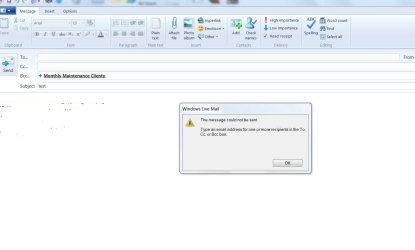
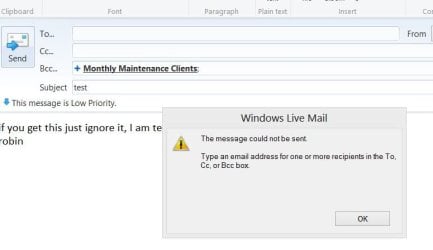
It does not go. when trying to send you get this error msg : imgur: the simple image sharer
I did not realize this problem until i tried to send out a group contact
In fact I put the program on 3 different machines that were upgrades- same problem
Worse, I put this on 8 client computers who had windows live mail essentials 2011 prior and same problem.
I went to the Micrososft Forum and told them the problem. They have been working with me to come up with a fix. i sent them logs that they asked for. So far I only see on the forum "they are working on it"
This is the forum that i posted to Windows Live Mail Essentials 2012 will not allow group contacts - Microsoft Community

I suggest prior to putting the new version on you backup Windows live mail first
Also this does NOT happend if you are putting the program on for the first time and not doing an upgrade
It does not matter if you sign into Live Mail with a live account or you use your own isp, I have tried both and I still cannot send a group contact.

Once uninstalling 2012 and going back to 2011 (you can still get 2011) the group contacts went just fine
 

My Computer My Computer

Computer type
PC/Desktop
Computer Manufacturer/Model Number
Dell Computers
OS
Windows 7 Pro 32/64 bit and Windows 10 Pro 32 Bit/64bit
Memory
4gigs
Graphics Card(s)
AMD Radeon HD and Nvidia
Monitor(s) Displays
Samsung 24". INC 19". Dell 22 ". Dell 17" & 19"
Thank you robinb9 for the information. Please keep us updated if you can.
 

My Computer My Computer

Computer type
PC/Desktop
Computer Manufacturer/Model Number
Home made Desktop
OS
Windows 10 Pro. 64/ version 1709 Windows 7 Pro/64
CPU
Intel i7-6800K @ 4.3
Motherboard
ASUS X-99 Deluxe II
Memory
Corsair Platinum 16 gig @2400
Graphics Card(s)
EVGA GTX 1070 OC
Monitor(s) Displays
Asus 27" LED LCD/VE278Q
Screen Resolution
1920-1080 or 1280-720 HDMI
Hard Drives
INTEL SSD 730-240 Gb Sata 3.0/
PSU
EVGA Platium 1200W
Case
Phanteks Luxe Tempered Glass 8 fans/ one radiator
Cooling
XSPC/ Water Cooled CPU
Keyboard
Das 4 Professional
Mouse
Logitech M705/MX Anywhere 2-S
Internet Speed
100 mbits
Antivirus
Microsoft Security Essentials/ Malwarebytes Premium 3.0/ SAS
Browser
I.E. 11 default/Firefox/ ISP Time Warner Cable/Spectrum
Other Info
LG BluRay Burner/
Sound system-KLipsch-THX/
Icy Dock ssd Hot Swap bays.
will do
 

My Computer My Computer

Computer type
PC/Desktop
Computer Manufacturer/Model Number
Dell Computers
OS
Windows 7 Pro 32/64 bit and Windows 10 Pro 32 Bit/64bit
Memory
4gigs
Graphics Card(s)
AMD Radeon HD and Nvidia
Monitor(s) Displays
Samsung 24". INC 19". Dell 22 ". Dell 17" & 19"
FYI. Microsoft still trying to figure out the problem so I have no info as of yet
 

My Computer My Computer

Computer type
PC/Desktop
Computer Manufacturer/Model Number
Dell Computers
OS
Windows 7 Pro 32/64 bit and Windows 10 Pro 32 Bit/64bit
Memory
4gigs
Graphics Card(s)
AMD Radeon HD and Nvidia
Monitor(s) Displays
Samsung 24". INC 19". Dell 22 ". Dell 17" & 19"
Thanks for keeping watch.
 

My Computer My Computer

Computer type
PC/Desktop
Computer Manufacturer/Model Number
Home made Desktop
OS
Windows 10 Pro. 64/ version 1709 Windows 7 Pro/64
CPU
Intel i7-6800K @ 4.3
Motherboard
ASUS X-99 Deluxe II
Memory
Corsair Platinum 16 gig @2400
Graphics Card(s)
EVGA GTX 1070 OC
Monitor(s) Displays
Asus 27" LED LCD/VE278Q
Screen Resolution
1920-1080 or 1280-720 HDMI
Hard Drives
INTEL SSD 730-240 Gb Sata 3.0/
PSU
EVGA Platium 1200W
Case
Phanteks Luxe Tempered Glass 8 fans/ one radiator
Cooling
XSPC/ Water Cooled CPU
Keyboard
Das 4 Professional
Mouse
Logitech M705/MX Anywhere 2-S
Internet Speed
100 mbits
Antivirus
Microsoft Security Essentials/ Malwarebytes Premium 3.0/ SAS
Browser
I.E. 11 default/Firefox/ ISP Time Warner Cable/Spectrum
Other Info
LG BluRay Burner/
Sound system-KLipsch-THX/
Icy Dock ssd Hot Swap bays.
@Robin: I've been trying to recreate this and I do not see the problem you describe

Created a category with 5 names and one with 3 names- all valid addresses
Clicked on the Email message icon on the home ribbon
Clicked a recipient field name (To, CC, BCC) in the msg

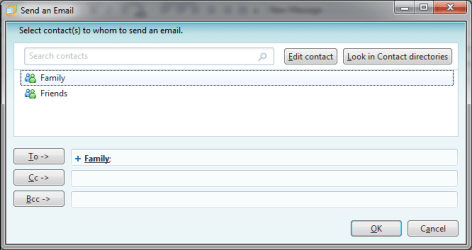
In the recipient dialog that opens

CatMail.png

This is the step I think you're missing - correct me if I'm wrong. If I'm reading your description correctly, you are highlighting (selecting) the category and oking out, then sending.

Double click the category I wanted to send to

The field corresponding to the button I clciked in the msg (To, CC, BCC) was populated with + CategoryName
If I clicked on the + the category recipients replaced the CategoryName
If ok out and send, then look at the msg in my outbox the recipients in the category are displayed.

Bill
.
 

My Computer My Computer

Computer type
Laptop
Computer Manufacturer/Model Number
HP Pavilion dv6-6c10us
OS
x64 (6.3.9600) Win8.1 Pro & soon dual boot x64 (6.1.7601) Win7_SP1 HomePrem
CPU
AMD A6-3420M APU with Radeon(tm) HD Graphics
Motherboard
Hewlett-Packard 1805
Memory
6.00 GB
Graphics Card(s)
AMD Radeon(TM) HD 6520G
Sound Card
(1) AMD High Definition Audio Device (2) IDT High Definiti
Monitor(s) Displays
HP W2072a 20" LCD (1600 x 900) @ 60 Hz
Screen Resolution
1366 x 768 x 32 bits (4294967296 colors) @ 60 Hz
Hard Drives
ST640LM0 00 HM641JI SATA Disk Device
Keyboard
Logitech k520 wireless KB
Mouse
Logitech m320 wireless mouse (bundled with KB)
Internet Speed
15/5 | 54 MB Wireless 'n'
Antivirus
Realtime: Defender or Avast | On-demand: Malwarebytes, ESET
Browser
IE 11 on Win8, IE 10 on win 7
Other Info
Media: [Gimp, Audacity, VLC] || Comm: [WEmail 2012, Skype] || Productivity: [OpenOffice,| Textpad] || Utils: [Sysinternals, cCleaner, Speccy, Defraggler]
If I clicked on the + the category recipients replaced the CategoryName
With WLM 2011 I don't have to click the + to replace the Category Name with the recipient names before sending.
I can click send with the Category Name in a "To" field, and it works correctly, sending to all recipients in the Category.

With WLM 2012 (updated from WLM 2011) I can not send with the Category Name in a "To" field.
Clicking the + may or may not translate the Category Name to the Recipient Names.

According to Robin (as I understand it) this only happens if the PC is updated to WLM 2012 from WLM 2011 (or maybe any prior version).

It sounds like after your W7 re-install, you never had a WLM version prior to WLM 2012 installed, so that system is not a good test case for this issue imho. ;)
 

My Computer My Computer

Computer type
PC/Desktop
Computer Manufacturer/Model Number
home built
OS
Multi-Boot W7_Pro_x64 W8.1_Pro_x64 W10_Pro_x64 +Linux_VMs +Chromium_VM
CPU
AMD Athlon II x4 620
Motherboard
Gigabyte GA-MA785G-UD3H
Memory
6GB GSkill DDR2 800
Graphics Card(s)
AMD 4670 GPU + AMD 4200 IGP
Sound Card
on board Realtek ALC889A
Monitor(s) Displays
RCA 40" LCD TV, Insignia 32" LCD TV, HP 15" LCD monitor
Screen Resolution
1680 x 1050
Hard Drives
OCZ Vertex 3 120GB,
Samsung F3 1TB (3),
Several others - WD, Seagate, Hitachi, ...
PSU
Corsair 500 W
Case
Rosewill mid tower
Cooling
CM 90mm rifle
Keyboard
Gyration wireless, Logitech wireless, Dell USB wired
Mouse
Gyration wireless, Logitech wireless, V7 USB wired
Internet Speed
Spectrum - 100Mbps D / 10Mbps U
Antivirus
Avast, MBAM3, EMET, WinPatrol
Browser
Pale Moon, Firefox, IE
Other Info
2 multi-boot PC's
Mainly HTPC/Office/Gen purpose (no gaming).
Trendnet USB KVM.
LG DVD burner/Blue Ray Player.
Tray system for removable SATA backup drives.

Not currently OCd, under-volted.
I use Hybrid sleep, rarely re-boot or shutdown.

Hauppauge HD-PVR, Avermedia PCIe TV Tuner, Hauppauge PCI TV Tuner.
yho opinon is correct :p

My test case was not valid since WEmail 2012 was not an "upgrade" on top of WLM 2011 (branding change: Windows Live Mail[WLM] to Windows Essentials Mail[WEmail] ). I was trying to understand the issue Robin described and provided feedback that WEmail 2012 was not broken, per se. My test showed that the send to category does work as Robin attested to in another post (only if it is a clean WEmail install)

The issue is an upgrade issue, as the title of this thread accurately describes,. Nit picking perhaps, but Robin does have the solution - a clean install of WEmail 2012. This was one of the issues I had with WLM 2011, it broke in some way almost everytime there was an update. Many times the only way to fix WLM 2011 was to wipe 2011 and download the standalone pkg (not use the web install shim or WinUpdate - even repair wouldn't fix it).

It's probably best to uninstall WLM 2011 and run Revo Uninstaller (freeware version). It's up to you good people to test this since I don't have the proper environment set up ;). If you're really inquisitive, you could try it without running Revo.

I used a bigger hammer "back in the day" and searched C:\ for Windows Live, renamed all folders found except those in my Appdata\Local folder (where user Application files exist) and ran cCleaner registry - backing up the registry before removing any Windows Live entries.

You might want to copy any Windows Live folders in your Appdata\local folder - just to be sure.

Revo is probably a safer option, but I didn't use it before.

Sooooo, my position is that this is an "upgrade" WLM 2011 issue, not a bug in 2012. Semantics!

Should MS fixi it? Definitely, but in the world of developers... priorities take precendence. A viable workaround and inclusion n the errata are often substitutes for code.

Just to clarify: I didn't have to click on +, that was only an explanation of what I tried and observed. If I just ok'd out and sent the mail, the recipients we populated in the field (to, cc, bcc) I specified.

I must be dense because I can't seem to figure out if send to categories doesn't work (hit or miss) or if the fields are not populated or both? I guess if the fields are not populated then you can't send to no recipient.

Anyway..... that's all I have on this. Try the standalone pkg above (clean up WLM 2011), and good luck.

Bill
.

WE standlone install page: How do I install Windows Essentials while offline? - Install offline
WE English direct download (run, save, cancel)
 
Last edited:

My Computer My Computer

Computer type
Laptop
Computer Manufacturer/Model Number
HP Pavilion dv6-6c10us
OS
x64 (6.3.9600) Win8.1 Pro & soon dual boot x64 (6.1.7601) Win7_SP1 HomePrem
CPU
AMD A6-3420M APU with Radeon(tm) HD Graphics
Motherboard
Hewlett-Packard 1805
Memory
6.00 GB
Graphics Card(s)
AMD Radeon(TM) HD 6520G
Sound Card
(1) AMD High Definition Audio Device (2) IDT High Definiti
Monitor(s) Displays
HP W2072a 20" LCD (1600 x 900) @ 60 Hz
Screen Resolution
1366 x 768 x 32 bits (4294967296 colors) @ 60 Hz
Hard Drives
ST640LM0 00 HM641JI SATA Disk Device
Keyboard
Logitech k520 wireless KB
Mouse
Logitech m320 wireless mouse (bundled with KB)
Internet Speed
15/5 | 54 MB Wireless 'n'
Antivirus
Realtime: Defender or Avast | On-demand: Malwarebytes, ESET
Browser
IE 11 on Win8, IE 10 on win 7
Other Info
Media: [Gimp, Audacity, VLC] || Comm: [WEmail 2012, Skype] || Productivity: [OpenOffice,| Textpad] || Utils: [Sysinternals, cCleaner, Speccy, Defraggler]
Well actually it is not entirely true
I installed 2012 on a windows 8 machine that did not have 2111. The same problem happens (in 2112 it happens on and off, Yesterday I tried it and it did not go, today I tried it and same error msg (picture attached)

I put it in the BCC but I can put it in the To or the CC, same problem happens

The only difference is I signed in with the @ live.com account so it would sync my contacts
All my group contacts showed up. I tried to send one group, same error msg showed up and it would not send
 

Attachments

  • windowsliveproblem.jpg
    windowsliveproblem.jpg
    62.8 KB · Views: 2
Last edited:

My Computer My Computer

Computer type
PC/Desktop
Computer Manufacturer/Model Number
Dell Computers
OS
Windows 7 Pro 32/64 bit and Windows 10 Pro 32 Bit/64bit
Memory
4gigs
Graphics Card(s)
AMD Radeon HD and Nvidia
Monitor(s) Displays
Samsung 24". INC 19". Dell 22 ". Dell 17" & 19"
Apples and Oranges. You need a TO recipient (yep, I read that you said you tried all fileds, but.... show me the money!)

CC is courtesy copy
BCC is Blind courtesy copy

The keyword is copy.

And to be fair, you tested on Win8.

The sign in to live.com is also useful information. I only use WEmail as a POP3 client, no IMAP accounts.
Note that I always manually configure accounts as I've seen issues with the automatic configurations.


I'm not sure what syncing contacts, if anything, might have to do with the issue, but that is also helpful information.
Note also that MS is dumping Messenger in favor of Skype, so there might be an issue during the transition. I understand that you've been experiencing this for a while, so Skype is just a reference to current changes in WEmail.

If you can show a pic of this on Win7 with a TO recipient, it will help me understand. Please provide a step-by-step "storybook" of the process you're using. I want to help resolve this, but just as when I was a developer, if I cannot reproduce the issue and complete information (I'm dense sometimes) isn't provided - I won't be much use.

Proposed test methodology
Win7 + WEmail 2012 (not an upgraded WLM 2011)
POP3 account access, manually configured
No @live sign in (to eliminate sync as a cause issue)
Category and recipient information manually entered
--> these can be dummied up for testing but they need to have correct syntax [email protected]; the server will reject bogus addresses

Click on the To.... button (post pic)
Double click a category (should populate the TO field with + CatName (post pic)
OK out
Msg should show + CatName in the To field (post pic)
Save as draft
Click send (post pic)
If it sent the msg, a copy should be saved in your sent items folder (default)
and the To field in the sent item should show the recipients in the CatName (post pic)
If this works, it will help isolate the root cause. We can work forward from there. If not, I'm out of ideas - but willing to dig deeper if you're willing to also.
I've espressed my opinion of WLM 2011 and will not go backwards, even to help solve the issue. You have an environment where the issue occurs. It might take some time and I will have questions - as long as we stick to a plan and accurately report (or accurately ask for information) we'll make progess. Will we solve it? Prehaps, perhaps not - neither of us can change the code.

If it turns out to be auto config (POP3 or IMAP); solely an IMAP configuration, then a solution is to manually configure IMAP or manually configure the account as POP3.

Please keep the testing on a Win7 machine to eliminate that variable.

Thanks,

Bill
.


Well actually it is not entirely true
I installed 2012 on a windows 8 machine that did not have 2111. The same problem happens (in 2112 it happens on and off, Yesterday I tried it and it did not go, today I tried it and same error msg (picture attached)

I put it in the BCC but I can put it in the To or the CC, same problem happens

The only difference is I signed in with the @ live.com account so it would sync my contacts
All my group contacts showed up. I tried to send one group, same error msg showed up and it would not send
 

My Computer My Computer

Computer type
Laptop
Computer Manufacturer/Model Number
HP Pavilion dv6-6c10us
OS
x64 (6.3.9600) Win8.1 Pro & soon dual boot x64 (6.1.7601) Win7_SP1 HomePrem
CPU
AMD A6-3420M APU with Radeon(tm) HD Graphics
Motherboard
Hewlett-Packard 1805
Memory
6.00 GB
Graphics Card(s)
AMD Radeon(TM) HD 6520G
Sound Card
(1) AMD High Definition Audio Device (2) IDT High Definiti
Monitor(s) Displays
HP W2072a 20" LCD (1600 x 900) @ 60 Hz
Screen Resolution
1366 x 768 x 32 bits (4294967296 colors) @ 60 Hz
Hard Drives
ST640LM0 00 HM641JI SATA Disk Device
Keyboard
Logitech k520 wireless KB
Mouse
Logitech m320 wireless mouse (bundled with KB)
Internet Speed
15/5 | 54 MB Wireless 'n'
Antivirus
Realtime: Defender or Avast | On-demand: Malwarebytes, ESET
Browser
IE 11 on Win8, IE 10 on win 7
Other Info
Media: [Gimp, Audacity, VLC] || Comm: [WEmail 2012, Skype] || Productivity: [OpenOffice,| Textpad] || Utils: [Sysinternals, cCleaner, Speccy, Defraggler]
Please edit the image in Post# 9 to remove sensitive information. You'll probably have to locally edit the image and remove the exisitng one, then upload the "new" one.

Bill
.
 

My Computer My Computer

Computer type
Laptop
Computer Manufacturer/Model Number
HP Pavilion dv6-6c10us
OS
x64 (6.3.9600) Win8.1 Pro & soon dual boot x64 (6.1.7601) Win7_SP1 HomePrem
CPU
AMD A6-3420M APU with Radeon(tm) HD Graphics
Motherboard
Hewlett-Packard 1805
Memory
6.00 GB
Graphics Card(s)
AMD Radeon(TM) HD 6520G
Sound Card
(1) AMD High Definition Audio Device (2) IDT High Definiti
Monitor(s) Displays
HP W2072a 20" LCD (1600 x 900) @ 60 Hz
Screen Resolution
1366 x 768 x 32 bits (4294967296 colors) @ 60 Hz
Hard Drives
ST640LM0 00 HM641JI SATA Disk Device
Keyboard
Logitech k520 wireless KB
Mouse
Logitech m320 wireless mouse (bundled with KB)
Internet Speed
15/5 | 54 MB Wireless 'n'
Antivirus
Realtime: Defender or Avast | On-demand: Malwarebytes, ESET
Browser
IE 11 on Win8, IE 10 on win 7
Other Info
Media: [Gimp, Audacity, VLC] || Comm: [WEmail 2012, Skype] || Productivity: [OpenOffice,| Textpad] || Utils: [Sysinternals, cCleaner, Speccy, Defraggler]
Please edit the image in Post# 9 to remove sensitive information. You'll probably have to locally edit the image and remove the exisitng one, then upload the "new" one.

Bill
.

i just realized it- i wanted it up real fast- i will pull it and edit it- thanks
 

My Computer My Computer

Computer type
PC/Desktop
Computer Manufacturer/Model Number
Dell Computers
OS
Windows 7 Pro 32/64 bit and Windows 10 Pro 32 Bit/64bit
Memory
4gigs
Graphics Card(s)
AMD Radeon HD and Nvidia
Monitor(s) Displays
Samsung 24". INC 19". Dell 22 ". Dell 17" & 19"
Apples and Oranges. You need a TO recipient (yep, I read that you said you tried all fileds, but.... show me the money!)

CC is courtesy copy
BCC is Blind courtesy copy

The keyword is copy.

And to be fair, you tested on Win8.

True but i did upgrade 7- window 7 machines from 2011 to 2012- all of them had the problem, when reinstalling back to 2011- problem went away for good.

The sign in to live.com is also useful information. I only use WEmail as a POP3 client, no IMAP accounts.
Note that I always manually configure accounts as I've seen issues with the automatic configurations.

I have 5 email addresses, 2 are a comcast account using pop3 only, 1 is also a pop account for my website domain, the other 2 use IMAP.
I tested NOT signing into live.com to see if the problem was the syncing of the contacts from the live.com webserver or not. I still had the problem.


I'm not sure what syncing contacts, if anything, might have to do with the issue, but that is also helpful information.
Note also that MS is dumping Messenger in favor of Skype, so there might be an issue during the transition. I understand that you've been experiencing this for a while, so Skype is just a reference to current changes in WEmail.

If you can show a pic of this on Win7 with a TO recipient, it will help me understand. Please provide a step-by-step "storybook" of the process you're using. I want to help resolve this, but just as when I was a developer, if I cannot reproduce the issue and complete information (I'm dense sometimes) isn't provided - I won't be much use.
The To looks exactly like the CC and BCC, I only used BCC as an example

Proposed test methodology
Win7 + WEmail 2012 (not an upgraded WLM 2011)
POP3 account access, manually configured
No @live sign in (to eliminate sync as a cause issue)
Category and recipient information manually entered
--> these can be dummied up for testing but they need to have correct syntax [email protected]; the server will reject bogus addresses

Click on the To.... button (post pic)
Double click a category (should populate the TO field with + CatName (post pic)
OK out
Msg should show + CatName in the To field (post pic)
Save as draft
Click send (post pic)
If it sent the msg, a copy should be saved in your sent items folder (default)
and the To field in the sent item should show the recipients in the CatName (post pic)

for the rest of the info above, I am going to have to install it on another test machine, I have one more that has no emal client on it, I am not sure if I can do it today but I will let you know when I can do it.

It is interesting that on Win8 and 2012 it happens on and off and I am logged in there so there is a bug somethere
If this works, it will help isolate the root cause. We can work forward from there. If not, I'm out of ideas - but willing to dig deeper if you're willing to also.
I've espressed my opinion of WLM 2011 and will not go backwards, even to help solve the issue. You have an environment where the issue occurs. It might take some time and I will have questions - as long as we stick to a plan and accurately report (or accurately ask for information) we'll make progess. Will we solve it? Prehaps, perhaps not - neither of us can change the code.

If it turns out to be auto config (POP3 or IMAP); solely an IMAP configuration, then a solution is to manually configure IMAP or manually configure the account as POP3.

Please keep the testing on a Win7 machine to eliminate that variable.

Thanks,

Bill
.
 

My Computer My Computer

Computer type
PC/Desktop
Computer Manufacturer/Model Number
Dell Computers
OS
Windows 7 Pro 32/64 bit and Windows 10 Pro 32 Bit/64bit
Memory
4gigs
Graphics Card(s)
AMD Radeon HD and Nvidia
Monitor(s) Displays
Samsung 24". INC 19". Dell 22 ". Dell 17" & 19"
You can try this as a work around to send an Email to everyone in a Category.

In the Contacts window:

  • Select the Category you want to send a message to.
  • Left click on the first Recipient name in the Contacts list.
  • Press the Shift key and Left click on the last Recipient name in the Contacts list.
  • Release the Shift key.
  • Right click in the Contacts list (where all the recipients are now selected).
  • Left Click Send Email.
That should open a new Email message with all the recipients in the To field.
 

My Computer My Computer

Computer type
PC/Desktop
Computer Manufacturer/Model Number
home built
OS
Multi-Boot W7_Pro_x64 W8.1_Pro_x64 W10_Pro_x64 +Linux_VMs +Chromium_VM
CPU
AMD Athlon II x4 620
Motherboard
Gigabyte GA-MA785G-UD3H
Memory
6GB GSkill DDR2 800
Graphics Card(s)
AMD 4670 GPU + AMD 4200 IGP
Sound Card
on board Realtek ALC889A
Monitor(s) Displays
RCA 40" LCD TV, Insignia 32" LCD TV, HP 15" LCD monitor
Screen Resolution
1680 x 1050
Hard Drives
OCZ Vertex 3 120GB,
Samsung F3 1TB (3),
Several others - WD, Seagate, Hitachi, ...
PSU
Corsair 500 W
Case
Rosewill mid tower
Cooling
CM 90mm rifle
Keyboard
Gyration wireless, Logitech wireless, Dell USB wired
Mouse
Gyration wireless, Logitech wireless, V7 USB wired
Internet Speed
Spectrum - 100Mbps D / 10Mbps U
Antivirus
Avast, MBAM3, EMET, WinPatrol
Browser
Pale Moon, Firefox, IE
Other Info
2 multi-boot PC's
Mainly HTPC/Office/Gen purpose (no gaming).
Trendnet USB KVM.
LG DVD burner/Blue Ray Player.
Tray system for removable SATA backup drives.

Not currently OCd, under-volted.
I use Hybrid sleep, rarely re-boot or shutdown.

Hauppauge HD-PVR, Avermedia PCIe TV Tuner, Hauppauge PCI TV Tuner.
I have tried that, it works when it is in the mood
but it is a real pain,
the program should just work like 2011 does
 

My Computer My Computer

Computer type
PC/Desktop
Computer Manufacturer/Model Number
Dell Computers
OS
Windows 7 Pro 32/64 bit and Windows 10 Pro 32 Bit/64bit
Memory
4gigs
Graphics Card(s)
AMD Radeon HD and Nvidia
Monitor(s) Displays
Samsung 24". INC 19". Dell 22 ". Dell 17" & 19"
Slartybart:
I just checked the test computer I have of windows 7. I was incorrect. I was not sure but I did install WLM 2011 on it so I have no more computers to test for you
I only have 2012 on one windows 8 one.
I left it there for when Microsoft asks me to test for them
One thing, If you leave 2012 open then you can send group contacts just fine
Close the program, reopen- then it is the luck of the draw or the day of the week
 

My Computer My Computer

Computer type
PC/Desktop
Computer Manufacturer/Model Number
Dell Computers
OS
Windows 7 Pro 32/64 bit and Windows 10 Pro 32 Bit/64bit
Memory
4gigs
Graphics Card(s)
AMD Radeon HD and Nvidia
Monitor(s) Displays
Samsung 24". INC 19". Dell 22 ". Dell 17" & 19"
I have tried that, it works when it is in the mood
but it is a real pain,
the program should just work like 2011 does
I agree, the problem should be fixed.

I know the work around is a pain, but it may help someone that runs into this issue and needs to get an email out asap...
 

My Computer My Computer

Computer type
PC/Desktop
Computer Manufacturer/Model Number
home built
OS
Multi-Boot W7_Pro_x64 W8.1_Pro_x64 W10_Pro_x64 +Linux_VMs +Chromium_VM
CPU
AMD Athlon II x4 620
Motherboard
Gigabyte GA-MA785G-UD3H
Memory
6GB GSkill DDR2 800
Graphics Card(s)
AMD 4670 GPU + AMD 4200 IGP
Sound Card
on board Realtek ALC889A
Monitor(s) Displays
RCA 40" LCD TV, Insignia 32" LCD TV, HP 15" LCD monitor
Screen Resolution
1680 x 1050
Hard Drives
OCZ Vertex 3 120GB,
Samsung F3 1TB (3),
Several others - WD, Seagate, Hitachi, ...
PSU
Corsair 500 W
Case
Rosewill mid tower
Cooling
CM 90mm rifle
Keyboard
Gyration wireless, Logitech wireless, Dell USB wired
Mouse
Gyration wireless, Logitech wireless, V7 USB wired
Internet Speed
Spectrum - 100Mbps D / 10Mbps U
Antivirus
Avast, MBAM3, EMET, WinPatrol
Browser
Pale Moon, Firefox, IE
Other Info
2 multi-boot PC's
Mainly HTPC/Office/Gen purpose (no gaming).
Trendnet USB KVM.
LG DVD burner/Blue Ray Player.
Tray system for removable SATA backup drives.

Not currently OCd, under-volted.
I use Hybrid sleep, rarely re-boot or shutdown.

Hauppauge HD-PVR, Avermedia PCIe TV Tuner, Hauppauge PCI TV Tuner.
You can try this as a work around to send an Email to everyone in a Category.

In the Contacts window:

  • Select the Category you want to send a message to.
  • Left click on the first Recipient name in the Contacts list.
  • Press the Shift key and Left click on the last Recipient name in the Contacts list.
  • Release the Shift key.
  • Right click in the Contacts list (where all the recipients are now selected).
  • Left Click Send Email.
That should open a new Email message with all the recipients in the To field.


that works but it only goes in the: To
For me that is not good because I need it to go into the BCC
I want to hide all the names

Basically that is not doing it by category group,
It seems to go when you put in one by one the email addresses

The problem is it will not go as a group when you click on the To, CC or BBC and pop the group name in it
 

My Computer My Computer

Computer type
PC/Desktop
Computer Manufacturer/Model Number
Dell Computers
OS
Windows 7 Pro 32/64 bit and Windows 10 Pro 32 Bit/64bit
Memory
4gigs
Graphics Card(s)
AMD Radeon HD and Nvidia
Monitor(s) Displays
Samsung 24". INC 19". Dell 22 ". Dell 17" & 19"
ok I just did another test on the 2012 one I have on windows 8 (I saw this exact problem on my windows 7 machine after the upgrade
All was working fine- group contacts were going out
I just closed the program and re opened it
now I got this again in the picture below

I closed the program, re opened it again, did it in the To, tried to send the group contact list- it went fine
Tried to send it bcc- it went fine
I told you the program is wacky!!
 

Attachments

  • another one.JPG
    another one.JPG
    32.8 KB · Views: 2

My Computer My Computer

Computer type
PC/Desktop
Computer Manufacturer/Model Number
Dell Computers
OS
Windows 7 Pro 32/64 bit and Windows 10 Pro 32 Bit/64bit
Memory
4gigs
Graphics Card(s)
AMD Radeon HD and Nvidia
Monitor(s) Displays
Samsung 24". INC 19". Dell 22 ". Dell 17" & 19"
and I was having this exact problem on my windows 7 machine as an upgrade from 2011, only it became worse because opening and closing the program after a while stopped working altogether so I gave up and went back to 2011 on all 6 machines
 

My Computer My Computer

Computer type
PC/Desktop
Computer Manufacturer/Model Number
Dell Computers
OS
Windows 7 Pro 32/64 bit and Windows 10 Pro 32 Bit/64bit
Memory
4gigs
Graphics Card(s)
AMD Radeon HD and Nvidia
Monitor(s) Displays
Samsung 24". INC 19". Dell 22 ". Dell 17" & 19"
Back
Top