Solved Is it possible to play sound both from PC speakers and out via TV?

Hoggorm

New member
Member
Local time
1:16 PM
Messages
64
Hi,

I have a normal desktop computer with a HDMI splitter that delivers video to my monitor as well as an image to my Panasonic TV on port HDMI 3 (HDMI 1 is TV and 2 is Playstation).

On my computer, audio is played using Bose Companion 5 speakers and this works well.

Is it possible to play audio on my TV as well as from my Bose speakers? My Samsung monitor does not include speakers so no sound will be played from it so that will not be a problem.

When selecting playback options in the Sound settings I seem only able to select sound out either via Bose or the monitor (that also delivers sound to the TV)...

Hope you can help me :)
 

My Computer My Computer

At a glance

Windows 7 Home premium, 64 bitIntel Core i7-3820 ProcessorCorsair Vengeance DDR3 1600MHz 16GB CL9HIS Radeon HD 7950 3GB
OS
Windows 7 Home premium, 64 bit
CPU
Intel Core i7-3820 Processor
Motherboard
ASUS P9X79
Memory
Corsair Vengeance DDR3 1600MHz 16GB CL9
Graphics Card(s)
HIS Radeon HD 7950 3GB
Monitor(s) Displays
Samsung S24B300H Monitor
Screen Resolution
1920 x 1080
Hard Drives
Samsung SSD 830 Series 128GB 2.5"
Western Digital Caviar® Green 2TB
It is possible but it depends on the capabilities and settings of your sound card that you failed to list in your system specs, and unless you can sync up the two outputs you will have an echo.

The trick involves fooling your sound card into thinking it has two outputs for sound by funneling the TV sound through your microphone.

Is it possible to get audio in Windows 7 through HDMI and PC Speakers - Microsoft Community

Is it possible to have speakers and HDMI play at the same time? - Microsoft Community

How can I have both my PC speakers and my TV speakers to work? - Nvidia - Graphic-Displays
 

My Computer My Computer

At a glance

Originally Win 7 Hm Prem x64 Ver 6.1.7600 Bui...Intel i3 530 2.93GHz, 2933MHz 2 Cores 4 Logic...6GB of 1,333MHz DDR3 SDRAM32MB Intel Graphics Media Accelerator HD IGChip
Computer type
PC/Desktop
Computer Manufacturer/Model Number
Gateway DX4831-01e (Mid-Tower Desktop)
OS
Originally Win 7 Hm Prem x64 Ver 6.1.7600 Build 7601-SP1 | Upgraded to Windows 10 December 14, 2019
CPU
Intel i3 530 2.93GHz, 2933MHz 2 Cores 4 Logical Processors
Motherboard
Gateway H57M01 133 megahertz
Memory
6GB of 1,333MHz DDR3 SDRAM
Graphics Card(s)
32MB Intel Graphics Media Accelerator HD IGChip
Sound Card
Realtek High Definition Audio
Monitor(s) Displays
Gateway HX2000 20inch TFT active matrix TN
Screen Resolution
1600 x 900 x 59 hertz
Hard Drives
WDC WD10EADS-00M2B0 [HDD] (1000.20 GB) -- drive 0,
HL-DT-ST DVDRAM GH41N [CD-ROM dr]
Four card readers, and Four USB 2.0
PSU
300watts.
Case
Mid-Tower Desktop
Cooling
Stock from Gateway
Keyboard
Natural Ergonomic Keyboard 4000, see Other Info
Mouse
Orig. Gateway wore out now using Insignia USB wired optical
Internet Speed
Vz FIOS 10ms png 57.64Mbps down 65.53Mbps up Speedtest.org
Antivirus
Zamana Anti-logger with Anti-malware, MSE, Windows Firewall,
Browser
IE11.0.9600.19399-Upd ver11.0.135, Firefox 68.0.1 x64
Other Info
System Specs by Belarc.

BIOS: American Megatrends Inc. P01-A0 11/17/2009

Replaced the MS 'Natural' Standard PS/2 Enhanced 101-102 Keyboard with a new Natural Ergonomic Keyboard 4000 on August 1st 2014.

Canon Pixma MG3222 Printer.

Updated to IE11 on 12102015 | Fios Quantum Router g1100

Additional AV: SpywareBlaster, manual Mbam, SAS
It is possible but it depends on the capabilities and settings of your sound card that you failed to list in your system specs, and unless you can sync up the two outputs you will have an echo.

The trick involves fooling your sound card into thinking it has two outputs for sound by funneling the TV sound through your microphone.

The Bose Companion 5 speakers include a soundcard so I do not use any internal ones. Hence I do not know what that might be - if any. maybe the motherboard has a soundcard? I do not know.

Unfortunately I need my microphone to other tasks on my computer, so using such a methode is not sufficient for me... Thanks for the help anyway.
 

My Computer My Computer

At a glance

Windows 7 Home premium, 64 bitIntel Core i7-3820 ProcessorCorsair Vengeance DDR3 1600MHz 16GB CL9HIS Radeon HD 7950 3GB
OS
Windows 7 Home premium, 64 bit
CPU
Intel Core i7-3820 Processor
Motherboard
ASUS P9X79
Memory
Corsair Vengeance DDR3 1600MHz 16GB CL9
Graphics Card(s)
HIS Radeon HD 7950 3GB
Monitor(s) Displays
Samsung S24B300H Monitor
Screen Resolution
1920 x 1080
Hard Drives
Samsung SSD 830 Series 128GB 2.5"
Western Digital Caviar® Green 2TB
It's completely possible as I've had to do this too many times with my HTPC (I like my headsets, others like the T.V. speakers).

Anyway, although I haven't found a way to do this with stock win7, there's a program called Virtual Audio Cable that allows exactly this.

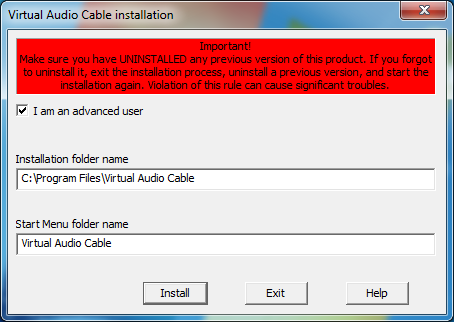
First, download & install it:-
Ugy9xHT.png


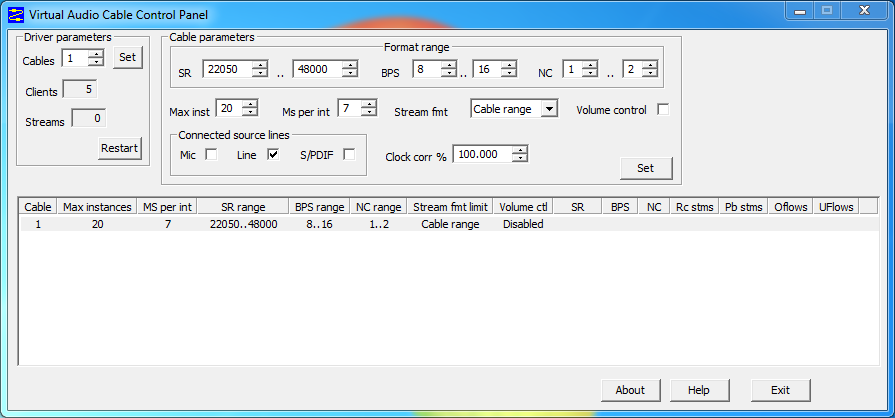
Next, go ahead and launch up the new program on your start bar called "Control Panel" (Located at .\Virtual Audio Cable\vcctlpan.exe):-
tTwONsd.png


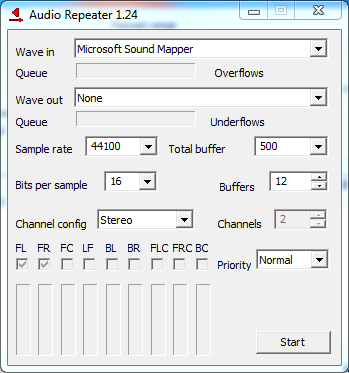
Go ahead and modify "Cable 1" to how you'd like your sound set up to be, for this example I'll leave it at the default settings. Next, go ahead and launch up "Audio Repeater", there's two versions, a "Kernel Streaming" one and a normal one, personally I've had issues with the Kernel level one (Plays random high pitch noises), so, I'll be using the normal (I presume application level? Driver level?) one:-
fYm9keq.png


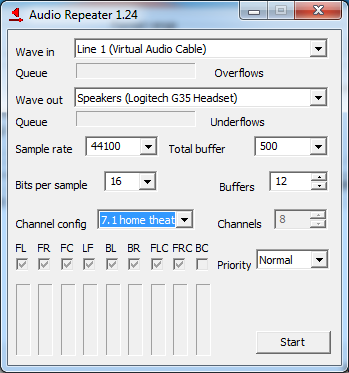
Go ahead and select "Line 1" for the wave in and select your first speaker/headset as Wave out, along with BPS/How many speakers (Mono/stereo/surround) you'd like:-
4ZZVkaH.png


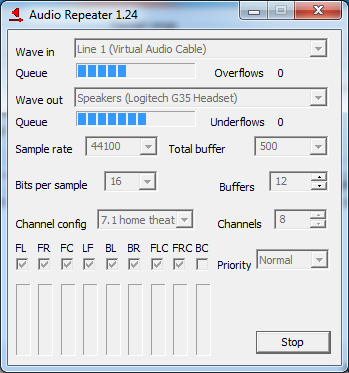
Hit start:-
3PCFLuW.png


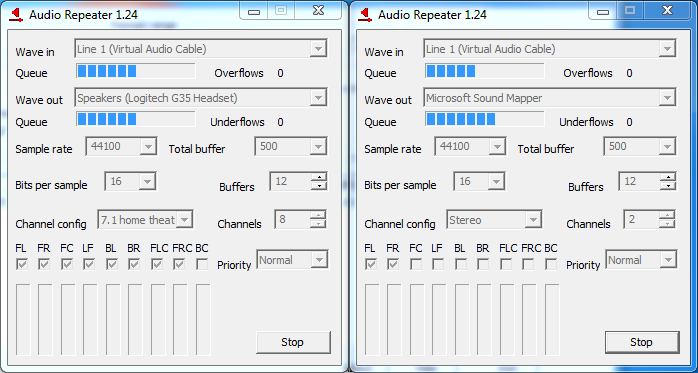
Launch up another copy of the program and do the exact same thing:-
EARakcF.png


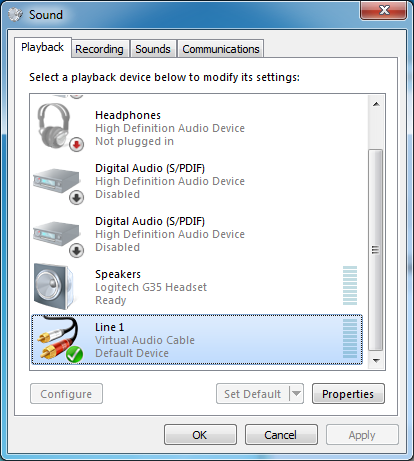
Do this until all your headsets are connected to line 1. Now go ahead and set line 1 as your default speaker:-
YSFOQ0Y.png


Boom, done. Now I won't feel guilty about leaching off this forum without giving anything back.
 

My Computer My Computer

At a glance

Windows Seven Ultimate sixty four bit.
Computer type
PC/Desktop
OS
Windows Seven Ultimate sixty four bit.
Hard Drives
Too many to count
Antivirus
None
Browser
Does my user agent not provide this information?

My Computer My Computer

At a glance

Win7 Home Premium 64xIntel Core 2 Duo P7450 / 2.13 GHz (2.29 with ...4 GB PC-6400 Hyundai (2X2) at 800MhzNVIDIA GeForce GTX 260M 1GB DDR3 VRAM
Computer type
Laptop
Computer Manufacturer/Model Number
ASUS G60-RBBX05
OS
Win7 Home Premium 64x
CPU
Intel Core 2 Duo P7450 / 2.13 GHz (2.29 with Extreme Turbo)
Memory
4 GB PC-6400 Hyundai (2X2) at 800Mhz
Graphics Card(s)
NVIDIA GeForce GTX 260M 1GB DDR3 VRAM
Monitor(s) Displays
16" LED Backlit
Screen Resolution
1366 x 768 on laptop 1600x1050 max res on 22" external mon
Hard Drives
OCZ Agility 3 60GB SSD / 320 GB - Serial ATA-150 - 7200 rpm
PSU
6-cell Lithium ion { lasts 1.5 hours }
Case
ASUS G60 Laptop
Keyboard
Chicklet type back-lit (white light) keyboard
Mouse
Logitech G9 Laser Mouse 3200dpi and 1000 reports per minute
Internet Speed
Comcast 8.60mb/s up - 3.11mb/s down
Antivirus
MSE
Browser
Firefox
Other Info
General mid-budget gaming Comp. Low batterylife - High FrameRates - currently overheating problems :(

2nd Rig: Case: Rosewill BLACKHAWK Gaming ATX Mid Tower Computer Case

Mobo: GIGABYTE GA-990FXA-UD3
CPU: AMD FX-6200 Zambezi 3.8GHz (4.1GHz Turbo)
Heatsink: COOLER MASTER V8 CPU Cooler
RAM: Patriot Viper 3 8GB (2 x 4GB) 240-Pin DDR3 SDRAM 1866 (PC3 15000)
GPU: SAPPHIRE Radeon HD 6850 1GB 2
Boom, done. Now I won't feel guilty about leaching off this forum without giving anything back.

Seems like a nice solution :)

But will the settings stay when I reboot the system or do I have to set it up every time?
 

My Computer My Computer

At a glance

Windows 7 Home premium, 64 bitIntel Core i7-3820 ProcessorCorsair Vengeance DDR3 1600MHz 16GB CL9HIS Radeon HD 7950 3GB
OS
Windows 7 Home premium, 64 bit
CPU
Intel Core i7-3820 Processor
Motherboard
ASUS P9X79
Memory
Corsair Vengeance DDR3 1600MHz 16GB CL9
Graphics Card(s)
HIS Radeon HD 7950 3GB
Monitor(s) Displays
Samsung S24B300H Monitor
Screen Resolution
1920 x 1080
Hard Drives
Samsung SSD 830 Series 128GB 2.5"
Western Digital Caviar® Green 2TB
Boom, done. Now I won't feel guilty about leaching off this forum without giving anything back.

Seems like a nice solution :)

But will the settings stay when I reboot the system or do I have to set it up every time?

That's something I have no idea about, my HTPC is on 24/7. Contact the developer of VAC, I believe his email is on the site.
 

My Computer My Computer

At a glance

Windows Seven Ultimate sixty four bit.
Computer type
PC/Desktop
OS
Windows Seven Ultimate sixty four bit.
Hard Drives
Too many to count
Antivirus
None
Browser
Does my user agent not provide this information?
If its not possible to do automatically, you could set up a script in Autohotkey to perform the configuration.

maybe there are command lines that could be utilized....
 

My Computer My Computer

At a glance

Win7 Home Premium 64xIntel Core 2 Duo P7450 / 2.13 GHz (2.29 with ...4 GB PC-6400 Hyundai (2X2) at 800MhzNVIDIA GeForce GTX 260M 1GB DDR3 VRAM
Computer type
Laptop
Computer Manufacturer/Model Number
ASUS G60-RBBX05
OS
Win7 Home Premium 64x
CPU
Intel Core 2 Duo P7450 / 2.13 GHz (2.29 with Extreme Turbo)
Memory
4 GB PC-6400 Hyundai (2X2) at 800Mhz
Graphics Card(s)
NVIDIA GeForce GTX 260M 1GB DDR3 VRAM
Monitor(s) Displays
16" LED Backlit
Screen Resolution
1366 x 768 on laptop 1600x1050 max res on 22" external mon
Hard Drives
OCZ Agility 3 60GB SSD / 320 GB - Serial ATA-150 - 7200 rpm
PSU
6-cell Lithium ion { lasts 1.5 hours }
Case
ASUS G60 Laptop
Keyboard
Chicklet type back-lit (white light) keyboard
Mouse
Logitech G9 Laser Mouse 3200dpi and 1000 reports per minute
Internet Speed
Comcast 8.60mb/s up - 3.11mb/s down
Antivirus
MSE
Browser
Firefox
Other Info
General mid-budget gaming Comp. Low batterylife - High FrameRates - currently overheating problems :(

2nd Rig: Case: Rosewill BLACKHAWK Gaming ATX Mid Tower Computer Case

Mobo: GIGABYTE GA-990FXA-UD3
CPU: AMD FX-6200 Zambezi 3.8GHz (4.1GHz Turbo)
Heatsink: COOLER MASTER V8 CPU Cooler
RAM: Patriot Viper 3 8GB (2 x 4GB) 240-Pin DDR3 SDRAM 1866 (PC3 15000)
GPU: SAPPHIRE Radeon HD 6850 1GB 2
It does support command prompt input: (hard to find info on this)

go to about 3min in


So you can set up bat files then either link the bat files in your Startup folder to have them start at startup or with an executable link to click on whenever you want to run the configuration.

Instructions are in the manual included with the program.

and some more forum type info: http://community.justin.tv/forums/showthread.php?t=7810
 

My Computer My Computer

At a glance

Win7 Home Premium 64xIntel Core 2 Duo P7450 / 2.13 GHz (2.29 with ...4 GB PC-6400 Hyundai (2X2) at 800MhzNVIDIA GeForce GTX 260M 1GB DDR3 VRAM
Computer type
Laptop
Computer Manufacturer/Model Number
ASUS G60-RBBX05
OS
Win7 Home Premium 64x
CPU
Intel Core 2 Duo P7450 / 2.13 GHz (2.29 with Extreme Turbo)
Memory
4 GB PC-6400 Hyundai (2X2) at 800Mhz
Graphics Card(s)
NVIDIA GeForce GTX 260M 1GB DDR3 VRAM
Monitor(s) Displays
16" LED Backlit
Screen Resolution
1366 x 768 on laptop 1600x1050 max res on 22" external mon
Hard Drives
OCZ Agility 3 60GB SSD / 320 GB - Serial ATA-150 - 7200 rpm
PSU
6-cell Lithium ion { lasts 1.5 hours }
Case
ASUS G60 Laptop
Keyboard
Chicklet type back-lit (white light) keyboard
Mouse
Logitech G9 Laser Mouse 3200dpi and 1000 reports per minute
Internet Speed
Comcast 8.60mb/s up - 3.11mb/s down
Antivirus
MSE
Browser
Firefox
Other Info
General mid-budget gaming Comp. Low batterylife - High FrameRates - currently overheating problems :(

2nd Rig: Case: Rosewill BLACKHAWK Gaming ATX Mid Tower Computer Case

Mobo: GIGABYTE GA-990FXA-UD3
CPU: AMD FX-6200 Zambezi 3.8GHz (4.1GHz Turbo)
Heatsink: COOLER MASTER V8 CPU Cooler
RAM: Patriot Viper 3 8GB (2 x 4GB) 240-Pin DDR3 SDRAM 1866 (PC3 15000)
GPU: SAPPHIRE Radeon HD 6850 1GB 2
Fantastic Thorsen!

With AutomaticCoding's description on how to set up Virtual Audio Cable and your link to the video on how to make .bat files my problem is solved!

And it works perfectly!

Thank you both!
 

My Computer My Computer

At a glance

Windows 7 Home premium, 64 bitIntel Core i7-3820 ProcessorCorsair Vengeance DDR3 1600MHz 16GB CL9HIS Radeon HD 7950 3GB
OS
Windows 7 Home premium, 64 bit
CPU
Intel Core i7-3820 Processor
Motherboard
ASUS P9X79
Memory
Corsair Vengeance DDR3 1600MHz 16GB CL9
Graphics Card(s)
HIS Radeon HD 7950 3GB
Monitor(s) Displays
Samsung S24B300H Monitor
Screen Resolution
1920 x 1080
Hard Drives
Samsung SSD 830 Series 128GB 2.5"
Western Digital Caviar® Green 2TB
Awesome! I don't ususally have to purchase software as there are usually freeware solutions, but I'm glad that someone has actually made a software solution for this and it helped you.

Glad you got it working :)
 

My Computer My Computer

At a glance

Win7 Home Premium 64xIntel Core 2 Duo P7450 / 2.13 GHz (2.29 with ...4 GB PC-6400 Hyundai (2X2) at 800MhzNVIDIA GeForce GTX 260M 1GB DDR3 VRAM
Computer type
Laptop
Computer Manufacturer/Model Number
ASUS G60-RBBX05
OS
Win7 Home Premium 64x
CPU
Intel Core 2 Duo P7450 / 2.13 GHz (2.29 with Extreme Turbo)
Memory
4 GB PC-6400 Hyundai (2X2) at 800Mhz
Graphics Card(s)
NVIDIA GeForce GTX 260M 1GB DDR3 VRAM
Monitor(s) Displays
16" LED Backlit
Screen Resolution
1366 x 768 on laptop 1600x1050 max res on 22" external mon
Hard Drives
OCZ Agility 3 60GB SSD / 320 GB - Serial ATA-150 - 7200 rpm
PSU
6-cell Lithium ion { lasts 1.5 hours }
Case
ASUS G60 Laptop
Keyboard
Chicklet type back-lit (white light) keyboard
Mouse
Logitech G9 Laser Mouse 3200dpi and 1000 reports per minute
Internet Speed
Comcast 8.60mb/s up - 3.11mb/s down
Antivirus
MSE
Browser
Firefox
Other Info
General mid-budget gaming Comp. Low batterylife - High FrameRates - currently overheating problems :(

2nd Rig: Case: Rosewill BLACKHAWK Gaming ATX Mid Tower Computer Case

Mobo: GIGABYTE GA-990FXA-UD3
CPU: AMD FX-6200 Zambezi 3.8GHz (4.1GHz Turbo)
Heatsink: COOLER MASTER V8 CPU Cooler
RAM: Patriot Viper 3 8GB (2 x 4GB) 240-Pin DDR3 SDRAM 1866 (PC3 15000)
GPU: SAPPHIRE Radeon HD 6850 1GB 2
Back
Top