is it possible to have different resolutions for pc & tv?

004

New member
Local time
2:38 PM
Messages
3
Hi
I have just connected my computer to my tv using a hdmi cord. After figuring out (thanks to the help of this & other forums) how to get both screens happening and how to toggle sound from one to the other, I just have one final obstacle to the set up. The picture in the tv is fine, if a little pixelated, but after linking them, the pc screen is looking squeezed in. If I go to the screen resolution, does the dropdown box only give me sizes that both devices can handle? It tells me that my optimum resolution is 1280x1024 but that is not a choice in the drop down box and it has changed to 1280x 768. Is there an easy toggle like the sound to change from one setting to another as the pc is mainly used as a pc but I wanted to get it set up to occasionally watch tv programs we miss on the tv instead of squeezed around the computer.
I appreciate any advice.
 

My Computer My Computer

At a glance

windows 7
OS
windows 7
If you use your HDMI to watch programs on your TV I would disregard what resolution your have on your pc and use the TV as your monitor until you are finished.
If your resolution doesn't change back to normal on your PC when you unplug your HDMI from the TV then there is a problem. This can be resolved in your display settings as both your devices should work to there optimum performance regardless of each other.
The way to switch your sound is to make sure your default sound device is HDMI before plugging in your cable. I find this works better but maybe that just the way my sony amp works.
 

My Computer My Computer

At a glance

7 ultimate x64Intel core i7 2600KVengeance™ — 16GB Triple Channel DDR3 PC16000GeForce GTX 560 Ti
Computer Manufacturer/Model Number
CustomBuild001
OS
7 ultimate x64
CPU
Intel core i7 2600K
Motherboard
ASUS P8Z68-V PRO
Memory
Vengeance™ — 16GB Triple Channel DDR3 PC16000
Graphics Card(s)
GeForce GTX 560 Ti
Monitor(s) Displays
HannsG 22" widescreen (HDMI)
Screen Resolution
1680x1050
Hard Drives
Samsung 1TB x2(RAID1) Deskstar 160G, Buffalo ExHD 500GB
PSU
Corsair 850HX
Case
Antec Three Hundred Gaming Tower Case
Cooling
CPU Freezer 7 Pro Rev. 2...ANTEC 3phase cooling, 2 intake.
Keyboard
microsoft intellitype 6000 v3.0
Mouse
microsoft sidewinder
Internet Speed
50Mb
Other Info
64GB SSD in pipeline for Intel Smart Response Technology.
004 welcome to the Seven Forums.

Sounds like you have it set to clone/duplicate mode, which is both displays showing the same thing and limited to the lower of whichever display's highest resolution. For example if your monitor is 1920x1080 and your TV is 1366x768, then both will only run at the lower. If that is the case you need to set it to extended mode so that both can be run at their native resolutions.

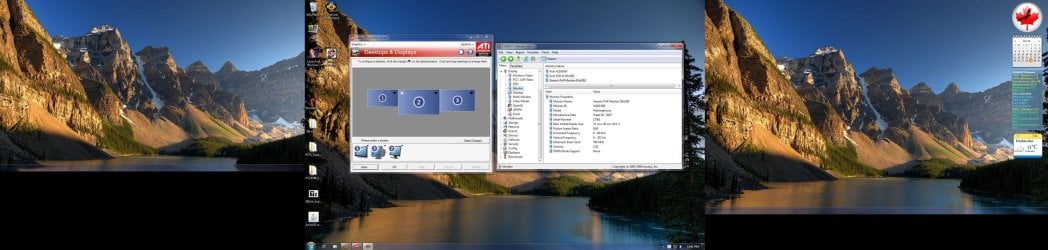
Just as an example here are three displays in extended mode at the same time all with a different resolution,

triplemonitor1.jpg

from left to right they are; 1366x768, 1680x1050, and 1400x900.
 

My Computer My Computer

At a glance

Win 7 Ultimate x64FX-8350 @ 4.6 GHz so farADATA XPG V1 Series Black 8GB DDR3 1600Sapphire R9 270x Dual-X
Computer type
PC/Desktop
Computer Manufacturer/Model Number
Me
OS
Win 7 Ultimate x64
CPU
FX-8350 @ 4.6 GHz so far
Motherboard
Asus M5A97 EVO
Memory
ADATA XPG V1 Series Black 8GB DDR3 1600
Graphics Card(s)
Sapphire R9 270x Dual-X
Sound Card
Xonar DGX w/ Corsair Vengence 1300
Monitor(s) Displays
Acer S232HL Abid
Screen Resolution
1920x1080
Hard Drives
120 GB OCZ Vertex 3
500 GB Seagate 7200.12
PSU
Antec Earthwatts 650W Green
Case
Antec Three Hundred
Cooling
Cooler Master 212 EVO
Keyboard
Logitech G510
Mouse
Logitech G500s
Internet Speed
35000/3000
Thanks for your replies.
ClassicD, I'm intending to leave it plugged in but the computer doesn't recognise the tv screen in the control panel unless it is turned on to hdmi input. Without that there, the original setting still seems to have disappeared from my options but I can live with slightly skinnny display on monitor to get good display on telly.


Stormy13, is this the place (below) where I should choose extend? When I do it here, the pc screen goes to desktop background with no icons and tv shows computer display, so I have to run to & from tv to see what it says then try & get the mouse in the right spot! Early on in the setup I had it the other way around (desktop background on the tv, computer display on the monitor) but not sure how I did this & can't seem to get the monitor as the main display.

Is there something else I need to change somewhere else first? I have tried a few different things using different bits of advice & can't really remember exactly what it was anymore.
And I thought I was capable of doing stuff on the computer!
Thanks for any advice.
 

My Computer My Computer

At a glance

windows 7
OS
windows 7
When I do it here, the pc screen goes to desktop background with no icons and tv shows computer display,

For whatever reason Windows has decided that the TV is the primary display, but it is an easy fix. Right click on the desktop and select "screen resolution", there should be a setting that allows you to set which is the primary. Click on the your monitor and then set it as the primary. That will get the desktop/taskbar/etc back on your computer instead of the TV.
 

My Computer My Computer

At a glance

Win 7 Ultimate x64FX-8350 @ 4.6 GHz so farADATA XPG V1 Series Black 8GB DDR3 1600Sapphire R9 270x Dual-X
Computer type
PC/Desktop
Computer Manufacturer/Model Number
Me
OS
Win 7 Ultimate x64
CPU
FX-8350 @ 4.6 GHz so far
Motherboard
Asus M5A97 EVO
Memory
ADATA XPG V1 Series Black 8GB DDR3 1600
Graphics Card(s)
Sapphire R9 270x Dual-X
Sound Card
Xonar DGX w/ Corsair Vengence 1300
Monitor(s) Displays
Acer S232HL Abid
Screen Resolution
1920x1080
Hard Drives
120 GB OCZ Vertex 3
500 GB Seagate 7200.12
PSU
Antec Earthwatts 650W Green
Case
Antec Three Hundred
Cooling
Cooler Master 212 EVO
Keyboard
Logitech G510
Mouse
Logitech G500s
Internet Speed
35000/3000
Thanks, Stormy13, it worked! Displays are both at their optimum again.
 

My Computer My Computer

At a glance

windows 7
OS
windows 7
Back
Top