UEFI and Backups/Restore when on Windows 7 (from 8)

mediaman09

New member
Member
VIP
Local time
10:08 PM
Messages
260
Location
Toronto
I have a recently purchase Dell XPS 8500 based on UEFI spec with came equipped with Windows 8... but I am now on Windows 7 and have UEFI related some questions.
First some quick background and I am in transition between Windows 8 and Windows 7 ....let me explain.

INTIIAL SETUP (Win 8) - My factory equipped windows 8 hard drive failed under warranty. A Dell tech is coming tomorrow to replace it. I have no current plans to use Windows8, but want to preserve what I will have - kind of like an extra backup, fully recognizing that the Win 8 license key is tied to the BIOS). So, when the tech leaves, I will be removing the new wokring drive and keeping safely on the shelf, for possible future use in this machine. All good.

NEW SETUP (Win 7) - In its place I am installing a licensed Windows 7 setup (one that I have been testing with all week on this machine and activated on this machine- one bootable Windows 7 drive and one internal data drive. So I know this works fine. Again all good.
Now for my UEFI question...

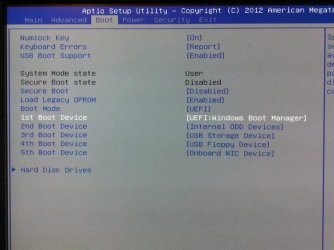
To get to the NEW SETUP (Win 7) from scratch, I removed all drives, and only connected a single brand new drive. I booted from a WIn 7 install DVD.... but it would not boot to the DVD. I assumed it was simply that I didnt set the BIOS to boot from the DVD, so I changed everything to legacy, and set the DVD as the first boot device. But it still would not boot. Finally I could only get it to boot fine by using the BIOS setting attached. I did my install of Win 7 , and all is good. I can boot to the bootable drive no probem....but thinking ahead to my next failure...

a) Am I going to get in trouble now with creating Win 7 system images ( with windows 7 backup and restore) and later needing to restore them ?? . I ask only becuase some users have posted issue with thier UEFi machines on WIndows7

b) Am I going to get in trouble if attempting to boot from a Windows 7 revovery CD?
The irony here was that I was trying to SIMPLIFY my life. I was simply wanting to replace an old old machne - got me the 8500 ... which came with Windows 8 (INITIAL SETUP) .... which I hated so much after two months I went back to 7 (NEW SETUP). All is fine now, but it has occred to me that I haven't yet had any Win 7 failures on this UEFI system.... hence my questions....
 

Attachments

  • bios.jpg
    bios.jpg
    49.2 KB · Views: 11

My Computer My Computer

At a glance

DELL Win 7 Home Premium 64 BitIntel Core i7-930 (8MB L2, 2.8GHz) // ntel Co...16GB // 18GB DDR3 SDRAM 1333Mhhz 6 DIMMS (3x2...AMD HD7570 // AMD Radeon HD6750 // ATI Radeon...
Computer type
PC/Desktop
Computer Manufacturer/Model Number
DELL XPS 8500 // DELL XPS Studio 9100 // DELL Dim 9200
OS
DELL Win 7 Home Premium 64 Bit
CPU
Intel Core i7-930 (8MB L2, 2.8GHz) // ntel Core 2 Quad Q6600
Motherboard
?? // Dell A02 BIOS // ??
Memory
16GB // 18GB DDR3 SDRAM 1333Mhhz 6 DIMMS (3x2, 3x4) //4 GB
Graphics Card(s)
AMD HD7570 // AMD Radeon HD6750 // ATI Radeon HD5670 1 GB GD
Sound Card
?? // THX TruStudio PC //?
Monitor(s) Displays
Dual Dell 2405 WFP-HC24 //SAmsung 27" // Triple 19" LCD
Screen Resolution
1900 x 1200
Hard Drives
Main :WD Caviar Black 1 TB SATA WD1002FAEX
Backup :WD Caviar Black 1 TB SATA WD1002FAEX
PSU
?? // Ultra 900W // ??
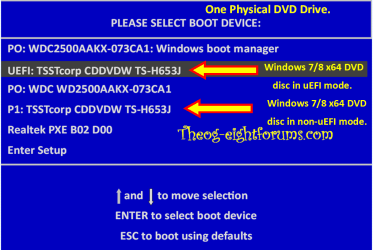
When booting a Windows 7/8 install DVD or Windows 7/8 Repair CD, you need to boot in UEFI mode.


Windows 8 Downgrade-006 SB for posting.PNG
 

My Computer My Computer

At a glance

ME/XP/Vista/Win7
OS
ME/XP/Vista/Win7
ok, so are you saying:
- given that my BIOS setting is already set for Bootmode = UEFI,
- and given that I installed Win 7 from that point on
- and given that I created system images and recovery CD's etc from that point on

...I can therefore leave it as it is, and forget about it, and not be concerend about it?
 

My Computer My Computer

At a glance

DELL Win 7 Home Premium 64 BitIntel Core i7-930 (8MB L2, 2.8GHz) // ntel Co...16GB // 18GB DDR3 SDRAM 1333Mhhz 6 DIMMS (3x2...AMD HD7570 // AMD Radeon HD6750 // ATI Radeon...
Computer type
PC/Desktop
Computer Manufacturer/Model Number
DELL XPS 8500 // DELL XPS Studio 9100 // DELL Dim 9200
OS
DELL Win 7 Home Premium 64 Bit
CPU
Intel Core i7-930 (8MB L2, 2.8GHz) // ntel Core 2 Quad Q6600
Motherboard
?? // Dell A02 BIOS // ??
Memory
16GB // 18GB DDR3 SDRAM 1333Mhhz 6 DIMMS (3x2, 3x4) //4 GB
Graphics Card(s)
AMD HD7570 // AMD Radeon HD6750 // ATI Radeon HD5670 1 GB GD
Sound Card
?? // THX TruStudio PC //?
Monitor(s) Displays
Dual Dell 2405 WFP-HC24 //SAmsung 27" // Triple 19" LCD
Screen Resolution
1900 x 1200
Hard Drives
Main :WD Caviar Black 1 TB SATA WD1002FAEX
Backup :WD Caviar Black 1 TB SATA WD1002FAEX
PSU
?? // Ultra 900W // ??
ok, so are you saying:
- given that my BIOS setting is already set for Bootmode = UEFI,

Some uEFI/BIOS firmware are set to UEFI only, or UEFI & Legacy.

Be sure you are booting in UEFI mode.
 

My Computer My Computer

At a glance

ME/XP/Vista/Win7
OS
ME/XP/Vista/Win7
If you're still referring to the WIn7 which you thought you installed in Legacy BIOS mode, it appears not to have done so as it is booting via the UEFI Boot Manager. So there must be another setting for Legacy BIOS to reinstall in Legacy Mode, or you'd want to boot the installer using that Internal ODD choice being sure that you install to an MBR disk.

However the technician is going to turn back on Secure Boot and disable Legacy BIOS to reinstall Win8 so you can perhaps query him about how you'd fully enable Legacy Mode to install normally to an MBR disk.
 
Let me ask it this way.

Per my original pic , it is currently set to and booting via the UEFI Boot Manager right now. Per the orignal pic posted, it actualy says
Legacy OPROM = Enabled
Boot Mode = UEFI

My Disk Manager shows the hidden drive as "Healthy (EFI System Partition)"

So I dont really know how to interpret this as meaning I am in UEFI mode or Legacy mode... but everything is currently working and booting fine

I guess all I am just seeking here from the gurus, is some sort of confirmation that:
- the setup I now have is OK, and
- that I should not have any issues if one day I need to boot from a CD to rebuild from images
- I can leave good enough alone and there is no need to reisntall WIndows 7 right now.
 

Attachments

  • dm_win7.JPG
    dm_win7.JPG
    21.6 KB · Views: 8

My Computer My Computer

At a glance

DELL Win 7 Home Premium 64 BitIntel Core i7-930 (8MB L2, 2.8GHz) // ntel Co...16GB // 18GB DDR3 SDRAM 1333Mhhz 6 DIMMS (3x2...AMD HD7570 // AMD Radeon HD6750 // ATI Radeon...
Computer type
PC/Desktop
Computer Manufacturer/Model Number
DELL XPS 8500 // DELL XPS Studio 9100 // DELL Dim 9200
OS
DELL Win 7 Home Premium 64 Bit
CPU
Intel Core i7-930 (8MB L2, 2.8GHz) // ntel Core 2 Quad Q6600
Motherboard
?? // Dell A02 BIOS // ??
Memory
16GB // 18GB DDR3 SDRAM 1333Mhhz 6 DIMMS (3x2, 3x4) //4 GB
Graphics Card(s)
AMD HD7570 // AMD Radeon HD6750 // ATI Radeon HD5670 1 GB GD
Sound Card
?? // THX TruStudio PC //?
Monitor(s) Displays
Dual Dell 2405 WFP-HC24 //SAmsung 27" // Triple 19" LCD
Screen Resolution
1900 x 1200
Hard Drives
Main :WD Caviar Black 1 TB SATA WD1002FAEX
Backup :WD Caviar Black 1 TB SATA WD1002FAEX
PSU
?? // Ultra 900W // ??
It seems your Win7 is installed UEFI mode as shown here: UEFI (Unified Extensible Firmware Interface) - Install Windows 7 with - Windows 7 Forums.

This is fine and will be the same way Win8 is installed, except Factory image will likely require Secure Boot which will cut out Win7 until you turn it off.

There must be other Legacy BIOS settings there for you to enable in order to install normally to an MBR disk. What choices are given for Legacy BIOS? Do you have another setting elsewhere for Compatibility Support Module which can often be set to Dual mode?
 
It seems your Win7 is installed UEFI mode as shown here: UEFI (Unified Extensible Firmware Interface) - Install Windows 7 with - Windows 7 Forums.

This is fine and will be the same way Win8 is installed, except Factory image will likely require Secure Boot which will cut out Win7 until you turn it off.
Phew, Great and thank you!
There must be other Legacy BIOS settings there for you to enable in order to install normally to an MBR disk. What choices are given for Legacy BIOS? Do you have another setting elsewhere for Compatibility Support Module which can often be set to Dual mode?
I will be able to answer that in a day or two...
 
Last edited:

My Computer My Computer

At a glance

DELL Win 7 Home Premium 64 BitIntel Core i7-930 (8MB L2, 2.8GHz) // ntel Co...16GB // 18GB DDR3 SDRAM 1333Mhhz 6 DIMMS (3x2...AMD HD7570 // AMD Radeon HD6750 // ATI Radeon...
Computer type
PC/Desktop
Computer Manufacturer/Model Number
DELL XPS 8500 // DELL XPS Studio 9100 // DELL Dim 9200
OS
DELL Win 7 Home Premium 64 Bit
CPU
Intel Core i7-930 (8MB L2, 2.8GHz) // ntel Core 2 Quad Q6600
Motherboard
?? // Dell A02 BIOS // ??
Memory
16GB // 18GB DDR3 SDRAM 1333Mhhz 6 DIMMS (3x2, 3x4) //4 GB
Graphics Card(s)
AMD HD7570 // AMD Radeon HD6750 // ATI Radeon HD5670 1 GB GD
Sound Card
?? // THX TruStudio PC //?
Monitor(s) Displays
Dual Dell 2405 WFP-HC24 //SAmsung 27" // Triple 19" LCD
Screen Resolution
1900 x 1200
Hard Drives
Main :WD Caviar Black 1 TB SATA WD1002FAEX
Backup :WD Caviar Black 1 TB SATA WD1002FAEX
PSU
?? // Ultra 900W // ??
Legacy BIOS setting are only need to use Out Dated OS's & Bootable software CD's.
 

My Computer My Computer

At a glance

ME/XP/Vista/Win7
OS
ME/XP/Vista/Win7
Legacy BIOS setting are only need to use Out Dated OS's & Bootable software CD's.

..which begs the question:

- is Win 7 considered a "outdated OS"
- is a Win 7 sys repair cd considered a "bootable software Cd"

Hope its no to both, and as stated earlier, I will be fine with UEFI in a Windows 7 seup.
 

My Computer My Computer

At a glance

DELL Win 7 Home Premium 64 BitIntel Core i7-930 (8MB L2, 2.8GHz) // ntel Co...16GB // 18GB DDR3 SDRAM 1333Mhhz 6 DIMMS (3x2...AMD HD7570 // AMD Radeon HD6750 // ATI Radeon...
Computer type
PC/Desktop
Computer Manufacturer/Model Number
DELL XPS 8500 // DELL XPS Studio 9100 // DELL Dim 9200
OS
DELL Win 7 Home Premium 64 Bit
CPU
Intel Core i7-930 (8MB L2, 2.8GHz) // ntel Core 2 Quad Q6600
Motherboard
?? // Dell A02 BIOS // ??
Memory
16GB // 18GB DDR3 SDRAM 1333Mhhz 6 DIMMS (3x2, 3x4) //4 GB
Graphics Card(s)
AMD HD7570 // AMD Radeon HD6750 // ATI Radeon HD5670 1 GB GD
Sound Card
?? // THX TruStudio PC //?
Monitor(s) Displays
Dual Dell 2405 WFP-HC24 //SAmsung 27" // Triple 19" LCD
Screen Resolution
1900 x 1200
Hard Drives
Main :WD Caviar Black 1 TB SATA WD1002FAEX
Backup :WD Caviar Black 1 TB SATA WD1002FAEX
PSU
?? // Ultra 900W // ??
..which begs the question:

- is Win 7 considered a "outdated OS"
- is a Win 7 sys repair cd considered a "bootable software Cd"

NO.

There three Windows Vista, Windows 7,& Windows 8 Repair CD's
1) x32 Repair CD
2) x64 Repair CD
3) x64 Repair CD with UEFI support, with the Windows 8 Repair CD also Secure Boot support.
 

My Computer My Computer

At a glance

ME/XP/Vista/Win7
OS
ME/XP/Vista/Win7
In my case, I am Windows 7 (installed when the BIOS was set to UEFI mode) and after activation I selected the option to create a repair disc,. Does that mean I indeed have a "x64 Repair CD with UEFI support" ? The screenshots at the time were silent as to any reference to UEFI support.
 

My Computer My Computer

At a glance

DELL Win 7 Home Premium 64 BitIntel Core i7-930 (8MB L2, 2.8GHz) // ntel Co...16GB // 18GB DDR3 SDRAM 1333Mhhz 6 DIMMS (3x2...AMD HD7570 // AMD Radeon HD6750 // ATI Radeon...
Computer type
PC/Desktop
Computer Manufacturer/Model Number
DELL XPS 8500 // DELL XPS Studio 9100 // DELL Dim 9200
OS
DELL Win 7 Home Premium 64 Bit
CPU
Intel Core i7-930 (8MB L2, 2.8GHz) // ntel Core 2 Quad Q6600
Motherboard
?? // Dell A02 BIOS // ??
Memory
16GB // 18GB DDR3 SDRAM 1333Mhhz 6 DIMMS (3x2, 3x4) //4 GB
Graphics Card(s)
AMD HD7570 // AMD Radeon HD6750 // ATI Radeon HD5670 1 GB GD
Sound Card
?? // THX TruStudio PC //?
Monitor(s) Displays
Dual Dell 2405 WFP-HC24 //SAmsung 27" // Triple 19" LCD
Screen Resolution
1900 x 1200
Hard Drives
Main :WD Caviar Black 1 TB SATA WD1002FAEX
Backup :WD Caviar Black 1 TB SATA WD1002FAEX
PSU
?? // Ultra 900W // ??
The Repair CD app, will make a Repair CD for version which is installed.

Yours will make the
3) x64 Repair CD with UEFI support, with the Windows 8 Repair CD also Secure Boot support.
as are in UEFI mode.
 

My Computer My Computer

At a glance

ME/XP/Vista/Win7
OS
ME/XP/Vista/Win7
Back
Top