I have a recently purchase Dell XPS 8500 based on UEFI spec with came equipped with Windows 8... but I am now on Windows 7 and have UEFI related some questions.
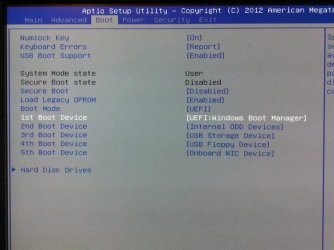
To get to the NEW SETUP (Win 7) from scratch, I removed all drives, and only connected a single brand new drive. I booted from a WIn 7 install DVD.... but it would not boot to the DVD. I assumed it was simply that I didnt set the BIOS to boot from the DVD, so I changed everything to legacy, and set the DVD as the first boot device. But it still would not boot. Finally I could only get it to boot fine by using the BIOS setting attached. I did my install of Win 7 , and all is good. I can boot to the bootable drive no probem....but thinking ahead to my next failure...
First some quick background and I am in transition between Windows 8 and Windows 7 ....let me explain.
INTIIAL SETUP (Win 8) - My factory equipped windows 8 hard drive failed under warranty. A Dell tech is coming tomorrow to replace it. I have no current plans to use Windows8, but want to preserve what I will have - kind of like an extra backup, fully recognizing that the Win 8 license key is tied to the BIOS). So, when the tech leaves, I will be removing the new wokring drive and keeping safely on the shelf, for possible future use in this machine. All good.
NEW SETUP (Win 7) - In its place I am installing a licensed Windows 7 setup (one that I have been testing with all week on this machine and activated on this machine- one bootable Windows 7 drive and one internal data drive. So I know this works fine. Again all good.
Now for my UEFI question...INTIIAL SETUP (Win 8) - My factory equipped windows 8 hard drive failed under warranty. A Dell tech is coming tomorrow to replace it. I have no current plans to use Windows8, but want to preserve what I will have - kind of like an extra backup, fully recognizing that the Win 8 license key is tied to the BIOS). So, when the tech leaves, I will be removing the new wokring drive and keeping safely on the shelf, for possible future use in this machine. All good.
NEW SETUP (Win 7) - In its place I am installing a licensed Windows 7 setup (one that I have been testing with all week on this machine and activated on this machine- one bootable Windows 7 drive and one internal data drive. So I know this works fine. Again all good.
To get to the NEW SETUP (Win 7) from scratch, I removed all drives, and only connected a single brand new drive. I booted from a WIn 7 install DVD.... but it would not boot to the DVD. I assumed it was simply that I didnt set the BIOS to boot from the DVD, so I changed everything to legacy, and set the DVD as the first boot device. But it still would not boot. Finally I could only get it to boot fine by using the BIOS setting attached. I did my install of Win 7 , and all is good. I can boot to the bootable drive no probem....but thinking ahead to my next failure...
a) Am I going to get in trouble now with creating Win 7 system images ( with windows 7 backup and restore) and later needing to restore them ?? . I ask only becuase some users have posted issue with thier UEFi machines on WIndows7
b) Am I going to get in trouble if attempting to boot from a Windows 7 revovery CD?
The irony here was that I was trying to SIMPLIFY my life. I was simply wanting to replace an old old machne - got me the 8500 ... which came with Windows 8 (INITIAL SETUP) .... which I hated so much after two months I went back to 7 (NEW SETUP). All is fine now, but it has occred to me that I haven't yet had any Win 7 failures on this UEFI system.... hence my questions....b) Am I going to get in trouble if attempting to boot from a Windows 7 revovery CD?
Attachments
My Computer
At a glance
DELL Win 7 Home Premium 64 BitIntel Core i7-930 (8MB L2, 2.8GHz) // ntel Co...16GB // 18GB DDR3 SDRAM 1333Mhhz 6 DIMMS (3x2...AMD HD7570 // AMD Radeon HD6750 // ATI Radeon...
- Computer type
- PC/Desktop
- Computer Manufacturer/Model Number
- DELL XPS 8500 // DELL XPS Studio 9100 // DELL Dim 9200
- OS
- DELL Win 7 Home Premium 64 Bit
- CPU
- Intel Core i7-930 (8MB L2, 2.8GHz) // ntel Core 2 Quad Q6600
- Motherboard
- ?? // Dell A02 BIOS // ??
- Memory
- 16GB // 18GB DDR3 SDRAM 1333Mhhz 6 DIMMS (3x2, 3x4) //4 GB
- Graphics Card(s)
- AMD HD7570 // AMD Radeon HD6750 // ATI Radeon HD5670 1 GB GD
- Sound Card
- ?? // THX TruStudio PC //?
- Monitor(s) Displays
- Dual Dell 2405 WFP-HC24 //SAmsung 27" // Triple 19" LCD
- Screen Resolution
- 1900 x 1200
- Hard Drives
- Main :WD Caviar Black 1 TB SATA WD1002FAEX
Backup :WD Caviar Black 1 TB SATA WD1002FAEX
- PSU
- ?? // Ultra 900W // ??