NTFS being read as RAW, not accesible

jimdog38

New member
Local time
4:46 AM
Messages
5
I have a computer with Windows 7. I have Windows 7 on a 750 GB HD. Along with this I have a 3 TB HD that is working, formatted with 1 test file on.
I removed the 750 GB drive and in its place put in a 256 GB OCZ Petrol SSD
I disconnected the 3 tb drive
I installed Windows 7 on a 256 GB SSD HD.
When I connect the 3TB HD it shows up as RAW
When I go through the Computer Management the drive is seen, and I have a drive letter assigned.
Through My Computer it shows up but is not accesible.
When I try to format the 3TB to set it up as NTFS, it runs for a while then a blue screen comes up stating that Windows has detected a problem and will shut down.
When I reboot, Windows starts and I am back to square one. 3 TB is RAW.
If I swap back to the 750 GB the 3 TB works fine, file is NTSF
Swap back to the 256 SSD and the 3 TB is RAW. Again it will not format. Blue screen shows up again.
If I use the 256 GB SSD along with the 750 GB plugged in ,all the 750 GB files are accessible, while the 3TB still shows up as RAW, again if I try to format I get the blue screen.
One more thing, I have formatted the 3TB a few times while using the 750 GB and I get no blue screens, It formats fine, If I put it back with the 256 GB SSD it is RAW again.

How do I get the 3TB to be read as NTFS with the 256 BB SSD
 

My Computer My Computer

At a glance

Windows 7 home primium 64 bit
Computer type
PC/Desktop
OS
Windows 7 home primium 64 bit
With partition wizard when i did a check file system check and it ran for a while then me the blue screen..
I restarted and did the partition test and and that passed.
If I use Explorer, properties, tools, error checking, it tells me the drive can't be accesed.
 

My Computer My Computer

At a glance

Windows 7 home primium 64 bit
Computer type
PC/Desktop
OS
Windows 7 home primium 64 bit
Try the maker's diagnostics to confirm if the HD is good. If the HD is less than a year old it has warranty and tech support so I'd call them to have them test it with you to set it up for RMA if necessary.

If good I'd full format it to block out bad sectors, but I don't know if it will format if PW won't Check the file system.
 
When I connect the 3TB HD it shows up as RAW
When I go through the Computer Management the drive is seen, and I have a drive letter assigned.
You mean disk management? You can only assign drive letters to ntfs or fat partitions. Please post screenshot of disk management.
 

My Computer My Computer

At a glance

Microsoft Windows 7 Home Premium 64-bits 7601...Intel(R) Core(TM) i3 CPU M 370 @ 2.40GHz4,00 GBATI Mobility Radeon HD 5400 Series
Computer type
Laptop
Computer Manufacturer/Model Number
ACER ASPIRE 5742G
OS
Microsoft Windows 7 Home Premium 64-bits 7601 Multiprocessor Free Service Pack 1
CPU
Intel(R) Core(TM) i3 CPU M 370 @ 2.40GHz
Motherboard
Acer Aspire 5742G
Memory
4,00 GB
Graphics Card(s)
ATI Mobility Radeon HD 5400 Series
Sound Card
(1) AMD High Definition Audio Device (2) Realtek High Defi
Screen Resolution
1366 x 768 x 32 bits (4294967296 colors) @ 60 Hz
Hard Drives
WDC WD5000BEVT-22ZAT0
Greg, The HD checks out.
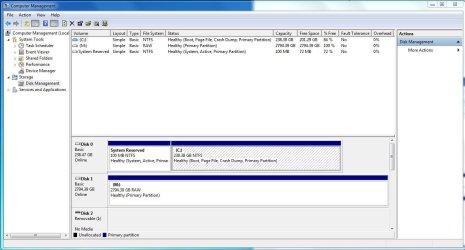
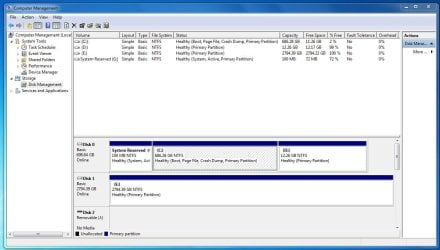
Kaktussoft, here are screenshots, first one is with the SSD installed, The second is with the 750 HD installed,
I Also I have noticed that I can't do a restart, if I restart the screen goes off, keyboard goes off, compter goes off, computer power comes on but nothing else. I have to hold the Power button down before it shuts down before I can boot back up. This does not happen with the 750 HD installed.

Disk manager takes 2min. 45 seconds to start with SSD, It starts almost instantly with 750 installed.

The SSD takes a extremly long time to boot into windows. It used to take 40 seconds, before I was up and on the internet. I had to reinstall windows due to a bad windows update not letting me load windows, Windows repair would not work.
 

Attachments

  • SSD disk management.JPG
    SSD disk management.JPG
    96.2 KB · Views: 8
  • 750 disk manager.JPG
    750 disk manager.JPG
    99.7 KB · Views: 5

My Computer My Computer

At a glance

Windows 7 home primium 64 bit
Computer type
PC/Desktop
OS
Windows 7 home primium 64 bit
When Windows Updates affect Win7 like that you need to roll back with System Restore to before the problem began.

What other ports did you try the data drive in?

I'd reinstall to the SSD following the same steps as Clean Reinstall - Factory OEM Windows 7 to get a perfect install, but this time first wipe the SSD with Diskpart Clean Command to clear the boot sector.

If the problem persists with SSD after reinstall then I'd have the drive's Tech Support test it for you to possibly RMA. We see a lot of bad SSD's.
 
Wiping the disk with diskpart did the trick, I was then able to format it without causing the Blue screen. Up and running, Thanks for the Help, Jim
 

My Computer My Computer

At a glance

Windows 7 home primium 64 bit
Computer type
PC/Desktop
OS
Windows 7 home primium 64 bit
Will do right away
 

My Computer My Computer

At a glance

Windows 7 home primium 64 bit
Computer type
PC/Desktop
OS
Windows 7 home primium 64 bit
Back
Top